<?xml version="1.0" encoding="utf-8"?>
<feed xmlns="http://www.w3.org/2005/Atom" xmlns:media="http://search.yahoo.com/mrss/">
  <title>Old Town Home Category: 'Whole House Audio'</title>
  <updated>2012-07-25T08:24:00.000-04:00</updated>
  <id>http://www.oldtownhome.com/whole-house-audio/index.atom</id>
  <link rel="alternate" href="http://www.oldtownhome.com/whole-house-audio/index.atom" />
  <author>
    <name>Alex and Wendy</name>
    <uri>http://www.oldtownhome.com/</uri>
    <email>wendy@oldtownhome.com</email>
  </author>
  <entry>
    <guid>816694e2-759e-473c-a372-89a06b51dbb6</guid>
    <id>https://www.oldtownhome.com/2012/7/25/Music-to-My-Ears---Installing-a-Ceiling-Speaker/</id>
    <title>Music to My Ears - Installing a Ceiling Speaker</title>
    <summary type="html"><![CDATA[<p>I don't think <a href="http://www.oldtownhome.com/week-of-alex-ii/index.aspx">Week of Alex II </a>could possibly be considered complete without the inclusion of a particularly manly/geeky how to post, don't you agree? Well, I've surely got one for you.</p>
<p>When we talk to friends and neighbors about our house, or even to people we've just met that are blog readers, one of the most frequent topics of conversation revolves around our <a href="http://www.oldtownhome.com/2011/7/21/Wired-for-Sound---Whole-Historic-House-Audio/">whole house audio</a>. Whether they're interested in having it in their home, or are just curious how it works, for many (myself included), the idea of room filling music at your fingertips anywhere in your house is an absolutely awesome concept. While there are many different options out there that involve the placement of speakers and other devices in obvious places within the room where you want music, most people are far more drawn to the idea of built in speakers and controls that blend and disappear in the room.&nbsp;</p>
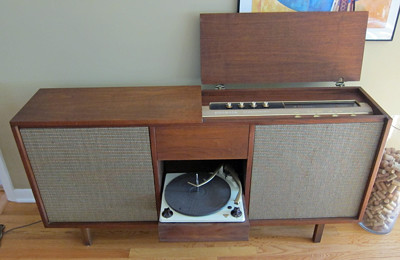
<p>I'll tell you one thing for sure, it doesn't matter how much we like music, if the device that delivered the music looked like a giant piece of furniture, there's no way Wendy would go for it (but I might, just sayin'). As cool as it may look, our house isn't Mad Men.&nbsp;</p>
<p>
</p>
<div class="MediaContainer PhotoContainer"><a href="http://farm9.staticflickr.com/8009/7643086086_f7a46c3c33.jpg" rel="PhotoPopup" popupheight="260" popupwidth="400"><img alt="" src="https://farm9.staticflickr.com/8009/7643086086_f7a46c3c33.jpg" width="400" height="260" style="border-width: 0px; border-style: solid;"></a><br>
<em>Photo Credit: <a href="http://www.jtl.us/wp/" target="_blank">Crosswalks to Nowhere</a></em></div>
<p>I'd say the thing I hear most often during conversations is "I'd love integrated music, but I just don't know where to start when running wires or installing a speaker. Is it hard?"</p>
<p>My response to this question is typically, "Well, in general, it's not hard at all, but in your house, it could be."</p>
<p>The key here is the distinction between running wires and installing a speaker. Running wires can be very easy or very hard, depending on where you're running them. If you're doing it on the top floor and have access to the back of the ceiling via the attic and you have the necessary electrical in the attic, it can be very easy. If you're trying to run them in a ceiling that has no access from above and is fully insulated, possibly with spray foam, it can be ridiculously hard. Bottom line, it's a case by case basis and you often won't know your case until you start poking holes in the walls or ceiling.&nbsp;</p>
<p>All of this being the said, installing a speaker when the wires have been run to the necessary location, purely child's play. No, really, if you've already gotten your wires where they need to be, you've got yourself a DIY task anyone can handle.&nbsp;</p>
<p>Over the weekend I found myself jumping forward several steps (and maybe getting ahead of myself) so that I could feel like I was actually accomplishing something. I decided I wanted to patch a rather large hole I had created months ago with the intention of installing a speaker. The hole is just in front of our bathroom window and was once the location of an HVAC vent. We're moving the HVAC location and are placing a speaker in its place.&nbsp;</p>
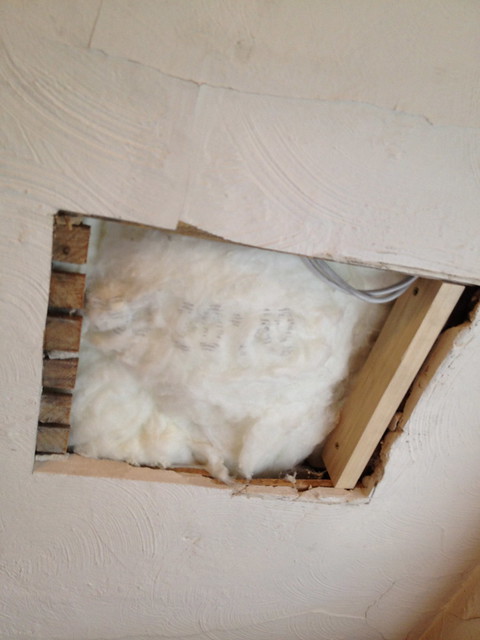
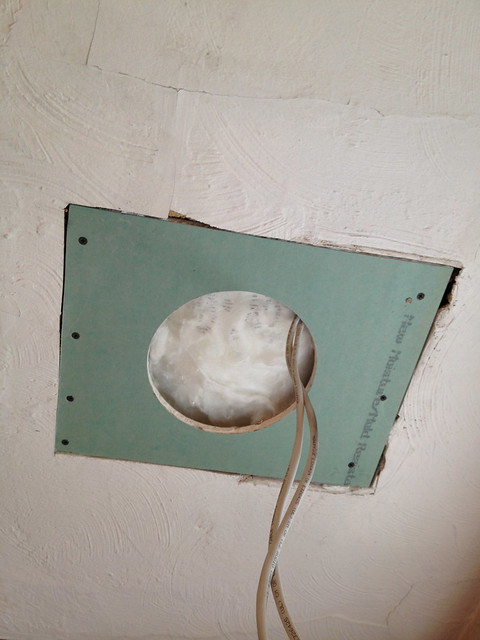
<p>Since I was installing this in a plaster ceiling and in a place that already had a large hole, I had to be a little more destructive than you typically need to be. A speaker install needs a perfectly round hole and the wall material can't be much more than 3/4 inch thick to accommodate the mounting brackets. Because of these restrictions, the fact that old plaster and lath is nearly impossible to make a round hole in without the edges cracking and crumbling, and the tendency for plaster thickness to be variable (up to and over 1 inch), I had no option other than to make a larger hole that I could patch with drywall.&nbsp;</p>
<p>
</p>
<div class="MediaContainer PhotoContainer"><a href="http://farm9.staticflickr.com/8165/7627009106_4246f96eb3_z.jpg" rel="PhotoPopup" popupheight="640" popupwidth="480"><img alt="" src="https://farm9.staticflickr.com/8165/7627009106_4246f96eb3.jpg" width="375" height="500" style="border-width: 0px; border-style: solid;"></a></div>
<p>This speaker is getting installed in a location where I've had extensive access while <a href="http://www.oldtownhome.com/2012/7/18/Attic-Insulation---or---How-to-Lose-8-Lbs-in-2-Hours/index.aspx">installing all of the attic insulation</a>, so I took advantage of this access by running the wires necessary for this speaker prior to completing the insulation.&nbsp;</p>
<p></p></img></img> <a href="https://www.oldtownhome.com/2012/7/25/Music-to-My-Ears---Installing-a-Ceiling-Speaker/">more</a>]]></summary>
    <published>2012-07-25T08:24:00.000-04:00</published>
    <updated>2012-07-25T08:24:00.000-04:00</updated>
    <link rel="alternate" href="https://www.oldtownhome.com/2012/7/25/Music-to-My-Ears---Installing-a-Ceiling-Speaker/" />
    <author>
      <name>Alex</name>
    </author>
    <content type="html"><![CDATA[<p>I don't think <a href="http://www.oldtownhome.com/week-of-alex-ii/index.aspx">Week of Alex II </a>could possibly be considered complete without the inclusion of a particularly manly/geeky how to post, don't you agree? Well, I've surely got one for you.</p>
<p>When we talk to friends and neighbors about our house, or even to people we've just met that are blog readers, one of the most frequent topics of conversation revolves around our <a href="http://www.oldtownhome.com/2011/7/21/Wired-for-Sound---Whole-Historic-House-Audio/">whole house audio</a>. Whether they're interested in having it in their home, or are just curious how it works, for many (myself included), the idea of room filling music at your fingertips anywhere in your house is an absolutely awesome concept. While there are many different options out there that involve the placement of speakers and other devices in obvious places within the room where you want music, most people are far more drawn to the idea of built in speakers and controls that blend and disappear in the room.&nbsp;</p>
<p>I'll tell you one thing for sure, it doesn't matter how much we like music, if the device that delivered the music looked like a giant piece of furniture, there's no way Wendy would go for it (but I might, just sayin'). As cool as it may look, our house isn't Mad Men.&nbsp;</p>
<p>
</p>
<div class="MediaContainer PhotoContainer"><a href="http://farm9.staticflickr.com/8009/7643086086_f7a46c3c33.jpg" rel="PhotoPopup" popupheight="260" popupwidth="400"><img alt="" src="https://farm9.staticflickr.com/8009/7643086086_f7a46c3c33.jpg" width="400" height="260" style="border-width: 0px; border-style: solid;"></a><br>
<em>Photo Credit: <a href="http://www.jtl.us/wp/" target="_blank">Crosswalks to Nowhere</a></em></div>
<p>I'd say the thing I hear most often during conversations is "I'd love integrated music, but I just don't know where to start when running wires or installing a speaker. Is it hard?"</p>
<p>My response to this question is typically, "Well, in general, it's not hard at all, but in your house, it could be."</p>
<p>The key here is the distinction between running wires and installing a speaker. Running wires can be very easy or very hard, depending on where you're running them. If you're doing it on the top floor and have access to the back of the ceiling via the attic and you have the necessary electrical in the attic, it can be very easy. If you're trying to run them in a ceiling that has no access from above and is fully insulated, possibly with spray foam, it can be ridiculously hard. Bottom line, it's a case by case basis and you often won't know your case until you start poking holes in the walls or ceiling.&nbsp;</p>
<p>All of this being the said, installing a speaker when the wires have been run to the necessary location, purely child's play. No, really, if you've already gotten your wires where they need to be, you've got yourself a DIY task anyone can handle.&nbsp;</p>
<p>Over the weekend I found myself jumping forward several steps (and maybe getting ahead of myself) so that I could feel like I was actually accomplishing something. I decided I wanted to patch a rather large hole I had created months ago with the intention of installing a speaker. The hole is just in front of our bathroom window and was once the location of an HVAC vent. We're moving the HVAC location and are placing a speaker in its place.&nbsp;</p>
<p>Since I was installing this in a plaster ceiling and in a place that already had a large hole, I had to be a little more destructive than you typically need to be. A speaker install needs a perfectly round hole and the wall material can't be much more than 3/4 inch thick to accommodate the mounting brackets. Because of these restrictions, the fact that old plaster and lath is nearly impossible to make a round hole in without the edges cracking and crumbling, and the tendency for plaster thickness to be variable (up to and over 1 inch), I had no option other than to make a larger hole that I could patch with drywall.&nbsp;</p>
<p>
</p>
<div class="MediaContainer PhotoContainer"><a href="http://farm9.staticflickr.com/8165/7627009106_4246f96eb3_z.jpg" rel="PhotoPopup" popupheight="640" popupwidth="480"><img alt="" src="https://farm9.staticflickr.com/8165/7627009106_4246f96eb3.jpg" width="375" height="500" style="border-width: 0px; border-style: solid;"></a></div>
<p>This speaker is getting installed in a location where I've had extensive access while <a href="http://www.oldtownhome.com/2012/7/18/Attic-Insulation---or---How-to-Lose-8-Lbs-in-2-Hours/index.aspx">installing all of the attic insulation</a>, so I took advantage of this access by running the wires necessary for this speaker prior to completing the insulation.&nbsp;</p>
<p></p>
<p>It's also important to note that we're only going to have one speaker in this room. When you normally think of music you think of speakers, in the plural. In a bare minimum setup you tend to have two speakers, a right and a left. Since audio is recorded with multiple channels, some sounds come from the right, some from the left. This may be very obvious to most people, but if you've never heard of this or thought about it, just give <a href="http://www.youtube.com/watch?v=YptgC3goAUY" target="_blank">U2's Achtung Baby - Zoo Station</a> a listen, it's obvious in the intro. So the question is, how do we ensure we aren't missing out on music from only one speaker that has to do the double duty of left and right? Simple, dual voice coils.&nbsp;</p>
<p>
</p>
<div class="MediaContainer PhotoContainer"><a href="http://farm9.staticflickr.com/8156/7627022362_007a1b2f6f_z.jpg" rel="PhotoPopup" popupheight="640" popupwidth="480"><img alt="" src="https://farm9.staticflickr.com/8156/7627022362_007a1b2f6f.jpg" width="375" height="500" style="border-width: 0px; border-style: solid;"></a></div>
<div class="ToolItem"><iframe src="http://rcm-na.amazon-adsystem.com/e/cm?t=oltoho-20&amp;o=1&amp;p=8&amp;l=as1&amp;asins=B0000WWP4M&amp;IS1=1&amp;ref=qf_sp_asin_til&amp;fc1=3A3128&amp;lt1=_blank&amp;m=amazon&amp;lc1=61838A&amp;bc1=FAFAF8&amp;bg1=FAFAF8&amp;f=ifr" style="width: 120px; height: 240px;" scrolling="no" marginwidth="0" marginheight="0" frameborder="0"></iframe>
</div>
<p>I can hear the audiophiles reading this scoffing at the idea of a single speaker producing adequate sound. "BAH, you lose so much quality, need better range, need an enclosure, etc, etc, etc." Keep in mind, this is our bathroom, not our home theater, not a recording studio, not a professional sound booth. We just want music while we brush our teeth or sit in the bath. For this purpose, this single speaker will do beautifully.</p>
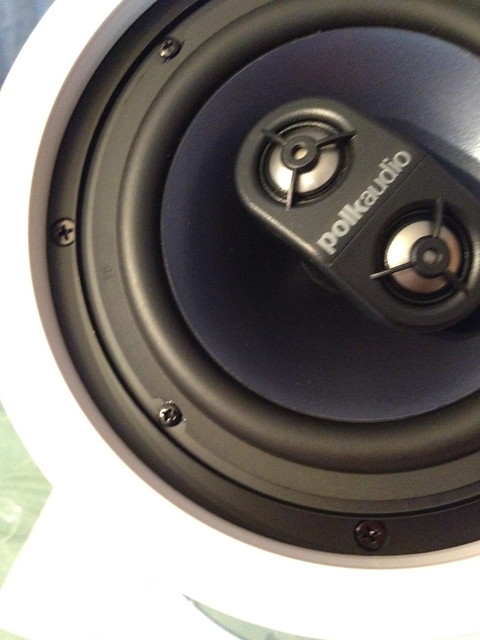
<p>The speaker we bought for this purpose is a Polk Audio 6" In-Ceiling/Wall dual voice coil speaker. I chose it because it is relatively small, it's range seems good, and it has dual voice coils. I also tend to like Polk speakers and have been using them as far back as the days I pimped my ride with two 12" subs in the trunk (yes, I was lame). But I digress. The point and purpose of a dual coil speaker is to accept connections from four speaker wires rather than just two. The speaker can then do double duty without issue, handling both channels and ensuring you don't miss out on any sound.&nbsp;</p>
<p>The speaker comes in a small box with a cutout template for the wall or ceiling opening. It also has a perforated grill cover (for when the project is completely finished), and a solid plastic cover to protect the speaker after you install it but before you're done with the work.</p>
<div class="MediaContainer PhotoContainer"><a href="http://farm9.staticflickr.com/8424/7627012514_2a95340afc_z.jpg" rel="PhotoPopup" popupheight="640" popupwidth="480"><img alt="" src="https://farm9.staticflickr.com/8424/7627012514_2a95340afc.jpg" width="375" height="500" style="border-width: 0px; border-style: solid;"></a></div>
<p>Using the piece of drywall I cut in my <a href="http://www.oldtownhome.com/2012/7/24/Toolbox-Tuesday-Can-Magnets-Make-the-Perfect-Drywall-Knife/index.aspx">super duper magnetic drywall cutting post</a> from yesterday, I began by cutting a nice and even hole for the speaker. While the speaker comes with the cutout template, I only use this to make a basic outline, measure the diameter, and establish a center point for the hole. Using my <a href="http://oldtownhome.com/2012/2/28/Toolbox-Tuesday-Need-to-Make-a-Circle-Cutout-in-Drywall-or-Plaster/index.aspx">drywall hole cutter</a>, I score the drywall on both sides using the established center point and outline, then cut out from the center of the drywall.</p>
<p>
</p>
<div class="MediaContainer PhotoContainer"><a href="http://farm8.staticflickr.com/7139/7627008340_e70baeaa4a_z.jpg" rel="PhotoPopup" popupheight="640" popupwidth="480"><img alt="" src="https://farm8.staticflickr.com/7139/7627008340_e70baeaa4a.jpg" width="375" height="500" style="border-width: 0px; border-style: solid;"></a></div>
<p>Once you cut from the center to the&nbsp;perimeter&nbsp;with the saw, if you've scored both sides the pieces will just fall out. If you've only scored one side, you will need to use your utility knife to cut away the back side once the pieces break away. What I'm left with is a perfectly round hole in just the right size that's ready to accept the speaker. If you're adding a speaking to existing drywall, it's even easier, since you don't need to worry about installing a patch. Just determine the center point of the speaker location and use your circle cutter to pop a hole in your ceiling it wall using the same technique.</p>
<div class="MediaContainer PhotoContainer"><a href="http://farm9.staticflickr.com/8021/7627014380_94c1eb45be_z.jpg" rel="PhotoPopup" popupheight="640" popupwidth="480"><img alt="" src="https://farm9.staticflickr.com/8021/7627014380_94c1eb45be.jpg" width="375" height="500" style="border-width: 0px; border-style: solid;"></a></div>
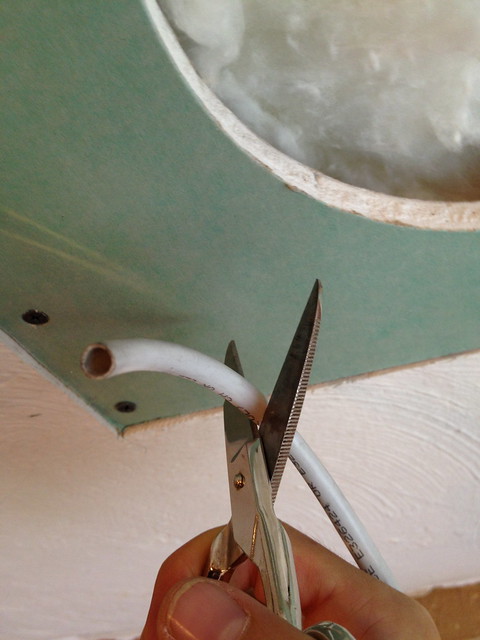
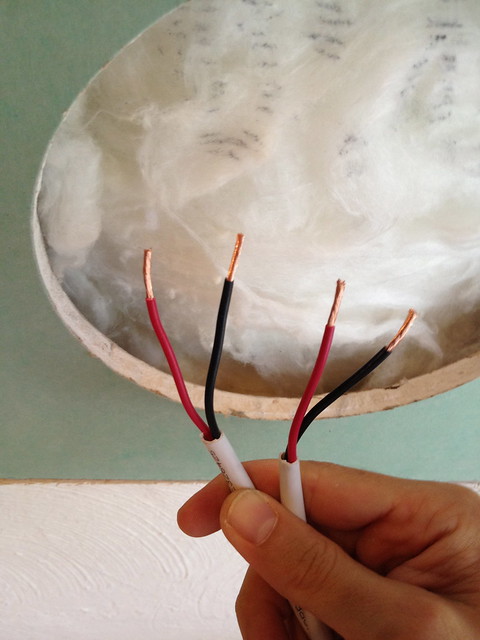
<p>Next, pull the speakers wires down from the ceiling. You need to prep the wires to get them ready for the speakers. Since these are in wall wires, they need to have their plastic jacket stripped away. Carefully cut back about four to six inches of jacket to expose the red and black wires inside.</p>
<div class="MediaContainer PhotoContainer"><a href="http://farm9.staticflickr.com/8422/7627017490_c52427a10d_z.jpg" rel="PhotoPopup" popupheight="640" popupwidth="480"><img alt="" src="https://farm9.staticflickr.com/8422/7627017490_c52427a10d.jpg" width="375" height="500" style="border-width: 0px; border-style: solid;"></a></div>
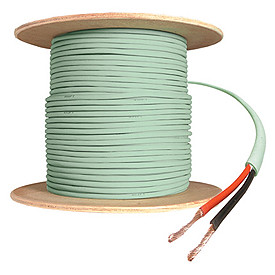
<p>Once you have your red and black wires, use your wire stripper to strip off about 3/4" of wire sheath. In our case, I'm using a <a href="http://www.oldtownhome.com/2012/6/26/Toolbox-Tuesday-Dont-Be-Fooled-by-Hi-Fi-Speaker-Wire-Hype/index.aspx">14 gauge stranded (and inexpensive) in-wall speaker wire</a>.</p>
<div class="MediaContainer PhotoContainer"><a href="http://farm9.staticflickr.com/8432/7627020100_494d6d69bc_z.jpg" rel="PhotoPopup" popupheight="640" popupwidth="480"><img alt="" src="https://farm9.staticflickr.com/8432/7627020100_494d6d69bc.jpg" width="375" height="500" style="border-width: 0px; border-style: solid;"></a></div>
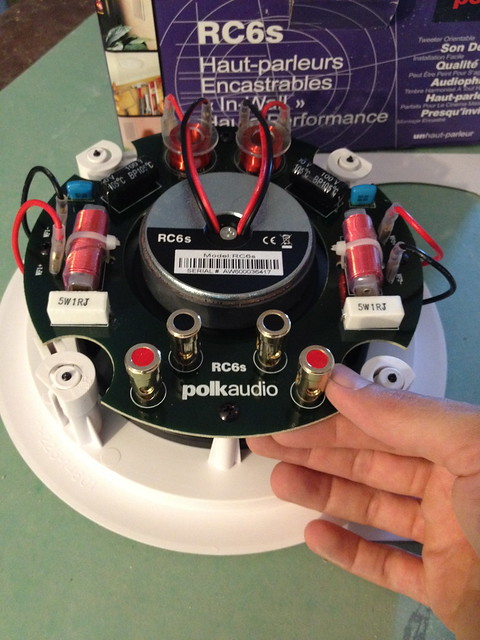
<p>If you look at the back of the speaker, you'll see four binding posts that will allow you to feed the wires through.&nbsp;</p>
<div class="MediaContainer PhotoContainer"><a href="http://farm9.staticflickr.com/8165/7627013556_e86ac46517_z.jpg" rel="PhotoPopup" popupheight="640" popupwidth="480"><img alt="" src="https://farm9.staticflickr.com/8165/7627013556_e86ac46517.jpg" width="375" height="500" style="border-width: 0px; border-style: solid;"></a></div>
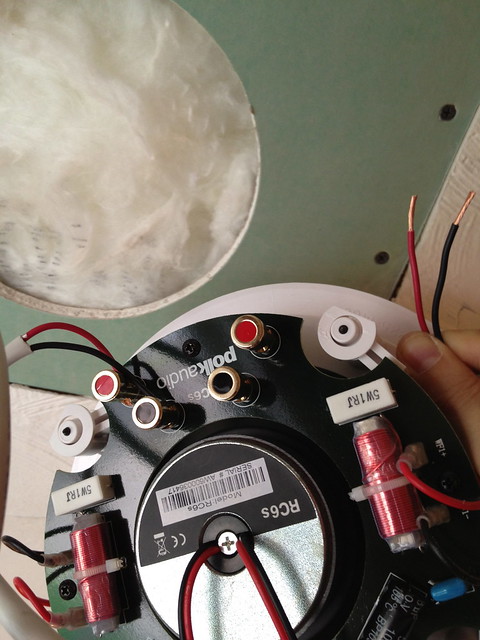
<p>Each has a side (left or right) and color, it's in your best interest to make sure you keep them all straight as you secure the wires.&nbsp;The next several steps are very quick and easy. Just feed the wires into the posts to secure them in place...</p>
<div class="MediaContainer PhotoContainer"><a href="http://farm8.staticflickr.com/7280/7627024366_845ee864c6_z.jpg" rel="PhotoPopup" popupheight="640" popupwidth="480"><img alt="" src="https://farm8.staticflickr.com/7280/7627024366_845ee864c6.jpg" width="375" height="500" style="border-width: 0px; border-style: solid;"></a></div>
<p>...and tuck the speaker into the opening.&nbsp;</p>
<div class="MediaContainer PhotoContainer"><a href="http://farm9.staticflickr.com/8019/7627025270_a0a5a33b5e_z.jpg" rel="PhotoPopup" popupheight="640" popupwidth="480"><img alt="" src="https://farm9.staticflickr.com/8019/7627025270_a0a5a33b5e.jpg" width="375" height="500" style="border-width: 0px; border-style: solid;"></a></div>
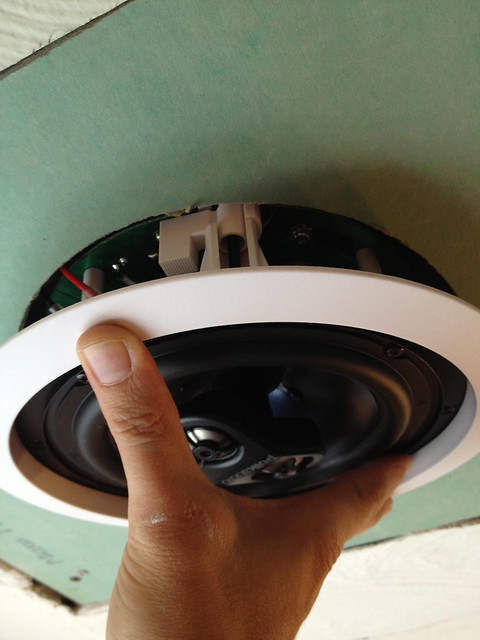
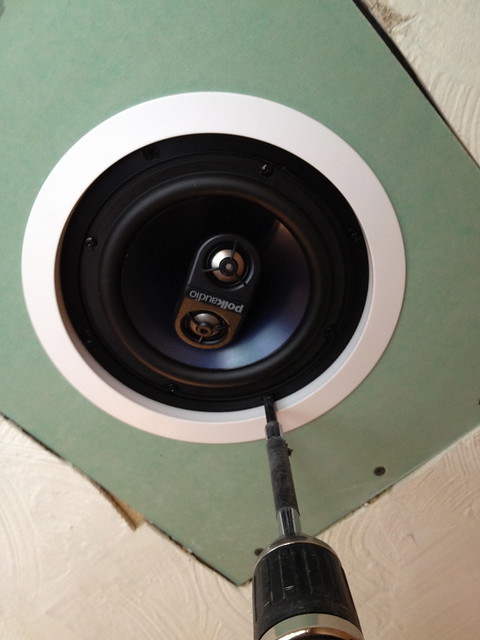
<p>As long as you make sure the wires are free from the clamps, securing the speaker in place is a simple task. Using the drill I simply tighten several screws around the perimeter of the speaker.</p>
<div class="MediaContainer PhotoContainer"><a href="http://farm8.staticflickr.com/7122/7627026044_8261cf52e8_z.jpg" rel="PhotoPopup" popupheight="640" popupwidth="480"><img alt="" src="https://farm8.staticflickr.com/7122/7627026044_8261cf52e8.jpg" width="375" height="500" style="border-width: 0px; border-style: solid;"></a></div>
<p>These screws flip the plastic clamps out and then draw them down on the rim of the drywall to secure the speaker in place. The main thing here is to not over tighten the screws, you just want to get them to the point where the speaker is secure. Here's a photo of the plastic clamp that flips out. This is why the wall material cant be too thick.</p>
<div class="MediaContainer PhotoContainer"><a href="http://farm9.staticflickr.com/8163/7627021346_86be063995_z.jpg" rel="PhotoPopup" popupheight="480" popupwidth="640"><img alt="" src="https://farm9.staticflickr.com/8163/7627021346_86be063995.jpg" width="500" height="375" style="border-width: 0px; border-style: solid;"></a></div>
<p>And there you have it, just a few simple steps to hook up and install a speaker in the ceiling. Obviously I'm not done and still need to fill in the seams of the patch and skim the whole thing, as well as paint and a million other steps between now and then, but for the example purpose of this post, we've installed the speaker and properly hooked it up. The best part, from this point forward, we'll have music in the room while working on our project. And as any good DIYer knows, music always helps a project wrap up just a little bit quicker.</p>
<p>One other note about the install.&nbsp;If you'll notice from the earlier photo of the hole, the insulation job I recently completed just above this speaker is very important. Speakers with open baskets need some sort of insulation behind them to ensure the sound is going in the direction you want it to go, towards the room. The insulation work I had already completed was perfect, and it will do its job to both keep the room warm or cool, and direct sound down toward the room's occupants.</p>
<p>So what do you think? Is this something you think you can handle and might be interested in? Do speakers in the ceiling and whole house audio components in your home sound appealing to you? Let me know.</p>
<p><em>Looking for information on how to go about wiring up your speakers?&nbsp;<a href="http://www.oldtownhome.com/2011/7/7/Confessions-of-a-Total-House-Geek-Structured-Wiring-Technology-Overkill/">Check out what we've done for running the structured wiring in our old home.</a></em></p>
<p><em>Or if you want to see the <a href="http://www.oldtownhome.com/2011/7/21/Wired-for-Sound---Whole-Historic-House-Audio/">system that runs this whole house audio</a>, or the <a href="http://www.oldtownhome.com/2011/9/16/What-100-Year-Old-House-Doesnt-Have-a-DIY-Server-Rack/">crazy server rack I built for the basement</a>, you can check those out too.</em></p><p><a href="https://www.oldtownhome.com/2012/7/25/Music-to-My-Ears---Installing-a-Ceiling-Speaker/">Read Full Post</a></p>]]></content>
    <category term="Header Image" />
    <category term="Projects:Hi Tech" />
    <category term="Technology" />
    <category term="Whole House Audio" />
    <PostImage>http://farm9.staticflickr.com/8141/7643252044_917579da40.jpg</PostImage>
    <media:thumbnail url="https://farm9.staticflickr.com/8141/7643252044_917579da40_t.jpg" />
    <ExtensionElements>
      <Item>PostImage</Item>
      <Item>media:thumbnail</Item>
    </ExtensionElements>
  </entry>
  <entry>
    <guid>6b906f18-fec2-47ae-8f10-66001ed4f517</guid>
    <id>https://www.oldtownhome.com/2012/6/26/Toolbox-Tuesday-Dont-Be-Fooled-by-Hi-Fi-Speaker-Wire-Hype/</id>
    <title>Toolbox Tuesday: Don't Be Fooled by Hi-Fi Speaker Wire Hype</title>
    <summary type="html"><![CDATA[<p>This week's Toolbox Tuesday deviates a little from the tool theme and goes the way of technology supplies. Though it's a bit of a departure from our normal posts, we still hope you'll enjoy reading it. <em>Also, we updated yesterday's <a href="http://www.oldtownhome.com/2012/6/25/A-4th-of-July-Decorating-Upgrade/index.aspx">4th of July buntings</a> post with a few additional photos that show the colors just a little bit better. <a href="http://www.oldtownhome.com/2012/6/25/A-4th-of-July-Decorating-Upgrade/index.aspx">So head on over that way to check out the changes.</a></em></p>
<p>We've been working for quite some time on getting our whole house audio and fairly elaborate wiring project done in our house. Throughout this time, we've learned some critical lessons on where we should and shouldn't spend a little extra money to get better results. One of the most critical areas where I learned that extra dollars don't always make "cents" is in the realm of high cost speaker wire.</p>
<p>
</p>
<div class="MediaContainer PhotoContainer"><a href="http://farm8.staticflickr.com/7272/7448171752_5fc04d3b33.jpg" rel="PhotoPopup" popupheight="275" popupwidth="275"><img alt="" src="https://farm8.staticflickr.com/7272/7448171752_5fc04d3b33.jpg" width="275" height="275" style="border-width: 0px; border-style: solid;"></a></div>
<p>The debate about speaker wire is one that has raged on for what seems like ages, and a billion dollar industry has been formed out of this very hotly debated topic. From super pretentious audiophiles to Best Buy sales clerks to DIYers, most have an opinion about the best speaker wire that usually costs a boatload, but is said to provide the highest fidelity in sound, lowest signal loss, minimal distortion or interruption, and the "best possible listening experience," All this may be gospel to the preacher, but the simple truth is that it's all meant to sell you something that's overpriced, and really, all of the hype is really just sort of crap. </p>
<p>I know, I may have just touched a nerve there, and I hope you'll accept my apologies if you feel I've wronged you, but I mean no ill will. To be completely honest, I'm actually just trying to inform and educate you, primarily so that you can save some money down the road and help you put that extra cash towards items that matter (like speakers and components). However, if you're the owner of a "high quality" speaker wire manufacturer, or this industry somehow puts food on your table, you have every right to rant to me in the comments. Don't worry, I can take it, and maybe I'll even learn a thing or two. </p>
<p>As a young teenager I was bitten by the audio bug. What started with a basement boom box slowly evolved to a portable CD player, home theater, surround sound, car audio with thumping bass (hey, I was a teenager), and eventually, our whole house audio system that I love. Music and the technologies associated with listening to music anywhere have been a serious interest of mine for years, and I was one of those people who initially bought into the idea that Monster Cable, in all its stranded and shielded glory, offered a premium experience to me as a listener, and one that was worth the 10x price tag that came with the higher quality product. </p>
<p>
</p>
<div class="MediaContainer PhotoContainer"><a href="http://farm9.staticflickr.com/8024/7448171856_635609b7d1.jpg" rel="PhotoPopup" popupheight="500" popupwidth="500"><img alt="" src="https://farm9.staticflickr.com/8024/7448171856_635609b7d1.jpg" width="500" height="500" style="border-width: 0px; border-style: solid;"></a></div>
<p>The problem with my belief in the superior product was it was only based in the various advertisements I had seen, or from viewing the systems of others who also bought into the myth. I mean, how can you not believe something that says "You just spent a lot of money on your components, don't ruin it all with inexpensive speaker wire." It was a brilliant marketing strategy to say the least, sort of like buying insurance for your precious  sound waves. </p>
<p></p></img></img> <a href="https://www.oldtownhome.com/2012/6/26/Toolbox-Tuesday-Dont-Be-Fooled-by-Hi-Fi-Speaker-Wire-Hype/">more</a>]]></summary>
    <published>2012-06-26T12:05:00.000-04:00</published>
    <updated>2012-06-26T12:05:00.000-04:00</updated>
    <link rel="alternate" href="https://www.oldtownhome.com/2012/6/26/Toolbox-Tuesday-Dont-Be-Fooled-by-Hi-Fi-Speaker-Wire-Hype/" />
    <author>
      <name>Alex</name>
    </author>
    <content type="html"><![CDATA[<p>This week's Toolbox Tuesday deviates a little from the tool theme and goes the way of technology supplies. Though it's a bit of a departure from our normal posts, we still hope you'll enjoy reading it. <em>Also, we updated yesterday's <a href="http://www.oldtownhome.com/2012/6/25/A-4th-of-July-Decorating-Upgrade/index.aspx">4th of July buntings</a> post with a few additional photos that show the colors just a little bit better. <a href="http://www.oldtownhome.com/2012/6/25/A-4th-of-July-Decorating-Upgrade/index.aspx">So head on over that way to check out the changes.</a></em></p>
<p>We've been working for quite some time on getting our whole house audio and fairly elaborate wiring project done in our house. Throughout this time, we've learned some critical lessons on where we should and shouldn't spend a little extra money to get better results. One of the most critical areas where I learned that extra dollars don't always make "cents" is in the realm of high cost speaker wire.</p>
<p>
</p>
<div class="MediaContainer PhotoContainer"><a href="http://farm8.staticflickr.com/7272/7448171752_5fc04d3b33.jpg" rel="PhotoPopup" popupheight="275" popupwidth="275"><img alt="" src="https://farm8.staticflickr.com/7272/7448171752_5fc04d3b33.jpg" width="275" height="275" style="border-width: 0px; border-style: solid;"></a></div>
<p>The debate about speaker wire is one that has raged on for what seems like ages, and a billion dollar industry has been formed out of this very hotly debated topic. From super pretentious audiophiles to Best Buy sales clerks to DIYers, most have an opinion about the best speaker wire that usually costs a boatload, but is said to provide the highest fidelity in sound, lowest signal loss, minimal distortion or interruption, and the "best possible listening experience," All this may be gospel to the preacher, but the simple truth is that it's all meant to sell you something that's overpriced, and really, all of the hype is really just sort of crap. </p>
<p>I know, I may have just touched a nerve there, and I hope you'll accept my apologies if you feel I've wronged you, but I mean no ill will. To be completely honest, I'm actually just trying to inform and educate you, primarily so that you can save some money down the road and help you put that extra cash towards items that matter (like speakers and components). However, if you're the owner of a "high quality" speaker wire manufacturer, or this industry somehow puts food on your table, you have every right to rant to me in the comments. Don't worry, I can take it, and maybe I'll even learn a thing or two. </p>
<p>As a young teenager I was bitten by the audio bug. What started with a basement boom box slowly evolved to a portable CD player, home theater, surround sound, car audio with thumping bass (hey, I was a teenager), and eventually, our whole house audio system that I love. Music and the technologies associated with listening to music anywhere have been a serious interest of mine for years, and I was one of those people who initially bought into the idea that Monster Cable, in all its stranded and shielded glory, offered a premium experience to me as a listener, and one that was worth the 10x price tag that came with the higher quality product. </p>
<p>
</p>
<div class="MediaContainer PhotoContainer"><a href="http://farm9.staticflickr.com/8024/7448171856_635609b7d1.jpg" rel="PhotoPopup" popupheight="500" popupwidth="500"><img alt="" src="https://farm9.staticflickr.com/8024/7448171856_635609b7d1.jpg" width="500" height="500" style="border-width: 0px; border-style: solid;"></a></div>
<p>The problem with my belief in the superior product was it was only based in the various advertisements I had seen, or from viewing the systems of others who also bought into the myth. I mean, how can you not believe something that says "You just spent a lot of money on your components, don't ruin it all with inexpensive speaker wire." It was a brilliant marketing strategy to say the least, sort of like buying insurance for your precious  sound waves. </p>
<p></p>
<p>It wasn't until about five years ago that I realized my assumptions and beliefs were false. While in a pinch, I was forced to temporarily hook up a set of speakers using very old, partially damaged, and very low quality speaker wire. The result being I honestly couldn't tell the difference. After this finding I did a little test with the highfalutin&nbsp;wire and pit it against the bad stuff in a sort of speaker duel. I had a right speaker and a left speaker, one with high quality, and one with low quality, both with very long runs of wire, and I couldn't tell a lick of difference when I switched between speakers. I was floored.</p>
<p>Yes, I could have gone on living the lie, buying 12 gauge Monster Cable for all of our whole house audio, ignoring the evidence and instead posturing for my friends because I was too ashamed to admit I had fallen for the clever marketing ploy, but why do that? To save face? That's not my style, especially not when I had a bunch of speaker wire to buy for the rest of our projects.</p>
<div class="ToolItem">
<iframe src="http://rcm.amazon.com/e/cm?t=oltoho-20&amp;o=1&amp;p=8&amp;l=as1&amp;asins=B0036CXZJ2&amp;IS1=1&amp;ref=qf_sp_asin_til&amp;fc1=3A3128&amp;lt1=_blank&amp;m=amazon&amp;lc1=61838A&amp;bc1=FAFAF8&amp;bg1=FAFAF8&amp;f=ifr" style="width: 120px; height: 240px;" scrolling="no" marginwidth="0" marginheight="0" frameborder="0"></iframe>
</div>
<p>Instead of dropping a serious chunk of change on some Monster brand whole house audio speaker wire, I opted to select a budget quality speaker wire to support the many speakers throughout our house. Though the wire snob that once existed within me fidgetted once or twice, I know I actually had nothing serious to worry about. And after hooking up out longest run of speaker wires, from the basement to the bedroom, and powering the system up, a little Dave Matthews Band followed by Lenny Kravitz reinforced my decision. </p>
<p>Just last week we had to buy a bit more wire to finish up a little speaker project, and the price of the order reminded me just why I like the decision we made. We paid a mere $30 for 100' rather than the $70-$120+ for the same thing labeled as "high quality."</p>
<p>
</p>
<div class="MediaContainer PhotoContainer"><a href="http://farm9.staticflickr.com/8008/7448033108_ccce4a67a7_z.jpg" rel="PhotoPopup" popupheight="640" popupwidth="480"><img alt="" src="https://farm9.staticflickr.com/8008/7448033108_ccce4a67a7.jpg" width="375" height="500" style="border-width: 0px; border-style: solid;"></a></div>
<p>As you can see from the photo, our speaker wire is a basic two connector 12 gauge wire with a white plastic jacket and a string that aides in stripping back the jacket. It took me a long time to learn what this string was for, but if you start the strip with snips, and pull on this string, it strips the jacket back for you very nicely. This wire comes in rolls of 50', 100', 200' and 500'. It doesn't have a highly molded jacket, or extra shielding, but it has worked great for us in runs of over 50 feet total.</p>
<p>
</p>
<div class="MediaContainer PhotoContainer"><a href="http://farm8.staticflickr.com/7246/7448035058_724a5ffddb_z.jpg" rel="PhotoPopup" popupheight="640" popupwidth="480"><img alt="" src="https://farm8.staticflickr.com/7246/7448035058_724a5ffddb.jpg" width="375" height="500" style="border-width: 0px; border-style: solid;"></a></div>
<p>Now I know you may still be a skeptic, and my little test may not be able to convince you of my beliefs. You're probably thinking "sure, Alex can't hear the difference, but I'm sure I could." Recently a good friend sent along an article that truly vindicated me. (because I needed vindication?) The Consumerist did a type of myth buster exercise, <a href="http://consumerist.com/2008/03/do-coat-hangers-sound-as-good-monster-cables.html" target="_blank">pitting a high fidelity speaker wire against a wire coat hanger</a> and having a real world listening experiment with a group of audiophiles. Kind of a blind hearing test for audio nerds. The results, though shocking for many, weren't all that surprising for me. </p>
<p>The audiophiles had been unable to differentiate between the items given away for free by your dry cleaner, and the wire you would normally pay a premium for. The results of this test reinforced my decision to purchase budget speaker wire to run within our house. Since our installation of over 1000' of speaker wire to support our whole house audio, we've never once said, "boy, I really wish we had spent a whole bunch more money and used better speaker wire." And that's saying a lot. </p>
<p>I hope this little blog post was informative and educational. But most of all, I hope it dispelled a few myths about speaker wire and the need to drop your hard earned cash on the expensive stuff. Have you been the victim of this marketing hype? Or did you question the logic and go with your gut? I was fooled for many years, so there's no shame in that.</p>
<p><em>Did you enjoy reading this post? Want to learn more about our first-hand experiences with other tools, devices or items used throughout our renovation? If so, check out&nbsp;<a href="http://www.oldtownhome.com/Toolbox-Tuesday/index.aspx">our complete list of product reviews in our Toolbox Tuesday section</a>.&nbsp;</em></p>
<p><em>Note: We weren't compensated for this review. We simply want to&nbsp;<a href="http://www.oldtownhome.com/Toolbox-Tuesday/index.aspx">share good products</a>&nbsp;when we see them, and hope that learning from our mistakes can help save you time, money and frustration.</em></p><p><a href="https://www.oldtownhome.com/2012/6/26/Toolbox-Tuesday-Dont-Be-Fooled-by-Hi-Fi-Speaker-Wire-Hype/">Read Full Post</a></p>]]></content>
    <category term="Header Image" />
    <category term="Technology" />
    <category term="Toolbox Tuesday" />
    <category term="Whole House Audio" />
    <PostImage>http://farm8.staticflickr.com/7111/7448518642_4b17bfb336.jpg</PostImage>
    <media:thumbnail url="https://farm8.staticflickr.com/7111/7448518642_4b17bfb336_t.jpg" />
    <ExtensionElements>
      <Item>PostImage</Item>
      <Item>media:thumbnail</Item>
    </ExtensionElements>
  </entry>
  <entry>
    <guid>07cd5188-1e9b-45d8-9ef4-4025aa77e3d1</guid>
    <id>https://www.oldtownhome.com/2012/5/8/Toolbox-Tuesday-The-Sweet-Sound-of-Wireless-Outdoor-Speakers/</id>
    <title>Toolbox Tuesday: The Sweet Sound of Wireless Outdoor Speakers</title>
    <summary type="html"><![CDATA[<p>Today's "tool" has been somewhat critical in the success of this year's gardening, planting, and entertaining endeavors. No, I'm not talking about an axe, shovel, or some other sort of gardening accessory, I'm actually talking about a tool that's primary purpose is for entertainment. The tool I'm talking about is actually our outdoor wireless speaker system. </p>
<p>Last summer we were <a href="http://www.oldtownhome.com/2011/7/14/Lights-Cameras-Action-Our-Day-with-the-DIY-Network/index.aspx">filmed for a brief segment on DIY Network's show, "I Want That."</a> Back when we wrote our post about the show we couldn't specifically talk about the main item they were filming at our house, but since the show has now aired (actually, it aired back in December) we can blab all about the product. </p>
<p>The devices we reviewed were actually outdoor wireless speakers from Audiovox Acoustic Research. Here's a video of the show as it originally aired. But before you watch, be warned, we are definitely more "bloggers" than we are "television personalities." Our strengths lay far more on the writer/website side of things. </p>
<p>
</p>
<div class="MediaContainer VideoEmbed"><iframe width="560" height="349" src="http://www.youtube.com/embed/0dnseOs2TZM?wmode=transparent&amp;hd=1" frameborder="0" allowfullscreen="true"></iframe></div>
<p>Ok, I hope you weren't too scared off my odd and nasally dialogue, ginormous ears, and inopportune crotch shot. At least Lulu looked good and got some screen time. She and Mel are the actual stars of our family, that's for sure. </p>
<p>Anyhow, we've touched on the speakers we Installed for the show a few times in the past, but we've never really spoken about them in depth. </p>
<p>For years we wanted speakers outside, but we've always had the challenge of needing to run wires from the speakers to the basement or family room. Given the length of wire needed, and the number of rooms we had to run through, it just wasn't really possible. A few years ago we installed a nice whole house audio system that gave us wonderful music throughout the interior of our house, but we were unfortunately without any tunes when we were spending time outside. </p>
<p>I tried several different approaches to alleviate this lack of music, including turning the volume up inside, using small iPod speakers, and even asking Wendy to sing. Though she doesn't have a bad voice, when I wanted to hear the latest from Mumford &amp; Sons or Flo Rida, she really left something to be desired. </p>
<div class="ToolItem">
<iframe style="width: 120px; height: 240px;" marginwidth="0" marginheight="0" scrolling="no" frameborder="0" src="//ws-na.amazon-adsystem.com/widgets/q?ServiceVersion=20070822&amp;OneJS=1&amp;Operation=GetAdHtml&amp;MarketPlace=US&amp;source=ac&amp;ref=qf_sp_asin_til&amp;ad_type=product_link&amp;tracking_id=oltoho-20&amp;marketplace=amazon&amp;region=US&amp;placement=B007JCMDA2&amp;asins=B007JCMDA2&amp;linkId=EKHJKYKKLFLELLBF&amp;show_border=false&amp;link_opens_in_new_window=true&amp;price_color=333333&amp;title_color=0066C0&amp;bg_color=FAFAF8">
</iframe>
</div>
<p>I began looking into wireless speakers and found that the pair we ended up with were given consistently wonderful reviews and rave comments by Amazon users. When I was almost to the point of deciding on the specific speakers we wanted, the DIY Network contacted us about the show and I shared my interest in the speakers. The end result, they liked the useful technology feel and novice user installation ability, and they were able to secure speakers for us for the show. Score!!!</p>
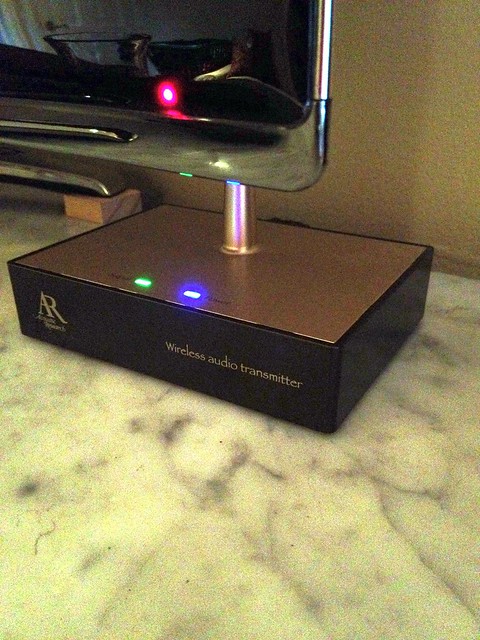
<p>Setup of the speakers were straight forward and easy. I had no problem configuring them to play from our stereo for the show, and then changed the configuration to run off of our whole house audio a few weeks later. All you really need to do is to plug the transmitter into RCA or headphone line out and then turn the music and speakers on. Bam, music anywhere. </p>
<p></p> <a href="https://www.oldtownhome.com/2012/5/8/Toolbox-Tuesday-The-Sweet-Sound-of-Wireless-Outdoor-Speakers/">more</a>]]></summary>
    <published>2012-05-08T09:33:00.000-04:00</published>
    <updated>2012-05-08T09:33:00.000-04:00</updated>
    <link rel="alternate" href="https://www.oldtownhome.com/2012/5/8/Toolbox-Tuesday-The-Sweet-Sound-of-Wireless-Outdoor-Speakers/" />
    <author>
      <name>Alex</name>
    </author>
    <content type="html"><![CDATA[<p>Today's "tool" has been somewhat critical in the success of this year's gardening, planting, and entertaining endeavors. No, I'm not talking about an axe, shovel, or some other sort of gardening accessory, I'm actually talking about a tool that's primary purpose is for entertainment. The tool I'm talking about is actually our outdoor wireless speaker system. </p>
<p>Last summer we were <a href="http://www.oldtownhome.com/2011/7/14/Lights-Cameras-Action-Our-Day-with-the-DIY-Network/index.aspx">filmed for a brief segment on DIY Network's show, "I Want That."</a> Back when we wrote our post about the show we couldn't specifically talk about the main item they were filming at our house, but since the show has now aired (actually, it aired back in December) we can blab all about the product. </p>
<p>The devices we reviewed were actually outdoor wireless speakers from Audiovox Acoustic Research. Here's a video of the show as it originally aired. But before you watch, be warned, we are definitely more "bloggers" than we are "television personalities." Our strengths lay far more on the writer/website side of things. </p>
<p>
</p>
<div class="MediaContainer VideoEmbed"><iframe width="560" height="349" src="http://www.youtube.com/embed/0dnseOs2TZM?wmode=transparent&amp;hd=1" frameborder="0" allowfullscreen="true"></iframe></div>
<p>Ok, I hope you weren't too scared off my odd and nasally dialogue, ginormous ears, and inopportune crotch shot. At least Lulu looked good and got some screen time. She and Mel are the actual stars of our family, that's for sure. </p>
<p>Anyhow, we've touched on the speakers we Installed for the show a few times in the past, but we've never really spoken about them in depth. </p>
<p>For years we wanted speakers outside, but we've always had the challenge of needing to run wires from the speakers to the basement or family room. Given the length of wire needed, and the number of rooms we had to run through, it just wasn't really possible. A few years ago we installed a nice whole house audio system that gave us wonderful music throughout the interior of our house, but we were unfortunately without any tunes when we were spending time outside. </p>
<p>I tried several different approaches to alleviate this lack of music, including turning the volume up inside, using small iPod speakers, and even asking Wendy to sing. Though she doesn't have a bad voice, when I wanted to hear the latest from Mumford &amp; Sons or Flo Rida, she really left something to be desired. </p>
<div class="ToolItem">
<iframe style="width: 120px; height: 240px;" marginwidth="0" marginheight="0" scrolling="no" frameborder="0" src="//ws-na.amazon-adsystem.com/widgets/q?ServiceVersion=20070822&amp;OneJS=1&amp;Operation=GetAdHtml&amp;MarketPlace=US&amp;source=ac&amp;ref=qf_sp_asin_til&amp;ad_type=product_link&amp;tracking_id=oltoho-20&amp;marketplace=amazon&amp;region=US&amp;placement=B007JCMDA2&amp;asins=B007JCMDA2&amp;linkId=EKHJKYKKLFLELLBF&amp;show_border=false&amp;link_opens_in_new_window=true&amp;price_color=333333&amp;title_color=0066C0&amp;bg_color=FAFAF8">
</iframe>
</div>
<p>I began looking into wireless speakers and found that the pair we ended up with were given consistently wonderful reviews and rave comments by Amazon users. When I was almost to the point of deciding on the specific speakers we wanted, the DIY Network contacted us about the show and I shared my interest in the speakers. The end result, they liked the useful technology feel and novice user installation ability, and they were able to secure speakers for us for the show. Score!!!</p>
<p>Setup of the speakers were straight forward and easy. I had no problem configuring them to play from our stereo for the show, and then changed the configuration to run off of our whole house audio a few weeks later. All you really need to do is to plug the transmitter into RCA or headphone line out and then turn the music and speakers on. Bam, music anywhere. </p>
<p></p>
<p>
</p>
<div class="MediaContainer PhotoContainer"><a href="http://farm8.staticflickr.com/7223/7157864228_827a320ec1_z.jpg" rel="PhotoPopup" popupheight="640" popupwidth="480"><img alt="" src="https://farm8.staticflickr.com/7223/7157864228_827a320ec1.jpg" width="375" height="500" style="border-width: 0px; border-style: solid;"></a></div>
<p>Since configuring the speakers, we've really had a great time with them. From background music while entertaining to listening to a Nationals game while laying in the hammock on a warm spring weekend afternoon, having the ability to bring the speakers outside and turn on some tunes has made our backyard space far more functional and enjoyable. </p>
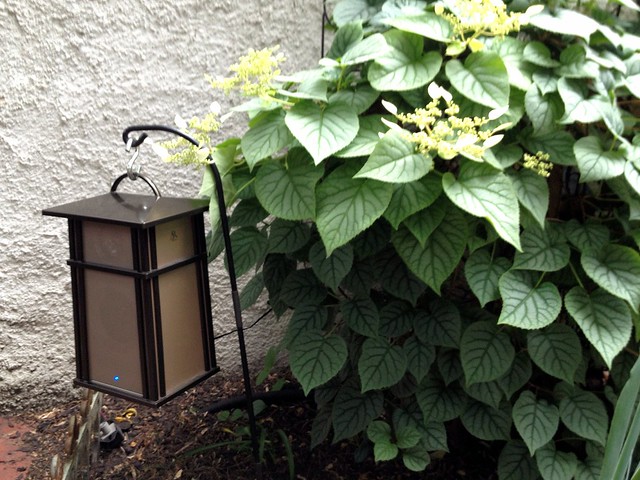
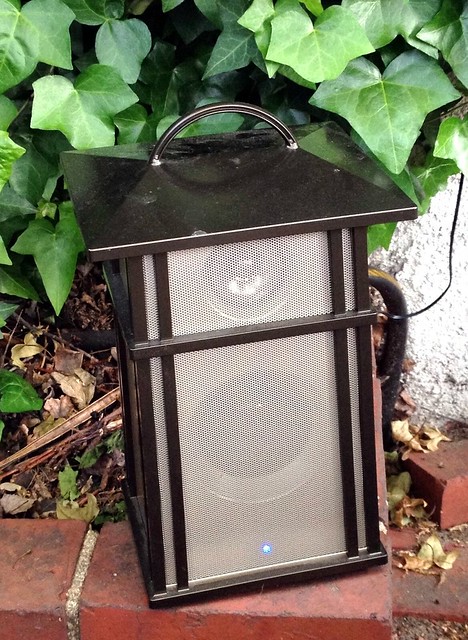
<p>Unlike many similar devices, these speakers are actually quite attractive and sturdy. The exterior actually looks like a craftsman style lantern and blends in quite nicely with our garden. </p>
<p>
</p>
<div class="MediaContainer PhotoContainer"><a href="http://farm6.staticflickr.com/5275/7157898490_16c2b1c56b_z.jpg" rel="PhotoPopup" popupheight="479" popupwidth="640"><img alt="" src="https://farm6.staticflickr.com/5275/7157898490_16c2b1c56b.jpg" width="500" height="375" style="border-width: 0px; border-style: solid;"></a></div>
<p>We've had several people come over for dinner or drinks that have asked where our music is coming from. The tend to blend so nicely that you just sort of overlook them.</p>
<p>Power comes from either a plugin transformer if you have a plug nearby, or via six AA batteries. Last summer we ran them from batteries and one set lasted for the duration of the summer. Luckily through we have outlets near the speaker locations, so it's just easier to plug them in.</p>
<p>
</p>
<div class="MediaContainer PhotoContainer"><a href="http://farm6.staticflickr.com/5335/7157934526_2e71279b5c_z.jpg" rel="PhotoPopup" popupheight="640" popupwidth="468"><img alt="" src="https://farm6.staticflickr.com/5335/7157934526_2e71279b5c.jpg" width="365" height="500" style="border-width: 0px; border-style: solid;"></a></div>
<p>But why am I talking about these speakers as a "tool"? Simple! Music makes a job go faster. Since these speakers are weather resistant, outdoor, and wireless, you can turn on your music at the source and then tote these speakers from room to room giving yourself endless tunes. Perfect if your painting, working on a craft project, or in our case, working to plant flowers or vegetables.</p>
<p>Pair these speakers with a <a href="http://www.oldtownhome.com/2011/9/22/Sonos-Zoneplayer-90-A-Little-Awesome-Sauce-for-our-Whole-House-Audio/index.aspx">Sonos Internet music device</a> and you'll end up streaming music in any room of the house that can be easily controlled with your iPhone or Android device. Not too shabby. </p>
<p>The range of the transmitter is pretty good. We've noticed occasional static at about 40 feet, but overall performance has been pretty solid. The speakers have independent volume controls and bass boost, and a little blue light on the front of the speaker lets you know when it's on. </p>
<div class="ToolItem">
<iframe style="width: 120px; height: 240px;" marginwidth="0" marginheight="0" scrolling="no" frameborder="0" src="//ws-na.amazon-adsystem.com/widgets/q?ServiceVersion=20070822&amp;OneJS=1&amp;Operation=GetAdHtml&amp;MarketPlace=US&amp;source=ac&amp;ref=qf_sp_asin_til&amp;ad_type=product_link&amp;tracking_id=oltoho-20&amp;marketplace=amazon&amp;region=US&amp;placement=B007JCMDA2&amp;asins=B007JCMDA2&amp;linkId=EKHJKYKKLFLELLBF&amp;show_border=false&amp;link_opens_in_new_window=true&amp;price_color=333333&amp;title_color=0066C0&amp;bg_color=FAFAF8">
</iframe>
</div>
<p>I know a lot of people want outdoor music but can't easily run wires. If you've been looking for a good and easy way to get music in your outdoor space, these might be the perfect speakers for you. And if you want a little more versatility, Acoustic Research offers another version of the speakers that have a small light built into it. The only difference is that this one is hard wired and doesn't need a transformer. </p>
<p>Do you have any similar experience with outdoor wireless speakers you can share? Perhaps a brand that's worked well for you? Or maybe you've been searching high and low and these will be perfect? Let us know what you think. You know we always love to hear about your experiences. </p>
<p><em>Did you enjoy reading this post? Want to learn more about our first-hand experiences with other tools, devices or items used throughout our renovation? If so, check out&nbsp;<a href="http://www.oldtownhome.com/Toolbox-Tuesday/index.aspx">our complete list of product reviews in our Toolbox Tuesday section</a>.&nbsp;</em></p>
<p><em>Note: We weren't paid for this review. We simply want to&nbsp;<a href="http://www.oldtownhome.com/Toolbox-Tuesday/index.aspx">share good products</a>&nbsp;when we see them, and hope that learning from our mistakes can help save you time, money and frustration.</em></p>
<p><em><strong>Don't forget to stop back later today, as we announce the winner of the $100 gift certificate to The Home Depot. Will it be you?&nbsp;</strong></em></p>
<p><em><br>
</em></p><p><a href="https://www.oldtownhome.com/2012/5/8/Toolbox-Tuesday-The-Sweet-Sound-of-Wireless-Outdoor-Speakers/">Read Full Post</a></p>]]></content>
    <category term="Exclude-Teaser-Projects:Garden" />
    <category term="Header Image" />
    <category term="Projects:Garden" />
    <category term="Projects:Hi Tech" />
    <category term="Technology" />
    <category term="Toolbox Tuesday" />
    <category term="Whole House Audio" />
    <PostImage>http://farm8.staticflickr.com/7085/7157503090_e4f52ea193.jpg</PostImage>
    <media:thumbnail url="https://farm8.staticflickr.com/7085/7157503090_e4f52ea193_t.jpg" />
    <ExtensionElements>
      <Item>PostImage</Item>
      <Item>media:thumbnail</Item>
    </ExtensionElements>
  </entry>
  <entry>
    <guid>f4269544-330d-4a80-8bc0-23fdbc6ee0d3</guid>
    <id>https://www.oldtownhome.com/2012/1/9/Helping-Out-a-Neighbor-in-Audio-Distress---With-Sonos-Sound-Tech/</id>
    <title>Helping Out a Neighbor in (Audio) Distress - With Sonos Sound Tech</title>
    <summary type="html"><![CDATA[<p>About two years ago Wendy and I hosted a <a href="http://www.oldtownhome.com/2011/10/12/Its-a-Halloween-Par-tay/index.aspx">Halloween party</a> for our neighborhood. Not only did it mark a celebration of our favorite holiday, but it was also one of the first times many neighbors had seen the changes we had been steadily making to our home over the years.</p>
<p>Many were familiar with the <a href="http://www.oldtownhome.com/2011/4/25/Lets-Start-at-the-Very-Beginning/index.aspx">dirty, off white, and slightly rundown version of our house</a> they had seen when it was listed for sale in 2002 before we swooped in. (Everyone loves a good open house.) The party served as our mini reveal from all of our efforts, and we had a wonderful and very positive reponse to everything we had accomplished. The funny thing was that overwhelmingly one of the features people seemed to love and ask the most about was our <a href="http://www.oldtownhome.com/2011/7/21/Wired-for-Sound---Whole-Historic-House-Audio/">Whole House Audio solution</a>. One friend and neighbor, Sherry, liked it so much that she wanted to talk about how she could accomplish something similar in her house.</p>
<p>Shorty after the party we got together with Sherry to discuss details of the system, what she wanted out of it, and what she currently had. At the time there wasn't much on the market that didn't require a pretty major effort with lots of construction, so we put the idea on the back burner. </p>
<p>Fast forward to present day...yes, two years later. (Again, I'm slow.) I had not forgotten our conversations with Sherry and decided to put together a plan for how we could make music throughout her house a reality.</p>
<p>With the introduction of the iPad (and other tablets), the rich set of apps in the app store and market places, advancement in technology and availability of Internet streaming music services, and wireless capabilities, it was finally time to get Sherry's system up and running.</p>
<p>Let me first say that Sherry's house is absolutely amazing. I'm not kidding and I really can't oversell this. If we could walk around Old Town and choose any one house to live the rest of our lives in, Sherry's home may very well be it. It was built between the late 18th century (the original rear flounder section) and 1810 (the three story front section). It is large enough to comfortably fit almost any size family, but it isn't overwhelming in its size. It has a rich history, a great flow, wonderful original details throughout, an amazing yard, and a garage. It's one of those houses in Old Town where you just say, "Wow!"</p>
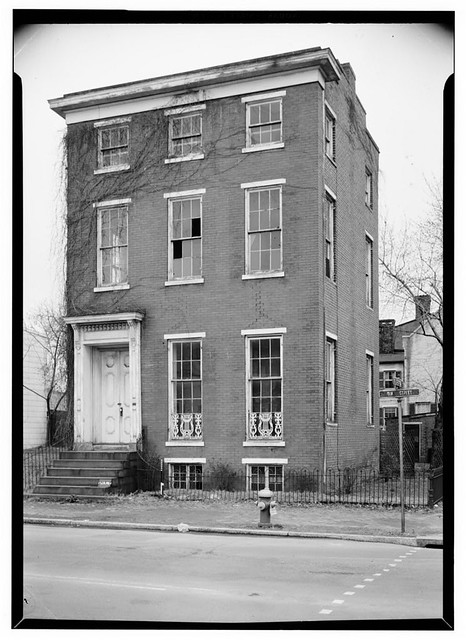
<p>Here's a photo of her house circa 1933.</p>
<p></p> <a href="https://www.oldtownhome.com/2012/1/9/Helping-Out-a-Neighbor-in-Audio-Distress---With-Sonos-Sound-Tech/">more</a>]]></summary>
    <published>2012-01-09T10:30:00.000-05:00</published>
    <updated>2012-01-09T10:30:00.000-05:00</updated>
    <link rel="alternate" href="https://www.oldtownhome.com/2012/1/9/Helping-Out-a-Neighbor-in-Audio-Distress---With-Sonos-Sound-Tech/" />
    <author>
      <name>Alex</name>
    </author>
    <content type="html"><![CDATA[<p>About two years ago Wendy and I hosted a <a href="http://www.oldtownhome.com/2011/10/12/Its-a-Halloween-Par-tay/index.aspx">Halloween party</a> for our neighborhood. Not only did it mark a celebration of our favorite holiday, but it was also one of the first times many neighbors had seen the changes we had been steadily making to our home over the years.</p>
<p>Many were familiar with the <a href="http://www.oldtownhome.com/2011/4/25/Lets-Start-at-the-Very-Beginning/index.aspx">dirty, off white, and slightly rundown version of our house</a> they had seen when it was listed for sale in 2002 before we swooped in. (Everyone loves a good open house.) The party served as our mini reveal from all of our efforts, and we had a wonderful and very positive reponse to everything we had accomplished. The funny thing was that overwhelmingly one of the features people seemed to love and ask the most about was our <a href="http://www.oldtownhome.com/2011/7/21/Wired-for-Sound---Whole-Historic-House-Audio/">Whole House Audio solution</a>. One friend and neighbor, Sherry, liked it so much that she wanted to talk about how she could accomplish something similar in her house.</p>
<p>Shorty after the party we got together with Sherry to discuss details of the system, what she wanted out of it, and what she currently had. At the time there wasn't much on the market that didn't require a pretty major effort with lots of construction, so we put the idea on the back burner. </p>
<p>Fast forward to present day...yes, two years later. (Again, I'm slow.) I had not forgotten our conversations with Sherry and decided to put together a plan for how we could make music throughout her house a reality.</p>
<p>With the introduction of the iPad (and other tablets), the rich set of apps in the app store and market places, advancement in technology and availability of Internet streaming music services, and wireless capabilities, it was finally time to get Sherry's system up and running.</p>
<p>Let me first say that Sherry's house is absolutely amazing. I'm not kidding and I really can't oversell this. If we could walk around Old Town and choose any one house to live the rest of our lives in, Sherry's home may very well be it. It was built between the late 18th century (the original rear flounder section) and 1810 (the three story front section). It is large enough to comfortably fit almost any size family, but it isn't overwhelming in its size. It has a rich history, a great flow, wonderful original details throughout, an amazing yard, and a garage. It's one of those houses in Old Town where you just say, "Wow!"</p>
<p>Here's a photo of her house circa 1933.</p>
<p></p>
<div class="MediaContainer PhotoContainer"><a href="http://farm8.staticflickr.com/7003/6487824965_cbc5618301_z.jpg" rel="PhotoPopup" popupheight="640" popupwidth="466"><img alt="" src="https://farm8.staticflickr.com/7003/6487824965_cbc5618301.jpg" width="364" height="500" style="border-width: 0px;border-style: solid;"></a></div>
<p>And here it is today.</p>
<p>
</p>
<div class="MediaContainer PhotoContainer"><a href="http://farm8.staticflickr.com/7015/6632319733_7d204af70f_z.jpg" rel="PhotoPopup" popupheight="640" popupwidth="480"><img alt="" src="https://farm8.staticflickr.com/7015/6632319733_7d204af70f.jpg" width="375" height="500" style="border-width: 0px;border-style: solid;"></a></div>
<p>I was very excited to bring this 18th century home into the 21st century with audio in every room like we had our home, but don't forget, in our house we've been renovating for years. We had been running speaker and network cabling for the first several years of the renovation in anticipation of an audio system. Sherry's house is not constantly in the midst of a major renovation, doesn't have the necessary wiring all over the place, and she would like to get the project done sometime before it becomes a 22nd century idea. Luckily, I had a plan.</p>
<p>I recently<a href="http://oldtownhome.com/2011/9/22/Sonos-Zoneplayer-90-A-Little-Awesome-Sauce-for-our-Whole-House-Audio/index.aspx"> installed a Sonos Connect (formerly ZonePlayer90) to work with our Nuvo Essentia E6G system</a> and have absolutely loved how well it works. Pandora, Spotify, IHeartRadio, etc. all played from the convenience of an iPhone or iPod touch controller can't be beat. I liked the Sonos product that I purchased so much that I recommended Sherry go the Sonos route for her whole system.</p>
<p>We sat down with Sherry one evening to discuss the plan and gather her basic needs and requirements. Sherry's main interest was to start with music in the dining and living rooms. Beyond this she wanted to be sure the system could be expanded without significant issue, was easy to use, and could leverage her existing mp3 music catalog.</p>
<p>Based on her requirementsI I forumlated a few potential scenarios for Sherry to choose from. Each plan had its own pros and cons related to price, features, and what to use as a controller, but Sherry is a decisive person so the selection process was easy.</p>
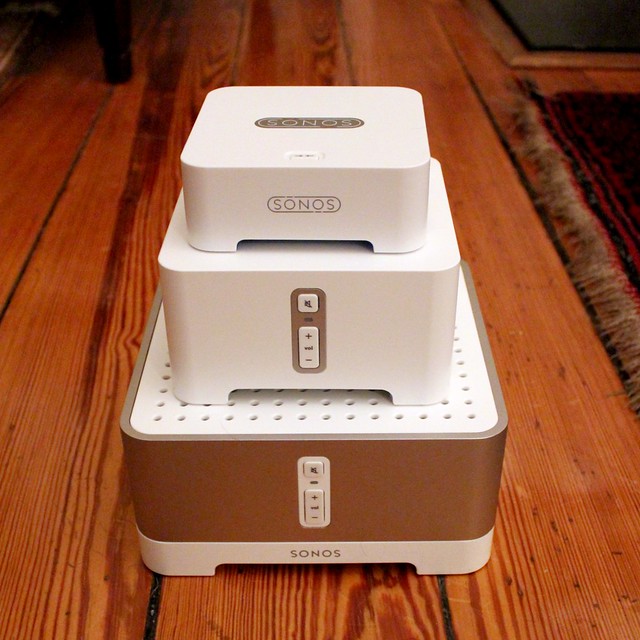
<p>I proposed a range of systems that would either leverage an existing stereo and speakers that Sherry already had, or would utilize the Sonos Play 3 or 5 all in one devices (basically stereo and speaker combos). We settled on a two zone system with a Sonos Connect in the dining room that could work with existing speakers and stereo, and a Sonos Connect:Amp in the living room that could power a set of larger speakers that Sherry already owned. We would also need a Sonos Bridge that would install where the Internet came into the house at her cable modem.</p>
<div class="MediaContainer">
<div style="display: inline-block;">
<a href="http://www.dpbolvw.net/click-5579168-10816427?url=http%3A%2F%2Fsonos.com%2Fshop%2Fproducts%2Fconnectamp&amp;cjsku=ZP120US1" target="_blank">
<img alt="" src="http://sonos.com/shop/i/products/connectamp.angle.png" width="150" height="150" style="border-width: 0px;border-style: solid;">
<br>
Sonos Connect:AMP<br>
Buy From Sonos</a><img alt="" src="http://www.ftjcfx.com/image-5579168-10816427" width="1" height="1" style="border-width: 0px;border-style: solid;">
</div>
<div style="display: inline-block;">
<a href="http://www.jdoqocy.com/click-5579168-10816427?url=http%3A%2F%2Fsonos.com%2Fshop%2Fproducts%2Fconnect&amp;cjsku=ZP090US1" target="_blank">
<img alt="" src="http://sonos.com/shop/i/products/connect.angle.png" width="150" height="150" style="border-width: 0px;border-style: solid;">
<br>
Sonos Connect<br>
Buy From Sonos</a><img alt="" src="http://www.ftjcfx.com/image-5579168-10816427" width="1" height="1" style="border-width: 0px;border-style: solid;">
</div>
<div style="display: inline-block;">
<a href="http://www.kqzyfj.com/click-5579168-10816427?url=http%3A%2F%2Fsonos.com%2Fshop%2Fproducts%2Fbridge%2F&amp;cjsku=BR100US1" target="_blank">
<img alt="" src="http://sonos.com/shop/i/products/bridge.angle.png" width="150" height="150" style="border-width: 0px;border-style: solid;"><br>
Sonos Bridge<br>
Buy From Sonos</a><img alt="" src="http://www.tqlkg.com/image-5579168-10816427" width="1" height="1" style="border-width: 0px;border-style: solid;">
</div>
</div>
<p>With the system defined we had to figure out what to use as a controller for the whole thing. I suggested four options.</p>
<ul>
    <li>An iPod Touch</li>
    <li>An iPad</li>
    <li>An existing Android device</li>
    <li>A laptop or desktop computer</li>
</ul>
<p>Each controller solution has the ability to run a native Sonos app to operate all aspects of the system. The packaged software has an interface similar to iTunes and allows independent control of each zone, including volume.</p>
<p>Sonos does offer a standalone controller for the system that is a color touch screen, but at $350 it just seems like a lot to pay for not a lot of functionality. Buying an entry level iPod Touch will provide better overall function and will cost you about $150 less. It's a no brainier.</p>
<p>When I presented the options to Sherry, she liked the idea of the iPad. She had been looking for a bit of an excuse to buy one, and this was it. So we figured out all of the specs and ordered everything that night. We also opted to make use of her existing Windows based laptop as well.</p>
<p>The only item that i had proposed that we didn't end up ordering was an external network attached storage device (external hard drive), or NAS, for remote storage and access of her existing music catalog. She already had one of these configured in her home network so we could just use the existing solution -- no need for something new.</p>
<p>A few days later all of the goodies showed up at Sherry's house and we got to work installing. For the nerd in me, even other people's tech toys are fun.</p>
<p>
</p>
<div class="MediaContainer PhotoContainer"><a href="http://farm8.staticflickr.com/7005/6666556853_0ab401c14c_z.jpg" rel="PhotoPopup" popupheight="427" popupwidth="640"><img alt="" src="https://farm8.staticflickr.com/7005/6666556853_0ab401c14c.jpg" width="500" height="333" style="border-width: 0px;border-style: solid;"></a></div>
<p>Before I get into the actuall install, let me first say how easy it is. I honestly think that any DIYer could quickly and successfully install a Sonos system without issue. The instructions are clear and setup is straight forward. The only thing you need to ensure is a good and strong wifi signal is able to reach all of your devices.</p>
<p>The first step in our install was to unpack everything and make sure we had everything we ordered. Sonos does a great job with packaging and everything comes in small devices with clean lines and a minimal footprint. We also had the iPad in Apple's signature beautiful packaging, and I had brought over the supplies I might need: speaker wire, my iPhone, wire strippers, and my laptop.</p>
<p>
</p>
<div class="MediaContainer PhotoContainer"><a href="http://farm8.staticflickr.com/7022/6666943411_a2c16ace9b_z.jpg" rel="PhotoPopup" popupheight="640" popupwidth="640"><img alt="" src="https://farm8.staticflickr.com/7022/6666943411_a2c16ace9b.jpg" width="500" height="500" style="border-width: 0px;border-style: solid;"></a></div>
<p>Once we were sure everything we had ordered was included, we got to work setting up the iPad. This was probably the longest part of the process. Getting the latest iOS version, signing up for the various plans, getting on the wifi, etc. I'd say about 50% of the overall project was configuring the iPad for use. The final step on the iPad was to download the Sonos app from the app store. Though the instructions suggest setting the system up from a PC, you can easily do the whole thing from a mobile device.</p>
<p>Once the iPad was all set, I took the Sonos Bridge to the point in the house where the cable modem is located. In this setup, think of the bridge as the source or antenna where all of the music ultimately streams from. Each Sonos device will connect wirelessly to the Bridge to obtain a stream of the various music services. The setup of the bridge was as easy as starting the Sonos app on the iPad, telling it to add a component to the system, then pressing the blinking button on the bridge. After that, the app did the rest.</p>
<p>The second component, the Sonos Connect:Amp, had to be located near a plug and also near the speakers we were using for that room. I connected the speaker wire from the speakers to the Sonos device, selected "add component" on the iPad, pressed the blinking buttons and bam, the second device was done.</p>
<p>At this point I also installed the software on Sherry's laptop to be sure it was working as well. Since I had already connected the various devices within the Sonos network all I had to do was sync the laptop with a single device and it was online. Within a few minutes we had Pandora playing over the first device and sounding great.</p>
<p>
</p>
<div class="MediaContainer PhotoContainer"><a href="http://farm8.staticflickr.com/7161/6666568393_68cc9546d3_z.jpg" rel="PhotoPopup" popupheight="427" popupwidth="640"><img alt="" src="https://farm8.staticflickr.com/7161/6666568393_68cc9546d3.jpg" width="500" height="333" style="border-width: 0px;border-style: solid;"></a></div>
<p>Next I turned my attention to the second component, the Sonos Connect. Like the Amp, the Connect utilizes an existing set of speakers, but this one doesn't have a built-in amp and acts as a source on an existing stereo. If you'll remember, I installed <a href="http://www.oldtownhome.com/2011/9/22/Sonos-Zoneplayer-90-A-Little-Awesome-Sauce-for-our-Whole-House-Audio/index.aspx">one of these in our Whole House Audio</a> a little while ago.</p>
<p>This was a little more difficult than the first two items but only because of the location of the stereo. The tight space meant I had to wedge myself into a cramped and dark area to run wires and ensure proper setup. Good thing I'm not a big guy. Once all of the wires were run and the unit was plugged in, we were all set and adding it to the network was as easy as the other devices.</p>
<p>Once everything was properly configured we instructed the system to automatically apply a software update to all of the devices. This update took about 5-10 minutes to complete, an it was a good test to ensure all of the devices had good wifi coverage.</p>
<p>With the system fully in place and updated, I instructed it to leverage the external hard drive I had mentioned earlier. This is one of the best parts of this system. If you already have a robust mp3 catalog or have made many purchases through the iTunes store, you can instruct the Sonos devices to connect directly to your catalog. This allows you to listen to any and all music you have access to, not just what's available streaming.</p>
<p>The final step of the install was to sit down with Sherry to cover how to use the system. I gave her a rundown of the iPad app, the PC app, and the various available music sources. We signed up for a subscription to Spotify for on demand streaming services, configured Pandora, IHeartRadio, and the various other sources, and went over the basics of how to go about selecting music to play.</p>
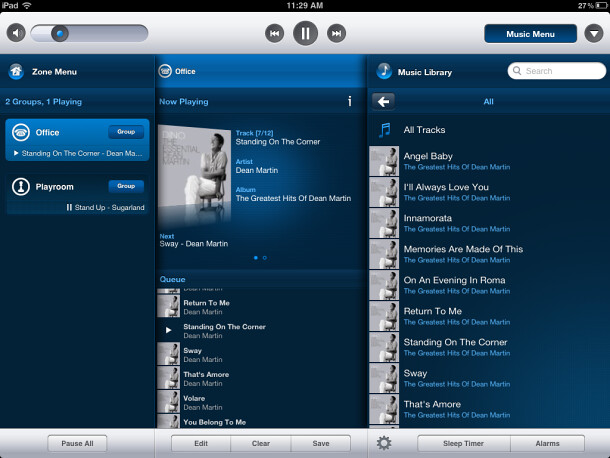
<p>I also covered how to select which music plays in which room, how to independently control the volume, and how to group rooms for parties and control the volume all at once. I must say, the iPad app for the Sonos system is super sweet and intuitive.</p>
<p>
</p>
<div class="MediaContainer PhotoContainer"><a href="http://farm8.staticflickr.com/7143/6667011039_4eee2d3e01_z.jpg" rel="PhotoPopup" popupheight="458" popupwidth="610"><img alt="" src="https://farm8.staticflickr.com/7143/6667011039_4eee2d3e01.jpg" width="500" height="375" style="border-width: 0px;border-style: solid;"></a></div>
<p>In all the whole process from selecting which items to purchase to actual setup and install was a relatively painless process. Sonos has gone to great lengths to ensure the system is quite user friendly while providing a high quality audio source that leverages the latest and greatest in digital and web based music. I'd say the succeeded in achieving their goals.</p>
<p>I can honestly give the various Sonos products my seal of approval. I will surely continue to recommend them to people who want a low to moderate cost whole house audio solution that leverages streaming sources. We live in a digital age and I think our stereos at home should reflect this.</p>
<p>Do you have any experience with installing Sonos components and would like to add something? Or maybe this just sounds like something that's really cool that you want in your house? Leave us a comment and let us know what you think of the project.</p>
<em>
Note: We weren't compensated for this review. We simply want to share good products when we see them, and hope that learning from our mistakes can help save you time, money and frustration.
</em>
<p><em>iPad Interface Image Credit: CNet.com</em></p><p><a href="https://www.oldtownhome.com/2012/1/9/Helping-Out-a-Neighbor-in-Audio-Distress---With-Sonos-Sound-Tech/">Read Full Post</a></p>]]></content>
    <category term="Header Image" />
    <category term="Projects:Hi Tech" />
    <category term="Sonos" />
    <category term="Technology" />
    <category term="Whole House Audio" />
    <PostImage>http://farm8.staticflickr.com/7022/6666943411_a2c16ace9b.jpg</PostImage>
    <media:thumbnail url="https://farm8.staticflickr.com/7022/6666943411_a2c16ace9b_t.jpg" />
    <ExtensionElements>
      <Item>PostImage</Item>
      <Item>media:thumbnail</Item>
    </ExtensionElements>
  </entry>
  <entry>
    <guid>f2061a2b-3726-4c4b-be22-20a163e69771</guid>
    <id>https://www.oldtownhome.com/2011/9/22/Sonos-Zoneplayer-90-A-Little-Awesome-Sauce-for-our-Whole-House-Audio/</id>
    <title>Sonos Zoneplayer 90 = A Little Awesome Sauce for our Whole House Audio</title>
    <summary type="html"><![CDATA[<p>Over the years we've slowly been installing and growing our <a href="http://www.oldtownhome.com/2011/7/21/Wired-for-Sound---Whole-Historic-House-Audio/index.aspx">Nuvo whole house audio solution</a>. Much like our renovation, it has been a slow process with a lot of prep work before we reached the payoff.</p>
<p>From <a href="http://www.oldtownhome.com/2011/7/7/Confessions-of-a-Total-House-Geek-Structured-Wiring-Technology-Overkill/index.aspx">miles of cabling</a>, to basic installation in limited rooms, to building a <a href="http://www.oldtownhome.com/2011/9/16/What-100-Year-Old-House-Doesnt-Have-a-DIY-Server-Rack/index.aspx">DIY server rack</a> to house the whole thing, each step has made our enjoyment and use of the music that floats from room to room just a little bit nicer. However, with all of it's cool features, and even hooked up to a computer to provide an enriched and more flexible approach to streaming music, our system left something to be desired when it came to the various Internet based music services like <a href="http://www.pandora.com" target="_blank">Pandora</a>, <a href="http://www.mog.com" target="_blank">Mog</a>, or <a href="http://www.iheartradio.com" target="_blank">iHeartRadio</a>, just to name a few.</p>
<p>
</p>
<div class="MediaContainer PhotoContainer"><a href="http://farm7.static.flickr.com/6169/6172533692_0b077760a0.jpg" rel="PhotoPopup" popupheight="271" popupwidth="462"><img alt="" src="https://farm7.static.flickr.com/6169/6172533692_0b077760a0.jpg" width="462" height="271" style="border-width: 0px;border-style: solid;"></a></div>
<p>Though I could use Pandora or other services from my computer and have it play over the system, control of the actual music was seriously lacking. Changing or skipping songs had to typically be done directly at the computer screen or over a laggy VNC connection from my phone or laptop. This was a less than desirable scenario, but one I would live with until I could find a better one.</p>
<p>Because of my described setup, and because services like Spotify and Mog are quite mature and convenient, I started to research alternatives to my hacked together computer controlled configuration. One company I had heard a lot about over the years was <a href="http://www.sonos.com/" target="_blank">Sonos</a>. Sonos makes a line of wireless and easily integrated components for whole house (or even single room) audio. I have a few friends who've installed Sonos devices and have liked their quality, easy setup, consistent improvement of their devices. Besides, I've always been intrigued myself, so I just needed a good excuse to buy something from them.</p>
<p>While researching I came across the Sonos Zoneplayer 90. The Sonos line contains a handful of source components that establish or integrate with their wireless systems, but this particular model is meant to hook directly into a non Sonos system. Better yet, the whole purpose of this product is to easily bring Internet streaming audio to your existing stereo, home theater, or whole house audio setup. And best of all, with an iPhone, iPad, or Android based device, the free remote control apps that Sonos offers appear to make operating the system a snap.</p>
<p>With all of that information, we decided to take the plunge and I ordered a Zoneplayer 90 from the Sonos.com website last week. I found a <a href="http://lmgtfy.com/?q=Sonos+Coupon+Code" target="_blank">Sonos coupon code</a> for free two day shipping, so I went ahead and placed the order. If you're shopping around, you can get the Zoneplayer 90 from Amazon or other sites, but the price is pretty much fixed at $349, and it typically takes longer for it to arrive. The only place I saw it for cheaper was from eBay, but the price typically ends up close to $349, and I just felt more comfortable buying straight from the source.</p>
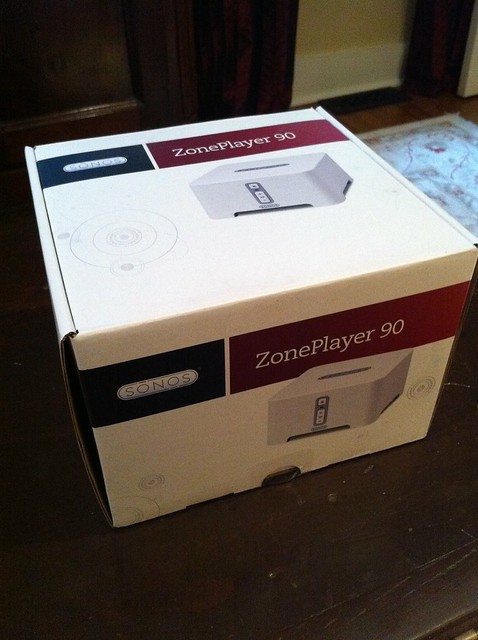
<p>When we got home from Ohio yesterday the box was waiting for me at home (thanks to our wonderful neighbors for bringing in our mail while we were away). I tore into the box and was greeted with a nicely packaged and somewhat smaller than I expected box.</p>
<p>
</p>
<div class="MediaContainer PhotoContainer"><a href="http://farm7.static.flickr.com/6176/6172540720_a23e00cd62_z.jpg" rel="PhotoPopup" popupheight="640" popupwidth="478"><img alt="" src="https://farm7.static.flickr.com/6176/6172540720_a23e00cd62.jpg" width="374" height="500" style="border-width: 0px;border-style: solid;"></a></div>
<p>The package comes with a multi-language manual as well as a software CD for installation.</p>
<p></p></img></img> <a href="https://www.oldtownhome.com/2011/9/22/Sonos-Zoneplayer-90-A-Little-Awesome-Sauce-for-our-Whole-House-Audio/">more</a>]]></summary>
    <published>2011-09-22T14:20:00.000-04:00</published>
    <updated>2011-09-22T14:20:00.000-04:00</updated>
    <link rel="alternate" href="https://www.oldtownhome.com/2011/9/22/Sonos-Zoneplayer-90-A-Little-Awesome-Sauce-for-our-Whole-House-Audio/" />
    <author>
      <name>Alex</name>
    </author>
    <content type="html"><![CDATA[<p>Over the years we've slowly been installing and growing our <a href="http://www.oldtownhome.com/2011/7/21/Wired-for-Sound---Whole-Historic-House-Audio/index.aspx">Nuvo whole house audio solution</a>. Much like our renovation, it has been a slow process with a lot of prep work before we reached the payoff.</p>
<p>From <a href="http://www.oldtownhome.com/2011/7/7/Confessions-of-a-Total-House-Geek-Structured-Wiring-Technology-Overkill/index.aspx">miles of cabling</a>, to basic installation in limited rooms, to building a <a href="http://www.oldtownhome.com/2011/9/16/What-100-Year-Old-House-Doesnt-Have-a-DIY-Server-Rack/index.aspx">DIY server rack</a> to house the whole thing, each step has made our enjoyment and use of the music that floats from room to room just a little bit nicer. However, with all of it's cool features, and even hooked up to a computer to provide an enriched and more flexible approach to streaming music, our system left something to be desired when it came to the various Internet based music services like <a href="http://www.pandora.com" target="_blank">Pandora</a>, <a href="http://www.mog.com" target="_blank">Mog</a>, or <a href="http://www.iheartradio.com" target="_blank">iHeartRadio</a>, just to name a few.</p>
<p>
</p>
<div class="MediaContainer PhotoContainer"><a href="http://farm7.static.flickr.com/6169/6172533692_0b077760a0.jpg" rel="PhotoPopup" popupheight="271" popupwidth="462"><img alt="" src="https://farm7.static.flickr.com/6169/6172533692_0b077760a0.jpg" width="462" height="271" style="border-width: 0px;border-style: solid;"></a></div>
<p>Though I could use Pandora or other services from my computer and have it play over the system, control of the actual music was seriously lacking. Changing or skipping songs had to typically be done directly at the computer screen or over a laggy VNC connection from my phone or laptop. This was a less than desirable scenario, but one I would live with until I could find a better one.</p>
<p>Because of my described setup, and because services like Spotify and Mog are quite mature and convenient, I started to research alternatives to my hacked together computer controlled configuration. One company I had heard a lot about over the years was <a href="http://www.sonos.com/" target="_blank">Sonos</a>. Sonos makes a line of wireless and easily integrated components for whole house (or even single room) audio. I have a few friends who've installed Sonos devices and have liked their quality, easy setup, consistent improvement of their devices. Besides, I've always been intrigued myself, so I just needed a good excuse to buy something from them.</p>
<p>While researching I came across the Sonos Zoneplayer 90. The Sonos line contains a handful of source components that establish or integrate with their wireless systems, but this particular model is meant to hook directly into a non Sonos system. Better yet, the whole purpose of this product is to easily bring Internet streaming audio to your existing stereo, home theater, or whole house audio setup. And best of all, with an iPhone, iPad, or Android based device, the free remote control apps that Sonos offers appear to make operating the system a snap.</p>
<p>With all of that information, we decided to take the plunge and I ordered a Zoneplayer 90 from the Sonos.com website last week. I found a <a href="http://lmgtfy.com/?q=Sonos+Coupon+Code" target="_blank">Sonos coupon code</a> for free two day shipping, so I went ahead and placed the order. If you're shopping around, you can get the Zoneplayer 90 from Amazon or other sites, but the price is pretty much fixed at $349, and it typically takes longer for it to arrive. The only place I saw it for cheaper was from eBay, but the price typically ends up close to $349, and I just felt more comfortable buying straight from the source.</p>
<p>When we got home from Ohio yesterday the box was waiting for me at home (thanks to our wonderful neighbors for bringing in our mail while we were away). I tore into the box and was greeted with a nicely packaged and somewhat smaller than I expected box.</p>
<p>
</p>
<div class="MediaContainer PhotoContainer"><a href="http://farm7.static.flickr.com/6176/6172540720_a23e00cd62_z.jpg" rel="PhotoPopup" popupheight="640" popupwidth="478"><img alt="" src="https://farm7.static.flickr.com/6176/6172540720_a23e00cd62.jpg" width="374" height="500" style="border-width: 0px;border-style: solid;"></a></div>
<p>The package comes with a multi-language manual as well as a software CD for installation.</p>
<p></p>
<p>
</p>
<div class="MediaContainer PhotoContainer"><a href="http://farm7.static.flickr.com/6153/6172538960_a50926e54f_z.jpg" rel="PhotoPopup" popupheight="640" popupwidth="478"><img alt="" src="https://farm7.static.flickr.com/6153/6172538960_a50926e54f.jpg" width="374" height="500" style="border-width: 0px;border-style: solid;"></a></div>
<p>Upon removal, the device has a small footprint with a very clean presentation. Only the most basic buttons are available on the front as it is intended to be used with a remote control device.</p>
<p>
</p>
<div class="MediaContainer PhotoContainer"><a href="http://farm7.static.flickr.com/6152/6172807356_f437a414ba_z.jpg" rel="PhotoPopup" popupheight="640" popupwidth="640"><img alt="" src="https://farm7.static.flickr.com/6152/6172807356_f437a414ba.jpg" width="500" height="500" style="border-width: 0px;border-style: solid;"></a></div>
<p>The connections on the rear of the device include the basic elements you'd need to connect to almost any system. In our case, we're using the RCA connections, but the digital/optical audio would come in very handy on a newer home theater system.</p>
<p>
</p>
<div class="MediaContainer PhotoContainer"><a href="http://farm7.static.flickr.com/6159/6172534414_1100f5452f_z.jpg" rel="PhotoPopup" popupheight="640" popupwidth="478"><img alt="" src="https://farm7.static.flickr.com/6159/6172534414_1100f5452f.jpg" width="374" height="500" style="border-width: 0px;border-style: solid;"></a></div>
<p>Installing the actual device into our system was quite simple. We had an open spot that was the right size in our server rack, and I was able to just plug in the power cable to the power bar, RCA cables into the sixth source of the Nuvo amp, and network cable into an open spot in our switch. Really, it was as simple as that.</p>
<p>
</p>
<div class="MediaContainer PhotoContainer"><a href="http://farm7.static.flickr.com/6176/6172015547_a83875f5af_z.jpg" rel="PhotoPopup" popupheight="478" popupwidth="640"><img alt="" src="https://farm7.static.flickr.com/6176/6172015547_a83875f5af.jpg" width="500" height="374" style="border-width: 0px;border-style: solid;"></a></div>
<p>Once I had our Zoneplayer in its proper location, I proceeded to install the iPhone app for setup. It's a free download from the App Store, and installed in a couple of seconds. Starting the app introduced me to the service.</p>
<p>
</p>
<div class="MediaContainer PhotoContainer"><a href="http://farm7.static.flickr.com/6155/6172015087_584c15396a_z.jpg" rel="PhotoPopup" popupheight="640" popupwidth="427"><img alt="" src="https://farm7.static.flickr.com/6155/6172015087_584c15396a_m.jpg" width="160" height="240" style="border-width: 0px;border-style: solid;"></a>
<a href="http://farm7.static.flickr.com/6158/6172015029_d4076f95f1_z.jpg" rel="PhotoPopup" popupheight="640" popupwidth="427"><img alt="" src="https://farm7.static.flickr.com/6158/6172015029_d4076f95f1_m.jpg" width="160" height="240" style="border-width: 0px;border-style: solid;"></a></div>
<p>Though the app warned me to first setup the Zoneplayer with the PC software, I decided to live dangerously and just use my iPhone for the whole process. The whole process was quick and easy. The next screen asked me to press a button on the front of the Zoneplayer to sync with the iPhone.</p>
<p>
</p>
<div class="MediaContainer PhotoContainer"><a href="http://farm7.static.flickr.com/6174/6172543896_6940449613_z.jpg" rel="PhotoPopup" popupheight="640" popupwidth="427"><img alt="" src="https://farm7.static.flickr.com/6174/6172543896_6940449613_m.jpg" width="160" height="240" style="border-width: 0px;border-style: solid;"></a>
<a href="http://farm7.static.flickr.com/6174/6172014911_84a4421a7d_z.jpg" rel="PhotoPopup" popupheight="640" popupwidth="427"><img alt="" src="https://farm7.static.flickr.com/6174/6172014911_84a4421a7d_m.jpg" width="160" height="240" style="border-width: 0px;border-style: solid;"></a></div>
<p>Once the sync completed, the phone confirmed and asked me to name the Zoneplayer from a list of available names. I wish I could have named it something specific (like another character from Southpark because my whole network consists of Southpark characters, Lemiwinks anyone), but I can let that slide.</p>
<p>
</p>
<div class="MediaContainer PhotoContainer"><a href="http://farm7.static.flickr.com/6167/6172543826_e94ab4aee8_z.jpg" rel="PhotoPopup" popupheight="640" popupwidth="427"><img alt="" src="https://farm7.static.flickr.com/6167/6172543826_e94ab4aee8_m.jpg" width="160" height="240" style="border-width: 0px;border-style: solid;"></a>
<a href="http://farm7.static.flickr.com/6153/6172543762_9e1f3177ec_z.jpg" rel="PhotoPopup" popupheight="640" popupwidth="427"><img alt="" src="https://farm7.static.flickr.com/6153/6172543762_9e1f3177ec_m.jpg" width="160" height="240" style="border-width: 0px;border-style: solid;"></a></div>
<p>After naming was complete I jumped to adding the various music services I want to use. Pandora, Mog, iHeartRadio, Last.fm, BBC, my own music catalog, etc.</p>
<p>
</p>
<div class="MediaContainer PhotoContainer"><a href="http://farm7.static.flickr.com/6153/6172542942_028bef02ef_z.jpg" rel="PhotoPopup" popupheight="640" popupwidth="427"><img alt="" src="https://farm7.static.flickr.com/6153/6172542942_028bef02ef.jpg" width="333" height="500" style="border-width: 0px;border-style: solid;"></a></div>
<p>Again, the whole process was quite easy. Just select the service, provide the necessary account information to enable the service in the Zoneplayer, and then you are good to go. The music service you've added comes up as an option for your listening.</p>
<p>
</p>
<div class="MediaContainer PhotoContainer"><a href="http://farm7.static.flickr.com/6163/6172013615_ccb7a03fb6_z.jpg" rel="PhotoPopup" popupheight="640" popupwidth="427"><img alt="" src="https://farm7.static.flickr.com/6163/6172013615_ccb7a03fb6.jpg" width="333" height="500" style="border-width: 0px;border-style: solid;"></a></div>
<p>You can see from the iPhone screenshots I entered above that the whole app configuration process took less than 10 minutes. We didn't spend a lot of time listening to music last night, but I did have a chance to play around with Pandora, Mog, and iHeartRadio. The app really works great, is extremely intuitive, and is able to be installed on multiple devices that can act as remotes all around the house. I actually installed the app on three iPhones, my laptop, and my desktop.&nbsp;</p>
<p>So, after my first evening using our new Zoneplayer 90, I absolutely love it. I've been wanting a great way to use Pandora and other services with an easy iPhone based remote control, but most of the services either didn't offer it or would require a somewhat difficult to use interface and hacky setup between the phone and computer. Finally, this is a concise and user friendly way to interact with whole house (or local room) audio.&nbsp;</p>
<p>Hopefully Sonos will add features that will allow other users to control what's being played through an anonymous request based system. And like I said, they're always added new features to their products, so there is a good chance something like this will come along.</p>
<p>What do you think? Does Sonos sound good to you? Do you already have some experience with Sonos? Maybe you're still using an 8-Track or hand crank record player to enjoy your tunes.</p><p><a href="https://www.oldtownhome.com/2011/9/22/Sonos-Zoneplayer-90-A-Little-Awesome-Sauce-for-our-Whole-House-Audio/">Read Full Post</a></p>]]></content>
    <category term="Header Image" />
    <category term="Projects:Hi Tech" />
    <category term="Technology" />
    <category term="Whole House Audio" />
    <PostImage>http://farm7.static.flickr.com/6152/6172807356_f437a414ba.jpg</PostImage>
    <media:thumbnail url="https://farm7.static.flickr.com/6152/6172807356_f437a414ba_t.jpg" />
    <ExtensionElements>
      <Item>PostImage</Item>
      <Item>media:thumbnail</Item>
    </ExtensionElements>
  </entry>
</feed>