<?xml version="1.0" encoding="utf-8"?>
<feed xmlns="http://www.w3.org/2005/Atom" xmlns:media="http://search.yahoo.com/mrss/">
  <title>Old Town Home Category: 'Technology'</title>
  <updated>2018-03-29T12:30:00.000-04:00</updated>
  <id>http://www.oldtownhome.com/technology/index.atom</id>
  <link rel="alternate" href="http://www.oldtownhome.com/technology/index.atom" />
  <author>
    <name>Alex and Wendy</name>
    <uri>http://www.oldtownhome.com/</uri>
    <email>wendy@oldtownhome.com</email>
  </author>
  <entry>
    <guid>cc2594a4-9d16-4758-a421-3c8776646593</guid>
    <id>https://www.oldtownhome.com/2018/3/29/How-We-Concealed-our-Sonos-Home-Theater-System---Spouse-Approved/</id>
    <title>How We Concealed our Sonos Home Theater System - Spouse Approved</title>
    <summary type="html"><![CDATA[<p>What happens when cutting edge technology is at odds with spousal aesthetic approval? Well...you need to get creative!</p><p>The more ubiquitous modern home technology becomes, we're seeing two very distinct styles and integration approaches from the manufacturers.&nbsp;</p><p>On one hand, as components shrink and become more low profile, some companies are attempting to make their products essentially disappear, designing them to seamlessly blend with their surroundings. Digital assistant microphones/speakers like the Echo Dot and Google Home Mini jump to mind.</p><p>On the other hand, much has been the tendency&nbsp;for cutting edge technology in homes for centuries, these cool modern devices are apparently intended to be put on display (<em>just look at visible heating and plumbing lines in Victorian homes</em>). All too often, the current trend is to embrace the tech in a utility meets modern art hybrid, the design of which is meant to resemble sleek monolithic cubes of digital sculpture on a stage for all to see.</p><p>While this might be the look you're going for in a modern loft space, or geometric minimalist environment, this tends to simply look out of place when it comes to trying to integrate it with an older home. It's tough to mix an upscale and comfortable yet antique aesthetic with a sterile glossy white or black plastic cube.</p><p>But all of this being said, the solution isn't just to forgo the modern tech in your home. I mean, I'm certain there's almost always a solution that can be found. Take for example the Sonos home theater package, with sound bar and subwoofer.</p> <a href="https://www.oldtownhome.com/2018/3/29/How-We-Concealed-our-Sonos-Home-Theater-System---Spouse-Approved/">more</a>]]></summary>
    <published>2018-03-29T12:30:00.000-04:00</published>
    <updated>2018-03-29T12:30:00.000-04:00</updated>
    <link rel="alternate" href="https://www.oldtownhome.com/2018/3/29/How-We-Concealed-our-Sonos-Home-Theater-System---Spouse-Approved/" />
    <author>
      <name>Alex</name>
    </author>
    <content type="html"><![CDATA[<p>What happens when cutting edge technology is at odds with spousal aesthetic approval? Well...you need to get creative!</p>
<p>The more ubiquitous modern home technology becomes, we're seeing two very distinct styles and integration approaches from the manufacturers.&nbsp;</p>
<p>On one hand, as components shrink and become more low profile, some companies are attempting to make their products essentially disappear, designing them to seamlessly blend with their surroundings. Digital assistant microphones/speakers like the Echo Dot and Google Home Mini jump to mind.</p>
<p>On the other hand, much has been the tendency&nbsp;for cutting edge technology in homes for centuries, these cool modern devices are apparently intended to be put on display (<em>just look at visible heating and plumbing lines in Victorian homes</em>). All too often, the current trend is to embrace the tech in a utility meets modern art hybrid, the design of which is meant to resemble sleek monolithic cubes of digital sculpture on a stage for all to see.</p>
<p>While this might be the look you're going for in a modern loft space, or geometric minimalist environment, this tends to simply look out of place when it comes to trying to integrate it with an older home. It's tough to mix an upscale and comfortable yet antique aesthetic with a sterile glossy white or black plastic cube.</p>
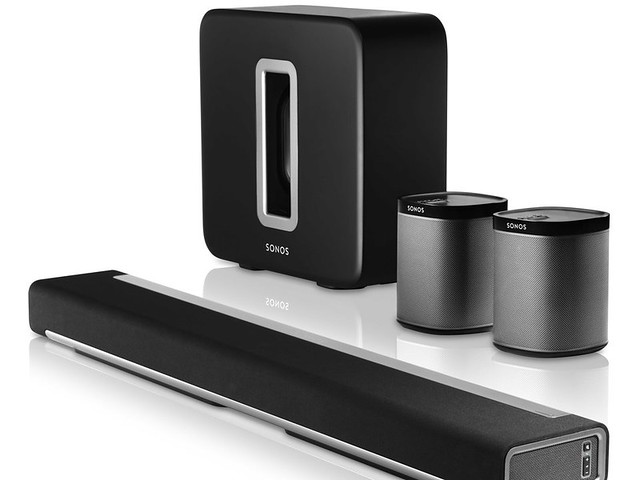
<p>But all of this being said, the solution isn't just to forgo the modern tech in your home. I mean, I'm certain there's almost always a solution that can be found. Take for example the Sonos home theater package, with sound bar and subwoofer.</p>
<p>
</p>
<div class="MediaContainer PhotoContainer"><a href="https://farm1.staticflickr.com/873/26192056957_af4098afdd_z.jpg" rel="PhotoPopup" popupheight="480" popupwidth="640"><img alt="" src="https://farm1.staticflickr.com/873/26192056957_af4098afdd.jpg" width="500" height="375" style="border-width: 0px; border-style: solid;" /></a></div>
<p>Ever since it debuted, I'd had my heart set on this Sonos home theater package. You could even say that I'm a total fan boy of Sonos and maybe just a tad bit too obsessed. I've been a huge fan of the Sonos streaming music components for years, and the idea of an almost wireless home theater system with 5.1 channels, including a television mounted sound bar and a massive couch shaking subwoofer, that also plays all of our favorite streaming music sources, was exactly what I had long dreamed of.&nbsp;&nbsp;</p>
<p>
</p>
<div class="MediaContainer PhotoContainer"><a href="https://farm8.staticflickr.com/7022/6666943411_a2c16ace9b_z.jpg" rel="PhotoPopup" popupheight="640" popupwidth="640"><img alt="" src="https://farm8.staticflickr.com/7022/6666943411_a2c16ace9b.jpg" width="500" height="500" style="border-width: 0px; border-style: solid;" /></a></div>
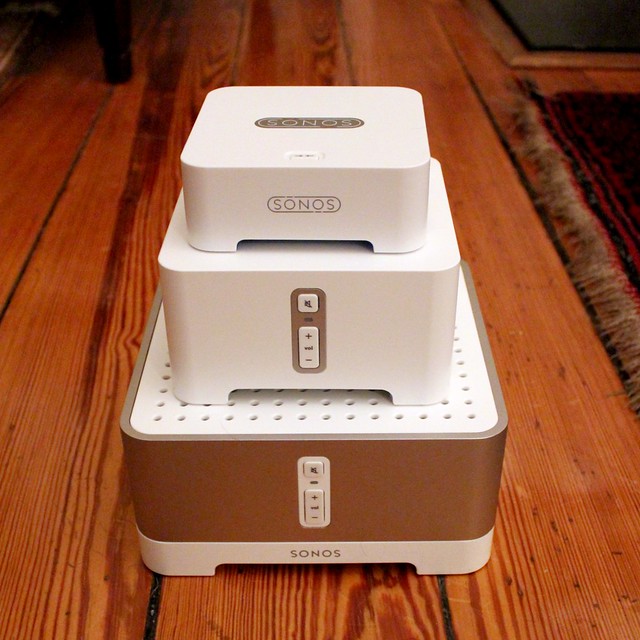
<p><em>Now, for all you home theater enthusiasts out there shaking your head and judging me, I know the 5.1 channels is simulated since there are not true front speakers, and I'm okay with that. The Playbar simulates the front speakers with side mounted end firing speakers. It's science, physics to be exact, and it sounds good in the right room. That being said, we're not trying to achieve an IMAX or THX experience in our living room, so you don't need to lecture us on the drawbacks.&nbsp;</em></p>
<p>So after much planning, convincing, and promising that we'd be able to effectively conceal the system, Wendy agreed to go forward with installing the Sonos home theater system in our home. But once I had the buy in,&nbsp; I had to figure out just how we'd make the whole install look acceptable from a skeptical spouse perspective.</p>
<h2>Sonos Sub</h2>
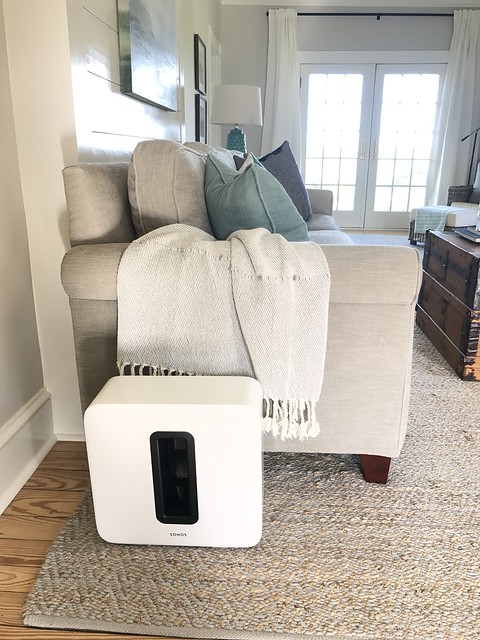
<p>The first component that we needed to figure out was the Sonos Sub. This room shaking sub-woofer packs the punch needed to give some serious oompf to any movie or music we're listening to. But this sub-woofer is also one of those monolithic modern art cubes I mentioned earlier. Not only that, it's also sort of huge.</p>
<p>
</p>
<div class="MediaContainer PhotoContainer"><a href="https://farm4.staticflickr.com/3931/33817420991_4e961ce829_z.jpg" rel="PhotoPopup" popupheight="640" popupwidth="480"><img alt="" src="https://farm4.staticflickr.com/3931/33817420991_4e961ce829.jpg" width="375" height="500" style="border-width: 0px; border-style: solid;" /></a></div>
<p>Sonos intends this block to be on full display, like the photo above, looking sleek and awesome in your room. But for us, how sleek and awesome could a plastic cube look next to 100 year old moulding, a grandfather clock, and a wood burning stove? Rather than putting this whole thing on display, we decided to hide it completely.&nbsp;</p>
<p>
</p>
<div class="MediaContainer PhotoContainer"><a href="https://farm1.staticflickr.com/342/32729884485_08306dfd5b_z.jpg" rel="PhotoPopup" popupheight="640" popupwidth="480"><img alt="" src="https://farm1.staticflickr.com/342/32729884485_08306dfd5b.jpg" width="375" height="500" style="border-width: 0px; border-style: solid;" /></a></div>
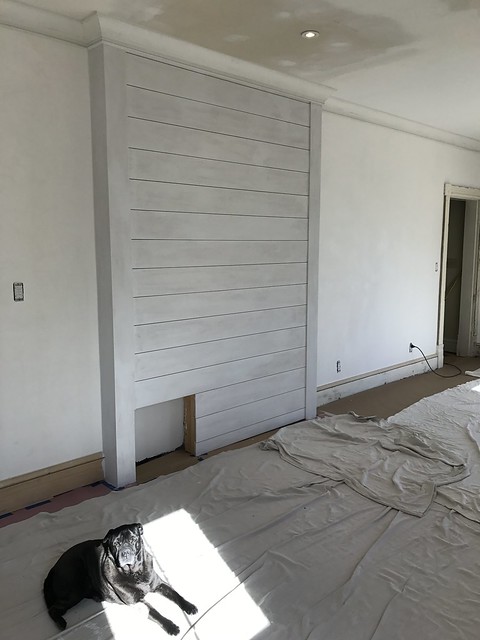
<p>Just behind the couch we built the shiplap wall to hide a support column. This meant that we had a little bit of room to play with, so we took advantage of it by including a perfectly sized little nook into the shiplap wall behind our couch.&nbsp;</p>
<p>
</p>
<div class="MediaContainer PhotoContainer"><a href="https://farm3.staticflickr.com/2898/33134304273_77e3b8f84f_z.jpg" rel="PhotoPopup" popupheight="640" popupwidth="480"><img alt="" src="https://farm3.staticflickr.com/2898/33134304273_77e3b8f84f.jpg" width="375" height="500" style="border-width: 0px; border-style: solid;" /></a></div>
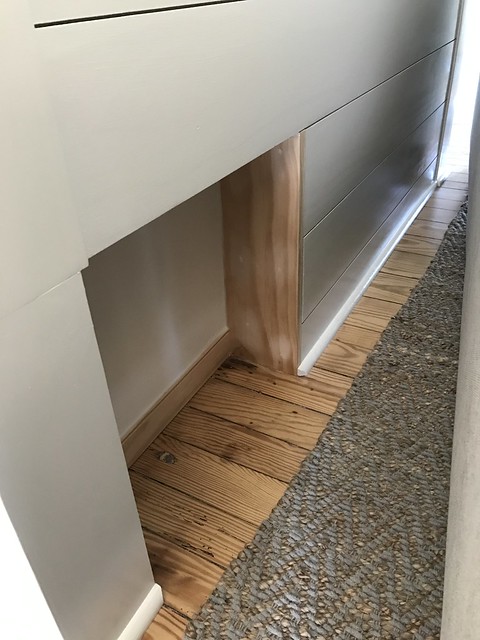
<p>We trimmed it out and ended up with very little room to spare, but the Sonos Sub slid right into place. We included a single outlet within the nook, so there are no wires to be seen anywhere.</p>
<p>
</p>
<div class="MediaContainer PhotoContainer"><a href="https://farm4.staticflickr.com/3776/33947400675_da69138cf6_z.jpg" rel="PhotoPopup" popupheight="640" popupwidth="480"><img alt="" src="https://farm4.staticflickr.com/3776/33947400675_da69138cf6.jpg" width="375" height="500" style="border-width: 0px; border-style: solid;" /></a></div>
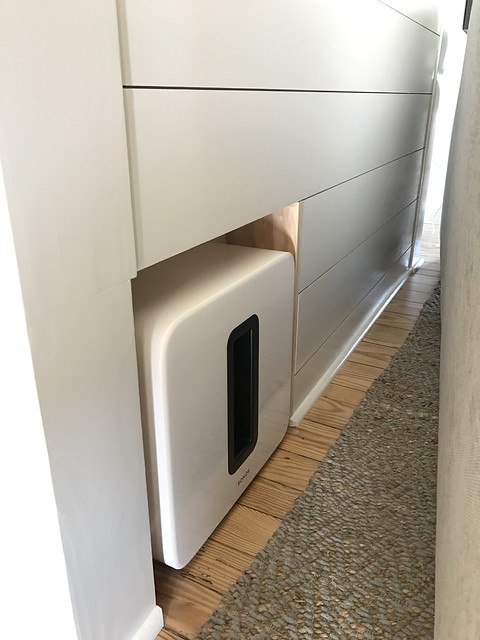
<p>As it turns out, this install is pretty much idea. The deep bass fires into the back of the couch and is completely out of view of anyone in the room. Concealed and completely acceptable as far as Wendy is concerned. And the performance of the sub woofer behind the couch is even better than I initially expected. This little setup and really quite the win win!</p>
<h2>Sonos Playbar</h2>
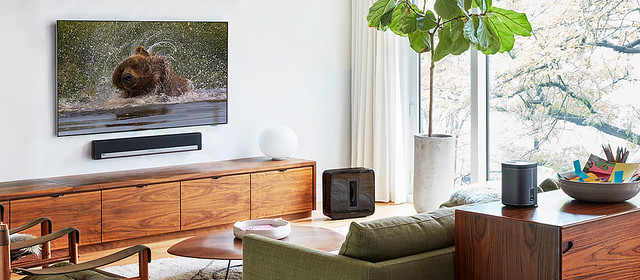
<p>While the design and intent of a subwoofer lends itself to being relatively easy to completely conceal, the Playbar is a different matter. This speaker is responsible for the primary sound from the television, and is meant to deliver the dialog from the television in a manner that is supposed to seem as if it's coming directly from the TV itself. There are plenty of examples online for how you can mount a Sonos Playbar, but pretty much all of them do not meet the concealment requirements of my lovely wife. Here's a beautiful example of putting the Playbar on display...and it would look rather terrible in our home.</p>
<p>
</p>
<div class="MediaContainer PhotoContainer"><a href="https://farm1.staticflickr.com/887/41063588901_275532428c_z.jpg" rel="PhotoPopup" popupheight="280" popupwidth="640"><img alt="" src="https://farm1.staticflickr.com/887/41063588901_275532428c.jpg" width="500" height="219" style="border-width: 0px; border-style: solid;" /></a><br />
<em>Photo Credit: Sonos.com</em></div>
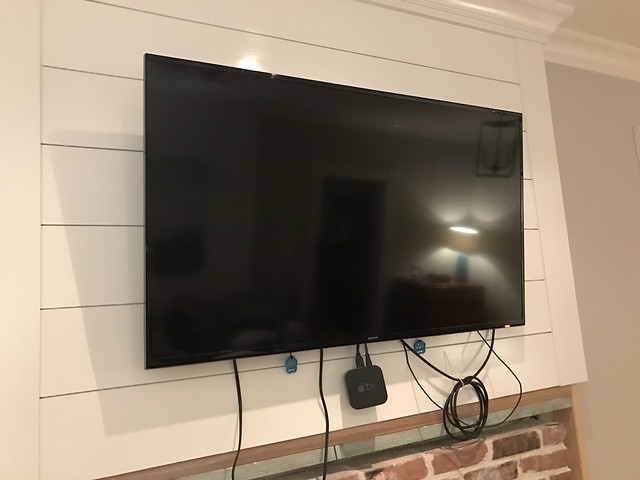
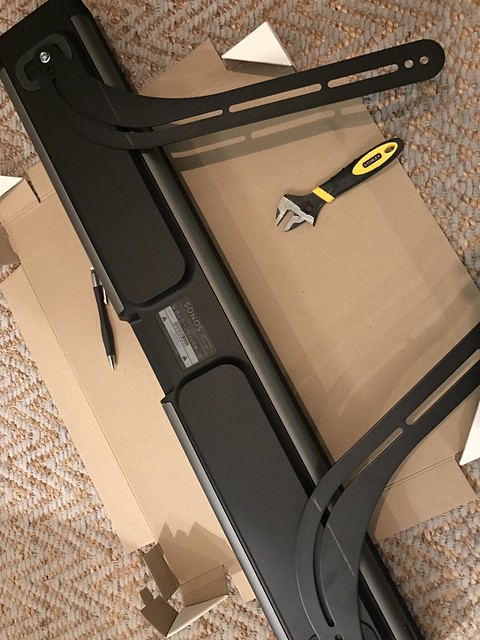
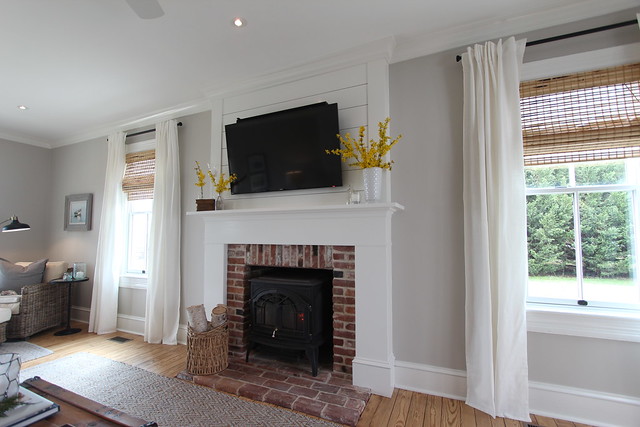
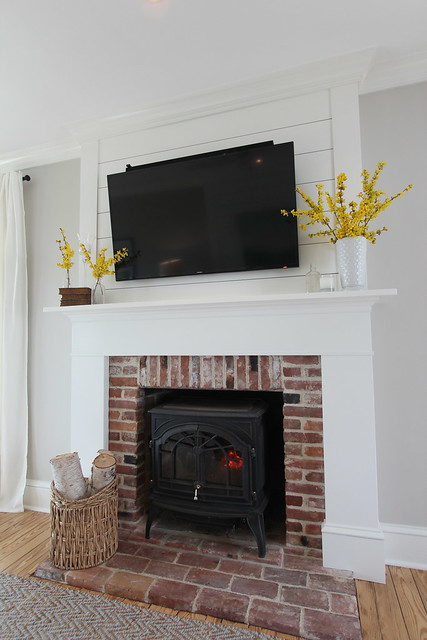
<p>When it came to our Playbar, it all started with my original intent (completely in my head) to mount it like the photo above, just below our television hanging above our fireplace mantel. The planning for this television hanging took a fair amount of time. We didn't want any wires or components visible, so our goal was to conceal everything behind the television.&nbsp;</p>
<p>
</p>
<div class="MediaContainer PhotoContainer"><a href="https://farm3.staticflickr.com/2859/33024923851_08f36bb48c_z.jpg" rel="PhotoPopup" popupheight="480" popupwidth="640"><img alt="" src="https://farm3.staticflickr.com/2859/33024923851_08f36bb48c.jpg" width="500" height="375" style="border-width: 0px; border-style: solid;" /></a></div>
<p>Before I could even put the Playbar on the mounting bracket on the TV, Wendy took one look at the "monstrosity" and slowly shook her head, giving me a firm and decidedly disapproving, "nuh-uh, try again." After I held it in place for a minute I think she said something along the lines of "NO WAY ARE YOU HANGING THAT BIG BLACK BOX BELOW OR EVEN ABOVE THE TV!!!"</p>
<p>
</p>
<div class="MediaContainer PhotoContainer"><a href="https://farm3.staticflickr.com/2862/33152101765_617f9029ba_z.jpg" rel="PhotoPopup" popupheight="640" popupwidth="480"><img alt="" src="https://farm3.staticflickr.com/2862/33152101765_617f9029ba.jpg" width="375" height="500" style="border-width: 0px; border-style: solid;" /></a></div>
<p>I was blinded by the technology, but she was absolutely right. We had a hard enough time coming to grips with hanging the TV above the mantel and making it an unfortunate focal point in the room, but adding a large black cube either below or above the TV was simply not acceptable. Our TV is 46", and this Playbar speaker is only slightly narrower. The low profile bezel of the TV is an attempt to minimize its impact as much as possible, so adding big 6" protrusion was borderline offensive. Ultimately, I had to go back to the drawing board.</p>
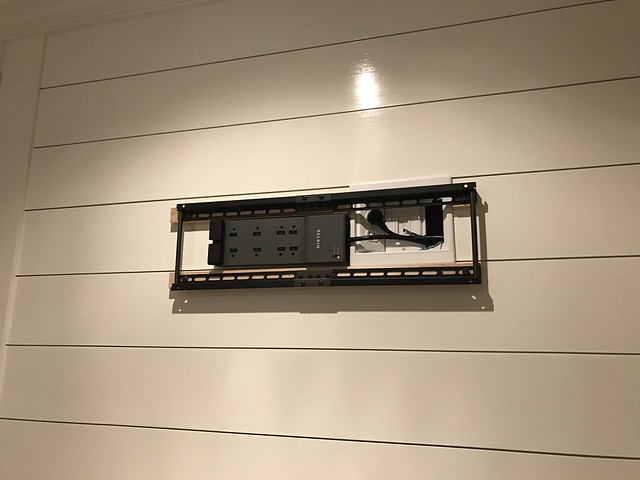
<p>As it turns out, given the height we mounted the TV, the optimal viewing angle requires the television to be tilted down a bit toward the couch/viewer. This gave me an idea. To allow a little extra tilt I ended up placing the television mount on two small strips of wood to essentially fur out the mount by 3/4".</p>
<p>
</p>
<div class="MediaContainer PhotoContainer"><a href="https://farm1.staticflickr.com/640/32306671314_48d8087cf7_z.jpg" rel="PhotoPopup" popupheight="480" popupwidth="640"><img alt="" src="https://farm1.staticflickr.com/640/32306671314_48d8087cf7.jpg" width="500" height="375" style="border-width: 0px; border-style: solid;" /></a></div>
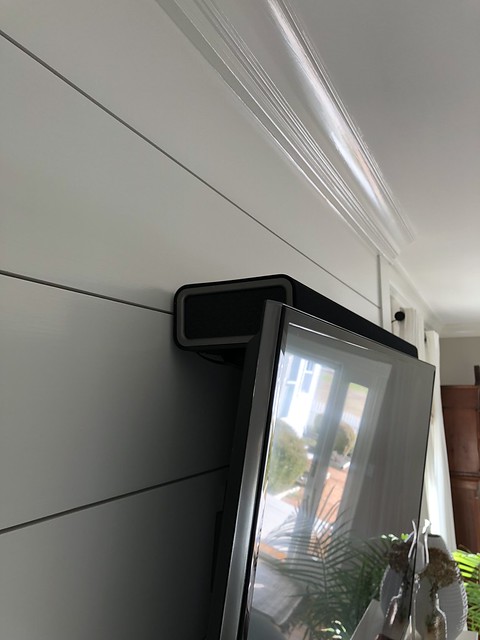
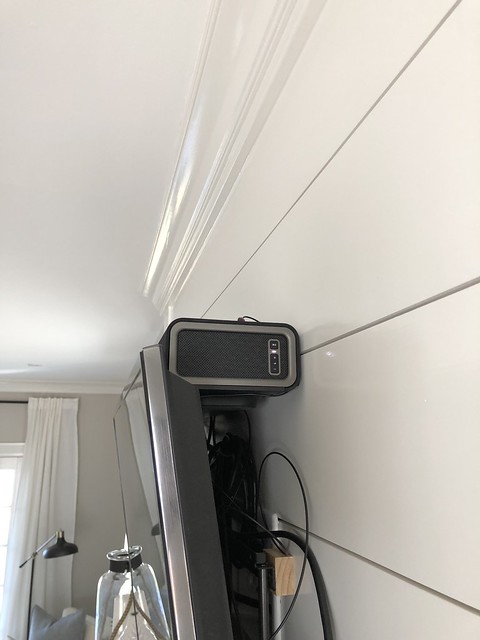
<p>This not only allowed the television to tilt down the necessary amount, but it also increased the gap between the top of the TV and the wall just enough! This was my true light bulb moment. Even though Sonos doesn't recommend mounting the Playbar in the manner that we're using it, it was either this way or no way. When it comes down to it, I'll take "slightly less than optimal" over "not at all."</p>
<p>
</p>
<div class="MediaContainer PhotoContainer"><a href="https://farm3.staticflickr.com/2866/32699236824_f89a392d0c_z.jpg" rel="PhotoPopup" popupheight="427" popupwidth="640"><img alt="" src="https://farm3.staticflickr.com/2866/32699236824_f89a392d0c.jpg" width="500" height="333" style="border-width: 0px; border-style: solid;" /></a></div>
<p>I was able to turn the Sonos Playbar on it's back and slide it in above the television. Similar to laying the Playbar flat on the mantel below the TV (another non-starter for Wendy), the Playbar now sits partially concealed behind the top of the TV. Only about an inch and a half of the Playbar is visible and when you're seated you can barely even see it.</p>
<p>
</p>
<div class="MediaContainer PhotoContainer"><a href="https://farm5.staticflickr.com/4794/38923123450_818106a3f9_z.jpg" rel="PhotoPopup" popupheight="640" popupwidth="480"><img alt="" src="https://farm5.staticflickr.com/4794/38923123450_818106a3f9.jpg" width="375" height="500" style="border-width: 0px; border-style: solid;" /></a></div>
<p>But the real test is in the sound. I was preparing myself to be disgusted by a muffled and partially blocked center channel, obscured by the television. But to be completely honest, neither of us can tell a difference between the Playbar mounted in this manner compared to how it sounded when mounted on an approved bracket based on Sonos guidance above the TV.</p>
<p>
</p>
<div class="MediaContainer PhotoContainer"><a href="https://farm5.staticflickr.com/4784/25862019537_dbebd2d216_z.jpg" rel="PhotoPopup" popupheight="640" popupwidth="480"><img alt="" src="https://farm5.staticflickr.com/4784/25862019537_dbebd2d216.jpg" width="375" height="500" style="border-width: 0px; border-style: solid;" /></a></div>
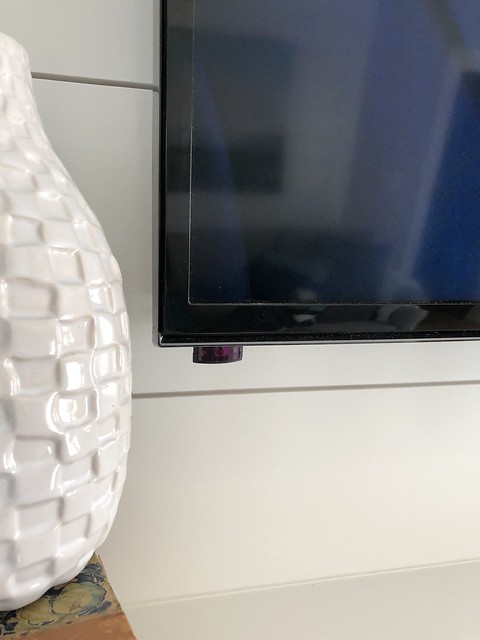
<p>The only drawback of this configuration is that the IR receiver on the speaker is blocked by the TV, so volume control doesn't work out of the box with the Apple TV remote. We were able to resolve this issue with a simple IR repeater that we mounted inconspicuously on the bottom left of the TV bezel. The IR repeater's other end just mounts to the top of the Playbar and the problem was solved.</p>
<p>
</p>
<div class="MediaContainer PhotoContainer"><a href="https://farm5.staticflickr.com/4783/40733275621_902dd7751c_z.jpg" rel="PhotoPopup" popupheight="640" popupwidth="480"><img alt="" src="https://farm5.staticflickr.com/4783/40733275621_902dd7751c.jpg" width="375" height="500" style="border-width: 0px; border-style: solid;" /></a></div>
<p>With everything in place, we added two Play One speakers for surround sound on the ground behind either side of the couch and our Sonos home theater setup is complete and sounding great.&nbsp;</p>
<p>
</p>
<div class="MediaContainer PhotoContainer"><a href="https://farm3.staticflickr.com/2901/33543071775_51dd910b56_z.jpg" rel="PhotoPopup" popupheight="640" popupwidth="427"><img alt="" src="https://farm3.staticflickr.com/2901/33543071775_51dd910b56.jpg" width="333" height="500" style="border-width: 0px; border-style: solid;" /></a></div>
<p>This is a case where a little creativity and an attempt to break from manufacturer guidance on optimal setup allowed us to solve our problems with aesthetics. I absolutely love the Sonos system as a whole, and a wireless 5.1 channel home theater (sure, it's simulated 5.1) that also streams our favorite music and synchronizes with music throughout the house is pretty great.&nbsp;</p>
<div class="MediaContainer">
<iframe style="width: 120px; height: 240px;" marginwidth="0" marginheight="0" scrolling="no" frameborder="0" src="//ws-na.amazon-adsystem.com/widgets/q?ServiceVersion=20070822&amp;OneJS=1&amp;Operation=GetAdHtml&amp;MarketPlace=US&amp;source=ac&amp;ref=qf_sp_asin_til&amp;ad_type=product_link&amp;tracking_id=oltoho-20&amp;marketplace=amazon&amp;region=US&amp;placement=B00AEMGGU2&amp;asins=B00AEMGGU2&amp;linkId=c42f8c8d267739501634ae9c41f4a5d1&amp;show_border=false&amp;link_opens_in_new_window=true&amp;price_color=333333&amp;title_color=0066c0&amp;bg_color=fafaf8">
</iframe>
<iframe style="width: 120px; height: 240px;" marginwidth="0" marginheight="0" scrolling="no" frameborder="0" src="//ws-na.amazon-adsystem.com/widgets/q?ServiceVersion=20070822&amp;OneJS=1&amp;Operation=GetAdHtml&amp;MarketPlace=US&amp;source=ac&amp;ref=qf_sp_asin_til&amp;ad_type=product_link&amp;tracking_id=oltoho-20&amp;marketplace=amazon&amp;region=US&amp;placement=B01HL8KX64&amp;asins=B01HL8KX64&amp;linkId=1b7c449e8cd99e44087eda9d48e283f6&amp;show_border=false&amp;link_opens_in_new_window=true&amp;price_color=333333&amp;title_color=0066c0&amp;bg_color=fafaf8">
</iframe>
<iframe style="width: 120px; height: 240px;" marginwidth="0" marginheight="0" scrolling="no" frameborder="0" src="//ws-na.amazon-adsystem.com/widgets/q?ServiceVersion=20070822&amp;OneJS=1&amp;Operation=GetAdHtml&amp;MarketPlace=US&amp;source=ac&amp;ref=qf_sp_asin_til&amp;ad_type=product_link&amp;tracking_id=oltoho-20&amp;marketplace=amazon&amp;region=US&amp;placement=B077GK3TTQ&amp;asins=B077GK3TTQ&amp;linkId=83a1bd92ed52c88eace6f1091616f887&amp;show_border=false&amp;link_opens_in_new_window=true&amp;price_color=333333&amp;title_color=0066c0&amp;bg_color=fafaf8">
</iframe>
</div>
<p>If you're considering the Sonos home theater system but are worried about how it will look when fully mounted and installed, rest assured that we were able to make it work for our purposes with only minor alterations. And in our case, it still sounds absolutely excellent. Personally, I think my greatest happiness in this outcome is that we were both able to achieve our independent goals on this project. I got to install the home theater package I had my technology nerd heart set on for several years, and Wendy isn't staring at a giant set of plastic cubes strategically placed around the room.</p>
<p>What do you think? Is this an aesthetically pleasing approach to integrating technology in our older home? Or are you getting a twitch simply by seeing the television mounted prominently above the mantel? Have you had any of these form over function style debates with your partner, only to realize there's a nice form meets function middle ground of blissful coexistence? Would love to hear your experiences.&nbsp;</p><p><a href="https://www.oldtownhome.com/2018/3/29/How-We-Concealed-our-Sonos-Home-Theater-System---Spouse-Approved/">Read Full Post</a></p>]]></content>
    <category term="Header Image" />
    <category term="Projects:Hi Tech" />
    <category term="Sonos" />
    <category term="Technology" />
    <PostImage>https://c1.staticflickr.com/1/818/41086858811_d8b32c2901_b.jpg</PostImage>
    <media:thumbnail url="https://c1.staticflickr.com/1/818/41086858811_d8b32c2901_t.jpg" />
    <ExtensionElements>
      <Item>PostImage</Item>
      <Item>media:thumbnail</Item>
    </ExtensionElements>
  </entry>
  <entry>
    <guid>765a1970-a2aa-4a8f-8d43-c3ddaa766ed6</guid>
    <id>https://www.oldtownhome.com/2016/9/8/When-a-5-in-1-Weather-Station-Simply-Cant-Stay-Put/</id>
    <title>When a 5-in-1 Weather Station Simply Can't Stay Put</title>
    <summary type="html"><![CDATA[<p>Ever wonder what happens when the sight of your newly installed 5-in-1 weather station interrupts your loving wife's lovely view? Well, I can tell you exactly what happens. </p><p>The saga of our weather station, a practical but not very aesthetically pleasing technological addition to our home's exterior, began with big plans some months ago. What started with the purchase of a few AcuRite temperature sensors and a communication hub quickly expanded.  This all happened when I realized that I was routinely checking the WeatherBug or The Weather Channel app to see the current temperature, wind direction, and other related information at our new house when we're not there. However, each time I checked I had to remind myself that the nearest reporting weather station was a good distance from our home and therefore was not entirely accurate.</p><p>In addition to this, I have dreams of someday building a vegetable garden in our front yard and would love to know how the specific micro-climates in our town will affect how those fruits and veggies will grow. And in order to really understand this, I wanted to have some solid historical data so I could watch the trend over time.</p><div class="ToolItem">
<iframe style="width: 120px; height: 240px;" marginwidth="0" marginheight="0" scrolling="no" frameborder="0" src="//ws-na.amazon-adsystem.com/widgets/q?ServiceVersion=20070822&amp;OneJS=1&amp;Operation=GetAdHtml&amp;MarketPlace=US&amp;source=ac&amp;ref=qf_sp_asin_til&amp;ad_type=product_link&amp;tracking_id=oltoho-20&amp;marketplace=amazon&amp;region=US&amp;placement=B00SN1WHEU&amp;asins=B00SN1WHEU&amp;linkId=0fd319c7ed8f4096afcaa7ec681d7f7a&amp;show_border=false&amp;link_opens_in_new_window=true&amp;price_color=&amp;title_color=&amp;bg_color=FAFAF8">
</iframe>
</div><p>In short, since I already owned an AcuRite hub and a few temperature sensors, I went ahead and purchased one of their 5-in-1 Pro+ weather stations to add to my existing system. This would allow us to monitor temperature, rainfall totals, wind speed, wind direction, and humidity. </p><p>Once I had the weather station up and running on our network (which really only took about 10 minutes to setup using the AcuRite app), the next most important piece of the equation was coming up with the all important decision of where we'd mount the unit. As of right now I'm most interested in the weather down on the water, so I decided to mount the weather station to the first piling on our pier. </p><p>I was especially keen on getting the weather station in place ASAP last weekend with Tropical Storm Hermine spinning just off the coast a somewhat short distance from our home. I really wanted to see how fast the gusts of wind were getting up to. We had friends visiting for the night, so with our ideal destination in mind, my friend Matt and I took our tools down to the pier to mount the weather station.</p> <a href="https://www.oldtownhome.com/2016/9/8/When-a-5-in-1-Weather-Station-Simply-Cant-Stay-Put/">more</a>]]></summary>
    <published>2016-09-08T09:31:00.000-04:00</published>
    <updated>2016-09-08T09:31:00.000-04:00</updated>
    <link rel="alternate" href="https://www.oldtownhome.com/2016/9/8/When-a-5-in-1-Weather-Station-Simply-Cant-Stay-Put/" />
    <author>
      <name>Alex</name>
    </author>
    <content type="html"><![CDATA[<p>Ever wonder what happens when the sight of your newly installed 5-in-1 weather station interrupts your loving wife's lovely view? Well, I can tell you exactly what happens. </p>
<p>The saga of our weather station, a practical but not very aesthetically pleasing technological addition to our home's exterior, began with big plans some months ago. What started with the purchase of a few AcuRite temperature sensors and a communication hub quickly expanded.  This all happened when I realized that I was routinely checking the WeatherBug or The Weather Channel app to see the current temperature, wind direction, and other related information at our new house when we're not there. However, each time I checked I had to remind myself that the nearest reporting weather station was a good distance from our home and therefore was not entirely accurate.</p>
<p>In addition to this, I have dreams of someday building a vegetable garden in our front yard and would love to know how the specific micro-climates in our town will affect how those fruits and veggies will grow. And in order to really understand this, I wanted to have some solid historical data so I could watch the trend over time.</p>
<div class="ToolItem">
<iframe style="width: 120px; height: 240px;" marginwidth="0" marginheight="0" scrolling="no" frameborder="0" src="//ws-na.amazon-adsystem.com/widgets/q?ServiceVersion=20070822&amp;OneJS=1&amp;Operation=GetAdHtml&amp;MarketPlace=US&amp;source=ac&amp;ref=qf_sp_asin_til&amp;ad_type=product_link&amp;tracking_id=oltoho-20&amp;marketplace=amazon&amp;region=US&amp;placement=B00SN1WHEU&amp;asins=B00SN1WHEU&amp;linkId=0fd319c7ed8f4096afcaa7ec681d7f7a&amp;show_border=false&amp;link_opens_in_new_window=true&amp;price_color=&amp;title_color=&amp;bg_color=FAFAF8">
</iframe>
</div>
<p>In short, since I already owned an AcuRite hub and a few temperature sensors, I went ahead and purchased one of their 5-in-1 Pro+ weather stations to add to my existing system. This would allow us to monitor temperature, rainfall totals, wind speed, wind direction, and humidity. </p>
<p>Once I had the weather station up and running on our network (which really only took about 10 minutes to setup using the AcuRite app), the next most important piece of the equation was coming up with the all important decision of where we'd mount the unit. As of right now I'm most interested in the weather down on the water, so I decided to mount the weather station to the first piling on our pier. </p>
<p>I was especially keen on getting the weather station in place ASAP last weekend with Tropical Storm Hermine spinning just off the coast a somewhat short distance from our home. I really wanted to see how fast the gusts of wind were getting up to. We had friends visiting for the night, so with our ideal destination in mind, my friend Matt and I took our tools down to the pier to mount the weather station.</p>
<p>
</p>
<div class="MediaContainer PhotoContainer"><a href="https://farm9.staticflickr.com/8148/29244951130_35f0897a54_z.jpg" rel="PhotoPopup" popupheight="480" popupwidth="640"><img alt="" src="https://farm9.staticflickr.com/8148/29244951130_35f0897a54.jpg" width="500" height="375" style="border-width: 0px; border-style: solid;" /></a></div>
<p>There's two dudes being super productive right there.</p>
<p>The device comes with a mounting post that's the same diameter as 3/4" PVC. So if I wanted to I could get a longer length of PVC in the future and mount it directly to that, such as in the middle of a vegetable garden.</p>
<p>
</p>
<div class="MediaContainer PhotoContainer"><a href="https://farm9.staticflickr.com/8144/29409604126_d13946fdbd_z.jpg" rel="PhotoPopup" popupheight="640" popupwidth="480"><img alt="" src="https://farm9.staticflickr.com/8144/29409604126_d13946fdbd.jpg" width="375" height="500" style="border-width: 0px; border-style: solid;" /></a></div>
<p>After our weather station was successfully mounted I sat back on the porch and began configuring the app to make sure it was still reporting. The weather station needs to be within 300 feet of the base station for it to work correctly. Everything was looking good, we were getting readings, and I took pride in a job that was not only done well, it was done quickly. That's when it happened.</p>
<p>
</p>
<div class="MediaContainer PhotoContainer"><a href="https://farm9.staticflickr.com/8148/28822632693_5b9c215313_z.jpg" rel="PhotoPopup" popupheight="360" popupwidth="640"><img alt="" src="https://farm9.staticflickr.com/8148/28822632693_5b9c215313.jpg" width="500" height="281" style="border-width: 0px; border-style: solid;" /></a></div>
<p>Wendy (followed by Matt's wife, Tracie) came out on the porch with a drink in her hand and exclaimed in a shocked tone, "What is that awful thing on the first piling of the pier?"</p>
<p>"Uh, it's the super awesome 5-in-1 weather station!" I replied.</p>
<p>The ladies conferred and quickly came to the same conclusion. The verdict?&nbsp;"Yeah, that thing is not staying there, I can tell you that right now. I mean, it's all I can see when I look out towards the water."&nbsp;</p>
<p>
</p>
<div class="MediaContainer PhotoContainer"><a href="https://farm9.staticflickr.com/8031/29335814522_2da0fd6a24_z.jpg" rel="PhotoPopup" popupheight="480" popupwidth="640"><img alt="" src="https://farm9.staticflickr.com/8031/29335814522_2da0fd6a24.jpg" width="500" height="375" style="border-width: 0px; border-style: solid;" /></a></div>
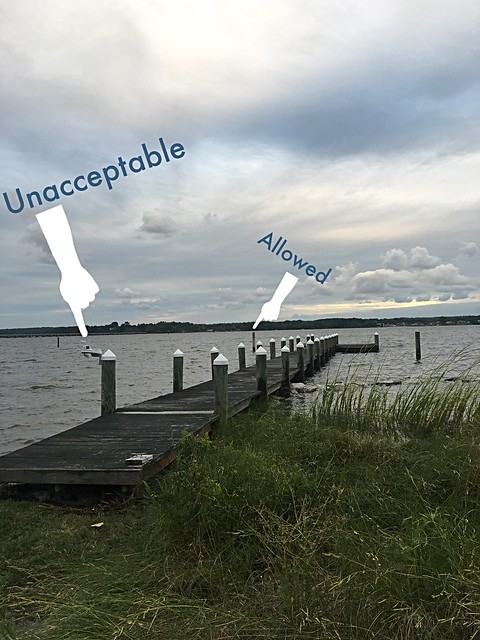
<p>As you can see from the (very one sided, in Wendy's opinion) photo above, this may have been a slight case of the Princess and the Pea, or maybe the Woman and the Weather Station. Wendy could see only the weather station among all of the beauty of her view from the porch. She also couldn't stand seeing it.</p>
<p>I thought that maybe I'd be able to ignore her insistence that it must move immediately, and perhaps relocate the install location at some point in the future. But it seemed Wendy had different ideas. She decided that the only suitable location for install of our jaw dropingly beautiful and functional piece of meteorological technology was not on the first, second, or even tenth pier piling, but rather on the lone piling in the water set away from the pier. </p>
<p>
</p>
<div class="MediaContainer PhotoContainer"><a href="https://farm9.staticflickr.com/8528/29543061455_c84964b7da_z.jpg" rel="PhotoPopup" popupheight="640" popupwidth="480"><img alt="" src="https://farm9.staticflickr.com/8528/29543061455_c84964b7da.jpg" width="375" height="500" style="border-width: 0px; border-style: solid;" /></a></div>
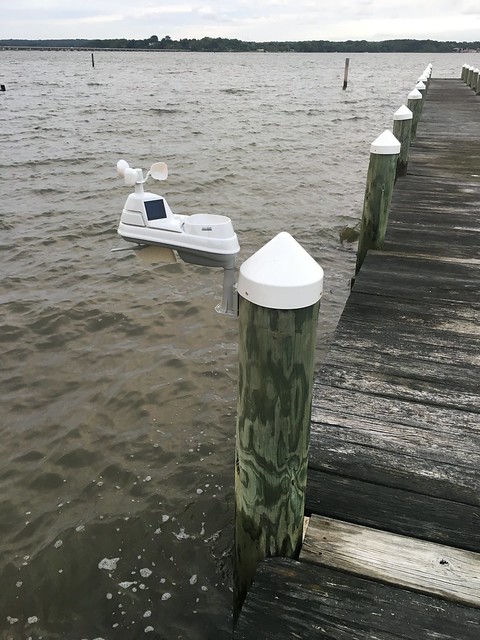
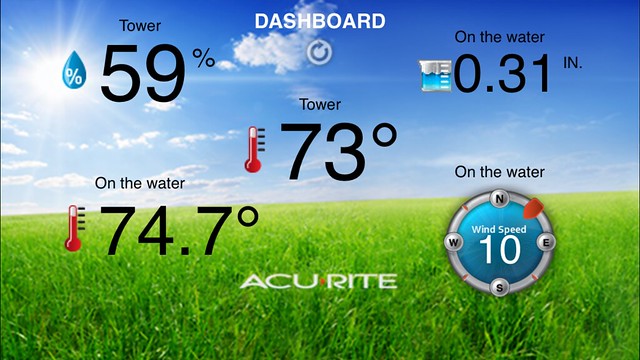
<p>Not only was Wendy's mind made up on where to mount the weather station, the date and time of when this must occur was also set in stone. Apparently that date and time was "then and immediately." Knowing that I wasn't interested in jumping in the kayak in nearly gale force wind (a fact I was able to confirm by looking at the windspeed readout from my weather station that reported a 30 mph max wind speed), Wendy decided to call my bluff. She grabbed the drill and kayak and started to act like she and Tracie would be moving the weather station themselves.</p>
<p>
</p>
<div class="MediaContainer PhotoContainer"><a href="https://farm9.staticflickr.com/8541/29155607160_52eaca7569_z.jpg" rel="PhotoPopup" popupheight="480" popupwidth="640"><img alt="" src="https://farm9.staticflickr.com/8541/29155607160_52eaca7569.jpg" width="500" height="375" style="border-width: 0px; border-style: solid;" /></a></div>
<p>Now, I was 100% sure Wendy wasn't about to go down to the pier and unscrew the weather station from the first pier for the purpose of moving it. I mean, I know Wendy is stubborn and likes to have things happen her way, drives a hard bargain, and won't accept no for an answer. Okay, on second thought, I was about 85% sure that the weather station was staying put until I would move it at a later date.</p>
<p>
</p>
<div class="MediaContainer PhotoContainer"><a href="https://farm9.staticflickr.com/8381/29155591550_aae59925e4_z.jpg" rel="PhotoPopup" popupheight="480" popupwidth="640"><img alt="" src="https://farm9.staticflickr.com/8381/29155591550_aae59925e4.jpg" width="500" height="375" style="border-width: 0px; border-style: solid;" /></a></div>
<p>I'd say my confidence was about 62% that as long as I held my ground, she wouldn't jump in the Kayak and paddle out with the drill and weather station to mount on the further piling. The more I thought about it I'd say I was probably about 43% sure that Wendy would stop well before she even dragged the kayak down to the water wearing her jeans, Wellies, and holding a glass of wine in one hand and drill in the other. </p>
<p>
</p>
<div class="MediaContainer PhotoContainer"><a href="https://farm9.staticflickr.com/8266/29453949321_143820aba5_z.jpg" rel="PhotoPopup" popupheight="480" popupwidth="640"><img alt="" src="https://farm9.staticflickr.com/8266/29453949321_143820aba5.jpg" width="500" height="375" style="border-width: 0px; border-style: solid;" /></a></div>
<p>Besides all of this, I was absolutely 24% positive that she wouldn't be mounting it, with proper south facing orientation to ensure proper function on wind direction...Ahhh dammit, this was not going to end well, so I sucked it up and grabbed the kayak, drill, and weather station to start "project relocation." </p>
<p>We loaded in the kayaks, amidst the high tide, white caps, and treacherous conditions to brave the high seas, all in the name of aesthetics.&nbsp;</p>
<p>
</p>
<div class="MediaContainer PhotoContainer"><a href="https://farm9.staticflickr.com/8100/29462745621_e824da6003_z.jpg" rel="PhotoPopup" popupheight="640" popupwidth="640"><img alt="" src="https://farm9.staticflickr.com/8100/29462745621_e824da6003.jpg" width="500" height="500" style="border-width: 0px; border-style: solid;" /></a></div>
<p>Form over function was my co-captain and we made our way around to the final destination of the weather station (not to be confused with Final Destination...which might be an appropriately set scene given the circumstances). Lulu was (understandably) concerned.</p>
<p>
</p>
<div class="MediaContainer PhotoContainer"><a href="https://farm9.staticflickr.com/8193/28820057834_4b9af76fd3_z.jpg" rel="PhotoPopup" popupheight="480" popupwidth="640"><img alt="" src="https://farm9.staticflickr.com/8193/28820057834_4b9af76fd3.jpg" width="500" height="375" style="border-width: 0px; border-style: solid;" /></a></div>
<p>I delicately worked my way into a standing position, which I'm pretty sure resembled a newborn giraffe trying to take its first steps. From this standing position I'd be able to properly align the weather station in a south facing manner.</p>
<p>
</p>
<div class="MediaContainer PhotoContainer"><a href="https://farm9.staticflickr.com/8107/29454066311_5ae383c62d_z.jpg" rel="PhotoPopup" popupheight="640" popupwidth="480"><img alt="" src="https://farm9.staticflickr.com/8107/29454066311_5ae383c62d.jpg" width="375" height="500" style="border-width: 0px; border-style: solid;" /></a></div>
<p>Matt wrangled my tools and handed me the critical items at the appropriate junctures, offered words of encouragement, nuggets of warning, and enough tough love to will me into bringing Wendy's vision to life.</p>
<p>Wendy looked on in amazement, wondering not only how she had gotten lucky enough to marry a man with such cat-like reflexes and balance, but also one brave and caring to risk life and limb to fulfill her wildest dreams.</p>
<p>
</p>
<div class="MediaContainer PhotoContainer"><a href="https://farm9.staticflickr.com/8518/29454066951_1f48f9b31e_z.jpg" rel="PhotoPopup" popupheight="640" popupwidth="480"><img alt="" src="https://farm9.staticflickr.com/8518/29454066951_1f48f9b31e.jpg" width="375" height="500" style="border-width: 0px; border-style: solid;" /></a></div>
<p>Or something.</p>
<p>It was a bit of delicate balancing to get it all in place, but I was assured by the fact that if I were to fall overboard I'd be able to stand in about shoulders' deep water while assessing my failure.</p>
<p>
</p>
<div class="MediaContainer PhotoContainer"><a href="https://farm9.staticflickr.com/8620/29155889620_1471a44d68_z.jpg" rel="PhotoPopup" popupheight="480" popupwidth="640"><img alt="" src="https://farm9.staticflickr.com/8620/29155889620_1471a44d68.jpg" width="500" height="375" style="border-width: 0px; border-style: solid;" /></a></div>
<p>As I mounted the weather station on the piling I remembered something very important. I'd eventually need to replace the batteries in the unit, which may well be a pain if I have to venture out on a boat. But then I realized that the weather station takes four AA batteries to operate, and are supposed to last for two years before they need to be replaced, so it won't be a frequent significant effort. The weather station also has two solar panels to power a small interior fan, which keeps temperature readings accurate.</p>
<p>When all was said and done the weather station had been re-located, my swash buckling friend Matt and I had survived our ordeal on the high seas, and I was able to sit back and relax with the phrase "happy wife, happy life" playing on repeat in the back of my mind. To celebrate, I invited Lulu into the kayak where we took a victory lap around the pier before navigating our ship back to shore and enjoying the rest of the night.</p>
<p>
</p>
<div class="MediaContainer PhotoContainer"><a href="https://farm9.staticflickr.com/8480/29425188402_545c3cde1b_z.jpg" rel="PhotoPopup" popupheight="480" popupwidth="640"><img alt="" src="https://farm9.staticflickr.com/8480/29425188402_545c3cde1b.jpg" width="500" height="375" style="border-width: 0px; border-style: solid;" /></a></div>
<p>Wendy was very happy with our <em>joint</em> decision to move the weather station, and was very happy with the new location. However, on testing once my land loving legs were back on terra firma, the base station no longer had contact with the weather station. It seems the move was just far enough to take the device out of the 300 foot max range. I had to do a little fiddling with the hub inside and was able to move it closer to the device, which was now on Siberia near the edge of the Earth. </p>
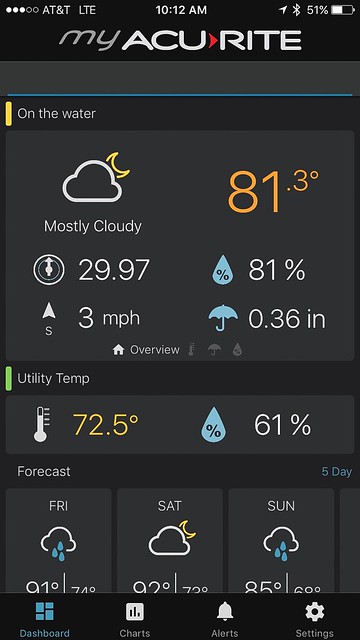
<p>After all was said and done I updated the firmware on the hub and got the latest "MyAcuRite" app on the phone, which offers a great new interface and the ability to share my weather data with friends and family. Overall I'm very happy with the weather station thus far and can't wait to see how it works over the course of the next few years.&nbsp;</p>
<p>
</p>
<div class="MediaContainer PhotoContainer"><a href="https://farm9.staticflickr.com/8253/29508412356_388df9bf55_z.jpg" rel="PhotoPopup" popupheight="640" popupwidth="360"><img alt="" src="https://farm9.staticflickr.com/8253/29508412356_388df9bf55.jpg" width="281" height="500" style="border-width: 0px; border-style: solid;" /></a></div>
<p>How about you, do you have any experience with weather stations? If not, do you have any experience where your significant other makes crazy demands and forces you to call their bluff when implementing those demands? Do you live by the mantra, "Happy Wife, Happy Life"? I'd love to hear your opinion.</p><p><a href="https://www.oldtownhome.com/2016/9/8/When-a-5-in-1-Weather-Station-Simply-Cant-Stay-Put/">Read Full Post</a></p>]]></content>
    <category term="Header Image" />
    <category term="Projects:Hi Tech" />
    <category term="Technology" />
    <category term="Water House" />
    <category term="Weather" />
    <PostImage>https://c1.staticflickr.com/9/8538/29245207960_6fe5163b71.jpg</PostImage>
    <media:thumbnail url="https://c1.staticflickr.com/9/8538/29245207960_6fe5163b71_t.jpg" />
    <ExtensionElements>
      <Item>PostImage</Item>
      <Item>media:thumbnail</Item>
    </ExtensionElements>
  </entry>
  <entry>
    <guid>c8638b4d-b680-4b79-9833-9d6c61fd0b0b</guid>
    <id>https://www.oldtownhome.com/2016/2/19/One-Year-Since-the-Big-Freeze-and-How-Were-Preventing-a-Refreeze/</id>
    <title>One Year Since the Big Freeze and How We're Preventing a Refreeze</title>
    <summary type="html"><![CDATA[<p>This week marks the one year anniversary of the most significant home damage event we've ever experienced.</p><p>Yes, one year has passed since our four square, in the midst of the coldest week in the DC area in over 100 years, had a boiler failure and a subsequent whole home freeze. </p><p>The resulting damage destroyed our home's oil fired boiler...</p><p>
</p><div class="MediaContainer PhotoContainer"><a href="https://farm9.staticflickr.com/8590/16631019445_2db3d1a125_z.jpg" rel="PhotoPopup" popupheight="640" popupwidth="480"><img alt="" src="https://farm9.staticflickr.com/8590/16631019445_2db3d1a125.jpg" width="375" height="500" style="border-width: 0px; border-style: solid;"></a></div><p>...ruptured plumbing lines throughout the house...</p><p>
</p> <a href="https://www.oldtownhome.com/2016/2/19/One-Year-Since-the-Big-Freeze-and-How-Were-Preventing-a-Refreeze/">more</a>]]></summary>
    <published>2016-02-19T15:00:59.043-05:00</published>
    <updated>2016-02-19T15:00:59.043-05:00</updated>
    <link rel="alternate" href="https://www.oldtownhome.com/2016/2/19/One-Year-Since-the-Big-Freeze-and-How-Were-Preventing-a-Refreeze/" />
    <author>
      <name>Alex</name>
    </author>
    <content type="html"><![CDATA[<p>This week marks the one year anniversary of the most significant home damage event we've ever experienced.</p>
<p>Yes, one year has passed since our four square, in the midst of the coldest week in the DC area in over 100 years, had a boiler failure and a subsequent whole home freeze. </p>
<p>The resulting damage destroyed our home's oil fired boiler...</p>
<p>
</p>
<div class="MediaContainer PhotoContainer"><a href="https://farm9.staticflickr.com/8590/16631019445_2db3d1a125_z.jpg" rel="PhotoPopup" popupheight="640" popupwidth="480"><img alt="" src="https://farm9.staticflickr.com/8590/16631019445_2db3d1a125.jpg" width="375" height="500" style="border-width: 0px; border-style: solid;" /></a></div>
<p>...ruptured plumbing lines throughout the house...</p>
<p>
</p>
<div class="MediaContainer PhotoContainer"><a href="https://farm9.staticflickr.com/8681/16011285893_e282d40cf1_z.jpg" rel="PhotoPopup" popupheight="640" popupwidth="480"><img alt="" src="https://farm9.staticflickr.com/8681/16011285893_e282d40cf1.jpg" width="375" height="500" style="border-width: 0px; border-style: solid;" /></a></div>
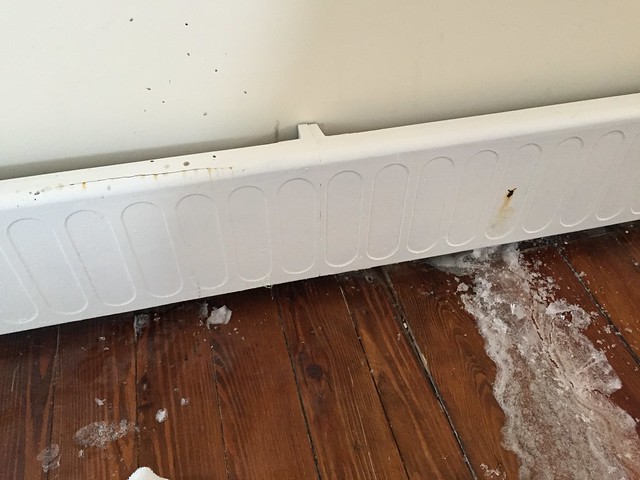
<p>...burst baseboard radiators and copper radiator lines in every single room...</p>
<p>
</p>
<div class="MediaContainer PhotoContainer"><a href="https://farm9.staticflickr.com/8601/16423662017_ca28f75ba6_z.jpg" rel="PhotoPopup" popupheight="480" popupwidth="640"><img alt="" src="https://farm9.staticflickr.com/8601/16423662017_ca28f75ba6.jpg" width="500" height="375" style="border-width: 0px; border-style: solid;" /></a></div>
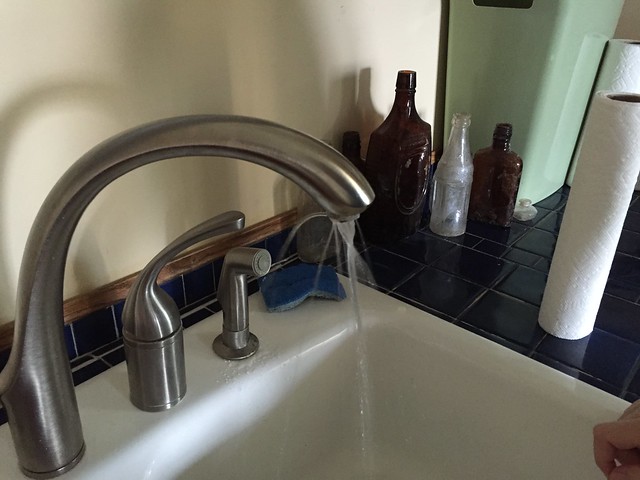
<p>...broke all three toilets...</p>
<p>
</p>
<div class="MediaContainer PhotoContainer"><a href="https://farm9.staticflickr.com/8754/17023893740_a5b5f5d753_z.jpg" rel="PhotoPopup" popupheight="640" popupwidth="480"><img alt="" src="https://farm9.staticflickr.com/8754/17023893740_a5b5f5d753.jpg" width="375" height="500" style="border-width: 0px; border-style: solid;" /></a></div>
<p>...destroyed several plumbing fixtures... </p>
<p>
</p>
<div class="MediaContainer PhotoContainer"><a href="https://farm1.staticflickr.com/550/19495592244_f1a428d72c_z.jpg" rel="PhotoPopup" popupheight="480" popupwidth="640"><img alt="" src="https://farm1.staticflickr.com/550/19495592244_f1a428d72c.jpg" width="500" height="375" style="border-width: 0px; border-style: solid;" /></a></div>
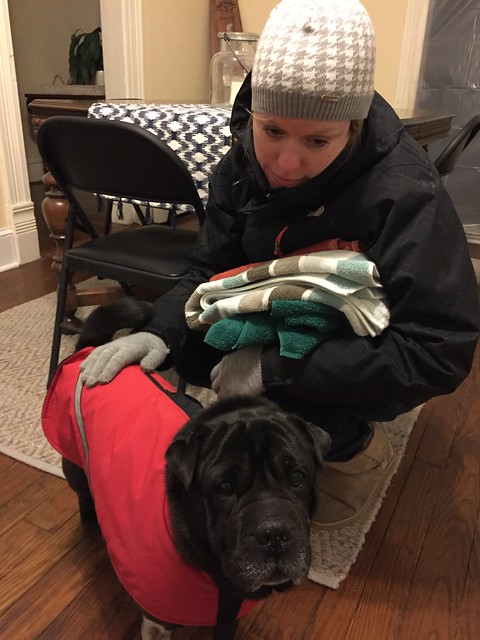
<p>...and effectively rendered our house an almost uninhabitable shell for many months while leaving us angry, frustrated, and very cold.</p>
<p>
</p>
<div class="MediaContainer PhotoContainer"><a href="https://farm9.staticflickr.com/8643/16444035500_e6a537a7b3_z.jpg" rel="PhotoPopup" popupheight="640" popupwidth="480"><img alt="" src="https://farm9.staticflickr.com/8643/16444035500_e6a537a7b3.jpg" width="375" height="500" style="border-width: 0px; border-style: solid;" /></a></div>
<p>The subsequent project to repair and replace the house's HVAC and plumbing stretched on for months, required far more effort than we anticipated at the onset, and tried our patience at every turn as we discovered obstacle after obstacle.</p>
<p>But now that we once again have fully working plumbing (with toilets that flush and refill automatically like fancy people), functional forced air heating for the winter, and air conditioning for the summer, I wanted to take a moment to look at where we are today and compare it to where we were a year ago. More specifically, I want to look at how we're now better suited to prevent such an issue in the future. After all, one of the most frequent questions we receive from friends, family, and pretty much anyone who learned of the "big freeze" is the same, "So...how is your house doing now? Is it all fixed?"</p>
<h3>Where We Were</h3>
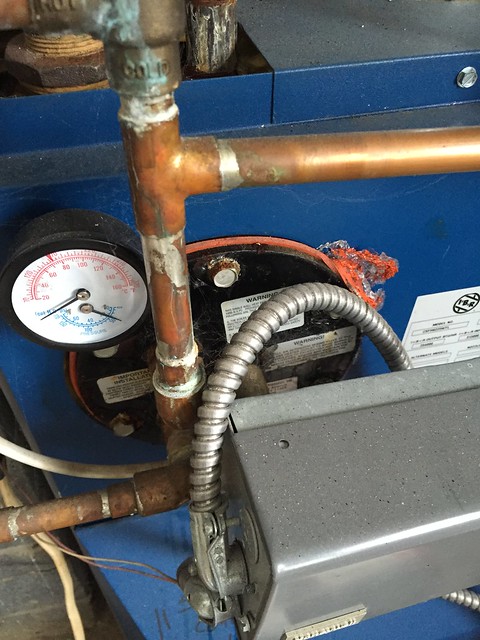
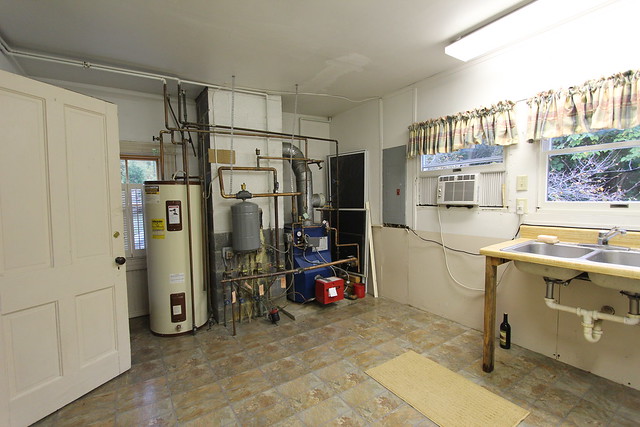
<p>When this all began last year our home was heated by an outdated and oversized oil fired boiler fueled by a large 500 gallon underground oil tank. Though the heat it produced was very comfortable, the boiler was loud, inefficient, and expensive to operate. Though oil prices have dropped since last year, it was costing the previous owners about $1,500-$2,000 to fill the tank, and we'd typically need two fills per year. Expensive or not, it was what we had, and it seemed to be working well. I had dreams of turning the baseboard radiators into radiant heat, but we were content with the boiler.</p>
<p>
</p>
<div class="MediaContainer PhotoContainer"><a href="https://farm4.staticflickr.com/3948/15340142727_4f0a20340e_z.jpg" rel="PhotoPopup" popupheight="427" popupwidth="640"><img alt="" src="https://farm4.staticflickr.com/3948/15340142727_4f0a20340e.jpg" width="500" height="333" style="border-width: 0px; border-style: solid;" /></a></div>
<p>The house also didn't have central air (and no duct work), so it was cooled by window units in the summer, which also carried a hefty price tag for electricity. Let's not forget how the window units allowed hundreds of stink bugs to infiltrate the house and just generally looked bad from both inside and out. </p>
<p>And one of the most aesthetically unappealing (to me) aspects of our home is all of the boxed in or exposed plumbing lines. All of the plumbing was added to the house well after it was built, so it was run along baseboards and boxed in up the corners of walls. I knew we'd eventually address the exposed pipes, but I didn't realize it would end up being one of our first giant projects.</p>
<h3>Where Are We Now?</h3>
<p>After a spring and summer full of contacting our insurance, our mortgage company, coordinating repair estimates, the claims process, determining what the new system should be, and a summer full of a whole lot of work, we are the proud owners of a shiny and new geothermal heat pump and fully concealed plumbing.</p>
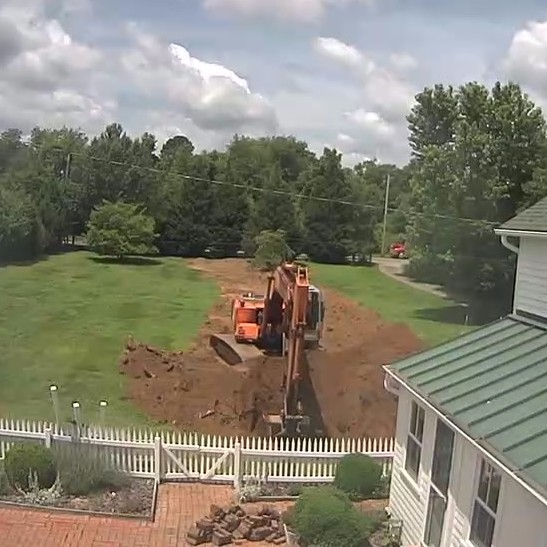
<p class="MediaContainer PhotoContainer"><a href="https://farm1.staticflickr.com/282/19153971611_0181b80f05_z.jpg" rel="PhotoPopup" popupheight="547" popupwidth="547"><img alt="" src="https://farm1.staticflickr.com/282/19153971611_0181b80f05.jpg" width="500" height="500" style="border-width: 0px; border-style: solid;" /></a></p>
<p class="MediaContainer PhotoContainer"><em>Digging up the front yard for the geothermal pipe</em></p>
<p>For those not familiar with geothermal, it simply means that our heating and cooling come from the ground, rather than through burning a fuel (like oil or gas) or using an electric element to heat, or using a condensing unit to cool. This equates to a heating and cooling system that's far more efficient and environmentally friendly, only using electricity to run the pumps and letting the ground work as a large heat sink that stays warm in the winter for heat, and cool in the summer for air conditioning.</p>
<p class="MediaContainer PhotoContainer"><a href="https://farm4.staticflickr.com/3692/19255065483_16ca1950ab_z.jpg" rel="PhotoPopup" popupheight="640" popupwidth="480"><img alt="" src="https://farm4.staticflickr.com/3692/19255065483_16ca1950ab.jpg" width="375" height="500" style="border-width: 0px; border-style: solid;" /></a></p>
<p class="MediaContainer PhotoContainer"><em>Duct work waiting to go under the house</em></p>
<p>With all of our modern and efficient systems in place, we should be sitting pretty, right? Well, yes and no. There is still a risk that something like what happened to us last year could happen again. After all, we're not at this house 100% of the time, so if the power goes out, or something else happens that impacts the temperature of the house, we could very well be back to square one.</p>
<p class="MediaContainer PhotoContainer"><a href="https://farm1.staticflickr.com/550/19497198413_3c4201e185_z.jpg" rel="PhotoPopup" popupheight="640" popupwidth="480"><img alt="" src="https://farm1.staticflickr.com/550/19497198413_3c4201e185.jpg" width="375" height="500" style="border-width: 0px; border-style: solid;" /></a></p>
<p class="MediaContainer PhotoContainer"><em>Geothermal system in the middle of install. It isn't small...</em></p>
<p>The main thing we've wanted to do is to install various remote monitoring resources that will help us be aware of the status of our house, even if we're not there. This is critical in keeping us informed about the house's general well being, since last year we walked into a completely frozen house and had no idea of the situation until we could still see our breath while standing in front of the failed boiler. If we had known the boiler had failed and the temperature of the house was falling, there's a chance we could have gotten out there fast enough to fixed the problem before it turned into one giant icicle. But the question is, what sort of remote monitoring is necessary? </p>
<p>Here's our suite of tools we use to enable us to remotely view and control our house in the hopes this will prevent a repeat of the freeze of 2015.</p>
<h4>WaterFurnace Symphony Thermostat</h4>
<p>In my opinion, the most critical element for the remote monitoring our house's temperature is simple. It's the ability to access our primary HVAC thermostat using the Internet (or our phone, as it more typically goes). This will allow us to not only determine and control the set temperature for the heating and cooling, but will also allow us to remotely monitor the current indoor temperature.</p>
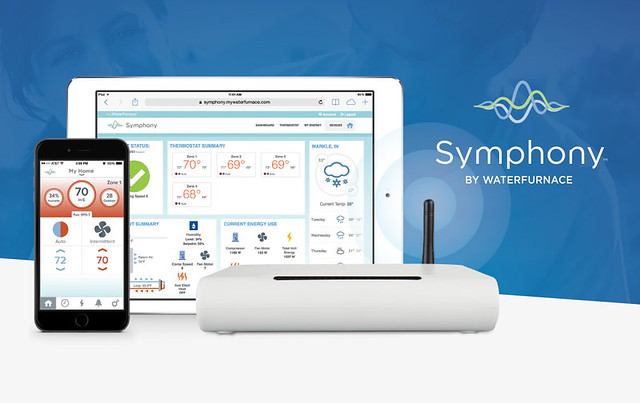
<p>In our case, in order to get the most our of our new geothermal heating system, we chose the companion wifi enabled thermostat offering from WaterFurnace (the manufacturer of our HVAC system) call the Symphony. </p>
<p>
</p>
<div class="MediaContainer PhotoContainer"><a href="https://farm2.staticflickr.com/1668/24503442514_0a2bf71e20_z.jpg" rel="PhotoPopup" popupheight="403" popupwidth="640"><img alt="" src="https://farm2.staticflickr.com/1668/24503442514_0a2bf71e20.jpg" width="500" height="315" style="border-width: 0px; border-style: solid;" /></a></div>
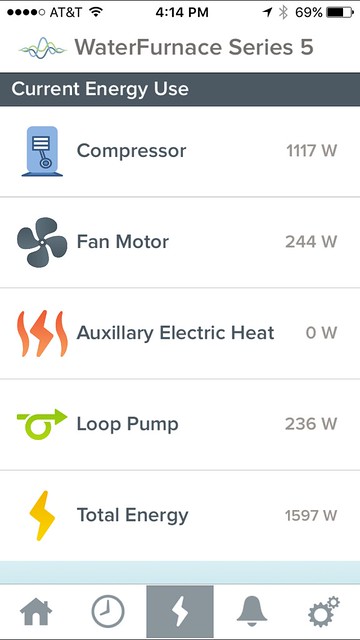
<p>The Symphony is a relatively new option and very specific to the system we had installed. While the Nest and other smart thermostats may have claimed to "work" with the geothermal, we'd lose a lot of the benefits of the system if we had installed one. The off the shelf smart thermostats are generic to HVAC systems, and the Symphony has been specifically programmed to work with the unique elements of a WaterFurnace Series 5 geothermal heat pump we installed, such as managing the variable speed of the system's fan. It also offers a bunch of other really nice features, like the ability to measure the real time energy usage of the system components, as well as the incoming and outgoing air and water temperatures.&nbsp;</p>
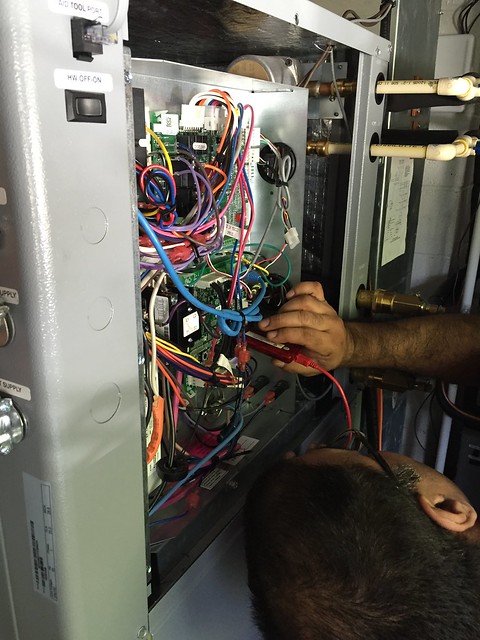
<p>Back in October our HVAC contractor, <a href="http://www.southernprideservice.com/" target="_blank">Southern Pride Service</a>, came out to install the Symphony add-on and I stuck close by to learn about the process. Since the symphony is an add-on to the existing system and standard WaterFurnace thermostat, this install was pretty straight forward and only required a tech with some specific equipment to configure the whole thing.</p>
<p>
</p>
<div class="MediaContainer PhotoContainer"><a href="https://farm1.staticflickr.com/567/21478716108_19b2403bb3_z.jpg" rel="PhotoPopup" popupheight="640" popupwidth="480"><img alt="" src="https://farm1.staticflickr.com/567/21478716108_19b2403bb3.jpg" width="375" height="500" style="border-width: 0px; border-style: solid;" /></a></div>
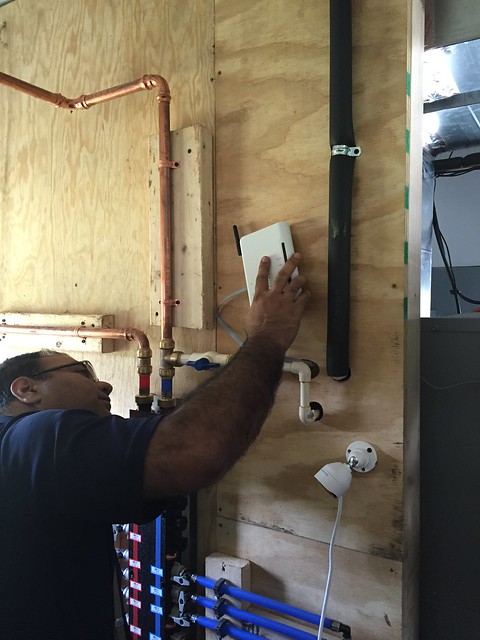
<p>Overall the install was probably only about an hour total, and simply required that we mount the communication device in our utility room connected to the main WaterFurnace unit.</p>
<p>
</p>
<div class="MediaContainer PhotoContainer"><a href="https://farm1.staticflickr.com/626/21485994820_21824cf98c_z.jpg" rel="PhotoPopup" popupheight="640" popupwidth="480"><img alt="" src="https://farm1.staticflickr.com/626/21485994820_21824cf98c.jpg" width="375" height="500" style="border-width: 0px; border-style: solid;" /></a></div>
<p>Once we had it hooked up to the system, we had to configure the device to recognize our wifi connection, set up an account on the WaterFurnace website, and download the app on my phone, then we were off to the races.&nbsp;</p>
<p>
</p>
<div class="MediaContainer PhotoContainer"><a href="https://farm1.staticflickr.com/608/21655160282_b55cd6d8f0_z.jpg" rel="PhotoPopup" popupheight="640" popupwidth="480"><img alt="" src="https://farm1.staticflickr.com/608/21655160282_b55cd6d8f0.jpg" width="375" height="500" style="border-width: 0px; border-style: solid;" /></a></div>
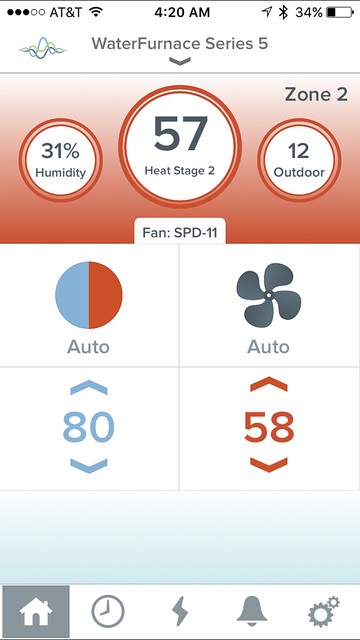
<p>We were immediately able to see the status of the system, energy usage, etc.</p>
<p>
</p>
<div class="MediaContainer PhotoContainer"><a href="https://farm6.staticflickr.com/5742/21045559333_e802532d6c_z.jpg" rel="PhotoPopup" popupheight="640" popupwidth="360"><img alt="" src="https://farm6.staticflickr.com/5742/21045559333_e802532d6c.jpg" width="281" height="500" style="border-width: 0px; border-style: solid;" /></a></div>
<p>I immediately breathed a sigh of relief as it meant we were one step closer to being able to truly monitor the status of our house while we weren't there. But the only thing the Symphony doesn't have yet is an open API that would allow people (like me) to code things to work with the system. I'd love to integrate If This Then That (IFTTT) with a recipe that would automatically adjust the temperature when my phone/car knows we're driving out to the house. Maybe sometime soon.</p>
<p>
</p>
<div class="MediaContainer PhotoContainer"><a href="https://farm2.staticflickr.com/1617/24729823800_c6252b539a_z.jpg" rel="PhotoPopup" popupheight="640" popupwidth="360"><img alt="" src="https://farm2.staticflickr.com/1617/24729823800_c6252b539a.jpg" width="281" height="500" style="border-width: 0px; border-style: solid;" /></a></div>
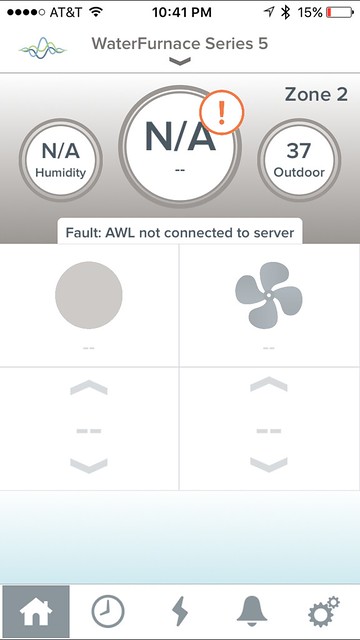
<p>We can also use this app to help diagnose issues with the HVAC while we're not there. For example, when our power went out at the house and came back on, I opened the app to check on the temperature. But when the app opened this is what I saw.</p>
<p>
</p>
<div class="MediaContainer PhotoContainer"><a href="https://farm2.staticflickr.com/1646/24685892980_a58c654ba6_z.jpg" rel="PhotoPopup" popupheight="640" popupwidth="360"><img alt="" src="https://farm2.staticflickr.com/1646/24685892980_a58c654ba6.jpg" width="281" height="500" style="border-width: 0px; border-style: solid;" /></a></div>
<p>This could mean that either the Internet was still down, or the HVAC unit doesn't have power and isn't running. So I checked on one of our cameras and could access it, which told me the Internet was alive. Based on this I was able to contact our HVAC company who paid a visit to the house and was able to fix the issue with the HVAC unit. This all happened remotely and we didn't have to be on site to identify that there was an issue or coordinate fixing it. In this case the thermostat package and app saved our house from a repeat freeze. &nbsp;</p>
<h4>Samsung SmartCam Video Monitoring</h4>
<p>The funny thing about monitoring temperature data is that it only goes so far to making me feel good about the state of our house. There's something very assuring about actually seeing that things are okay. This is why we have several of my favorite Samsung SmartCam video cameras set up throughout the house. These camera let us keep an eye on everything from the water around our pier...</p>
<p class="MediaContainer PhotoContainer"><a href="https://farm1.staticflickr.com/777/21925735666_bc42162fcf_z.jpg" rel="PhotoPopup" popupheight="360" popupwidth="640"><img alt="" src="https://farm1.staticflickr.com/777/21925735666_bc42162fcf.jpg" width="500" height="281" style="border-width: 0px; border-style: solid;" /></a></p>
<p class="MediaContainer PhotoContainer"><em>Keeping an eye on high tide even though we were in Ireland</em></p>
<p>...to the crawlspace below the HVAC equipment.&nbsp;</p>
<p>
</p>
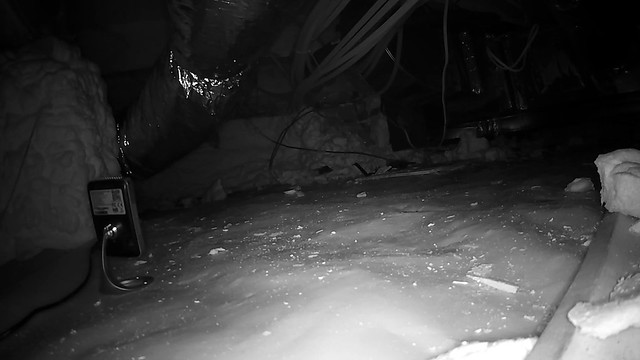
<div class="MediaContainer PhotoContainer"><a href="https://farm2.staticflickr.com/1566/25134709505_2dae30fa54_z.jpg" rel="PhotoPopup" popupheight="360" popupwidth="640"><img alt="" src="https://farm2.staticflickr.com/1566/25134709505_2dae30fa54.jpg" width="500" height="281" style="border-width: 0px; border-style: solid;" /></a></div>
<p>I figure if we have a leak in the house the first place it's going to start filling up is in the crawl space, so I'd like to have eyes on that if it's an actual issue.</p>
<div class="ToolItem">
<iframe style="width: 120px; height: 240px;" marginwidth="0" marginheight="0" scrolling="no" frameborder="0" src="//ws-na.amazon-adsystem.com/widgets/q?ServiceVersion=20070822&amp;OneJS=1&amp;Operation=GetAdHtml&amp;MarketPlace=US&amp;source=ac&amp;ref=qf_sp_asin_til&amp;ad_type=product_link&amp;tracking_id=oltoho-20&amp;marketplace=amazon&amp;region=US&amp;placement=B0182UE3I4&amp;asins=B0182UE3I4&amp;linkId=WNEYRZHLRR5OJLZO&amp;show_border=false&amp;link_opens_in_new_window=true&amp;price_color=333333&amp;title_color=0066C0&amp;bg_color=FAFAF8">
</iframe>
</div>
<p>These cameras have been great and I still love them. They recently released the HD Plus that looks far more like the Dropcam than the previous version. I bought one just about a month ago and it's the camera in the crawlspace from the photo above.&nbsp;</p>
<p>Samsung updated the firmware a few months ago and it disabled the local web server on the cameras. There's been a bit of an outcry from the people that bought these cameras to use in this way, but I think samsung disabled it because of the websites that were connecting to unprotected cameras all over the internet and displaying people's lives without their knowledge. At any rate, they still work great for us and for our purposes, and you can even use them to live stream to YouTube if you'd like.</p>
<p>
</p>
<div class="MediaContainer PhotoContainer"><a href="https://farm1.staticflickr.com/343/19160145185_c4d4878d21_z.jpg" rel="PhotoPopup" popupheight="361" popupwidth="640"><img alt="" src="https://farm1.staticflickr.com/343/19160145185_c4d4878d21.jpg" width="500" height="282" style="border-width: 0px; border-style: solid;" /></a></div>
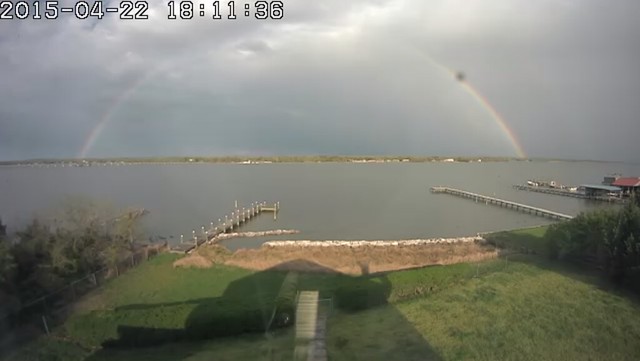
<p>We were even able to capture this amazing rainbow last April. So the camera is also good at making you wish you were there.</p>
<h4>Alarm.com and 2Gig Alarm Monitoring</h4>
<p>The main weakness with all of this monitoring is that it requires both the power to be on and the Internet to be up and running to function. Without both power and internet, we have no idea if the house is even there, and that's sort of a strange thought (the whole if a tree falls in the forest thing). Also, if the internet goes down and we only had the thermostat and video monitoring, we have no good way of knowing if the power is still on and only the Internet is down, or if the whole thing is offline.</p>
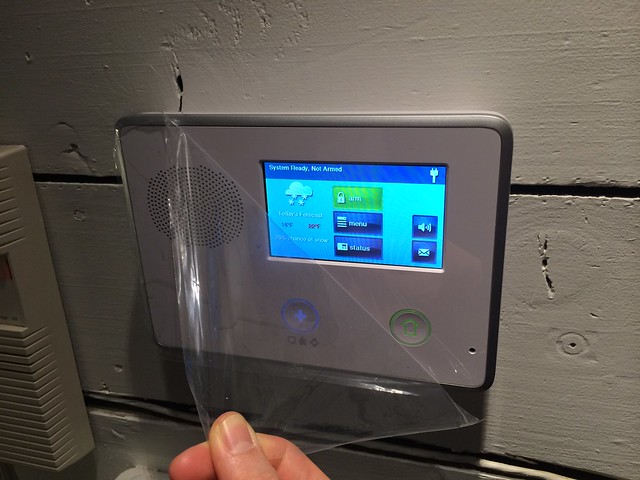
<p>This is where our security system comes into the mix. The system we chose is the 2Gig DIY install system (you can <a href="http://www.oldtownhome.com/security-system/">read more about it on our series regarding its install</a>), and it is a cellular based system with a battery backup. This means that when the Internet goes down and we can't access the camera or thermostat, we can remotely check on our alarm system to see if we can reach it. If we're able to reach the alarm system and there are no errors, I typically start troubleshooting the Internet and possibly remote restarting the cable modem from the Xfinity website.&nbsp;</p>
<p>
</p>
<div class="MediaContainer PhotoContainer"><a href="https://farm4.staticflickr.com/3819/12145515843_9bc937332a_z.jpg" rel="PhotoPopup" popupheight="480" popupwidth="640"><img alt="" src="https://farm4.staticflickr.com/3819/12145515843_9bc937332a.jpg" width="500" height="375" style="border-width: 0px; border-style: solid;" /></a></div>
<p>But if we lose power to the house (which is the real risk of freezing since HVAC will also be off), the alarm system will stay online due to its battery backup, but Alarm.com will also send us a message on our phone and an email letting us know that power was lost to the house. Not only will it alert us, it will also let us know what percentage of customers locally also lost power, so we can understand if it's a localized thing or something affecting many different people throughout the area.</p>
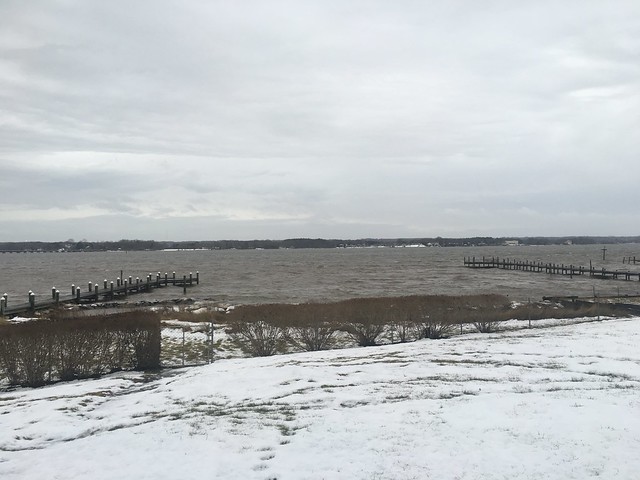
<p>We had this very situation during the blizzard a few weeks ago. When we received the notification that our house had lost power we were able to go on our power company's website to see the status of outages in the area. We were also able to report a failure in our house and sign up for text notifications for updates on the ETA to restore power. With all of these systems working the way they do, we do truly live in an amazingly connected world.</p>
<p>And finally, we added several smoke detectors to the house that are also freeze detectors. If the temperature around these devices starts to get into the danger zone of cold where a freeze could happen, the system will notify us of the issue and the fact that we need to get out to the house and take care of the issues.</p>
<h4>Remote Temperature Monitoring</h4>
<p>And finally, aside from all of the other items, one thing I want to keep an eye on simply for peace of mind is the the temperature in the crawl space. More importantly, I want to watch the temperature in the crawl space near where the water line comes into the house. I'm now completely paranoid that no matter how we pay attention to the house, the systems, the HVAC, the temperature, etc, that our water line is going to freeze while we're away and rupture. This is why I have one of the cameras in the crawlspace pointing back at the main HVAC trunk.&nbsp;</p>
<div class="ToolItem">
<iframe style="width: 120px; height: 240px;" marginwidth="0" marginheight="0" scrolling="no" frameborder="0" src="//ws-na.amazon-adsystem.com/widgets/q?ServiceVersion=20070822&amp;OneJS=1&amp;Operation=GetAdHtml&amp;MarketPlace=US&amp;source=ac&amp;ref=qf_sp_asin_til&amp;ad_type=product_link&amp;tracking_id=oltoho-20&amp;marketplace=amazon&amp;region=US&amp;placement=B00WXIR2TE&amp;asins=B00WXIR2TE&amp;linkId=YOXWNU5F654JBDI2&amp;show_border=false&amp;link_opens_in_new_window=true&amp;price_color=333333&amp;title_color=0066C0&amp;bg_color=FAFAF8">
</iframe>
</div>
<p>I realize this is all pretty much my own paranoia, but I'd rather calm my nerves by having a simple device that keeps track of the current temperature and humidity. Is that so wrong? So I went ahead and bought one of these models from AcuRite.</p>
<p>The cool thing about this thermometer is that it's expandable and I can add devices over time. This means we'll be able to use is to see both indoor and outdoor temperature information and can even use it to track trend information over time. This makes my nerd heart truly smile, and may help us plan for and execute a nice vegetable garden if we ever get to that point.</p>
<p>So there you have it. These three items together give us remote insight into the current status of our house. They help us identify problems before they become big problems, calm our nerves, and give us a bit of peace of mind.</p>
<p>Just this week we had another situation where the various devices proved extremely useful. It seemed I failed to properly lock and latch one of our French doors when we left last weekend. On Tuesday morning we had a pretty good storm kicking up and a gust of wind was able to blow the door open. Due to our security system we received a call that a door had been opened and the alarm was activated. We checked on the cameras in the house and various other security sensors, so we could see that nobody was actually in the house, so either the door sensor had malfunctioned, or I was a doofus and hadn't properly closed the door. By opening the thermostat app we could see that the temperature on the first floor of the house was falling pretty quickly, so it was likely the door was actually open. It was a huge pain to have to drive out to the house when we weren't planning to go (at the crack of dawn before our work day started), but when we got there this is what welcomed us.</p>
<p>
</p>
<div class="MediaContainer PhotoContainer"><a href="https://farm2.staticflickr.com/1606/25069759945_5c3d80f1c2_z.jpg" rel="PhotoPopup" popupheight="640" popupwidth="480"><img alt="" src="https://farm2.staticflickr.com/1606/25069759945_5c3d80f1c2.jpg" width="375" height="500" style="border-width: 0px; border-style: solid;" /></a></div>
<p>The water was really rough and the wind was whipping, so it's no surprise that it blew an incorrectly latched door open.</p>
<p>
</p>
<div class="MediaContainer PhotoContainer"><a href="https://farm2.staticflickr.com/1602/24702113049_5932518058_z.jpg" rel="PhotoPopup" popupheight="480" popupwidth="640"><img alt="" src="https://farm2.staticflickr.com/1602/24702113049_5932518058.jpg" width="500" height="375" style="border-width: 0px; border-style: solid;" /></a></div>
<p>Though it was a pain, we were fortunate to have the house configured to let us know when something like this happened. If we hadn't have been notified, or didn't have a way to figure this out, that door could have remained open until the next time we made it out to the house.</p>
<p>The two lessons I learned are: 1) you can't be too prepared with monitoring; and 2) learn how to lock the door properly.&nbsp;</p>
<p>The end result is that we're in a much better place to proactively monitor our home and react when there's an issue. Last year's big freeze was certainly unfortunate to put it mildly, but we were able to learn a lot from the experience and are now better prepared to prevent something similar from happening again in the future.&nbsp;</p>
<p>Do you have anything in your home that allows you to remotely monitor everything? I'd love to hear about anything we might be missing that we can add to our bag of tricks. There's almost nothing I like more than a well connected home, so I'm all ears.</p><p><a href="https://www.oldtownhome.com/2016/2/19/One-Year-Since-the-Big-Freeze-and-How-Were-Preventing-a-Refreeze/">Read Full Post</a></p>]]></content>
    <category term="Geothermal" />
    <category term="Header Image" />
    <category term="Projects:Hi Tech" />
    <category term="Security System" />
    <category term="Technology" />
    <category term="Water House" />
    <category term="WaterFurnace" />
    <PostImage>https://c2.staticflickr.com/2/1669/25108769266_093a1405a5.jpg</PostImage>
    <media:thumbnail url="https://c2.staticflickr.com/2/1669/25108769266_093a1405a5_t.jpg" />
    <ExtensionElements>
      <Item>PostImage</Item>
      <Item>media:thumbnail</Item>
    </ExtensionElements>
  </entry>
  <entry>
    <guid>4e9413b7-d8d1-4b8f-91e4-34c8f2265b55</guid>
    <id>https://www.oldtownhome.com/2015/6/10/Old-Look-with-a-Modern-Twist---The-LED-Edison-Bulb/</id>
    <title>Old Look with a Modern Twist - The LED Edison Bulb</title>
    <summary type="html"><![CDATA[<p>Historic home renovation of any sort is a delicate balance between old and new. </p><p>Whether you're patching a hole in a 100 plus year old plaster wall or looking for period hardware or accessories that are both functional and appropriate in an old home, you have to weigh the character of the old against the function of the new. This has been true with everything from the advent of plumbing and electricity, to telephones, to modern HVAC, to Internet, etc. With the recent advances in technology related to eco friendly and cost effective alternatives to traditional home elements, this challenge of staying true to your home's roots while still embracing modern conveniences has never been more apparent.</p><p>Recently we discussed the new <a href="http://www.oldtownhome.com/2015/4/30/Classing-Up-the-Joint-with-Some-Barn-Lights/">barn inspired lights we installed at the front door of our new house</a>. We wanted something that looks appropriate and authentic for the home, and I think we achieved our goal. But the exposed bulb also had to look appropriate, otherwise we lose the whole look. </p><p>
</p><div class="MediaContainer PhotoContainer"><a href="https://farm1.staticflickr.com/381/18475304698_fdb4675c7e_z.jpg" rel="PhotoPopup" popupheight="640" popupwidth="480"><img alt="" src="https://farm1.staticflickr.com/381/18475304698_fdb4675c7e.jpg" width="375" height="500" style="border-width: 0px; border-style: solid;"></a></div><p>Initially we chose to use an historic looking <a href="http://www.amazon.com/gp/product/B00RW6TAAQ/ref=as_li_tl?ie=UTF8&amp;camp=1789&amp;creative=9325&amp;creativeASIN=B00RW6TAAQ&amp;linkCode=as2&amp;tag=oltoho-20&amp;linkId=3V6XXCCQ6HQ4GNT3">filament "Edison" style bulb</a><img alt="" src="http://ir-na.amazon-adsystem.com/e/ir?t=oltoho-20&amp;l=as2&amp;o=1&amp;a=B00RW6TAAQ" width="1" height="1" style="border: none !important; margin: 0px !important;"> for the lights. We felt that the look of the bulb was as important as anything, so we were prepared to sacrifice the energy efficiency of a modern CFL or LED bulb for the style and warm light given off by these historically inspired bulbs.</p><p>
</p> <a href="https://www.oldtownhome.com/2015/6/10/Old-Look-with-a-Modern-Twist---The-LED-Edison-Bulb/">more</a>]]></summary>
    <published>2015-06-10T00:51:43.537-04:00</published>
    <updated>2015-06-10T00:51:43.537-04:00</updated>
    <link rel="alternate" href="https://www.oldtownhome.com/2015/6/10/Old-Look-with-a-Modern-Twist---The-LED-Edison-Bulb/" />
    <author>
      <name>Alex</name>
    </author>
    <content type="html"><![CDATA[<p>Historic home renovation of any sort is a delicate balance between old and new. </p>
<p>Whether you're patching a hole in a 100 plus year old plaster wall or looking for period hardware or accessories that are both functional and appropriate in an old home, you have to weigh the character of the old against the function of the new. This has been true with everything from the advent of plumbing and electricity, to telephones, to modern HVAC, to Internet, etc. With the recent advances in technology related to eco friendly and cost effective alternatives to traditional home elements, this challenge of staying true to your home's roots while still embracing modern conveniences has never been more apparent.</p>
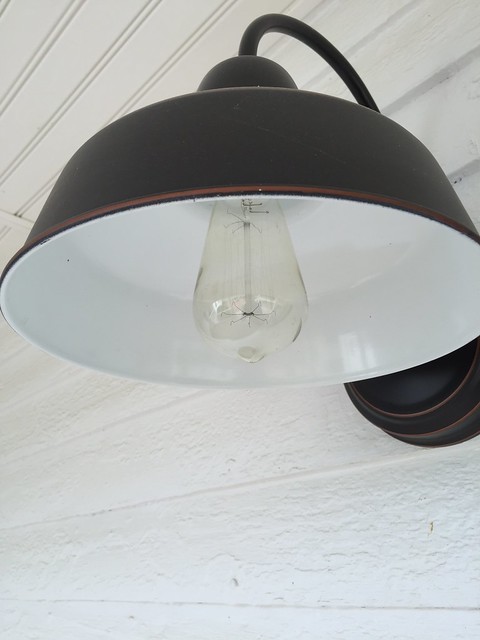
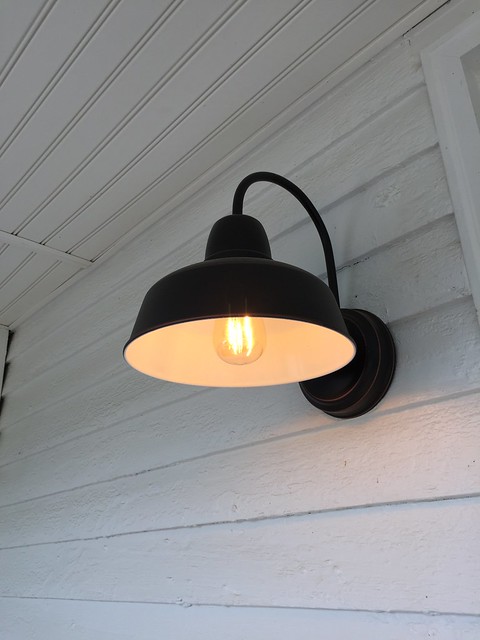
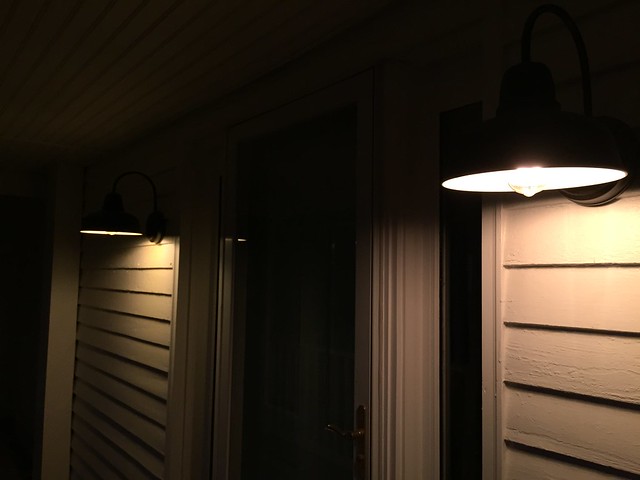
<p>Recently we discussed the new <a href="http://www.oldtownhome.com/2015/4/30/Classing-Up-the-Joint-with-Some-Barn-Lights/">barn inspired lights we installed at the front door of our new house</a>. We wanted something that looks appropriate and authentic for the home, and I think we achieved our goal. But the exposed bulb also had to look appropriate, otherwise we lose the whole look. </p>
<p>
</p>
<div class="MediaContainer PhotoContainer"><a href="https://farm1.staticflickr.com/381/18475304698_fdb4675c7e_z.jpg" rel="PhotoPopup" popupheight="640" popupwidth="480"><img alt="" src="https://farm1.staticflickr.com/381/18475304698_fdb4675c7e.jpg" width="375" height="500" style="border-width: 0px; border-style: solid;"></a></div>
<p>Initially we chose to use an historic looking <a href="http://www.amazon.com/gp/product/B00RW6TAAQ/ref=as_li_tl?ie=UTF8&amp;camp=1789&amp;creative=9325&amp;creativeASIN=B00RW6TAAQ&amp;linkCode=as2&amp;tag=oltoho-20&amp;linkId=3V6XXCCQ6HQ4GNT3">filament "Edison" style bulb</a><img alt="" src="http://ir-na.amazon-adsystem.com/e/ir?t=oltoho-20&amp;l=as2&amp;o=1&amp;a=B00RW6TAAQ" width="1" height="1" style="border: none !important; margin: 0px !important;"> for the lights. We felt that the look of the bulb was as important as anything, so we were prepared to sacrifice the energy efficiency of a modern CFL or LED bulb for the style and warm light given off by these historically inspired bulbs.</p>
<p>
</p>
<div class="MediaContainer PhotoContainer"><a href="https://farm1.staticflickr.com/455/18475344050_655dd064a4_z.jpg" rel="PhotoPopup" popupheight="640" popupwidth="480"><img alt="" src="https://farm1.staticflickr.com/455/18475344050_655dd064a4.jpg" width="375" height="500" style="border-width: 0px; border-style: solid;"></a></div>
<div class="ToolItem">
<iframe style="width: 120px; height: 240px;" marginwidth="0" marginheight="0" scrolling="no" frameborder="0" src="//ws-na.amazon-adsystem.com/widgets/q?ServiceVersion=20070822&amp;OneJS=1&amp;Operation=GetAdHtml&amp;MarketPlace=US&amp;source=ac&amp;ref=qf_sp_asin_til&amp;ad_type=product_link&amp;tracking_id=oltoho-20&amp;marketplace=amazon&amp;region=US&amp;placement=B00QK84H1O&amp;asins=B00QK84H1O&amp;linkId=JVSRQUBYRN6LAGBM&amp;show_border=false&amp;link_opens_in_new_window=true&amp;price_color=333333&amp;title_color=0066C0&amp;bg_color=FAFAF8">
</iframe>
</div>
<p>Begrudgingly accepting of our decision, I soldiered on, until a commenter on our blog post discussing our approach pointed out the availability of LED style filament bulbs. They directed me to the website, <a href="http://www.earthled.com/" target="_blank">EarthLED.com</a>. What I found was a treasure trove of light bulbs that would make the most ardently historic house nerds and eco friendly hipsters swoon with delight. </p>
<p>Their selection of filament style LED bulbs runs the gamut. From classic bulbs to candelabras they have offerings in all shapes and sizes from a huge variety of vendors. I was instantly intrigued and had to give it a shot. We had been running two 40 watt Edison style bulbs in the lights, so I looked for a comparable replacement in both shape, size and equivalent wattage.</p>
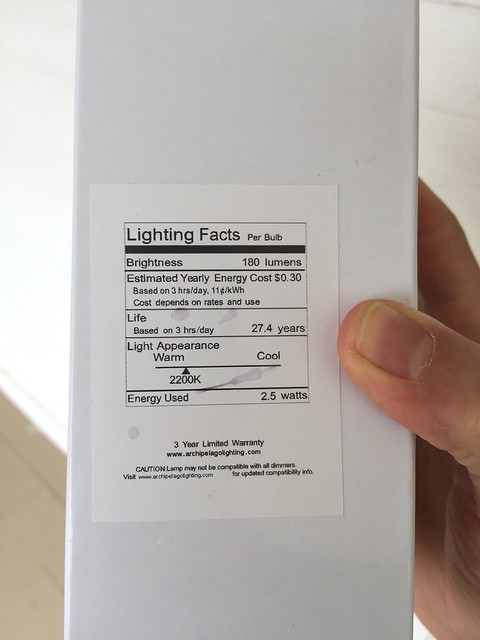
<p>When they arrived I was oddly giddy to try them out. The brand I opted for was from a company called <a href="http://www.archipelagolighting.com/" target="_blank">Archipelago</a> and the box outlined the expected energy usage and life expectancy of the bulb.</p>
<p>
</p>
<div class="MediaContainer PhotoContainer"><a href="https://farm1.staticflickr.com/511/18475300788_f754566fce_z.jpg" rel="PhotoPopup" popupheight="640" popupwidth="480"><img alt="" src="https://farm1.staticflickr.com/511/18475300788_f754566fce.jpg" width="375" height="500" style="border-width: 0px; border-style: solid;"></a></div>
<p>This is an important factor in my decision to purchase these bulbs. These are our outdoor lights and will be on when the sun sets and turned off around midnight, so there will be a good amount of use in these lights, possibly 3-7 hours per day depending on the time of year. As a result, we'll likely see a pretty significant overall reduction in cost, and we also likely won't ever need to replace these bulbs (unless we have the house for 30 plus years).</p>
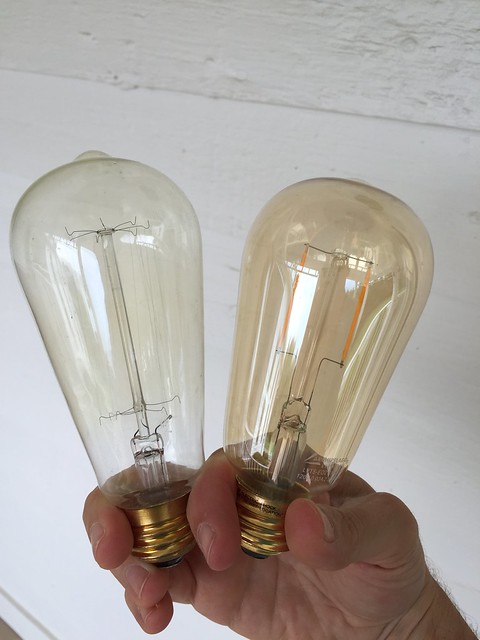
<p>Comparing the two bulbs you can see they are essentially the same. The size and shape are very close, and the "filament" of the LED bulb on the right (the two yellowish strips) look very similar to the real filament of the traditional Edison bulb on the left.</p>
<p>
</p>
<div class="MediaContainer PhotoContainer"><a href="https://farm1.staticflickr.com/516/18475295738_200e6a0f66_z.jpg" rel="PhotoPopup" popupheight="640" popupwidth="480"><img alt="" src="https://farm1.staticflickr.com/516/18475295738_200e6a0f66.jpg" width="375" height="500" style="border-width: 0px; border-style: solid;"></a></div>
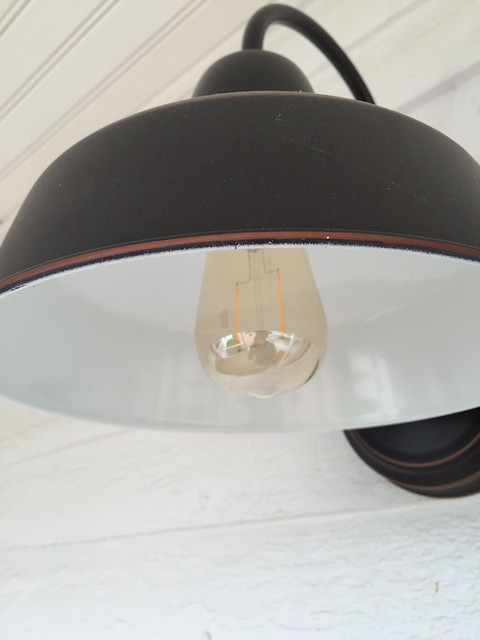
<p>So before we applied any electricity to actually generate light, they looked really good. But what would happen when we actually put them in place and flicked the switch? LED often has a higher than expected color temp, which means cooler light that often appears blue or green, rather than the traditional yellow orange of these old fashioned bulbs.</p>
<p>
</p>
<div class="MediaContainer PhotoContainer"><a href="https://farm1.staticflickr.com/299/18663062575_f8f177310e_z.jpg" rel="PhotoPopup" popupheight="640" popupwidth="480"><img alt="" src="https://farm1.staticflickr.com/299/18663062575_f8f177310e.jpg" width="375" height="500" style="border-width: 0px; border-style: solid;"></a></div>
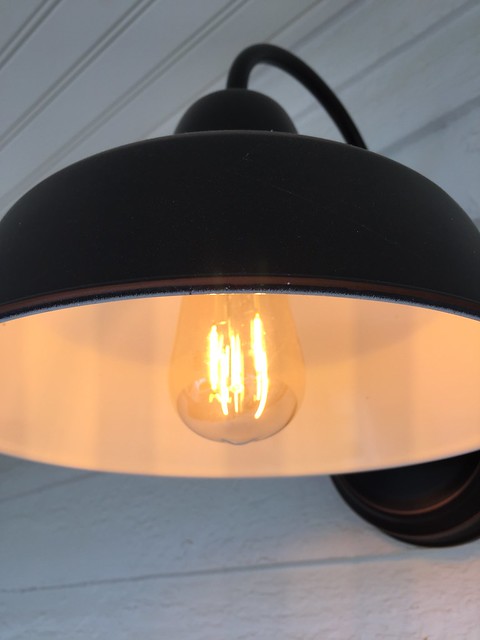
<p>The color temp of these bulbs promised 2200K, very low and warm by bulb standards, and exactly what we wanted, but was it accurate? The moment of truth was upon us. After screwing in the bulb and turning on the lights, I was shocked at just how perfect this light looked. When illuminated the true filament bulb was almost indistinguishable from the LED Edison bulb! </p>
<p>
</p>
<div class="MediaContainer PhotoContainer"><a href="https://farm1.staticflickr.com/350/18665340461_eb0cbb103c_z.jpg" rel="PhotoPopup" popupheight="640" popupwidth="480"><img alt="" src="https://farm1.staticflickr.com/350/18665340461_eb0cbb103c.jpg" width="375" height="500" style="border-width: 0px; border-style: solid;"></a></div>
<p>To say I was happy with the bulb is an understatement. With one of each installed we took a step back and looked at the light and they were pretty much identical. </p>
<p>
</p>
<div class="MediaContainer PhotoContainer"><a href="https://farm1.staticflickr.com/548/18665337291_8a1bfcde16_z.jpg" rel="PhotoPopup" popupheight="640" popupwidth="480"><img alt="" src="https://farm1.staticflickr.com/548/18665337291_8a1bfcde16.jpg" width="375" height="500" style="border-width: 0px; border-style: solid;"></a></div>
<p>As the sun set it kept looking good. I'd even say the LED bulb light is a little warmer in person, which is exactly what we wanted. And to the touch, the LED bulb remains cool, where the filament bulb heats up almost immediately.</p>
<p>
</p>
<div class="MediaContainer PhotoContainer"><a href="https://farm1.staticflickr.com/436/18475323930_76e8637027_z.jpg" rel="PhotoPopup" popupheight="480" popupwidth="640"><img alt="" src="https://farm1.staticflickr.com/436/18475323930_76e8637027.jpg" width="500" height="375" style="border-width: 0px; border-style: solid;"></a></div>
<p>Deep down inside I've got a little hipster in me with my desire to make things look old and salvaged while also embracing the eco-friendly performance improvement that comes with these bulbs. (Hey, my hipster friend even told me that one of his hipster friends sent him a link to my salvaged rim lock restoration post, so I've got some street cred there.) So I'm super excited about using these bulbs in our house and plan to make our whole house as eco friendly and energy efficient as possible...one light bulb at a time.</p>
<p>Have you used any of these bulbs in your projects? If so, do you have a brand that works well for you? If not, do you think you have a place where you'll use them?</p><p><a href="https://www.oldtownhome.com/2015/6/10/Old-Look-with-a-Modern-Twist---The-LED-Edison-Bulb/">Read Full Post</a></p>]]></content>
    <category term="Eco Friendly" />
    <category term="Header Image" />
    <category term="Lighting" />
    <category term="Technology" />
    <category term="Water House" />
    <PostImage>https://farm1.staticflickr.com/372/18636737196_7308ab7b17.jpg</PostImage>
    <media:thumbnail url="https://farm1.staticflickr.com/372/18636737196_7308ab7b17_t.jpg" />
    <ExtensionElements>
      <Item>PostImage</Item>
      <Item>media:thumbnail</Item>
    </ExtensionElements>
  </entry>
  <entry>
    <guid>dc498762-5804-4250-9499-73c1fd66feb3</guid>
    <id>https://www.oldtownhome.com/2015/3/19/How-to-Transfer-Your-Telephone-Land-Line-to-Google-Voice/</id>
    <title>How to Transfer Your Telephone Land Line to Google Voice</title>
    <summary type="html"><![CDATA[<p>As of today we're saving $45 per month by using Google Voice and an OBi VoIP bridge for our home phone! </p><p>If that's not a infomercial sounding beginning to a blog post, I don't know what is. But we are, and it was really easy to setup. If you're like us and you still have a land line, and you've been interested in how you can use Google Voice for your home phone, this post is for you. </p><p>We're always on the lookout for ways to save a few dollars by altering our approach to normal things. And over the past few months we've been trying to take a critical look at our monthly spending in order to figure out which superfluous items can be eliminated from our monthly budget. When looking over our monthly expenses one of the first items we realized as a potentially unnecessary expense was our Comcast cable bill.</p><p>While dropping cable and joining the "cord cutter" movement is a possibility long term, we love TV and I don't see dropping cable anytime soon (though the new Dish Sling option is pretty appealing, and we'll see what Apple might offer in the next few months). However, the bundled services on cable seemed like it might be a good place to find some cost savings. </p><p>More specifically, I was looking at the $45 per month we were spending on our landline turned VoIP home phone service. Yes, that's right, $45 for the series of telemarketing, survey, political ad, occasional Microsoft Scammer, and periodic calls from our parents, grandparents, and other people from at least one generation older than us. In short, we were getting about 2-3 useful calls per month, and we were paying a lot for it. </p><p>I started to do a bit of research into the various options to drop our landline. Many of our friends don't have a landline any longer, and really the only reason we still had it was for our old security system that we replaced last year. So technically, we didn't really *need* our home phone. But our phone number has been our number since we bought our house 12 years ago, and we're sentimental and nostalgic and aren't ready to get rid of it. </p> <a href="https://www.oldtownhome.com/2015/3/19/How-to-Transfer-Your-Telephone-Land-Line-to-Google-Voice/">more</a>]]></summary>
    <published>2015-03-19T11:24:00.000-04:00</published>
    <updated>2015-03-19T11:24:00.000-04:00</updated>
    <link rel="alternate" href="https://www.oldtownhome.com/2015/3/19/How-to-Transfer-Your-Telephone-Land-Line-to-Google-Voice/" />
    <author>
      <name>Alex</name>
    </author>
    <content type="html"><![CDATA[<p>As of today we're saving $45 per month by using Google Voice and an OBi VoIP bridge for our home phone! </p>
<p>If that's not a infomercial sounding beginning to a blog post, I don't know what is. But we are, and it was really easy to setup. If you're like us and you still have a land line, and you've been interested in how you can use Google Voice for your home phone, this post is for you. </p>
<h3>Background</h3>
<p>We're always on the lookout for ways to save a few dollars by altering our approach to normal things. And over the past few months we've been trying to take a critical look at our monthly spending in order to figure out which superfluous items can be eliminated from our monthly budget. When looking over our monthly expenses one of the first items we realized as a potentially unnecessary expense was our Comcast cable bill.</p>
<p>While dropping cable and joining the "cord cutter" movement is a possibility long term, we love TV and I don't see dropping cable anytime soon (though the new Dish Sling option is pretty appealing, and we'll see what Apple might offer in the next few months). However, the bundled services on cable seemed like it might be a good place to find some cost savings. </p>
<p>More specifically, I was looking at the $45 per month we were spending on our landline turned VoIP home phone service. Yes, that's right, $45 for the series of telemarketing, survey, political ad, occasional Microsoft Scammer, and periodic calls from our parents, grandparents, and other people from at least one generation older than us. In short, we were getting about 2-3 useful calls per month, and we were paying a lot for it. </p>
<p>I started to do a bit of research into the various options to drop our landline. Many of our friends don't have a landline any longer, and really the only reason we still had it was for our old security system that we replaced last year. So technically, we didn't really *need* our home phone. But our phone number has been our number since we bought our house 12 years ago, and we're sentimental and nostalgic and aren't ready to get rid of it. </p>
<p>Feeling a bit late to the party on dropping our land line, I started to research our options. Both while looking around online and while speaking with our technology informed friends, one option kept popping up over and over. It involved transferring our landline phone number to Google Voice and then using our existing Internet service for our phone, which includes free calling throughout the United States. </p>
<p><strong>Perfect!</strong></p>
<h3>The Plan </h3>
<p>In order to accomplish this Google Voice and Internet phone plan we'd need to purchase a few things and follow a series of steps. But our goal was simple, spend some money (about $70) and time (about 2-3 hours) up front and save ourselves $45 per month after that. The process was a series of simple steps. </p>
<ol>
    <li>Check Phone Number Transfer Capability</li>
    <li>Purchase pre-paid "burner" phone or sim card and VoIP bridge</li>
    <li>Transfer your number to pre-paid phone</li>
    <li>Transfer your number to Google Voice</li>
    <li>Setup the OBi VoIP device</li>
    <li>Configure Google Voice</li>
</ol>
<h3>Step 1: Check Transfer Capability</h3>
<p><strong>The most important step in this whole process is the check to make sure your number can be ported.</strong></p>
<p>Google Voice can only accept number ports from cell phone carriers, so you have to actually transfer your number twice during this whole process, once to a cell service and then once to Google Voice. So you need to make sure your number can be transferred to both the cell carrier and Google (since some, like Hawaii numbers, just won't work with Google Voice). So you'll want to check your number on the following two pages, one for the cell provider and one for Google Voice. </p>
<p>First let's check to be sure your number can be handled by Google Voice. </p>
<ul>
    <li><a href="https://www.google.com/voice/b/0/porting?pli=1" target="_blank">Google Transfer Check</a></li>
</ul>
<p>If check your number and it says that something like "<strong>Ooops! We currently don't support porting from your carrier. We apologize and are working on adding support for more carriers,</strong>" that's good news. It means that once your number is on a supported carrier, such as AT&amp;T or Sprint, you'll be able to port your number over to Google Voice.</p>
<p>However, if the check says something like "<strong>Ooops! This number appears to be from an area we don't currently support,</strong>" that's bad news. It means that even if you can port your number to a supported carrier, you might not be able to transfer the number into Google Voice. You might still be able to do something that works for you, but Google Voice is not your answer...sorry.</p>
<p>If you're still in the game from the Google check, let's take a look at whether we can port your number to a carrier. </p>
<ul>
    <li><a href="http://www.att.com/shop/wireless/transferyournumber.html" target="_blank">AT&amp;T Number Transfer Check</a></li>
</ul>
<p>If this tells you that your number is "<strong>Eligible for Transfer,</strong>" you're good to go onto the next step. And if you prefer to use a different intermediate carrier, you can check your eligibility on their websites as well.</p>
<p>
</p>
<ul>
    <li><a href="http://shop2.sprint.com/NASApp/onlinestore/en/Action/PECLanding?audience=INDIVIDUAL&amp;language=EN" target="_blank">Sprint Transfer Check</a></li>
    <li><a href="http://www.t-mobile.com/switch/default.aspx" target="_blank">T-Mobile Transfer Check</a></li>
    <li><a href="http://www.verizonwireless.com/b2c/support/switch-to-verizon" target="_blank">Verizon Transfer Check</a></li>
</ul>
<p>If everything looks good and you get a favorable message, from both then you're ready to move full speed ahead. </p>
<h3>Step 2: Purchase a pre-paid "Burner" Phone </h3>
<p>In the vain of Scandal or The Wire, we bought a cheap pre-paid or pay-as-you-go cell phone and plan. The purpose of this phone is to act as a middle man in the transfer process. Since you need a cell carrier to have the number you're moving able to move to Google Voice, we need to first get the number to this "burner" phone. We got a great deal on a $9.99 flip phone that I plan to resell on eBay when we're all said and done, but a sim card will work just as well if you already have an unlocked phone.</p>
<div class="MediaContainer">
<iframe style="width: 120px; height: 240px;" marginwidth="0" marginheight="0" scrolling="no" frameborder="0" src="//ws-na.amazon-adsystem.com/widgets/q?ServiceVersion=20070822&amp;OneJS=1&amp;Operation=GetAdHtml&amp;MarketPlace=US&amp;source=ac&amp;ref=qf_sp_asin_til&amp;ad_type=product_link&amp;tracking_id=oltoho-20&amp;marketplace=amazon&amp;region=US&amp;placement=B004VHI708&amp;asins=B004VHI708&amp;linkId=DDBF6JRVT2CM3U6E&amp;show_border=false&amp;link_opens_in_new_window=true&amp;price_color=333333&amp;title_color=0066C0&amp;bg_color=FAFAF8">
</iframe>
<iframe style="width: 120px; height: 240px;" marginwidth="0" marginheight="0" scrolling="no" frameborder="0" src="//ws-na.amazon-adsystem.com/widgets/q?ServiceVersion=20070822&amp;OneJS=1&amp;Operation=GetAdHtml&amp;MarketPlace=US&amp;source=ac&amp;ref=qf_sp_asin_til&amp;ad_type=product_link&amp;tracking_id=oltoho-20&amp;marketplace=amazon&amp;region=US&amp;placement=B00A7YRIJK&amp;asins=B00A7YRIJK&amp;linkId=RCVQWGEUTFLU7KK5&amp;show_border=false&amp;link_opens_in_new_window=true&amp;price_color=333333&amp;title_color=0066C0&amp;bg_color=FAFAF8">
</iframe>
<iframe style="width: 120px; height: 240px;" marginwidth="0" marginheight="0" scrolling="no" frameborder="0" src="//ws-na.amazon-adsystem.com/widgets/q?ServiceVersion=20070822&amp;OneJS=1&amp;Operation=GetAdHtml&amp;MarketPlace=US&amp;source=ac&amp;ref=qf_sp_asin_til&amp;ad_type=product_link&amp;tracking_id=oltoho-20&amp;marketplace=amazon&amp;region=US&amp;placement=B003X7RY06&amp;asins=B003X7RY06&amp;linkId=QDUH2BT55O7AIOFX&amp;show_border=false&amp;link_opens_in_new_window=true&amp;price_color=333333&amp;title_color=0066C0&amp;bg_color=FAFAF8">
</iframe>
</div>
<p>Just about any cell carrier will work, and really if you already have an unlocked phone laying around, I'd just purchase a SIM card for your favorite carrier so you don't need the whole burner phone, but where's the fun in that? If you are buying a sim card, just be sure it's the right size and type to work with your unlocked phone.</p>
<p class="MediaContainer PhotoContainer"><a href="https://farm8.staticflickr.com/7394/16212175310_68f28f32d2_z.jpg" rel="PhotoPopup" popupheight="640" popupwidth="480"><img alt="" src="https://farm8.staticflickr.com/7394/16212175310_68f28f32d2.jpg" width="375" height="500" style="border-width: 0px; border-style: solid;"></a></p>
<p class="MediaContainer PhotoContainer"><em>I feel cool like Olivia Pope</em></p>
<p>In our case, we're familiar with AT&amp;T and they had a good deal for a $9.99 no commitment GoPhone that would be perfect for our needs. We bought the GoPhone and entered in the information necessary to begin the number porting process. </p>
<p>
</p>
<div class="MediaContainer PhotoContainer"><a href="https://farm8.staticflickr.com/7627/16240996114_151d6f230f_z.jpg" rel="PhotoPopup" popupheight="327" popupwidth="640"><img alt="" src="https://farm8.staticflickr.com/7627/16240996114_151d6f230f.jpg" width="500" height="255" style="border-width: 0px; border-style: solid;"></a></div>
<h3>Step 3: Transfer Number to Pre-Paid Phone</h3>
<p>This is a bit of step 2a since the porting begins during the purchase process for our phone. </p>
<p>To begin porting your number you'll need to provide your phone number to be ported, your information, as well as the PIN code associated with securing your phone number. In our case we had to log into Comcast's website and determine where to find our PIN. Though it's referenced in several locations, on Comcast's website it's hidden in the equivalent to "under a rock in the corner of the forest." If you're a Comcast customer, look for a link on the very right under the My Account section, Users &amp; Preferences tab, that says "View Voice Security PIN."</p>
<div class="MediaContainer PhotoContainer"><a href="https://farm9.staticflickr.com/8676/16862202632_9d1e3ec5db_z.jpg" rel="PhotoPopup" popupheight="390" popupwidth="640"><img alt="" src="https://farm9.staticflickr.com/8676/16862202632_9d1e3ec5db.jpg" width="500" height="305" style="border-width: 0px; border-style: solid;"></a></div>
<p>Once the phone is purchased and number porting has begun, it will take between one and five business days to complete the port. When you receive your phone in the mail it's best to call AT&amp;T to ask for a number port status. If more than five days pass without confirmation the number is returned to your normal phone provider and the port will fail and you'll need to start over. By calling you can make sure the port keeps moving along.</p>
<p>After the port is successful your burner or unlocked phone will be able to make and receive calls from your ported landline number.</p>
<p>In our circumstance I was able to sign up for the GoPhone plan that is a pay as you go $0.10 per minute. I found conflicting information about having to fund the plan ahead of time, but I ultimately found a support person in AT&amp;T who was willing to active the account without adding any funds. </p>
<p>And if TV has taught me anything, after getting the confirmation call on your burner phone that the number port is successful, you should immediately break the phone in half and throw it in the trash so the people who are tracking you can't find you.</p>
<h3>Step 4: Port Your Number to Google Voice</h3>
<p>Once your cell phone has your number, you can immediately begin the porting process over to Google Voice, no need to wait. </p>
<p>The Google Voice process is quite simple. You just fill out all of the info in their number port form. The one thing that got me popped up when I needed to provide my new AT&amp;T GoPhone's account number. AT&amp;T doesn't display your account number anywhere on the website or from the phone, you have to call customer service to get your account number. And before you ask, no, it's not the same as your phone number, it's a separate and distinct account number. But a quick call to AT&amp;T resolved this issue and I was on my way. </p>
<p>
</p>
<div class="MediaContainer PhotoContainer"><a href="https://farm9.staticflickr.com/8593/16243784553_5f6d8c5fba_z.jpg" rel="PhotoPopup" popupheight="323" popupwidth="640"><img alt="" src="https://farm9.staticflickr.com/8593/16243784553_5f6d8c5fba.jpg" width="500" height="252" style="border-width: 0px; border-style: solid;"></a></div>
<p>In order to port your number over to Google Voice you have to pay a one time $20 fee to cover the process. If you're counting along, so far we've spent $29.99 including the burner phone. After filling out the information it will go into a pending state on Google where you'll be able to check the status on the port until it is complete.</p>
<h3>Step 5: Setup the OBi VoIP Bridge</h3>
<p>Okay, at this point you've got your number transfer started and you're waiting the prerequisite business days for the various ports to finish. Now you'll need to purchase an OBi device to support the final transition of your landline to a VoIP service that uses your internet connection and Google Voice.</p>
<div class="MediaContainer">
<iframe style="width: 120px; height: 240px;" marginwidth="0" marginheight="0" scrolling="no" frameborder="0" src="//ws-na.amazon-adsystem.com/widgets/q?ServiceVersion=20070822&amp;OneJS=1&amp;Operation=GetAdHtml&amp;MarketPlace=US&amp;source=ac&amp;ref=qf_sp_asin_til&amp;ad_type=product_link&amp;tracking_id=oltoho-20&amp;marketplace=amazon&amp;region=US&amp;placement=B004LO098O&amp;asins=B004LO098O&amp;linkId=ORW7KGWHPTQMSBQL&amp;show_border=false&amp;link_opens_in_new_window=true&amp;price_color=333333&amp;title_color=0066C0&amp;bg_color=FAFAF8">
</iframe>
<iframe style="width: 120px; height: 240px;" marginwidth="0" marginheight="0" scrolling="no" frameborder="0" src="//ws-na.amazon-adsystem.com/widgets/q?ServiceVersion=20070822&amp;OneJS=1&amp;Operation=GetAdHtml&amp;MarketPlace=US&amp;source=ac&amp;ref=qf_sp_asin_til&amp;ad_type=product_link&amp;tracking_id=oltoho-20&amp;marketplace=amazon&amp;region=US&amp;placement=B00BUV7C9A&amp;asins=B00BUV7C9A&amp;linkId=JMCJ2CGV6U3JDMHW&amp;show_border=false&amp;link_opens_in_new_window=true&amp;price_color=333333&amp;title_color=0066C0&amp;bg_color=FAFAF8">
</iframe>
<iframe style="width: 120px; height: 240px;" marginwidth="0" marginheight="0" scrolling="no" frameborder="0" src="//ws-na.amazon-adsystem.com/widgets/q?ServiceVersion=20070822&amp;OneJS=1&amp;Operation=GetAdHtml&amp;MarketPlace=US&amp;source=ac&amp;ref=qf_sp_asin_til&amp;ad_type=product_link&amp;tracking_id=oltoho-20&amp;marketplace=amazon&amp;region=US&amp;placement=B007D930YO&amp;asins=B007D930YO&amp;linkId=EYT5HLGT2LOVHOYV&amp;show_border=false&amp;link_opens_in_new_window=true&amp;price_color=333333&amp;title_color=0066C0&amp;bg_color=FAFAF8">
</iframe>
</div>
<p>If you do a quick search on Amazon you'll see there are several different VoIP device options from OBi, as well as other brands. Each has a different price point and different set of features, from multiple ports to support for fax machines. After looking over everything we decided we only needed the most basic single port option, the <a href="http://www.amazon.com/gp/product/B004LO098O/ref=as_li_tl?ie=UTF8&amp;camp=1789&amp;creative=9325&amp;creativeASIN=B004LO098O&amp;linkCode=as2&amp;tag=oltoho-20&amp;linkId=KFS5S5M6AEE53QGQ">OBi100 VoIP Bridge</a><img alt="" src="http://ir-na.amazon-adsystem.com/e/ir?t=oltoho-20&amp;l=as2&amp;o=1&amp;a=B004LO098O" width="1" height="1" style="border: none !important; margin: 0px !important;">. It offers a single port for connecting to our phone.</p>
<p>
</p>
<div class="MediaContainer PhotoContainer"><a href="https://farm8.staticflickr.com/7374/16290718199_6091c50875_z.jpg" rel="PhotoPopup" popupheight="480" popupwidth="640"><img alt="" src="https://farm8.staticflickr.com/7374/16290718199_6091c50875.jpg" width="500" height="375" style="border-width: 0px; border-style: solid;"></a></div>
<p>In our case we're able to place it in our basement where all of our phone lines are run and can wire in as many phones as we need to through a split panel. But our situation is unique because of how we've wried up our house. In your situation you'll likely just install it where your main phone line comes into the house, or where your cable modem sits.</p>
<p>
</p>
<div class="MediaContainer PhotoContainer"><a href="https://farm8.staticflickr.com/7322/16291205177_01ff5f1f49_z.jpg" rel="PhotoPopup" popupheight="640" popupwidth="480"><img alt="" src="https://farm8.staticflickr.com/7322/16291205177_01ff5f1f49.jpg" width="375" height="500" style="border-width: 0px; border-style: solid;"></a></div>
<p>However, if you'd like to install the device somewhere other than near your phone line or cable line, you can buy one of the <a href="http://www.amazon.com/gp/product/B00BUV7C9A/ref=as_li_tl?ie=UTF8&amp;camp=1789&amp;creative=9325&amp;creativeASIN=B00BUV7C9A&amp;linkCode=as2&amp;tag=oltoho-20&amp;linkId=MYZMOWLW6BX7ANMF">OBi200</a><img alt="" src="http://ir-na.amazon-adsystem.com/e/ir?t=oltoho-20&amp;l=as2&amp;o=1&amp;a=B00BUV7C9A" width="1" height="1" style="border: none !important; margin: 0px !important;"> or <a href="http://www.amazon.com/gp/product/B007D930YO/ref=as_li_tl?ie=UTF8&amp;camp=1789&amp;creative=9325&amp;creativeASIN=B007D930YO&amp;linkCode=as2&amp;tag=oltoho-20&amp;linkId=ALGYFGD2MG6TFF6Q">OBi202</a><img alt="" src="http://ir-na.amazon-adsystem.com/e/ir?t=oltoho-20&amp;l=as2&amp;o=1&amp;a=B007D930YO" width="1" height="1" style="border: none !important; margin: 0px !important;"> model and actually hook up a small <a href="http://www.amazon.com/gp/product/B007R6F7PS/ref=as_li_tl?ie=UTF8&amp;camp=1789&amp;creative=9325&amp;creativeASIN=B007R6F7PS&amp;linkCode=as2&amp;tag=oltoho-20&amp;linkId=WPQZNNSUEKZZ627R">OBiWiFi Adapter</a><img alt="" src="http://ir-na.amazon-adsystem.com/e/ir?t=oltoho-20&amp;l=as2&amp;o=1&amp;a=B007R6F7PS" width="1" height="1" style="border: none !important; margin: 0px !important;"> into your OBi which allows you to pretty much connect it anywhere in your house. </p>
<p>Regardless of what you choose, you should be able to hook up the OBi into your network and phone line by simply plugging in a few items, and you're well on your way.</p>
<p>
</p>
<div class="MediaContainer PhotoContainer"><a href="https://farm8.staticflickr.com/7394/16477001465_eff11b5a0c_z.jpg" rel="PhotoPopup" popupheight="640" popupwidth="480"><img alt="" src="https://farm8.staticflickr.com/7394/16477001465_eff11b5a0c.jpg" width="375" height="500" style="border-width: 0px; border-style: solid;"></a></div>
<p>Though the cost of the OBi will vary based on the version your purchase, we spent about $40 for it so we're at $69.99, and that's all we'll have to spend.</p>
<h3>Step 6: Setup Google Voice for VoIP</h3>
<p>The final step in the process is the setup of Google Voice to work with the OBi VoIP device. OBi has an excellent guide that walks you through the whole setup process, but it's all done on their OBiTalk.com website. The key component to the configuration is setting up Google Voice as one of your OBi's two lines (the other being an e-911 service I'll mention in the next section).</p>
<p>
</p>
<div class="MediaContainer PhotoContainer"><a href="https://farm8.staticflickr.com/7625/16240998474_ac1cbb0505_z.jpg" rel="PhotoPopup" popupheight="280" popupwidth="640"><img alt="" src="https://farm8.staticflickr.com/7625/16240998474_ac1cbb0505.jpg" width="500" height="219" style="border-width: 0px; border-style: solid;"></a></div>
<p>Other than this basic step, there are a ton of small configuration items you can tweak in your OBi.&nbsp;</p>
<p>
</p>
<div class="MediaContainer PhotoContainer"><a href="https://farm8.staticflickr.com/7601/16863006042_4423ff39ba_z.jpg" rel="PhotoPopup" popupheight="486" popupwidth="640"><img alt="" src="https://farm8.staticflickr.com/7601/16863006042_4423ff39ba.jpg" width="500" height="380" style="border-width: 0px; border-style: solid;"></a></div>
<p>And in case you're wondering, Officer Barbrady is the name I gave my OBi device. All of our home's various network devices are Southpark characters. It's been that way since 2000. And yes, Kenny is a computer that's died many times.</p>
<h3>Conclusion/Considerations</h3>
<p>There are a few things to note about this whole process. While it was all pretty straight forward to accomplish, it did take a few hours of effort in figuring out some of the various oddities. But once it was all setup, it all just worked.</p>
<p>One thing that's really nice about the whole setup is how you can forward your Google voice calls to multiple devices. If someone calls on our home phone number, it rings through to my cell phone, alerts me on my computer, rings on our home phone, and leaves a notification in various places if the call was missed.</p>
<p>While the notifications feel a bit like <a href="http://en.wikipedia.org/wiki/WUPHF.com" target="_blank">WUPHF</a> from The Office at first, Google Voice has a lot of great features to help you streamline the process, including number blocking forwarding options, and built in voicemail. After a little more tinkering we're now to a point where only the numbers that we want to get through actually ring to us.</p>
<p>But what about our old phone account, don't we have to cancel it? In our case, after porting our phone number from our Comcast account, I checked our account a day or two later and our phone service had been automatically cancelled. No need to call and argue about why you're canceling the account or anything, it was great! Not only that, but we got a pro-rated credit since we cancelled in the middle of the billing cycle. Each individual service many be different, so be sure to double check</p>
<p>I have read a few concerns about Google Voice no longer supporting XMPP, the protocol that enables VoIP call forwarding that makes the whole system work, and while they were supposed to drop it in 2012, they reversed their decision and kept it in place with official support for OBi being extended in late 2014. This is ultimately what led me to trust this approach as a long term home phone solution. It's true they could drop it at any time, but it seems unlikely given the adoption rate of users using this same approach. More likely would be the possibility that Google begins charging a small fee to keep the feature up and running on an individual account. I could see an annual charge happening in the future, though nothing has been discussed.</p>
<p>While this is all pretty great, the big disadvantage to this whole approach to home phone is the need for power for your phone to function. If you were using a standard copper land line (not VoIP of any sort) and your power goes out, your corded phone still typically works. But since this requires your internet stay up, which means your cable modem, router, and any other devices remain online, you'll need a battery backup to make sure everything stays up and running during power flickers if you're concerned about that. However, with cell phones available, this likely isn't as big of a deal.</p>
<p>And the final major consideration with this type of number port is 911 service. Since you're no longer using a local phone company or service provider, the 911 routing won't work the same, since your call's point of origin is unknown. The way around this is simple, there are multiple e-911 services for this very scenario. You sign up for the service and pay a small annual fee of $10-$20 and enter your local address information. Then you add the e-911 service to your OBi VoIP bridge and anytime you dial 911 the service will route your call to the correct local 911 dispatch. OBi has actually partnered with a service that comes built into their interface. It's call <a href="http://www.anveo.com/" target="_blank">Anveo</a> and is $15 per year. We went ahead and use it as a service due to the ease of setup and configuration in the device. And at this point, the $15 per year will be our only recurring charges for phone.</p>
<p>So when all was said and done we have unlimited calling within the United States on our original phone number completely free of charge. International calling does require credit in Google Voice but the rates are very reasonable. However, we'll just likely use our cell phone for any international calls. We ended up paying about $70 up front and $15 per year for the whole service, so after using it for just two months we'll already be saving money. And best of all, with Google's integration on everything else I already use (Gmail, Docs, Drive, etc), it feels pretty seamless across all of our stuff.</p>
<p>If your considering the switch to using Google Voice as your new home phone, we hope our experience and guide will be useful in helping you transition. And while there are lots of variables and options out there, this is what has worked well for us. Best of luck and we'd love to hear your experiences or questions if you make the switch.</p><p><a href="https://www.oldtownhome.com/2015/3/19/How-to-Transfer-Your-Telephone-Land-Line-to-Google-Voice/">Read Full Post</a></p>]]></content>
    <category term="Header Image" />
    <category term="Projects:Hi Tech" />
    <category term="Technology" />
    <PostImage>https://farm8.staticflickr.com/7624/16677308008_2d68dc7678.jpg</PostImage>
    <media:thumbnail url="https://farm8.staticflickr.com/7624/16677308008_2d68dc7678_t.jpg" />
    <ExtensionElements>
      <Item>PostImage</Item>
      <Item>media:thumbnail</Item>
    </ExtensionElements>
  </entry>
</feed>