<?xml version="1.0" encoding="utf-8"?>
<feed xmlns="http://www.w3.org/2005/Atom" xmlns:media="http://search.yahoo.com/mrss/">
  <title>Old Town Home Category: 'Sonos'</title>
  <updated>2018-03-29T12:30:00.000-04:00</updated>
  <id>http://www.oldtownhome.com/sonos/index.atom</id>
  <link rel="alternate" href="http://www.oldtownhome.com/sonos/index.atom" />
  <author>
    <name>Alex and Wendy</name>
    <uri>http://www.oldtownhome.com/</uri>
    <email>wendy@oldtownhome.com</email>
  </author>
  <entry>
    <guid>cc2594a4-9d16-4758-a421-3c8776646593</guid>
    <id>https://www.oldtownhome.com/2018/3/29/How-We-Concealed-our-Sonos-Home-Theater-System---Spouse-Approved/</id>
    <title>How We Concealed our Sonos Home Theater System - Spouse Approved</title>
    <summary type="html"><![CDATA[<p>What happens when cutting edge technology is at odds with spousal aesthetic approval? Well...you need to get creative!</p><p>The more ubiquitous modern home technology becomes, we're seeing two very distinct styles and integration approaches from the manufacturers.&nbsp;</p><p>On one hand, as components shrink and become more low profile, some companies are attempting to make their products essentially disappear, designing them to seamlessly blend with their surroundings. Digital assistant microphones/speakers like the Echo Dot and Google Home Mini jump to mind.</p><p>On the other hand, much has been the tendency&nbsp;for cutting edge technology in homes for centuries, these cool modern devices are apparently intended to be put on display (<em>just look at visible heating and plumbing lines in Victorian homes</em>). All too often, the current trend is to embrace the tech in a utility meets modern art hybrid, the design of which is meant to resemble sleek monolithic cubes of digital sculpture on a stage for all to see.</p><p>While this might be the look you're going for in a modern loft space, or geometric minimalist environment, this tends to simply look out of place when it comes to trying to integrate it with an older home. It's tough to mix an upscale and comfortable yet antique aesthetic with a sterile glossy white or black plastic cube.</p><p>But all of this being said, the solution isn't just to forgo the modern tech in your home. I mean, I'm certain there's almost always a solution that can be found. Take for example the Sonos home theater package, with sound bar and subwoofer.</p> <a href="https://www.oldtownhome.com/2018/3/29/How-We-Concealed-our-Sonos-Home-Theater-System---Spouse-Approved/">more</a>]]></summary>
    <published>2018-03-29T12:30:00.000-04:00</published>
    <updated>2018-03-29T12:30:00.000-04:00</updated>
    <link rel="alternate" href="https://www.oldtownhome.com/2018/3/29/How-We-Concealed-our-Sonos-Home-Theater-System---Spouse-Approved/" />
    <author>
      <name>Alex</name>
    </author>
    <content type="html"><![CDATA[<p>What happens when cutting edge technology is at odds with spousal aesthetic approval? Well...you need to get creative!</p>
<p>The more ubiquitous modern home technology becomes, we're seeing two very distinct styles and integration approaches from the manufacturers.&nbsp;</p>
<p>On one hand, as components shrink and become more low profile, some companies are attempting to make their products essentially disappear, designing them to seamlessly blend with their surroundings. Digital assistant microphones/speakers like the Echo Dot and Google Home Mini jump to mind.</p>
<p>On the other hand, much has been the tendency&nbsp;for cutting edge technology in homes for centuries, these cool modern devices are apparently intended to be put on display (<em>just look at visible heating and plumbing lines in Victorian homes</em>). All too often, the current trend is to embrace the tech in a utility meets modern art hybrid, the design of which is meant to resemble sleek monolithic cubes of digital sculpture on a stage for all to see.</p>
<p>While this might be the look you're going for in a modern loft space, or geometric minimalist environment, this tends to simply look out of place when it comes to trying to integrate it with an older home. It's tough to mix an upscale and comfortable yet antique aesthetic with a sterile glossy white or black plastic cube.</p>
<p>But all of this being said, the solution isn't just to forgo the modern tech in your home. I mean, I'm certain there's almost always a solution that can be found. Take for example the Sonos home theater package, with sound bar and subwoofer.</p>
<p>
</p>
<div class="MediaContainer PhotoContainer"><a href="https://farm1.staticflickr.com/873/26192056957_af4098afdd_z.jpg" rel="PhotoPopup" popupheight="480" popupwidth="640"><img alt="" src="https://farm1.staticflickr.com/873/26192056957_af4098afdd.jpg" width="500" height="375" style="border-width: 0px; border-style: solid;" /></a></div>
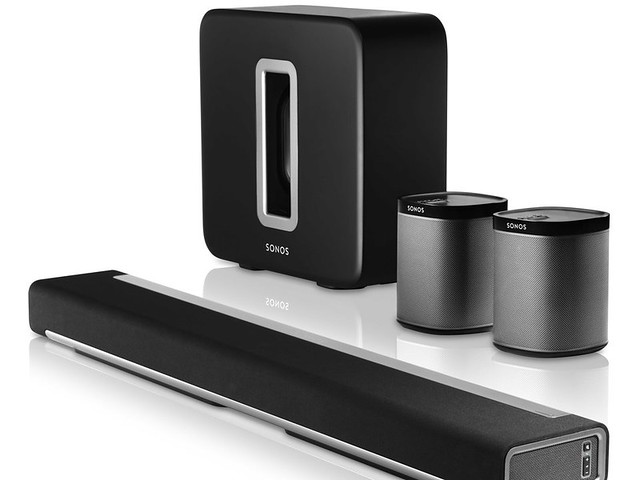
<p>Ever since it debuted, I'd had my heart set on this Sonos home theater package. You could even say that I'm a total fan boy of Sonos and maybe just a tad bit too obsessed. I've been a huge fan of the Sonos streaming music components for years, and the idea of an almost wireless home theater system with 5.1 channels, including a television mounted sound bar and a massive couch shaking subwoofer, that also plays all of our favorite streaming music sources, was exactly what I had long dreamed of.&nbsp;&nbsp;</p>
<p>
</p>
<div class="MediaContainer PhotoContainer"><a href="https://farm8.staticflickr.com/7022/6666943411_a2c16ace9b_z.jpg" rel="PhotoPopup" popupheight="640" popupwidth="640"><img alt="" src="https://farm8.staticflickr.com/7022/6666943411_a2c16ace9b.jpg" width="500" height="500" style="border-width: 0px; border-style: solid;" /></a></div>
<p><em>Now, for all you home theater enthusiasts out there shaking your head and judging me, I know the 5.1 channels is simulated since there are not true front speakers, and I'm okay with that. The Playbar simulates the front speakers with side mounted end firing speakers. It's science, physics to be exact, and it sounds good in the right room. That being said, we're not trying to achieve an IMAX or THX experience in our living room, so you don't need to lecture us on the drawbacks.&nbsp;</em></p>
<p>So after much planning, convincing, and promising that we'd be able to effectively conceal the system, Wendy agreed to go forward with installing the Sonos home theater system in our home. But once I had the buy in,&nbsp; I had to figure out just how we'd make the whole install look acceptable from a skeptical spouse perspective.</p>
<h2>Sonos Sub</h2>
<p>The first component that we needed to figure out was the Sonos Sub. This room shaking sub-woofer packs the punch needed to give some serious oompf to any movie or music we're listening to. But this sub-woofer is also one of those monolithic modern art cubes I mentioned earlier. Not only that, it's also sort of huge.</p>
<p>
</p>
<div class="MediaContainer PhotoContainer"><a href="https://farm4.staticflickr.com/3931/33817420991_4e961ce829_z.jpg" rel="PhotoPopup" popupheight="640" popupwidth="480"><img alt="" src="https://farm4.staticflickr.com/3931/33817420991_4e961ce829.jpg" width="375" height="500" style="border-width: 0px; border-style: solid;" /></a></div>
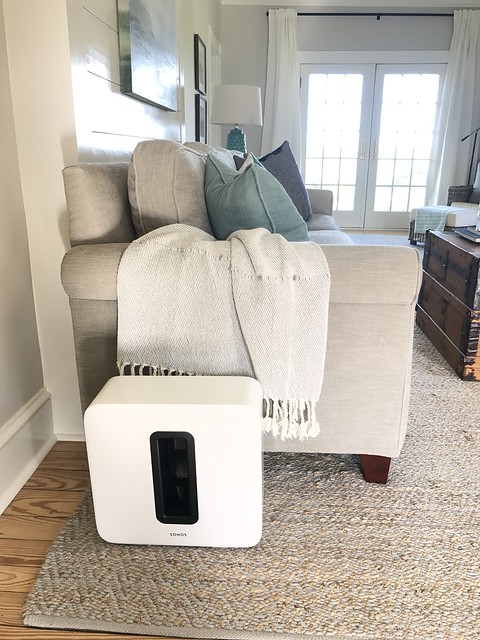
<p>Sonos intends this block to be on full display, like the photo above, looking sleek and awesome in your room. But for us, how sleek and awesome could a plastic cube look next to 100 year old moulding, a grandfather clock, and a wood burning stove? Rather than putting this whole thing on display, we decided to hide it completely.&nbsp;</p>
<p>
</p>
<div class="MediaContainer PhotoContainer"><a href="https://farm1.staticflickr.com/342/32729884485_08306dfd5b_z.jpg" rel="PhotoPopup" popupheight="640" popupwidth="480"><img alt="" src="https://farm1.staticflickr.com/342/32729884485_08306dfd5b.jpg" width="375" height="500" style="border-width: 0px; border-style: solid;" /></a></div>
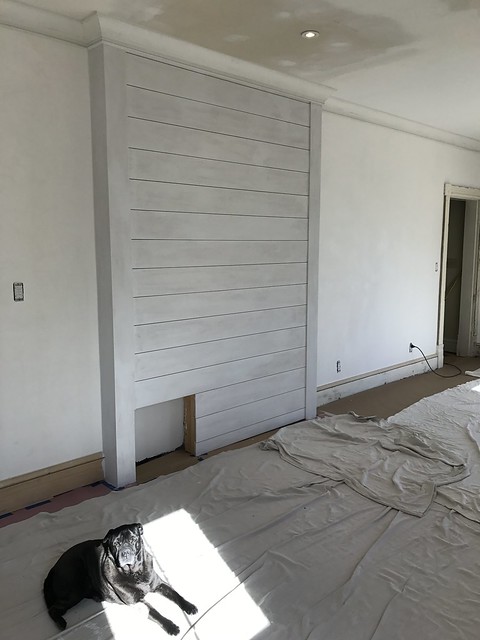
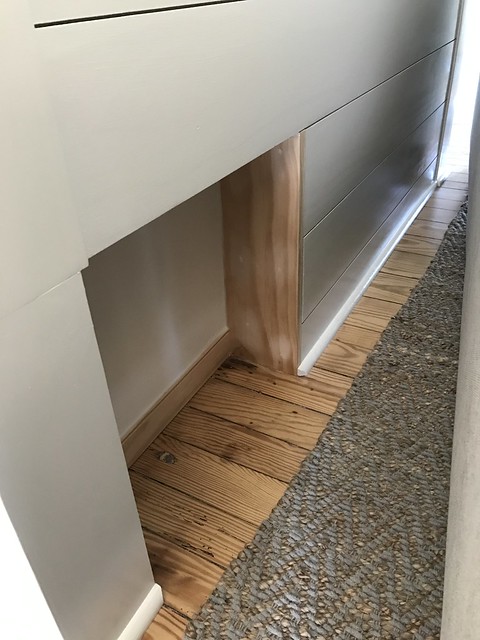
<p>Just behind the couch we built the shiplap wall to hide a support column. This meant that we had a little bit of room to play with, so we took advantage of it by including a perfectly sized little nook into the shiplap wall behind our couch.&nbsp;</p>
<p>
</p>
<div class="MediaContainer PhotoContainer"><a href="https://farm3.staticflickr.com/2898/33134304273_77e3b8f84f_z.jpg" rel="PhotoPopup" popupheight="640" popupwidth="480"><img alt="" src="https://farm3.staticflickr.com/2898/33134304273_77e3b8f84f.jpg" width="375" height="500" style="border-width: 0px; border-style: solid;" /></a></div>
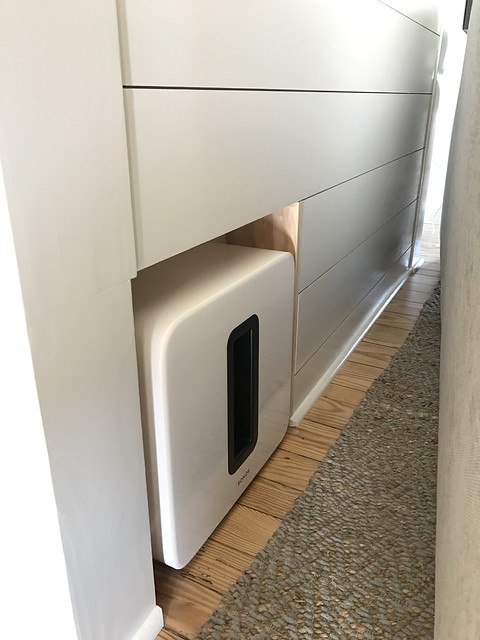
<p>We trimmed it out and ended up with very little room to spare, but the Sonos Sub slid right into place. We included a single outlet within the nook, so there are no wires to be seen anywhere.</p>
<p>
</p>
<div class="MediaContainer PhotoContainer"><a href="https://farm4.staticflickr.com/3776/33947400675_da69138cf6_z.jpg" rel="PhotoPopup" popupheight="640" popupwidth="480"><img alt="" src="https://farm4.staticflickr.com/3776/33947400675_da69138cf6.jpg" width="375" height="500" style="border-width: 0px; border-style: solid;" /></a></div>
<p>As it turns out, this install is pretty much idea. The deep bass fires into the back of the couch and is completely out of view of anyone in the room. Concealed and completely acceptable as far as Wendy is concerned. And the performance of the sub woofer behind the couch is even better than I initially expected. This little setup and really quite the win win!</p>
<h2>Sonos Playbar</h2>
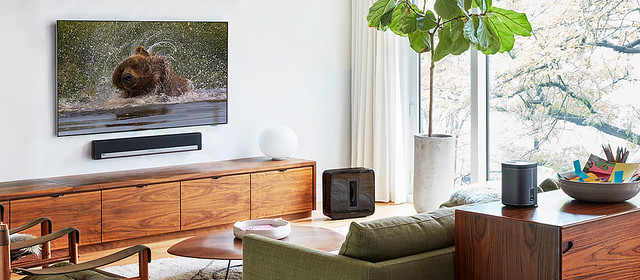
<p>While the design and intent of a subwoofer lends itself to being relatively easy to completely conceal, the Playbar is a different matter. This speaker is responsible for the primary sound from the television, and is meant to deliver the dialog from the television in a manner that is supposed to seem as if it's coming directly from the TV itself. There are plenty of examples online for how you can mount a Sonos Playbar, but pretty much all of them do not meet the concealment requirements of my lovely wife. Here's a beautiful example of putting the Playbar on display...and it would look rather terrible in our home.</p>
<p>
</p>
<div class="MediaContainer PhotoContainer"><a href="https://farm1.staticflickr.com/887/41063588901_275532428c_z.jpg" rel="PhotoPopup" popupheight="280" popupwidth="640"><img alt="" src="https://farm1.staticflickr.com/887/41063588901_275532428c.jpg" width="500" height="219" style="border-width: 0px; border-style: solid;" /></a><br />
<em>Photo Credit: Sonos.com</em></div>
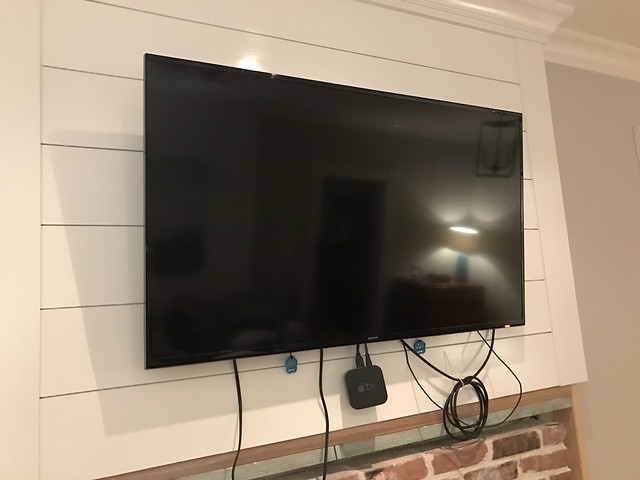
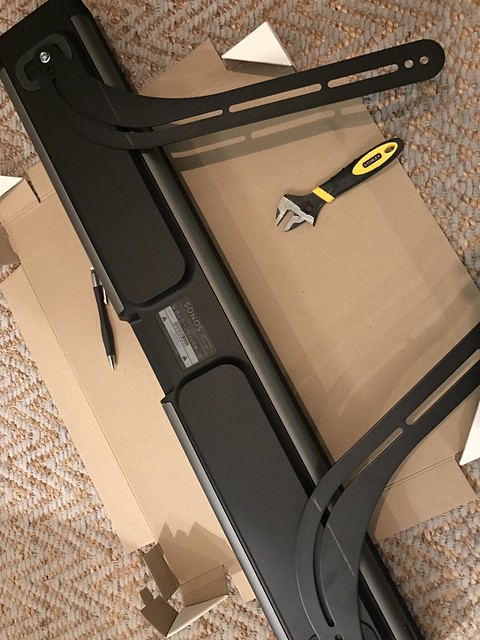
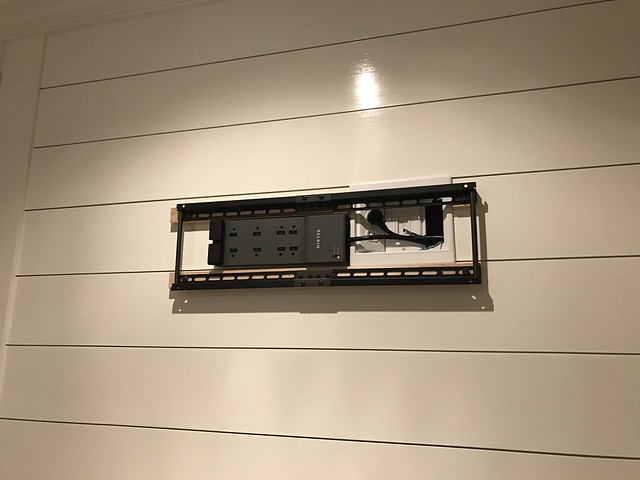
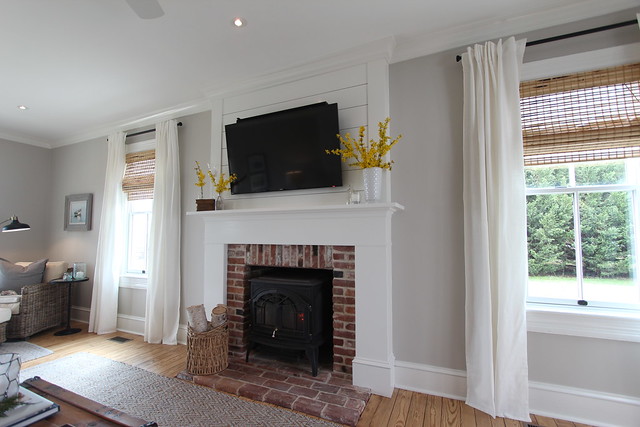
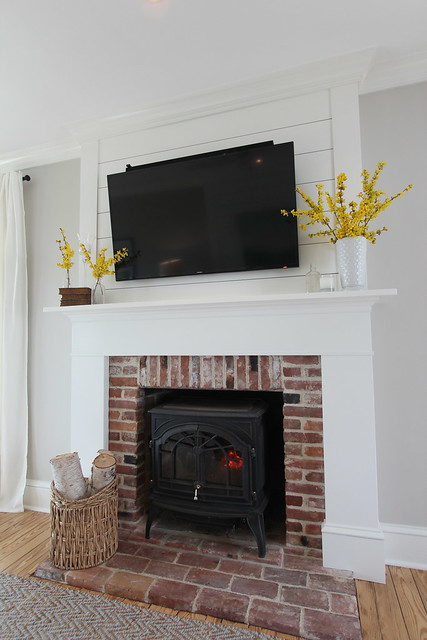
<p>When it came to our Playbar, it all started with my original intent (completely in my head) to mount it like the photo above, just below our television hanging above our fireplace mantel. The planning for this television hanging took a fair amount of time. We didn't want any wires or components visible, so our goal was to conceal everything behind the television.&nbsp;</p>
<p>
</p>
<div class="MediaContainer PhotoContainer"><a href="https://farm3.staticflickr.com/2859/33024923851_08f36bb48c_z.jpg" rel="PhotoPopup" popupheight="480" popupwidth="640"><img alt="" src="https://farm3.staticflickr.com/2859/33024923851_08f36bb48c.jpg" width="500" height="375" style="border-width: 0px; border-style: solid;" /></a></div>
<p>Before I could even put the Playbar on the mounting bracket on the TV, Wendy took one look at the "monstrosity" and slowly shook her head, giving me a firm and decidedly disapproving, "nuh-uh, try again." After I held it in place for a minute I think she said something along the lines of "NO WAY ARE YOU HANGING THAT BIG BLACK BOX BELOW OR EVEN ABOVE THE TV!!!"</p>
<p>
</p>
<div class="MediaContainer PhotoContainer"><a href="https://farm3.staticflickr.com/2862/33152101765_617f9029ba_z.jpg" rel="PhotoPopup" popupheight="640" popupwidth="480"><img alt="" src="https://farm3.staticflickr.com/2862/33152101765_617f9029ba.jpg" width="375" height="500" style="border-width: 0px; border-style: solid;" /></a></div>
<p>I was blinded by the technology, but she was absolutely right. We had a hard enough time coming to grips with hanging the TV above the mantel and making it an unfortunate focal point in the room, but adding a large black cube either below or above the TV was simply not acceptable. Our TV is 46", and this Playbar speaker is only slightly narrower. The low profile bezel of the TV is an attempt to minimize its impact as much as possible, so adding big 6" protrusion was borderline offensive. Ultimately, I had to go back to the drawing board.</p>
<p>As it turns out, given the height we mounted the TV, the optimal viewing angle requires the television to be tilted down a bit toward the couch/viewer. This gave me an idea. To allow a little extra tilt I ended up placing the television mount on two small strips of wood to essentially fur out the mount by 3/4".</p>
<p>
</p>
<div class="MediaContainer PhotoContainer"><a href="https://farm1.staticflickr.com/640/32306671314_48d8087cf7_z.jpg" rel="PhotoPopup" popupheight="480" popupwidth="640"><img alt="" src="https://farm1.staticflickr.com/640/32306671314_48d8087cf7.jpg" width="500" height="375" style="border-width: 0px; border-style: solid;" /></a></div>
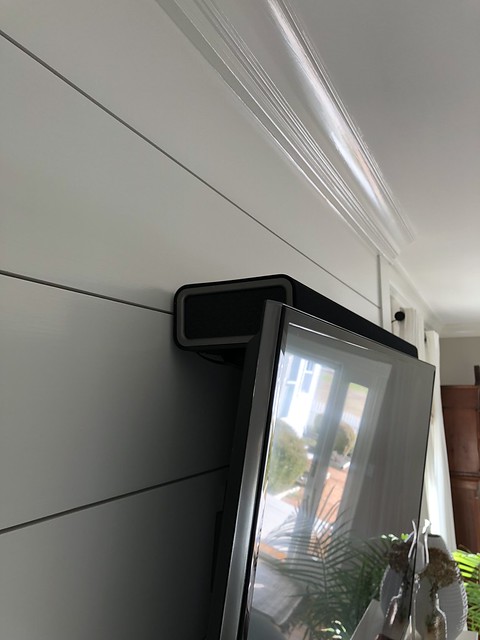
<p>This not only allowed the television to tilt down the necessary amount, but it also increased the gap between the top of the TV and the wall just enough! This was my true light bulb moment. Even though Sonos doesn't recommend mounting the Playbar in the manner that we're using it, it was either this way or no way. When it comes down to it, I'll take "slightly less than optimal" over "not at all."</p>
<p>
</p>
<div class="MediaContainer PhotoContainer"><a href="https://farm3.staticflickr.com/2866/32699236824_f89a392d0c_z.jpg" rel="PhotoPopup" popupheight="427" popupwidth="640"><img alt="" src="https://farm3.staticflickr.com/2866/32699236824_f89a392d0c.jpg" width="500" height="333" style="border-width: 0px; border-style: solid;" /></a></div>
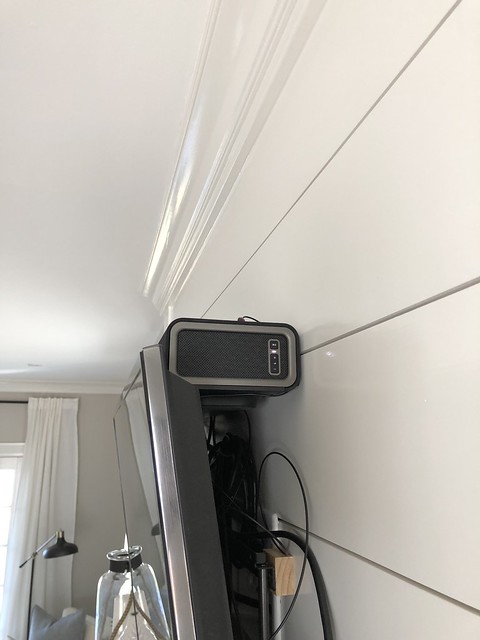
<p>I was able to turn the Sonos Playbar on it's back and slide it in above the television. Similar to laying the Playbar flat on the mantel below the TV (another non-starter for Wendy), the Playbar now sits partially concealed behind the top of the TV. Only about an inch and a half of the Playbar is visible and when you're seated you can barely even see it.</p>
<p>
</p>
<div class="MediaContainer PhotoContainer"><a href="https://farm5.staticflickr.com/4794/38923123450_818106a3f9_z.jpg" rel="PhotoPopup" popupheight="640" popupwidth="480"><img alt="" src="https://farm5.staticflickr.com/4794/38923123450_818106a3f9.jpg" width="375" height="500" style="border-width: 0px; border-style: solid;" /></a></div>
<p>But the real test is in the sound. I was preparing myself to be disgusted by a muffled and partially blocked center channel, obscured by the television. But to be completely honest, neither of us can tell a difference between the Playbar mounted in this manner compared to how it sounded when mounted on an approved bracket based on Sonos guidance above the TV.</p>
<p>
</p>
<div class="MediaContainer PhotoContainer"><a href="https://farm5.staticflickr.com/4784/25862019537_dbebd2d216_z.jpg" rel="PhotoPopup" popupheight="640" popupwidth="480"><img alt="" src="https://farm5.staticflickr.com/4784/25862019537_dbebd2d216.jpg" width="375" height="500" style="border-width: 0px; border-style: solid;" /></a></div>
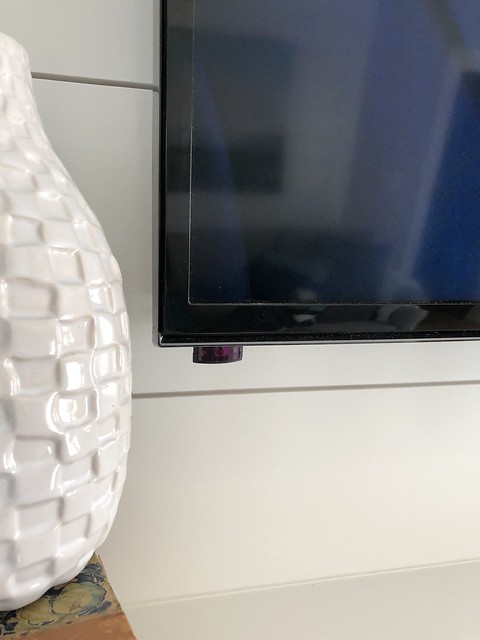
<p>The only drawback of this configuration is that the IR receiver on the speaker is blocked by the TV, so volume control doesn't work out of the box with the Apple TV remote. We were able to resolve this issue with a simple IR repeater that we mounted inconspicuously on the bottom left of the TV bezel. The IR repeater's other end just mounts to the top of the Playbar and the problem was solved.</p>
<p>
</p>
<div class="MediaContainer PhotoContainer"><a href="https://farm5.staticflickr.com/4783/40733275621_902dd7751c_z.jpg" rel="PhotoPopup" popupheight="640" popupwidth="480"><img alt="" src="https://farm5.staticflickr.com/4783/40733275621_902dd7751c.jpg" width="375" height="500" style="border-width: 0px; border-style: solid;" /></a></div>
<p>With everything in place, we added two Play One speakers for surround sound on the ground behind either side of the couch and our Sonos home theater setup is complete and sounding great.&nbsp;</p>
<p>
</p>
<div class="MediaContainer PhotoContainer"><a href="https://farm3.staticflickr.com/2901/33543071775_51dd910b56_z.jpg" rel="PhotoPopup" popupheight="640" popupwidth="427"><img alt="" src="https://farm3.staticflickr.com/2901/33543071775_51dd910b56.jpg" width="333" height="500" style="border-width: 0px; border-style: solid;" /></a></div>
<p>This is a case where a little creativity and an attempt to break from manufacturer guidance on optimal setup allowed us to solve our problems with aesthetics. I absolutely love the Sonos system as a whole, and a wireless 5.1 channel home theater (sure, it's simulated 5.1) that also streams our favorite music and synchronizes with music throughout the house is pretty great.&nbsp;</p>
<div class="MediaContainer">
<iframe style="width: 120px; height: 240px;" marginwidth="0" marginheight="0" scrolling="no" frameborder="0" src="//ws-na.amazon-adsystem.com/widgets/q?ServiceVersion=20070822&amp;OneJS=1&amp;Operation=GetAdHtml&amp;MarketPlace=US&amp;source=ac&amp;ref=qf_sp_asin_til&amp;ad_type=product_link&amp;tracking_id=oltoho-20&amp;marketplace=amazon&amp;region=US&amp;placement=B00AEMGGU2&amp;asins=B00AEMGGU2&amp;linkId=c42f8c8d267739501634ae9c41f4a5d1&amp;show_border=false&amp;link_opens_in_new_window=true&amp;price_color=333333&amp;title_color=0066c0&amp;bg_color=fafaf8">
</iframe>
<iframe style="width: 120px; height: 240px;" marginwidth="0" marginheight="0" scrolling="no" frameborder="0" src="//ws-na.amazon-adsystem.com/widgets/q?ServiceVersion=20070822&amp;OneJS=1&amp;Operation=GetAdHtml&amp;MarketPlace=US&amp;source=ac&amp;ref=qf_sp_asin_til&amp;ad_type=product_link&amp;tracking_id=oltoho-20&amp;marketplace=amazon&amp;region=US&amp;placement=B01HL8KX64&amp;asins=B01HL8KX64&amp;linkId=1b7c449e8cd99e44087eda9d48e283f6&amp;show_border=false&amp;link_opens_in_new_window=true&amp;price_color=333333&amp;title_color=0066c0&amp;bg_color=fafaf8">
</iframe>
<iframe style="width: 120px; height: 240px;" marginwidth="0" marginheight="0" scrolling="no" frameborder="0" src="//ws-na.amazon-adsystem.com/widgets/q?ServiceVersion=20070822&amp;OneJS=1&amp;Operation=GetAdHtml&amp;MarketPlace=US&amp;source=ac&amp;ref=qf_sp_asin_til&amp;ad_type=product_link&amp;tracking_id=oltoho-20&amp;marketplace=amazon&amp;region=US&amp;placement=B077GK3TTQ&amp;asins=B077GK3TTQ&amp;linkId=83a1bd92ed52c88eace6f1091616f887&amp;show_border=false&amp;link_opens_in_new_window=true&amp;price_color=333333&amp;title_color=0066c0&amp;bg_color=fafaf8">
</iframe>
</div>
<p>If you're considering the Sonos home theater system but are worried about how it will look when fully mounted and installed, rest assured that we were able to make it work for our purposes with only minor alterations. And in our case, it still sounds absolutely excellent. Personally, I think my greatest happiness in this outcome is that we were both able to achieve our independent goals on this project. I got to install the home theater package I had my technology nerd heart set on for several years, and Wendy isn't staring at a giant set of plastic cubes strategically placed around the room.</p>
<p>What do you think? Is this an aesthetically pleasing approach to integrating technology in our older home? Or are you getting a twitch simply by seeing the television mounted prominently above the mantel? Have you had any of these form over function style debates with your partner, only to realize there's a nice form meets function middle ground of blissful coexistence? Would love to hear your experiences.&nbsp;</p><p><a href="https://www.oldtownhome.com/2018/3/29/How-We-Concealed-our-Sonos-Home-Theater-System---Spouse-Approved/">Read Full Post</a></p>]]></content>
    <category term="Header Image" />
    <category term="Projects:Hi Tech" />
    <category term="Sonos" />
    <category term="Technology" />
    <PostImage>https://c1.staticflickr.com/1/818/41086858811_d8b32c2901_b.jpg</PostImage>
    <media:thumbnail url="https://c1.staticflickr.com/1/818/41086858811_d8b32c2901_t.jpg" />
    <ExtensionElements>
      <Item>PostImage</Item>
      <Item>media:thumbnail</Item>
    </ExtensionElements>
  </entry>
  <entry>
    <guid>f4269544-330d-4a80-8bc0-23fdbc6ee0d3</guid>
    <id>https://www.oldtownhome.com/2012/1/9/Helping-Out-a-Neighbor-in-Audio-Distress---With-Sonos-Sound-Tech/</id>
    <title>Helping Out a Neighbor in (Audio) Distress - With Sonos Sound Tech</title>
    <summary type="html"><![CDATA[<p>About two years ago Wendy and I hosted a <a href="http://www.oldtownhome.com/2011/10/12/Its-a-Halloween-Par-tay/index.aspx">Halloween party</a> for our neighborhood. Not only did it mark a celebration of our favorite holiday, but it was also one of the first times many neighbors had seen the changes we had been steadily making to our home over the years.</p>
<p>Many were familiar with the <a href="http://www.oldtownhome.com/2011/4/25/Lets-Start-at-the-Very-Beginning/index.aspx">dirty, off white, and slightly rundown version of our house</a> they had seen when it was listed for sale in 2002 before we swooped in. (Everyone loves a good open house.) The party served as our mini reveal from all of our efforts, and we had a wonderful and very positive reponse to everything we had accomplished. The funny thing was that overwhelmingly one of the features people seemed to love and ask the most about was our <a href="http://www.oldtownhome.com/2011/7/21/Wired-for-Sound---Whole-Historic-House-Audio/">Whole House Audio solution</a>. One friend and neighbor, Sherry, liked it so much that she wanted to talk about how she could accomplish something similar in her house.</p>
<p>Shorty after the party we got together with Sherry to discuss details of the system, what she wanted out of it, and what she currently had. At the time there wasn't much on the market that didn't require a pretty major effort with lots of construction, so we put the idea on the back burner. </p>
<p>Fast forward to present day...yes, two years later. (Again, I'm slow.) I had not forgotten our conversations with Sherry and decided to put together a plan for how we could make music throughout her house a reality.</p>
<p>With the introduction of the iPad (and other tablets), the rich set of apps in the app store and market places, advancement in technology and availability of Internet streaming music services, and wireless capabilities, it was finally time to get Sherry's system up and running.</p>
<p>Let me first say that Sherry's house is absolutely amazing. I'm not kidding and I really can't oversell this. If we could walk around Old Town and choose any one house to live the rest of our lives in, Sherry's home may very well be it. It was built between the late 18th century (the original rear flounder section) and 1810 (the three story front section). It is large enough to comfortably fit almost any size family, but it isn't overwhelming in its size. It has a rich history, a great flow, wonderful original details throughout, an amazing yard, and a garage. It's one of those houses in Old Town where you just say, "Wow!"</p>
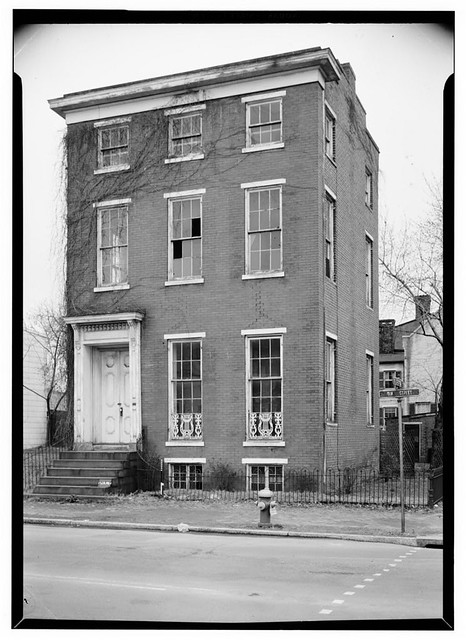
<p>Here's a photo of her house circa 1933.</p>
<p></p> <a href="https://www.oldtownhome.com/2012/1/9/Helping-Out-a-Neighbor-in-Audio-Distress---With-Sonos-Sound-Tech/">more</a>]]></summary>
    <published>2012-01-09T10:30:00.000-05:00</published>
    <updated>2012-01-09T10:30:00.000-05:00</updated>
    <link rel="alternate" href="https://www.oldtownhome.com/2012/1/9/Helping-Out-a-Neighbor-in-Audio-Distress---With-Sonos-Sound-Tech/" />
    <author>
      <name>Alex</name>
    </author>
    <content type="html"><![CDATA[<p>About two years ago Wendy and I hosted a <a href="http://www.oldtownhome.com/2011/10/12/Its-a-Halloween-Par-tay/index.aspx">Halloween party</a> for our neighborhood. Not only did it mark a celebration of our favorite holiday, but it was also one of the first times many neighbors had seen the changes we had been steadily making to our home over the years.</p>
<p>Many were familiar with the <a href="http://www.oldtownhome.com/2011/4/25/Lets-Start-at-the-Very-Beginning/index.aspx">dirty, off white, and slightly rundown version of our house</a> they had seen when it was listed for sale in 2002 before we swooped in. (Everyone loves a good open house.) The party served as our mini reveal from all of our efforts, and we had a wonderful and very positive reponse to everything we had accomplished. The funny thing was that overwhelmingly one of the features people seemed to love and ask the most about was our <a href="http://www.oldtownhome.com/2011/7/21/Wired-for-Sound---Whole-Historic-House-Audio/">Whole House Audio solution</a>. One friend and neighbor, Sherry, liked it so much that she wanted to talk about how she could accomplish something similar in her house.</p>
<p>Shorty after the party we got together with Sherry to discuss details of the system, what she wanted out of it, and what she currently had. At the time there wasn't much on the market that didn't require a pretty major effort with lots of construction, so we put the idea on the back burner. </p>
<p>Fast forward to present day...yes, two years later. (Again, I'm slow.) I had not forgotten our conversations with Sherry and decided to put together a plan for how we could make music throughout her house a reality.</p>
<p>With the introduction of the iPad (and other tablets), the rich set of apps in the app store and market places, advancement in technology and availability of Internet streaming music services, and wireless capabilities, it was finally time to get Sherry's system up and running.</p>
<p>Let me first say that Sherry's house is absolutely amazing. I'm not kidding and I really can't oversell this. If we could walk around Old Town and choose any one house to live the rest of our lives in, Sherry's home may very well be it. It was built between the late 18th century (the original rear flounder section) and 1810 (the three story front section). It is large enough to comfortably fit almost any size family, but it isn't overwhelming in its size. It has a rich history, a great flow, wonderful original details throughout, an amazing yard, and a garage. It's one of those houses in Old Town where you just say, "Wow!"</p>
<p>Here's a photo of her house circa 1933.</p>
<p></p>
<div class="MediaContainer PhotoContainer"><a href="http://farm8.staticflickr.com/7003/6487824965_cbc5618301_z.jpg" rel="PhotoPopup" popupheight="640" popupwidth="466"><img alt="" src="https://farm8.staticflickr.com/7003/6487824965_cbc5618301.jpg" width="364" height="500" style="border-width: 0px;border-style: solid;"></a></div>
<p>And here it is today.</p>
<p>
</p>
<div class="MediaContainer PhotoContainer"><a href="http://farm8.staticflickr.com/7015/6632319733_7d204af70f_z.jpg" rel="PhotoPopup" popupheight="640" popupwidth="480"><img alt="" src="https://farm8.staticflickr.com/7015/6632319733_7d204af70f.jpg" width="375" height="500" style="border-width: 0px;border-style: solid;"></a></div>
<p>I was very excited to bring this 18th century home into the 21st century with audio in every room like we had our home, but don't forget, in our house we've been renovating for years. We had been running speaker and network cabling for the first several years of the renovation in anticipation of an audio system. Sherry's house is not constantly in the midst of a major renovation, doesn't have the necessary wiring all over the place, and she would like to get the project done sometime before it becomes a 22nd century idea. Luckily, I had a plan.</p>
<p>I recently<a href="http://oldtownhome.com/2011/9/22/Sonos-Zoneplayer-90-A-Little-Awesome-Sauce-for-our-Whole-House-Audio/index.aspx"> installed a Sonos Connect (formerly ZonePlayer90) to work with our Nuvo Essentia E6G system</a> and have absolutely loved how well it works. Pandora, Spotify, IHeartRadio, etc. all played from the convenience of an iPhone or iPod touch controller can't be beat. I liked the Sonos product that I purchased so much that I recommended Sherry go the Sonos route for her whole system.</p>
<p>We sat down with Sherry one evening to discuss the plan and gather her basic needs and requirements. Sherry's main interest was to start with music in the dining and living rooms. Beyond this she wanted to be sure the system could be expanded without significant issue, was easy to use, and could leverage her existing mp3 music catalog.</p>
<p>Based on her requirementsI I forumlated a few potential scenarios for Sherry to choose from. Each plan had its own pros and cons related to price, features, and what to use as a controller, but Sherry is a decisive person so the selection process was easy.</p>
<p>I proposed a range of systems that would either leverage an existing stereo and speakers that Sherry already had, or would utilize the Sonos Play 3 or 5 all in one devices (basically stereo and speaker combos). We settled on a two zone system with a Sonos Connect in the dining room that could work with existing speakers and stereo, and a Sonos Connect:Amp in the living room that could power a set of larger speakers that Sherry already owned. We would also need a Sonos Bridge that would install where the Internet came into the house at her cable modem.</p>
<div class="MediaContainer">
<div style="display: inline-block;">
<a href="http://www.dpbolvw.net/click-5579168-10816427?url=http%3A%2F%2Fsonos.com%2Fshop%2Fproducts%2Fconnectamp&amp;cjsku=ZP120US1" target="_blank">
<img alt="" src="http://sonos.com/shop/i/products/connectamp.angle.png" width="150" height="150" style="border-width: 0px;border-style: solid;">
<br>
Sonos Connect:AMP<br>
Buy From Sonos</a><img alt="" src="http://www.ftjcfx.com/image-5579168-10816427" width="1" height="1" style="border-width: 0px;border-style: solid;">
</div>
<div style="display: inline-block;">
<a href="http://www.jdoqocy.com/click-5579168-10816427?url=http%3A%2F%2Fsonos.com%2Fshop%2Fproducts%2Fconnect&amp;cjsku=ZP090US1" target="_blank">
<img alt="" src="http://sonos.com/shop/i/products/connect.angle.png" width="150" height="150" style="border-width: 0px;border-style: solid;">
<br>
Sonos Connect<br>
Buy From Sonos</a><img alt="" src="http://www.ftjcfx.com/image-5579168-10816427" width="1" height="1" style="border-width: 0px;border-style: solid;">
</div>
<div style="display: inline-block;">
<a href="http://www.kqzyfj.com/click-5579168-10816427?url=http%3A%2F%2Fsonos.com%2Fshop%2Fproducts%2Fbridge%2F&amp;cjsku=BR100US1" target="_blank">
<img alt="" src="http://sonos.com/shop/i/products/bridge.angle.png" width="150" height="150" style="border-width: 0px;border-style: solid;"><br>
Sonos Bridge<br>
Buy From Sonos</a><img alt="" src="http://www.tqlkg.com/image-5579168-10816427" width="1" height="1" style="border-width: 0px;border-style: solid;">
</div>
</div>
<p>With the system defined we had to figure out what to use as a controller for the whole thing. I suggested four options.</p>
<ul>
    <li>An iPod Touch</li>
    <li>An iPad</li>
    <li>An existing Android device</li>
    <li>A laptop or desktop computer</li>
</ul>
<p>Each controller solution has the ability to run a native Sonos app to operate all aspects of the system. The packaged software has an interface similar to iTunes and allows independent control of each zone, including volume.</p>
<p>Sonos does offer a standalone controller for the system that is a color touch screen, but at $350 it just seems like a lot to pay for not a lot of functionality. Buying an entry level iPod Touch will provide better overall function and will cost you about $150 less. It's a no brainier.</p>
<p>When I presented the options to Sherry, she liked the idea of the iPad. She had been looking for a bit of an excuse to buy one, and this was it. So we figured out all of the specs and ordered everything that night. We also opted to make use of her existing Windows based laptop as well.</p>
<p>The only item that i had proposed that we didn't end up ordering was an external network attached storage device (external hard drive), or NAS, for remote storage and access of her existing music catalog. She already had one of these configured in her home network so we could just use the existing solution -- no need for something new.</p>
<p>A few days later all of the goodies showed up at Sherry's house and we got to work installing. For the nerd in me, even other people's tech toys are fun.</p>
<p>
</p>
<div class="MediaContainer PhotoContainer"><a href="http://farm8.staticflickr.com/7005/6666556853_0ab401c14c_z.jpg" rel="PhotoPopup" popupheight="427" popupwidth="640"><img alt="" src="https://farm8.staticflickr.com/7005/6666556853_0ab401c14c.jpg" width="500" height="333" style="border-width: 0px;border-style: solid;"></a></div>
<p>Before I get into the actuall install, let me first say how easy it is. I honestly think that any DIYer could quickly and successfully install a Sonos system without issue. The instructions are clear and setup is straight forward. The only thing you need to ensure is a good and strong wifi signal is able to reach all of your devices.</p>
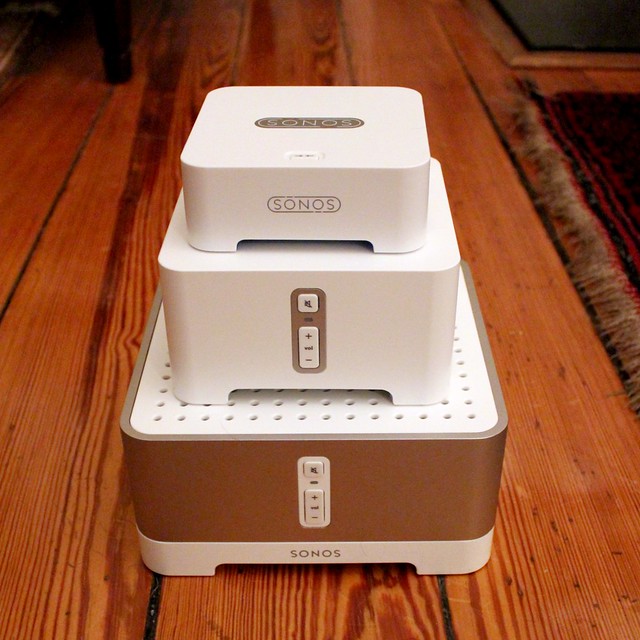
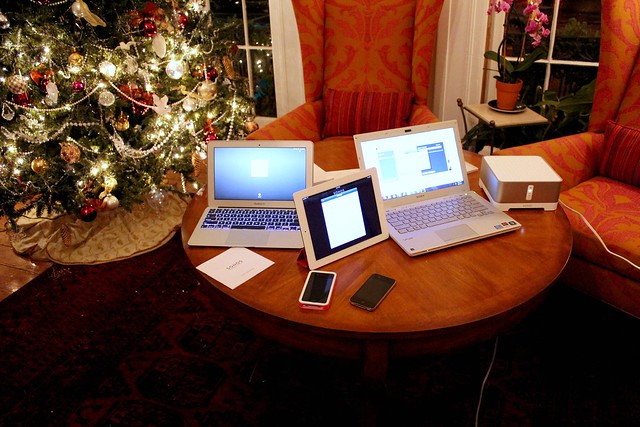
<p>The first step in our install was to unpack everything and make sure we had everything we ordered. Sonos does a great job with packaging and everything comes in small devices with clean lines and a minimal footprint. We also had the iPad in Apple's signature beautiful packaging, and I had brought over the supplies I might need: speaker wire, my iPhone, wire strippers, and my laptop.</p>
<p>
</p>
<div class="MediaContainer PhotoContainer"><a href="http://farm8.staticflickr.com/7022/6666943411_a2c16ace9b_z.jpg" rel="PhotoPopup" popupheight="640" popupwidth="640"><img alt="" src="https://farm8.staticflickr.com/7022/6666943411_a2c16ace9b.jpg" width="500" height="500" style="border-width: 0px;border-style: solid;"></a></div>
<p>Once we were sure everything we had ordered was included, we got to work setting up the iPad. This was probably the longest part of the process. Getting the latest iOS version, signing up for the various plans, getting on the wifi, etc. I'd say about 50% of the overall project was configuring the iPad for use. The final step on the iPad was to download the Sonos app from the app store. Though the instructions suggest setting the system up from a PC, you can easily do the whole thing from a mobile device.</p>
<p>Once the iPad was all set, I took the Sonos Bridge to the point in the house where the cable modem is located. In this setup, think of the bridge as the source or antenna where all of the music ultimately streams from. Each Sonos device will connect wirelessly to the Bridge to obtain a stream of the various music services. The setup of the bridge was as easy as starting the Sonos app on the iPad, telling it to add a component to the system, then pressing the blinking button on the bridge. After that, the app did the rest.</p>
<p>The second component, the Sonos Connect:Amp, had to be located near a plug and also near the speakers we were using for that room. I connected the speaker wire from the speakers to the Sonos device, selected "add component" on the iPad, pressed the blinking buttons and bam, the second device was done.</p>
<p>At this point I also installed the software on Sherry's laptop to be sure it was working as well. Since I had already connected the various devices within the Sonos network all I had to do was sync the laptop with a single device and it was online. Within a few minutes we had Pandora playing over the first device and sounding great.</p>
<p>
</p>
<div class="MediaContainer PhotoContainer"><a href="http://farm8.staticflickr.com/7161/6666568393_68cc9546d3_z.jpg" rel="PhotoPopup" popupheight="427" popupwidth="640"><img alt="" src="https://farm8.staticflickr.com/7161/6666568393_68cc9546d3.jpg" width="500" height="333" style="border-width: 0px;border-style: solid;"></a></div>
<p>Next I turned my attention to the second component, the Sonos Connect. Like the Amp, the Connect utilizes an existing set of speakers, but this one doesn't have a built-in amp and acts as a source on an existing stereo. If you'll remember, I installed <a href="http://www.oldtownhome.com/2011/9/22/Sonos-Zoneplayer-90-A-Little-Awesome-Sauce-for-our-Whole-House-Audio/index.aspx">one of these in our Whole House Audio</a> a little while ago.</p>
<p>This was a little more difficult than the first two items but only because of the location of the stereo. The tight space meant I had to wedge myself into a cramped and dark area to run wires and ensure proper setup. Good thing I'm not a big guy. Once all of the wires were run and the unit was plugged in, we were all set and adding it to the network was as easy as the other devices.</p>
<p>Once everything was properly configured we instructed the system to automatically apply a software update to all of the devices. This update took about 5-10 minutes to complete, an it was a good test to ensure all of the devices had good wifi coverage.</p>
<p>With the system fully in place and updated, I instructed it to leverage the external hard drive I had mentioned earlier. This is one of the best parts of this system. If you already have a robust mp3 catalog or have made many purchases through the iTunes store, you can instruct the Sonos devices to connect directly to your catalog. This allows you to listen to any and all music you have access to, not just what's available streaming.</p>
<p>The final step of the install was to sit down with Sherry to cover how to use the system. I gave her a rundown of the iPad app, the PC app, and the various available music sources. We signed up for a subscription to Spotify for on demand streaming services, configured Pandora, IHeartRadio, and the various other sources, and went over the basics of how to go about selecting music to play.</p>
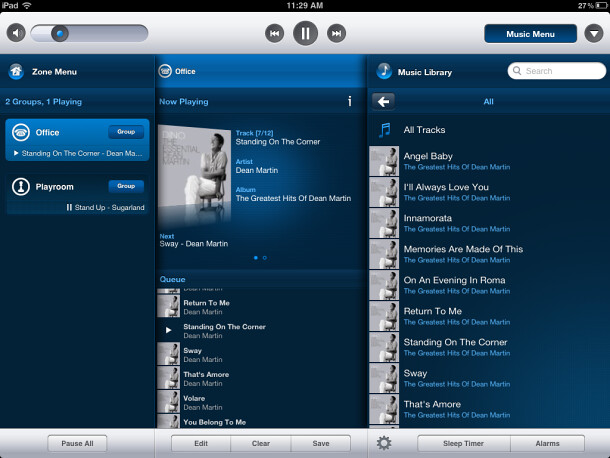
<p>I also covered how to select which music plays in which room, how to independently control the volume, and how to group rooms for parties and control the volume all at once. I must say, the iPad app for the Sonos system is super sweet and intuitive.</p>
<p>
</p>
<div class="MediaContainer PhotoContainer"><a href="http://farm8.staticflickr.com/7143/6667011039_4eee2d3e01_z.jpg" rel="PhotoPopup" popupheight="458" popupwidth="610"><img alt="" src="https://farm8.staticflickr.com/7143/6667011039_4eee2d3e01.jpg" width="500" height="375" style="border-width: 0px;border-style: solid;"></a></div>
<p>In all the whole process from selecting which items to purchase to actual setup and install was a relatively painless process. Sonos has gone to great lengths to ensure the system is quite user friendly while providing a high quality audio source that leverages the latest and greatest in digital and web based music. I'd say the succeeded in achieving their goals.</p>
<p>I can honestly give the various Sonos products my seal of approval. I will surely continue to recommend them to people who want a low to moderate cost whole house audio solution that leverages streaming sources. We live in a digital age and I think our stereos at home should reflect this.</p>
<p>Do you have any experience with installing Sonos components and would like to add something? Or maybe this just sounds like something that's really cool that you want in your house? Leave us a comment and let us know what you think of the project.</p>
<em>
Note: We weren't compensated for this review. We simply want to share good products when we see them, and hope that learning from our mistakes can help save you time, money and frustration.
</em>
<p><em>iPad Interface Image Credit: CNet.com</em></p><p><a href="https://www.oldtownhome.com/2012/1/9/Helping-Out-a-Neighbor-in-Audio-Distress---With-Sonos-Sound-Tech/">Read Full Post</a></p>]]></content>
    <category term="Header Image" />
    <category term="Projects:Hi Tech" />
    <category term="Sonos" />
    <category term="Technology" />
    <category term="Whole House Audio" />
    <PostImage>http://farm8.staticflickr.com/7022/6666943411_a2c16ace9b.jpg</PostImage>
    <media:thumbnail url="https://farm8.staticflickr.com/7022/6666943411_a2c16ace9b_t.jpg" />
    <ExtensionElements>
      <Item>PostImage</Item>
      <Item>media:thumbnail</Item>
    </ExtensionElements>
  </entry>
</feed>