<?xml version="1.0" encoding="utf-8"?>
<feed xmlns="http://www.w3.org/2005/Atom" xmlns:media="http://search.yahoo.com/mrss/">
  <title>Old Town Home Category: 'Security'</title>
  <updated>2015-01-08T01:34:00.000-05:00</updated>
  <id>http://www.oldtownhome.com/security/index.atom</id>
  <link rel="alternate" href="http://www.oldtownhome.com/security/index.atom" />
  <author>
    <name>Alex and Wendy</name>
    <uri>http://www.oldtownhome.com/</uri>
    <email>wendy@oldtownhome.com</email>
  </author>
  <entry>
    <guid>f586ec41-80e6-41b9-986b-869dda491fb8</guid>
    <id>https://www.oldtownhome.com/2015/1/8/Searching-for-a-Surveillance-Alternative-to-Dropcam/</id>
    <title>Searching for a Surveillance Alternative to Dropcam</title>
    <summary type="html"><![CDATA[<p>If you've asked anyone for their opinion on a good video monitoring solution recently, the almost automatic answer seems to be "Get a <a href="http://www.amazon.com/gp/product/B00F9FCW7K/ref=as_li_tl?ie=UTF8&amp;camp=1789&amp;creative=9325&amp;creativeASIN=B00F9FCW7K&amp;linkCode=as2&amp;tag=oltoho-20&amp;linkId=3UTGEVZODE6B5FKF" target="_blank">Dropcam</a><img alt="" src="http://ir-na.amazon-adsystem.com/e/ir?t=oltoho-20&amp;l=as2&amp;o=1&amp;a=B00F9FCW7K" width="1" height="1" style="border: none !important; margin: 0px !important;">, they're great!" </p><p>
</p><div class="MediaContainer PhotoContainer"><a href="https://farm8.staticflickr.com/7482/15615601163_b9b21b416c_z.jpg" rel="PhotoPopup" popupheight="506" popupwidth="640"><img alt="" src="https://farm8.staticflickr.com/7482/15615601163_b9b21b416c.jpg" width="500" height="396" style="border-width: 0px; border-style: solid;"></a></div><p>But the question I've long had is simple, "Is the Dropcam really all it's cracked up to be, or should we look elsewhere for a more effective, flexible, and economical solution?"</p><p>We've actually been searching for a good monitoring/security camera for some time now. This search began around the same time Dropcam hit the market and started generating all of its buzz. </p><p>Incidentally, at about this same time the <a href="http://www.oldtownhome.com/2012/10/17/Some-Moron-Stole-Our-Copper-Downspout/">copper gutter downspout was stolen from the side of our house</a>, kicking my desire for an improved security surveillance solution into higher gear. So the big question became, "what cameras should I use?"</p><p>While closed circuit analog cameras have been the historic standby in the security space, with the "Internet of Things" taking over every aspect of our lives, it seems like a web/network based IP camera is the way to go.</p> <a href="https://www.oldtownhome.com/2015/1/8/Searching-for-a-Surveillance-Alternative-to-Dropcam/">more</a>]]></summary>
    <published>2015-01-08T01:34:00.000-05:00</published>
    <updated>2015-01-08T01:34:00.000-05:00</updated>
    <link rel="alternate" href="https://www.oldtownhome.com/2015/1/8/Searching-for-a-Surveillance-Alternative-to-Dropcam/" />
    <author>
      <name>Alex</name>
    </author>
    <content type="html"><![CDATA[<p>If you've asked anyone for their opinion on a good video monitoring solution recently, the almost automatic answer seems to be "Get a <a href="http://www.amazon.com/gp/product/B00F9FCW7K/ref=as_li_tl?ie=UTF8&amp;camp=1789&amp;creative=9325&amp;creativeASIN=B00F9FCW7K&amp;linkCode=as2&amp;tag=oltoho-20&amp;linkId=3UTGEVZODE6B5FKF" target="_blank">Dropcam</a><img alt="" src="http://ir-na.amazon-adsystem.com/e/ir?t=oltoho-20&amp;l=as2&amp;o=1&amp;a=B00F9FCW7K" width="1" height="1" style="border: none !important; margin: 0px !important;">, they're great!" </p>
<p>
</p>
<div class="MediaContainer PhotoContainer"><a href="https://farm8.staticflickr.com/7482/15615601163_b9b21b416c_z.jpg" rel="PhotoPopup" popupheight="506" popupwidth="640"><img alt="" src="https://farm8.staticflickr.com/7482/15615601163_b9b21b416c.jpg" width="500" height="396" style="border-width: 0px; border-style: solid;"></a></div>
<p>But the question I've long had is simple, "Is the Dropcam really all it's cracked up to be, or should we look elsewhere for a more effective, flexible, and economical solution?"</p>
<p>We've actually been searching for a good monitoring/security camera for some time now. This search began around the same time Dropcam hit the market and started generating all of its buzz. </p>
<p>Incidentally, at about this same time the <a href="http://www.oldtownhome.com/2012/10/17/Some-Moron-Stole-Our-Copper-Downspout/">copper gutter downspout was stolen from the side of our house</a>, kicking my desire for an improved security surveillance solution into higher gear. So the big question became, "what cameras should I use?"</p>
<p>While closed circuit analog cameras have been the historic standby in the security space, with the "Internet of Things" taking over every aspect of our lives, it seems like a web/network based IP camera is the way to go.</p>
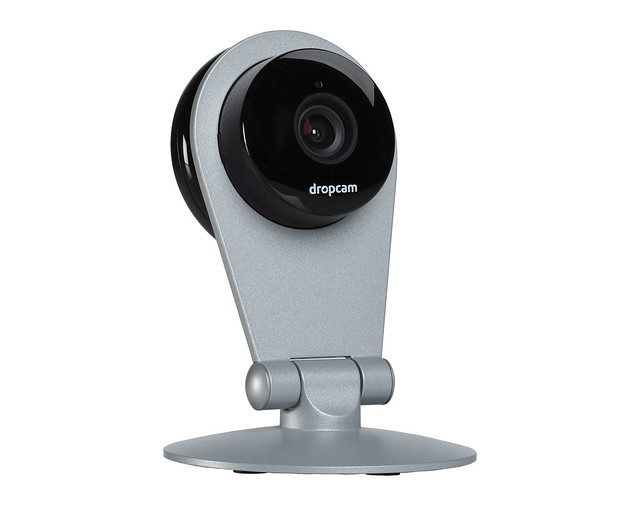
<p>When I discovered Dropcam I was totally intrigued by the little Internet device that could. Its high quality and wide angle lens provides a great HD video picture and easily overcomes the major drawbacks I've experienced with previous IP cameras that we've had or tried in the past, namely grainy and low res images. And I liked their marketing pitch, "Super Simple Monitoring."</p>
<p>But as I looked into Dropcam as a solution, I realized the two major drawbacks of the product. </p>
<h3>The Dropcam Problem</h3>
<ol>
    <li><strong>Dropcam is a cloud storage only device with monthly subscription and active Internet connection required. </strong></li>
    <li><strong>Dropcam is intended as an indoor only device.</strong></li>
</ol>
<p>Many people have no issues with these two items. When they need a quick and easy camera and they're setting up a Dropcam as a baby monitor, makeshift pet sitter, or as a simple camera to watch the weather, these items often aren't really drawbacks. But for our needs, they're a problem. </p>
<p>First, as a subscription based model with no ability to record locally, you're tied to the Dropcam $10 monthly charge, and more if you want longer term storage of video. This means that just to look in on your camera you're paying the $200 for the camera, and another $100 per year after that (if you pay up front). If you want to store more than the default seven days of video (limited to a max of 30 days), you're paying up to $300 per year, for a single camera's subscription!</p>
<p>But what if you want more than one camera? For Dropcam, you can easily add cameras, but each comes with a monthly fee. Dropcam does offer 50% discounts after the first camera, but I'm sorry to say, that doesn't feel like a good deal. Let's say you want three cameras for your home, and 30 days of storage, you're looking at $1,200 for the first year, and $600 per year after that!</p>
<p>This subscription service might be easy to setup, but I feel like it's pretty expensive. Honestly, it just seems like a great model to make money, I'll say that much. </p>
<p>The other issue with the cloud based storage of data is that an Internet connection is required. If your internet is down for any reason (even nefarious "the cord was cut" type reasons), your Dropcam can't record. When your internet is online, each Dropcam you have will require a 0.5 mbps upload connection that it uses ALL THE TIME. So if you have a slow connection on your upload side, your Dropcam video quality will suffer or drop out entirely. </p>
<p>In addition to the business model's issues for our needs, the camera can't be mounted outdoors without some sort of a hack by way of an aftermarket or DIY enclosure. While you know I'm always game for a good DIY challenge, and this is typically fine for simple indoor monitoring, it makes it far less useful as a true security device due to possibility of failure. </p>

<p class="MediaContainer PhotoContainer"><a href="https://farm9.staticflickr.com/8617/16237871541_0d8586d4f4_z.jpg" rel="PhotoPopup" popupheight="297" popupwidth="640"><img alt="" src="https://farm9.staticflickr.com/8617/16237871541_0d8586d4f4.jpg" width="500" height="232" style="border-width: 0px; border-style: solid;"></a></p>
<p class="MediaContainer PhotoContainer">Photo Credit: <a href="http://the-gadgeteer.com/" target="_blank">The Gadgeteer</a></p>
<p>With all of the problems I've outlined with these two simple items, the Dropcam, with all of its beautiful quality and smooth interfaces, just isn't an option for our needs. So what is?</p>
<h3>In Steps the Samsung SmartCam</h3>
<p>I don't know if you've ever searched for an Internet video camera solution, but the vast majority of Internet based cameras have poor reviews across the board. I looked high and low to find something good, but it seemed everything had some major issue that kept me from liking it for our needs. </p>
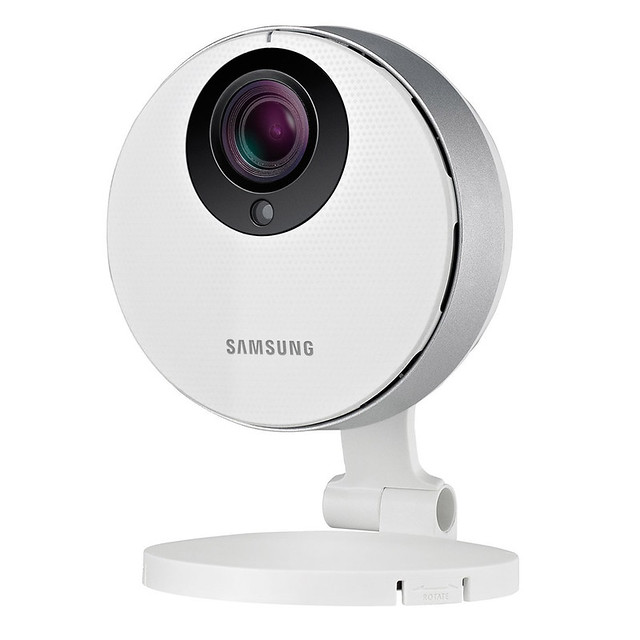
<p>Well, after months of searching and waiting for a good camera to come to market that would do what we needed, Samsung launched an upgraded version of their <a href="http://www.amazon.com/gp/product/B00J38NVHE/ref=as_li_tl?ie=UTF8&amp;camp=1789&amp;creative=9325&amp;creativeASIN=B00J38NVHE&amp;linkCode=as2&amp;tag=oltoho-20&amp;linkId=TV6UYDW63A3C47NO" target="_blank">SmartCam HD Pro Wi-Fi Camera</a><img alt="" src="http://ir-na.amazon-adsystem.com/e/ir?t=oltoho-20&amp;l=as2&amp;o=1&amp;a=B00J38NVHE" width="1" height="1" style="border: none !important; margin: 0px !important;"> that had me intrigued, especially at only about $180 per camera and no monthly fee. </p>
<p>
</p>
<div class="MediaContainer PhotoContainer"><a href="https://farm9.staticflickr.com/8666/16047948668_526b53fb98_z.jpg" rel="PhotoPopup" popupheight="640" popupwidth="640"><img alt="" src="https://farm9.staticflickr.com/8666/16047948668_526b53fb98.jpg" width="500" height="500" style="border-width: 0px; border-style: solid;"></a></div>
<p>The camera's specs included a wide 130 degree viewing angle, IR night vision, 1080p resolution, and a nice looking and compact package. I ordered one a few weeks ago to give it a spin and must say that I was completely impressed by what I received.</p>
<p>
</p>
<div class="MediaContainer PhotoContainer"><a href="https://farm8.staticflickr.com/7472/15619112903_866025735c_z.jpg" rel="PhotoPopup" popupheight="360" popupwidth="640"><img alt="" src="https://farm8.staticflickr.com/7472/15619112903_866025735c.jpg" width="500" height="281" style="border-width: 0px; border-style: solid;"></a></div>
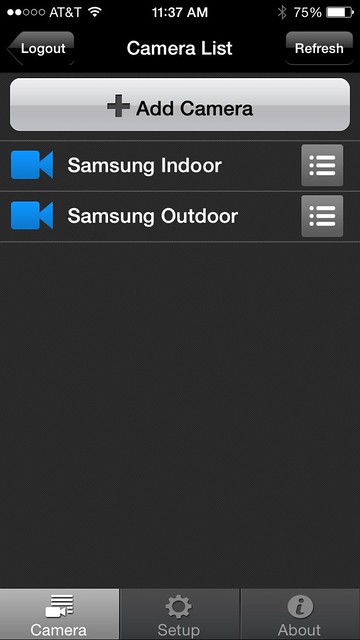
<p>Setup of the camera over our wifi network was pretty straight forward. I didn't even use the laptop and was able to get the camera up and running using only the mobile app and my iPhone. <em>(The screenshot below is after I had successfully setup two cameras.)</em></p>
<p>
</p>
<div class="MediaContainer PhotoContainer"><a href="https://farm8.staticflickr.com/7481/16213084746_f89a619474_z.jpg" rel="PhotoPopup" popupheight="640" popupwidth="360"><img alt="" src="https://farm8.staticflickr.com/7481/16213084746_f89a619474.jpg" width="281" height="500" style="border-width: 0px; border-style: solid;"></a></div>
<p>Once I had the camera running I verified I was able to connect from outside of our home network. While the image does lag a bit (by up to five seconds from my tests), it's very high quality and updates consistently. I did notice a few connection drops from time to time that required the app to reconnect, but I'm not sure if that's an issue with the app or network. Regardless, it's only a minor annoyance and nothing too serious. I didn't need to make any firewall changes to allow this as the camera uses standard and commonly used ports with secure communications.</p>
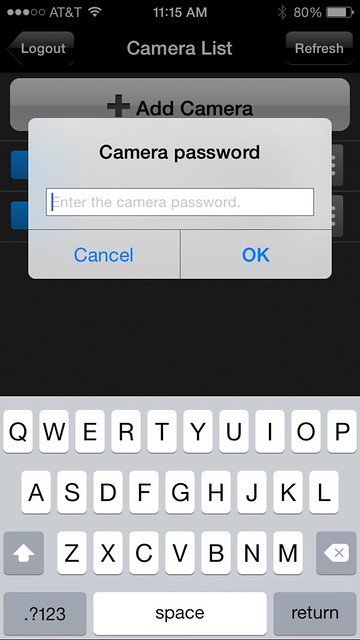
<p>One thing that's nice is that you can individually password protect each camera. So you have a primary account with password to access your camera list, then individual passwords once in the system (that are optionally saved in the app).</p>
<p>
</p>
<div class="MediaContainer PhotoContainer"><a href="https://farm9.staticflickr.com/8640/16052857459_6916e86b8a_z.jpg" rel="PhotoPopup" popupheight="640" popupwidth="360"><img alt="" src="https://farm9.staticflickr.com/8640/16052857459_6916e86b8a.jpg" width="281" height="500" style="border-width: 0px; border-style: solid;"></a></div>
<p>Unfortunately, the app doesn't incorporate complex passwords, two factor auth, or even the biometric fingerprint scanner of the latest iPhones. Hopefully Samsung will improve the software aspect of these cameras, as it's the primary lacking area of the whole package.</p>
<h3>Video Storage Options</h3>
<p>As advertised, this camera offers great onboard options for long term storage of video. </p>
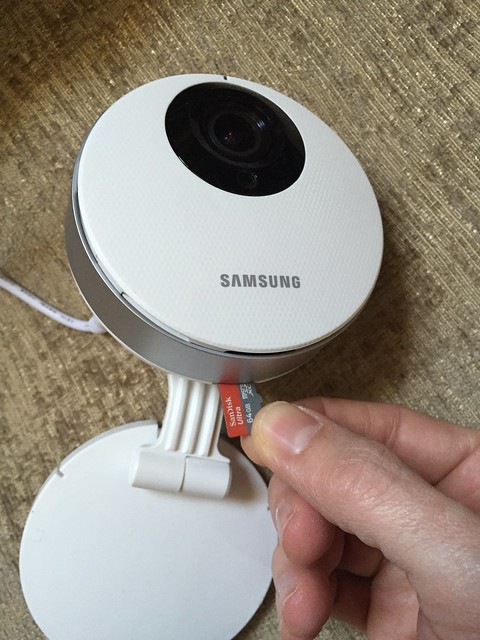
<p>At the rear of the camera is a compact high capacity flash card slot that takes up to a 64GB memory card. This allows you to store video right on the device for easy retrieval. Best of all, it records even if the Internet or Wifi connection is completely down, definitely beating out the Dropcam in that respect. Continuous recording on 64GB at 1280x720 resolution offers about 20 days of storage. Once the card is full, you can configure the camera to begin overwriting the older video.</p>
<div class="MediaContainer PhotoContainer"><a href="https://farm8.staticflickr.com/7581/16239777635_9f0773b3ef_z.jpg" rel="PhotoPopup" popupheight="640" popupwidth="480"><img alt="" src="https://farm8.staticflickr.com/7581/16239777635_9f0773b3ef.jpg" width="375" height="500" style="border-width: 0px; border-style: solid;"></a></div>
<br>
<p>However, I've been searching for something that allows for storage video on a network drive somewhere in the house's network. What I discovered was really cool. </p>
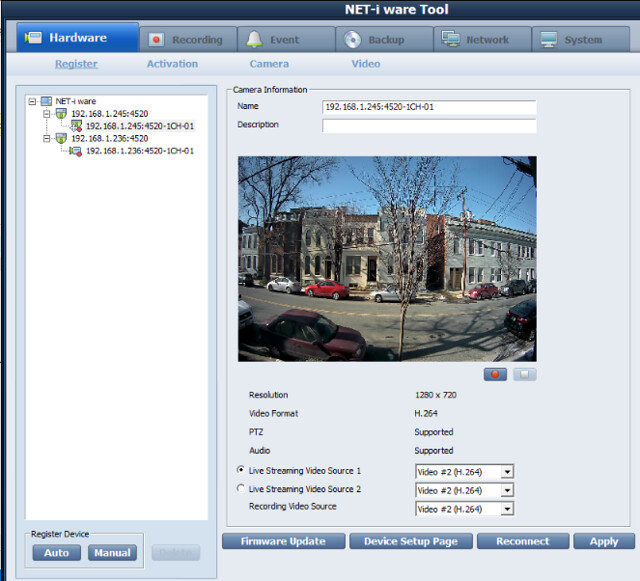
<p>Though not really mentioned anywhere in the camera's documentation (that I saw), you can download Samsung's free Net i-Ware software that allows you to configure up to 16 different cameras to all record simultaneously to network or local hard drive storage. The main caveat here is that you'll need a computer that can run the software for recording, and enough network or hard drive space to store the video.</p>
<p>
</p>
<div class="MediaContainer PhotoContainer"><a href="https://farm9.staticflickr.com/8625/16238295082_fdcf6bc829_z.jpg" rel="PhotoPopup" popupheight="581" popupwidth="640"><img alt="" src="https://farm9.staticflickr.com/8625/16238295082_fdcf6bc829.jpg" width="500" height="454" style="border-width: 0px; border-style: solid;"></a></div>
<p>Whether you're doing local memory card or network storage, you can configure the camera to continuously record, or to just record when an "event" of some sort occurs. Events can be motion or sound based, or continuous recording can be based on a schedule. </p>
<p>Configuring the Net i-Ware software was pretty straight forward. I'll put together a good how to guide on setting up this piece in a later post, as well as the approach we'll take to store the video. It took a little tinkering to get it working, but once it was all set it runs very smoothly.</p>
<h3>Outdoor Solution</h3>
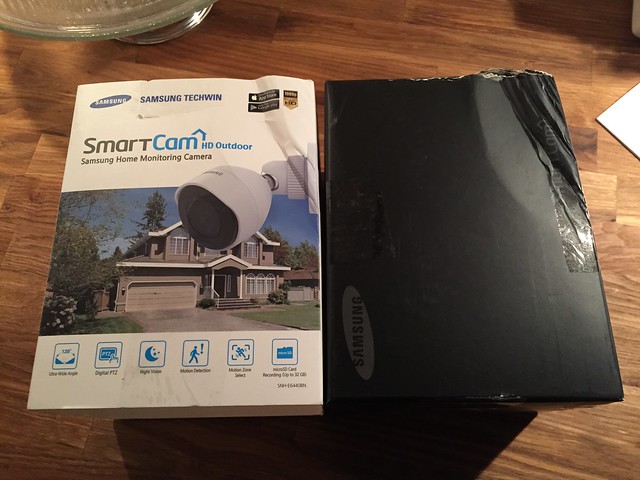
<p>While the Samsung SmartCam HD Pro is a great choice for our interior cameras, what about outside? Though this specific camera is not made for the outdoors, Samsung does have an offering that fits the bill perfectly. It's the <a href="http://www.amazon.com/gp/product/B00P1NAPPQ/ref=as_li_tl?ie=UTF8&amp;camp=1789&amp;creative=9325&amp;creativeASIN=B00P1NAPPQ&amp;linkCode=as2&amp;tag=oltoho-20&amp;linkId=NJY4TUNOXBUGLLJX" target="_blank">Samsung SmartCam HD Outdoor SNH-E6440BN</a><img alt="" src="http://ir-na.amazon-adsystem.com/e/ir?t=oltoho-20&amp;l=as2&amp;o=1&amp;a=B00P1NAPPQ" width="1" height="1" style="border: none !important; margin: 0px !important;"> Camera. </p>
<p>The really cool thing about this camera is how it's been constructed. The sensitive electronics that are not supposed to withstand the elements of extreme heat and cold have been split apart from the weatherproof camera lens enclosure. This means that the camera lens is housed in an outdoor ready enclosure, and is connected to the wifi and other electronics by a 28' long network cord tether so that it may be placed inside. You just need a way to get the cord from outside to in.</p>
<p>
</p>
<div class="MediaContainer PhotoContainer"><a href="https://farm9.staticflickr.com/8598/16235451515_db5e141059_z.jpg" rel="PhotoPopup" popupheight="570" popupwidth="640"><img alt="" src="https://farm9.staticflickr.com/8598/16235451515_db5e141059.jpg" width="500" height="445" style="border-width: 0px; border-style: solid;"></a></div>
<p>Really wanting to try this camera out, I bought an open/damaged box item off of Amazon to save myself $50. When it arrived, I could see exactly the damage they were talking about...</p>
<p>
</p>
<div class="MediaContainer PhotoContainer"><a href="https://farm8.staticflickr.com/7582/15587334784_96d8eedb08_z.jpg" rel="PhotoPopup" popupheight="480" popupwidth="640"><img alt="" src="https://farm8.staticflickr.com/7582/15587334784_96d8eedb08.jpg" width="500" height="375" style="border-width: 0px; border-style: solid;"></a></div>
<p>...but the camera was in perfect shape.</p>
<p>
</p>
<div class="MediaContainer PhotoContainer"><a href="https://farm9.staticflickr.com/8582/16047922868_820dcb157c_z.jpg" rel="PhotoPopup" popupheight="640" popupwidth="480"><img alt="" src="https://farm9.staticflickr.com/8582/16047922868_820dcb157c.jpg" width="375" height="500" style="border-width: 0px; border-style: solid;"></a></div>
<p>The setup, like it's indoor counterpart, was quick and easy. Since I already had an account on the Samsung SmartCam app for the first camera, it was just a click of a few buttons to add this second camera.</p>
<p>The two cameras are identical from a software standpoint. You can set notifications and alerts based on sound or motion, define motion areas to pay attention to, even configure push notifications that can alert your phone when events are triggered. The UI that Samsung offers is the top drawback to the cameras. Essentially, it looks like a developer created the design for the app. It's not particularly intuitive, doesn't look very pretty, and pretty much just barely does what you want it to do. If Samsung put more time and </p>
<h3>Conclusion</h3>
<div class="ToolItem">
<iframe style="width: 120px; height: 240px;" marginwidth="0" marginheight="0" scrolling="no" frameborder="0" src="//ws-na.amazon-adsystem.com/widgets/q?ServiceVersion=20070822&amp;OneJS=1&amp;Operation=GetAdHtml&amp;MarketPlace=US&amp;source=ac&amp;ref=qf_sp_asin_til&amp;ad_type=product_link&amp;tracking_id=oltoho-20&amp;marketplace=amazon&amp;region=US&amp;placement=B00J38NVHE&amp;asins=B00J38NVHE&amp;linkId=H6BP7QM4573JQXAP&amp;show_border=false&amp;link_opens_in_new_window=true&amp;price_color=333333&amp;title_color=0066C0&amp;bg_color=FAFAF8">
</iframe>
<iframe style="width: 120px; height: 240px;" marginwidth="0" marginheight="0" scrolling="no" frameborder="0" src="//ws-na.amazon-adsystem.com/widgets/q?ServiceVersion=20070822&amp;OneJS=1&amp;Operation=GetAdHtml&amp;MarketPlace=US&amp;source=ac&amp;ref=qf_sp_asin_til&amp;ad_type=product_link&amp;tracking_id=oltoho-20&amp;marketplace=amazon&amp;region=US&amp;placement=B00P1NAPPQ&amp;asins=B00P1NAPPQ&amp;linkId=JDRWIGP7MT27RP2Q&amp;show_border=false&amp;link_opens_in_new_window=true&amp;price_color=333333&amp;title_color=0066C0&amp;bg_color=FAFAF8">
</iframe>
</div>
<p>All in all, I'm very happy with these cameras and their setup options. These Samsung SmartCams are absolutely going to be our cameras of choice as they offer excellent video quality, real time viewing ability, local storage, local network storage, and remain fully functional even when the Internet is down. The outdoor camera protects the sensitive electronics with the two piece configuration and doesn't need any special aftermarket enclosures. But most importantly, the cost is only for the cameras and optional storage cards/network devices. There are no monthly fees, no limits on days you can store, and no worry about proprietary formats.&nbsp;</p>
<p>The major drawbacks of these cameras are only in how nice the interface looks on the software side of things. A little better security on the user account side of the software would also be nice, but I anticipate that will be added over time.&nbsp;</p>
<p>In a side by side comparison between Dropcam and the SmartCams, I'd say both are equal from a pure hardware/camera perspective, including small features like two way microphone and motion based event configuration, so the focus needs to turn towards the differences.</p>
<p>Though Dropcam has a great interface with cloud storage, the SmartCams have more flexibility in hardware (indoor/outdoor), no monthly cost, the ability to record locally, the ability to record to a custom device, and no required external internet connection to function. I'm still researching the ability to transfer video to an offsite storage location so your recorded video can be accessed in the cloud, but I'll report back on that in my Net i-Ware configuration post.&nbsp;</p>
<p>A cost check makes this whole comparison even easier:</p>
<p><em>Cost of 3 Dropcams and 30 days of video storage for 3 years, $2,400 ($600 cameras, $600/yr subscription)</em></p>
<p><em>Cost of 3 SmartCams (with 1 outdoor) and 30 days of video storage for 3 years, ~$655.</em></p>
<p>So I'd have to say in the head to head battle, the winner is clear:</p>
<p style="text-align: center;"><strong>Google Dropcam vs Samsung SmartCam</strong></p>
<h3 style="text-align: center;"><strong>Winner</strong></h3>
<h3 style="text-align: center;">Samsung SmartCam!</h3>
<p>I'm very excited about these cameras and I'm extremely happy to have found an excellent alternative to Dropcam that fits exactly what I was searching for.&nbsp;</p>
<p>I hope this blog post might help you make a better decision if you're searching for a similar comparison or alternative for your camera setup.</p><p><a href="https://www.oldtownhome.com/2015/1/8/Searching-for-a-Surveillance-Alternative-to-Dropcam/">Read Full Post</a></p>]]></content>
    <category term="Header Image" />
    <category term="Projects:Hi Tech" />
    <category term="Security" />
    <category term="Security System" />
    <category term="Technology" />
    <PostImage>https://farm8.staticflickr.com/7470/16213765326_a04877379f.jpg</PostImage>
    <media:thumbnail url="https://farm8.staticflickr.com/7470/16213765326_a04877379f_t.jpg" />
    <ExtensionElements>
      <Item>PostImage</Item>
      <Item>media:thumbnail</Item>
    </ExtensionElements>
  </entry>
  <entry>
    <guid>cd95d018-b5ff-4cdd-87a7-f85bf66609ab</guid>
    <id>https://www.oldtownhome.com/2014/2/26/Purchasing-a-DIY-Home-Security-System/</id>
    <title>Purchasing a DIY Home Security System</title>
    <summary type="html"><![CDATA[<p>A little while ago we shared our plans to purchase a new security system. Since we already had an existing (but dated) system, we had a solid understanding of the drawbacks and limitations of our existing system to help us in our shopping. However, I wasn't totally sure where to start.</p><p>While plenty of people purchase and have alarm systems installed each and every day, I needed to find a way to over complicate the process for myself, all in the hopes of simplifying it for other people. As you may know, I bring a very long and storied history of over complication to the table, and if I can justify this self inflicted burden though some sort of weak martyrdom, I'll welcome the excuse.   </p><p>I've actually been working on this post for a while. My goal here is to make the whole process as simple as I can, because it really is simple, but all of the details and requirements make it seem way more complicated. Hopefully I'll be able to do a decent job of reducing the whole process into a nice little nutshell. Today I'll cover the alarm system basics and how we selected the system we're installing. </p><p>For me, the primary caveat of this project is that I really want to understand the whole alarm system process, from shopping and selection to install and activation. Rather than having an installer come in and pitch me a system and service, or having a sponsored post from some alarm company outlining what's out there with a lean towards their offering, I want to see what's on the market. I want to research what I will be purchasing, and I want to be the installer, select who the monitoring company will be, and (most importantly) ensure the purchase price and monthly fees are competitive and not exorbitant. The problem with all of this, up until a few weeks ago the whole genre of alarm systems and alarm companies was sort of a shady black box to me.</p><p>Personally, I just feel like an alarm system should be one of the things in your house you really and truly understand, not one of those things you don't know how or why it works. Otherwise you end up in a situation where the thing that's supposed to be giving you peace of mind and protecting you is actually making you feel uncomfortable and intimidated. That's where we were with our old system. </p><p>
</p> <a href="https://www.oldtownhome.com/2014/2/26/Purchasing-a-DIY-Home-Security-System/">more</a>]]></summary>
    <published>2014-02-26T10:42:38.140-05:00</published>
    <updated>2014-02-26T10:42:38.140-05:00</updated>
    <link rel="alternate" href="https://www.oldtownhome.com/2014/2/26/Purchasing-a-DIY-Home-Security-System/" />
    <author>
      <name>Alex</name>
    </author>
    <content type="html"><![CDATA[<p>A little while ago we shared our plans to purchase a new security system. Since we already had an existing (but dated) system, we had a solid understanding of the drawbacks and limitations of our existing system to help us in our shopping. However, I wasn't totally sure where to start.</p>
<p>While plenty of people purchase and have alarm systems installed each and every day, I needed to find a way to over complicate the process for myself, all in the hopes of simplifying it for other people. As you may know, I bring a very long and storied history of over complication to the table, and if I can justify this self inflicted burden though some sort of weak martyrdom, I'll welcome the excuse.   </p>
<p>I've actually been working on this post for a while. My goal here is to make the whole process as simple as I can, because it really is simple, but all of the details and requirements make it seem way more complicated. Hopefully I'll be able to do a decent job of reducing the whole process into a nice little nutshell. Today I'll cover the alarm system basics and how we selected the system we're installing. </p>
<p>For me, the primary caveat of this project is that I really want to understand the whole alarm system process, from shopping and selection to install and activation. Rather than having an installer come in and pitch me a system and service, or having a sponsored post from some alarm company outlining what's out there with a lean towards their offering, I want to see what's on the market. I want to research what I will be purchasing, and I want to be the installer, select who the monitoring company will be, and (most importantly) ensure the purchase price and monthly fees are competitive and not exorbitant. The problem with all of this, up until a few weeks ago the whole genre of alarm systems and alarm companies was sort of a shady black box to me.</p>
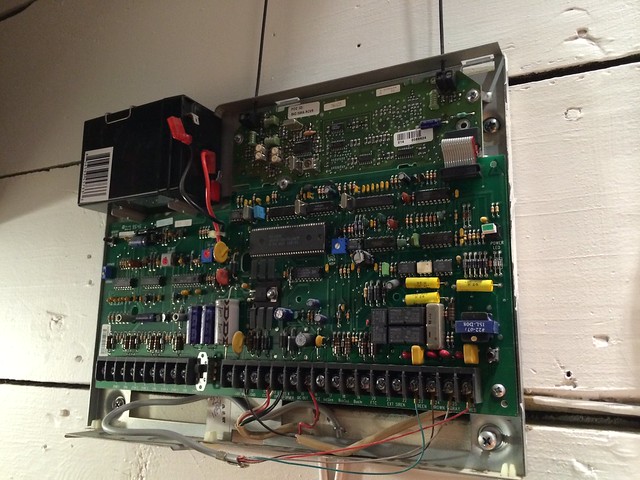
<p>Personally, I just feel like an alarm system should be one of the things in your house you really and truly understand, not one of those things you don't know how or why it works. Otherwise you end up in a situation where the thing that's supposed to be giving you peace of mind and protecting you is actually making you feel uncomfortable and intimidated. That's where we were with our old system. </p>
<p>
</p>
<p class="MediaContainer PhotoContainer"><a href="http://farm4.staticflickr.com/3705/12251839714_fc0f1b9271_z.jpg" rel="PhotoPopup" popupheight="480" popupwidth="640"><img alt="" src="https://farm4.staticflickr.com/3705/12251839714_fc0f1b9271.jpg" width="500" height="375" style="border-width: 0px; border-style: solid;"></a></p>
<p class="MediaContainer PhotoContainer"><em>Who wouldn't be intimidated by this wad of pre-Internet circuitry?</em></p>
<p>I actually blame the whole alarm system industry for this issue. I don't know why the whole shady and esoteric alarm industry is quite so shady and esoteric, but it really is. Alarm systems are actually very simple and relatively standard, so what's with all the secrecy, handshake deals, bait and switch offers, and feeling dirty when it's all said and done? </p>
<p>Most alarms consist of a few basic elements:
</p>
<ol>
    <li>A main or "central" panel, which operates as the brains for the whole system.</li>
    <li>A series of sensors throughout the premises that report an "open" or "closed" state to the panel.</li>
    <li>Other control devices for arming and disarming, like secondary panels or key fobs.</li>
</ol>
<p>That's it, that's really all there is to it. Even the smoke detectors, motion sensors, and glass break detectors all fit into category two. Everything else beyond these three items are essentially bells and whistles to make a basic system operate better and with more features. </p>
<p>Beyond the actual hardware of the system you have the optional monitoring company that you can subscribe to. They watch over your system, dispatch emergency people if an alarm event occurs, and help to make sure it's working correctly. You probably know of a lot of the more expensive ones from their marketing, such as ADT or Frontpoint. These monitoring companies are also responsible for allowing you to operate your system from your smartphone by using an app that's specific to the vendor, like ADT Plus, or something that's resold and offered by another 3rd party provider, like <a href="http://www.alarm.com/" target="_blank">Alarm.com</a>. Frontpoint works this way, they contract with alarm.com and then sell you the Alarm.com service at their monthly rate. </p>
<p>Is it getting confusing yet? The whole idea of the 3rd party app monitoring is what had me perplexed before. Don't worry, I'll clear it up in a later post when I cover the specific service. </p>
<p>The final, and most significant aspect of a good security system is the software that controls the system from the central panel of the solution. This software, the "brains" of the system, is responsible for arming, disarming, notifying, alarming, user management, configuration, voice announcements, communicating with the central station, and all other major actions of the security system. The good news, as I said earlier, alarm systems are pretty basic, so most systems have some pretty good software. </p>
<p>While anything technical with many customizable parts may be intimidating on the surface, the actual alarm itself is simply not worth being intimidated by. This is especially true with wireless systems. All of the components and pieces are all very simple pieces of circuitry. They have simple jobs of relaying signals, and all they need for install is a person who's moderately capable when it comes to following a manual. Let's be honest here, if it were really that complicated, a lot of the installers would not be able to do their jobs. </p>
<p>So let's take a look at what we ended up choosing and how we chose it. </p>
<p>As we said previously, we wanted a system that:</p>
<ul>
    <li>Could be installed and operate wirelessly.</li>
    <li>Could be installed by the purchaser.</li>
    <li>Could be configured to be operated remotely by our smartphones (iPhones).</li>
    <li>Was not tied to a single monitoring provider.</li>
    <li>Did not rely on a land line or cable connection to operate.</li>
    <li>Looked very cool (obviously most the important item).</li>
</ul>
<p>Oddly enough, these overall criteria really reduced our possible options when it came to purchase.</p>
<p>I was initially attracted to the Xfinity and AT&amp;T Digital Life offerings after seeing their amazing marketing in magazines and commercials on TV. It seemed great, not only did it protect my house like a security system, but I could schedule TV recordings, turn on and off lights, adjust my thermostat, remotely turn off the faucet when I might happen to leave it on when leaving the house, even water my lawn from a very distant location...</p>
<p>Then I thought "Wait a second...I don't have a lawn, I never leave the house with the faucet running (seriously, WTF?), I can already control my lights through something else, my thermostat is decent and if I wanted a new one I might just get a Nest, and I can already schedule and manage my TV recordings thanks to my TiVo app...soooooo...why pay extra for all of those features?" </p>
<p>When I realized this I felt a little like the Grinch must have felt when his heart grew three sizes that day, a tremendous sense of relief. I didn't need all of these bells and whistles, and the offerings of Xfinity and AT&amp;T requires the buyer to be tied to their service, their hardware (not cheap), their monitoring, their monthly rates (no matter how high they might climb). No thanks on that. </p>
<p>Well, what about places like ADT that offer to come out, do an assessment of your needs, then give you free equipment? </p>
<p>While their offer is enticing (hey, free or low cost sounds great to me), subsidized hardware only tells me that they'll make their money back in monthly costs many times over. Call my cynical, but companies don't typically like to subsidize their hardware costs unless they're making a profit somewhere. Add in the good old bait and switch of "oooh, that 'free' hardware only covers the panel, front door, and two windows, and since your home is more of a house than a tree fort, you're going to need a ton more stuff that will actually cost you about $2000+ up front because we, as certified alarm installer guys, are the only qualified people in the world to install the system," and you've no longer got yourself a very good bargain. </p>
<p>After disqualifying many systems based on these details, I turned to one of the many online security stores to begin researching other various offerings. I felt this was likely the best way to understand the landscape of DIY install and provider agnostic wireless security systems.</p>
<p>The store I used for all of my comparison shopping was <a href="http://www.homesecuritystore.com/" target="_blank">HomeSecurityStore.com</a>. They have a pretty lengthy selection of hardware and a good interface for comparing all of their stock. By selecting Wireless Alarm Systems I was presented with about five different options that met our rough needs. Try are:</p>
<ul>
    <li><a href="http://www.visonic.com/Products/Wireless-Property-Protection/PowerMax" target="_blank">Visonic Power Max</a></li>
    <li><a href="https://www.ismartalarm.com/" target="_blank">iSmartAlarm</a></li>
    <li>GE Interlogix</li>
    <li><a href="http://www.2gig.com/products/gocontrol-control-panel" target="_blank">2Gig Go!Control</a></li>
    <li><a href="http://homesecurity.honeywell.com/lynx_touch.html" target="_blank">Honeywell Lynx</a></li>
    <li><a href="http://www.dsc.com/index.php?n=products&amp;o=view&amp;id=53" target="_blank">DSC Alexor</a></li>
</ul>
<p>Each of these options met the majority of our criteria, so the only real deciding factors were price and general aesthetic. At this point I turned to reading reviews and looking at system photos. To do this I used Amazon, DIY home security forums, and other multi vendor store reviews to determine the best system for our needs. After much deliberation and comparison, we settled on the 2Gig GoControl system. </p>
<p>I had four primary reasons for choosing this solution over the others. </p>
<ol>
    <li>It met all of our major criteria I had outlined. </li>
    <li>All of the components seemed clean and straight forward to install and configure.</li>
    <li>Most system owners seemed to really like it in their home (based on reviews).</li>
    <li>I could expand the system with multiple very cool looking control panel touch screens. </li>
    <li>It seems the company has released periodic updates and continues to improve the system. </li>
    <li>I generally liked the aesthetic of this system compared to the other similar systems. </li>
</ol>
<div class="ToolItem">
<iframe src="http://rcm-na.amazon-adsystem.com/e/cm?t=oltoho-20&amp;o=1&amp;p=8&amp;l=as1&amp;asins=B00AYKA7AO&amp;IS1=1&amp;ref=qf_sp_asin_til&amp;fc1=3A3128&amp;lt1=_blank&amp;m=amazon&amp;lc1=61838A&amp;bc1=FAFAF8&amp;bg1=FAFAF8&amp;f=ifr" style="width: 120px; height: 240px;" scrolling="no" marginwidth="0" marginheight="0" frameborder="0"></iframe>
</div>
<p>I did have just one sticking point. The 2Gig system has home automation integration through the Z-wave/ZigBee protocol. Our home automation items use Insteon. There isn't a Z-Wave to Insteon bridge, so this feature is rather useless to us unless I custom develop a language converter of some sort (which I may do at some point). But this is okay, since I already have another home automation solution and don't need it through the alarm. </p>
<p>Given all of these items, we marched forward with our alarm system purchase with confidence. </p>
<p>I found a starter package for the system that included the central panel, a motion detector, key fob, and three window sensors. This was enough to act as the core of our system, but I knew I'd need far more than just these components. </p>
<p>To lay our the system I used our home's floor plan that I made a few months ago. I counted the windows that can open and entry/exit doors in the house to determine the number of sensors we'd need. Then I figured out areas of the house that might need glass break sensors where there are a lot of non opening windows, such as the sun porch. Next I looked at the house to determine where motion sensors can hang. I then added up all of the locations that would need smoke detectors (kitchen, hallways, basement, each bedroom) and realized we need a lot of smoke detectors. Finally we plotted out where the central unit would hang and where we wanted additional control panels. </p>
<p>If you're plotting out your system, I recommend starting a spreadsheet where you list out each device, where it will go, and what you'll use it for. This will come in handy once you're installing the whole system, and will give you a good shopping list for what you need to order. </p>
<p>Beyond those items there were a handful of "extras" I needed to include. </p>
<div class="ToolItem">
<iframe style="width: 120px; height: 240px;" marginwidth="0" marginheight="0" scrolling="no" frameborder="0" src="//ws-na.amazon-adsystem.com/widgets/q?ServiceVersion=20070822&amp;OneJS=1&amp;Operation=GetAdHtml&amp;MarketPlace=US&amp;source=ac&amp;ref=qf_sp_asin_til&amp;ad_type=product_link&amp;tracking_id=oltoho-20&amp;marketplace=amazon&amp;region=US&amp;placement=B00AYKA6V4&amp;asins=B00AYKA6V4&amp;linkId=UNGUIAZMSHFAFZC7&amp;show_border=false&amp;link_opens_in_new_window=true&amp;price_color=333333&amp;title_color=0066C0&amp;bg_color=FAFAF8">
</iframe>
</div>
<p>In order to ensure the system didn't rely on a phone line or cable connection, I ordered an unlocked cellular board that can plug into the main panel. The board I ordered is a GSM board that works with AT&amp;T, since I know AT&amp;T has good coverage in our house. With this installed, the system is able to communicate with the monitoring station at all times and isn't susceptible to a cut or down phone/cable line. With this device in place, we may finally be able to get rid of our land line and its associated monthly charge.</p>
<div class="ToolItem" style="clear: both;">
<iframe style="width: 120px; height: 240px;" marginwidth="0" marginheight="0" scrolling="no" frameborder="0" src="//ws-na.amazon-adsystem.com/widgets/q?ServiceVersion=20070822&amp;OneJS=1&amp;Operation=GetAdHtml&amp;MarketPlace=US&amp;source=ac&amp;ref=qf_sp_asin_til&amp;ad_type=product_link&amp;tracking_id=oltoho-20&amp;marketplace=amazon&amp;region=US&amp;placement=B00AYKA7S6&amp;asins=B00AYKA7S6&amp;linkId=IILNTVQ43DHCP3GC&amp;show_border=false&amp;link_opens_in_new_window=true&amp;price_color=333333&amp;title_color=0066C0&amp;bg_color=FAFAF8">
</iframe>
</div>
<p>I also needed to order a 900mhz communication module that also plugs into the main panel. This board facilitates communication between the main panel and the additional control panels we're placing around the house. If you're ordering any of these things, please note that you only need one of these 900mhz modules, even if you are installing multiple panels. </p>
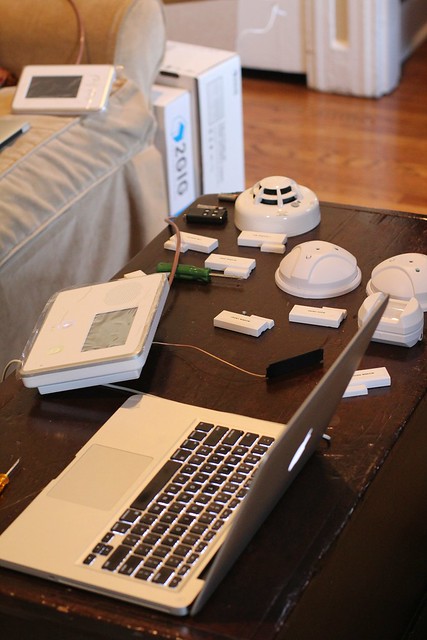
<p>That's it, that's our whole system. We ended up with the starter package, a few glass break sensors, a whole bunch of extra door/window sensors, smoke detectors, three additional control panels, and the modules for cellular and control panel communication. </p>
<p>All told, our entire system was right around $1,300 for all of the parts and pieces, and it has the all of the features and capabilities of a high end offering from big name vendors that can cost upwards of $3,000-$4,000. A good friend received a high quote like this from one of these big name vendors for a similar system in their home, but after our experience, they're likely following our lead and going the DIY route. </p>
<p>Next week we'll fill you all in on the install process of the system, as well as some rather heated and ongoing debates about the placement of various control panels. </p>
<p>
</p>
<div class="MediaContainer PhotoContainer"><a href="http://farm6.staticflickr.com/5539/12086663724_ac6b6565c3_z.jpg" rel="PhotoPopup" popupheight="640" popupwidth="427"><img alt="" src="https://farm6.staticflickr.com/5539/12086663724_ac6b6565c3.jpg" width="333" height="500" style="border-width: 0px; border-style: solid;"></a></div>
<p>What do you think? Does a DIY security system seem like something you're likely to take on, or do you think you'd prefer to leave it to the pros?</p><p><a href="https://www.oldtownhome.com/2014/2/26/Purchasing-a-DIY-Home-Security-System/">Read Full Post</a></p>]]></content>
    <category term="Header Image" />
    <category term="Security" />
    <category term="Security System" />
    <PostImage>http://farm4.staticflickr.com/3730/12800056264_d7b8a23f81.jpg</PostImage>
    <media:thumbnail url="https://farm4.staticflickr.com/3730/12800056264_d7b8a23f81_t.jpg" />
    <ExtensionElements>
      <Item>PostImage</Item>
      <Item>media:thumbnail</Item>
    </ExtensionElements>
  </entry>
  <entry>
    <guid>b97f4a2a-479b-4dfa-a11d-90460b51b67d</guid>
    <id>https://www.oldtownhome.com/2014/1/3/Finding-a-DIY-Install-Home-Security-System/</id>
    <title>Finding a DIY Install Home Security System</title>
    <summary type="html"><![CDATA[<p>As is always my goal, it's my hope that the process we're going to cover in researching, selecting, and installing a DIY Home Security System will be beneficial to readers of our blog. More than ever, I hope this particular series of posts ends up quite useful for future referencers of the topic, as good information on the Internets about this seem to be somewhat few and far between.&nbsp;</p><p>I'm also hopeful that readers that have some experience in either planning or installing their own system might be able to add some discussion to the mix.&nbsp;</p><p>When I began our search for a DIY Home Security System, I had no idea just how difficult it would be to find good information on this particular genre, or how sketchy the alarm industry seems to be. While I expected to just research, compare, purchase, and install, it didn't go the way I had planned. Everything I look into ends up feeling like it's misleading, a bait and switch of some sort, or even endless misdirection. It's no surprise you see so many people just hiring this job out or saying "just get a dog and a yard sign." In reality, shopping for and installing a home security system shouldn't be so difficult or uncertain.</p><p>
</p><div class="MediaContainer PhotoContainer"><a href="http://farm4.staticflickr.com/3822/11735490205_f770265caa_z.jpg" rel="PhotoPopup" popupheight="424" popupwidth="640"><img alt="" src="https://farm4.staticflickr.com/3822/11735490205_f770265caa.jpg" style="border-width: 0px; border-style: solid; width: 500px; height: 331px;"></a></div><p>Apparently, the home security system industry is SKETCHY. It's somewhat ironic given the particular purpose of a security system is to instill security (go figure), but if you've ever tried to research a system to install, you've likely noticed this same fact. I figure this blog topic alone should make the spammers crawl out of the woodwork in the comments, but more on this sketchiness in a minute.</p><p>In the last few decades a massive industry targeting the "do it yourselfer" has emerged, attempting to make everyone feel completely capable of doing anything from painting a room's walls to building an entire addition, almost entirely on their own. As you likely already know, this is an industry we're fully behind and one that has been greatly aided by the massive number of online resources and references that make this DIY life a more attainable possibility.</p> <a href="https://www.oldtownhome.com/2014/1/3/Finding-a-DIY-Install-Home-Security-System/">more</a>]]></summary>
    <published>2014-01-03T14:15:00.000-05:00</published>
    <updated>2014-01-03T14:15:00.000-05:00</updated>
    <link rel="alternate" href="https://www.oldtownhome.com/2014/1/3/Finding-a-DIY-Install-Home-Security-System/" />
    <author>
      <name>Alex</name>
    </author>
    <content type="html"><![CDATA[<p>As is always my goal, it's my hope that the process we're going to cover in researching, selecting, and installing a DIY Home Security System will be beneficial to readers of our blog. More than ever, I hope this particular series of posts ends up quite useful for future referencers of the topic, as good information on the Internets about this seem to be somewhat few and far between.&nbsp;</p>
<p>I'm also hopeful that readers that have some experience in either planning or installing their own system might be able to add some discussion to the mix.&nbsp;</p>
<p>When I began our search for a DIY Home Security System, I had no idea just how difficult it would be to find good information on this particular genre, or how sketchy the alarm industry seems to be. While I expected to just research, compare, purchase, and install, it didn't go the way I had planned. Everything I look into ends up feeling like it's misleading, a bait and switch of some sort, or even endless misdirection. It's no surprise you see so many people just hiring this job out or saying "just get a dog and a yard sign." In reality, shopping for and installing a home security system shouldn't be so difficult or uncertain.</p>
<p>
</p>
<div class="MediaContainer PhotoContainer"><a href="http://farm4.staticflickr.com/3822/11735490205_f770265caa_z.jpg" rel="PhotoPopup" popupheight="424" popupwidth="640"><img alt="" src="https://farm4.staticflickr.com/3822/11735490205_f770265caa.jpg" style="border-width: 0px; border-style: solid; width: 500px; height: 331px;"></a></div>
<p>Apparently, the home security system industry is SKETCHY. It's somewhat ironic given the particular purpose of a security system is to instill security (go figure), but if you've ever tried to research a system to install, you've likely noticed this same fact. I figure this blog topic alone should make the spammers crawl out of the woodwork in the comments, but more on this sketchiness in a minute.</p>
<p>In the last few decades a massive industry targeting the "do it yourselfer" has emerged, attempting to make everyone feel completely capable of doing anything from painting a room's walls to building an entire addition, almost entirely on their own. As you likely already know, this is an industry we're fully behind and one that has been greatly aided by the massive number of online resources and references that make this DIY life a more attainable possibility.</p>
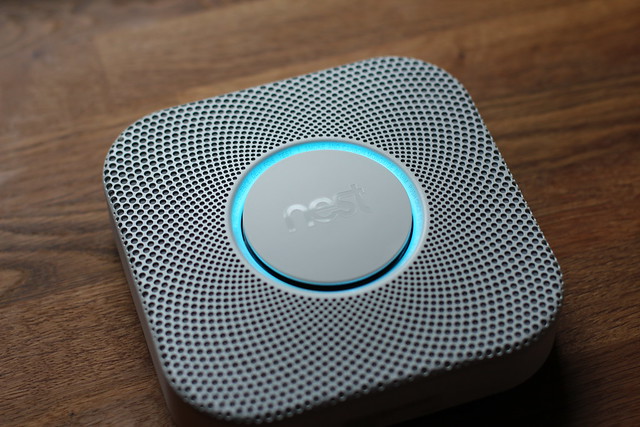
<p>At the same time, advances in technology, from the massive public adoption of the Internet we've come to know and love, to the more recent prevalence of smartphones, tablets, and other IP enabled home devices (like those from Nest), has permitted a wide scale adoption of user friendly and functionally beautiful components that have begun permeating our everyday lives.</p>
<p>
</p>
<div class="MediaContainer PhotoContainer"><a href="http://farm4.staticflickr.com/3693/11735673393_b33abbdf7c_z.jpg" rel="PhotoPopup" popupheight="427" popupwidth="640"><img alt="" src="https://farm4.staticflickr.com/3693/11735673393_b33abbdf7c.jpg" width="500" height="333" style="border-width: 0px; border-style: solid;"></a></div>
<p>With all of these promotions of the ultra capable homeowner, and the penetration of "form marries function" devices which integrate into our homes, there is a shocking lack of options when it comes to the availability of a functional and beautiful DIY Home Security System that meets the typical DIYers primary criteria.</p>
<ol>
    <li>It must work reliably.
    </li>
    <li>It must look good doing it.
    </li>
    <li>It must be affordable to install.
    </li>
    <li>It must be affordable to maintain.
    </li>
</ol>
<p>Wendy and I have been looking for a new home security system that meets these criteria for a little while now. The system we already have in our home is the one that was there when we moved in. It does its job acceptably, and was a top-of-the-line system when it was installed, but it's missing many of the bells and whistles of modern systems, like Internet connectivity and alarm profiles. Add to it that some of the sensors have begun to go bad (which lead to one of the most nerve wracking nights of Wendy's life), making maintenance of the system cost prohibitive, from both a monetary and emotional standpoint.</p>
<p>In addition to our desire to upgrade to modern times, we want to add a few features to our system we don't currently have. Namely, video monitoring, alarm user profiles, and the possibility of future expansion into home automation integration. With the <a href="http://www.oldtownhome.com/2012/10/17/Some-Moron-Stole-Our-Copper-Downspout/">theft of our copper downspout</a> over a year ago, the risk of "alley wanderers" next to our home, and even the occasional dog poop leaver, it would be nice to be able to keep an eye on the premises without the need to be standing at the window.</p>
<p class="MediaContainer PhotoContainer"><a href="http://farm8.staticflickr.com/7394/11735853423_169995ee5c_z.jpg" rel="PhotoPopup" popupheight="431" popupwidth="640"><img alt="" src="https://farm8.staticflickr.com/7394/11735853423_169995ee5c.jpg" width="500" height="336" style="border-width: 0px; border-style: solid;"></a></p>
<p class="MediaContainer PhotoContainer"><em>Photo Credit:&nbsp;<a href="http://greatlakesalarm.com/" target="_blank">Great Lakes Alarm</a></em></p>
<p>However, in the esoteric world of home security systems, one seems to deal more with the smarmy and skeevy than the upstanding and forthright. The high end systems you see in many television homes are not models you can just stroll into a store and purchase. Instead, you must know a guy who knows a guy who can come to your house and give you and estimate and then trust this unknown commodity to install and configure your system, all the while caring about your home as much as you do.</p>
<p>Call me a skeptic or just plain distrusting, but I simply don't like this approach. It leaves too much to chance, too many handshakes with accompanying head tilts and winks, and too often the feeling you just need to take a shower when you're done. There are a few other industries that fall into this sort of business category, such as sports memorabilia dealing, the always "going out of business" rug stores, and used care dealerships (sorry if you're in any of these lines of work, but you know what I'm talking about if you are).</p>
<p>I'm equally distrusting of the hard sell you encounter when going with the known commodities on the market. Few alarm installers/monitoring companies offer a clear and concise synopsis of costs associated with the purchase, install, and ongoing monitoring fees of their alarm, usually requiring "certified installers" to get the system into your home. Instead, most websites encourage you to enter your zip code, phone, and even address so one of their people can give you a "one on one consultation" (read: attempt to get you to shell over big bucks) to properly spec your home's system. </p>
<p>Besides the fact I'm interested in installing this new system myself, I want to shop around, I want to compare features, prices, capabilities, and I want to do it on my own time without having to schedule appointments. And more than anything, I'd rather not go through the experience while constantly talking to pushy people who are trying to sell me on their services of hardware.</p>
<p>Okay, I've done enough rambling about the difficulties, let's get down to brass tacks on the features I'm looking for.&nbsp;</p>
<h3>Required Features</h3>
<p>It almost goes without saying, but the system we're going to install must be a <strong>DIY system</strong>. This can be as simple or complex as necessary, but it has to be something that can be sold to an individual and installed by a non-certified installer.</p>
<p>The system must be a <strong>wireless system</strong>. There's no way I'm running wires to all of the windows, doors, motion detectors, etc. Wireless systems are the future of alarms. Whether we're talking about individual sensors sending RF, wifi, bluetooth, or any other types of communications to the base unit, wireless is the way to go.&nbsp;</p>
<p>Any system we install must have some level of <strong>Internet connectivity</strong>. Ideally, we'll be able to use our phone or a computer to arm/disarm the system, receive notifications when alarm events occur, check status, and even manage user accounts. Ideally, the Internet options may also allow integration with other systems for home automation, but this is more difficult since we've already established our home automation technologies.</p>
<p>The system's communications with the alarm company must be <strong>cellular capable</strong> and must not depend on an active landline or Internet connection. This eliminates the possibility that a phone line being cut&nbsp;</p>
<p>We must be able to use one of a <strong>variety of alarm monitoring companies</strong>. We're not interested in purchasing a system that is tied to a single alarm/monitoring company. When systems like this are installed you typically get a good intro rate, but before you know it the monthly cost begins to escalate and all of your savings are quickly wiped away. This single requirement does eliminate a good number of options, but just can't see buying and installing a system that has such an extreme limitation on vendors.</p>
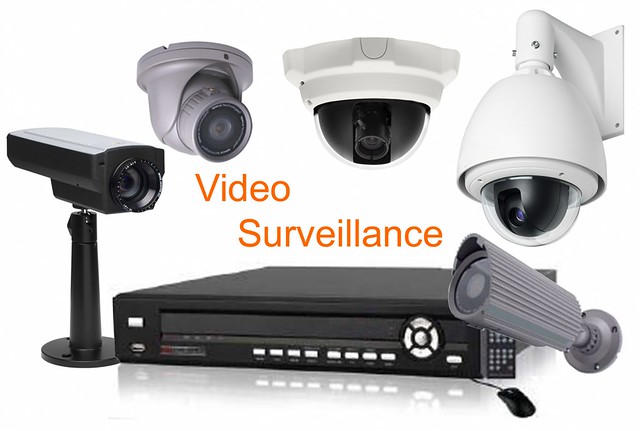
<p>The system we end up going with will need some type of <strong>video monitoring</strong>, though it doesn't have to be a part of the security system itself. In other words, I can see getting a secondary component that does video monitoring that I can check in a secondary app/location. But like the previous requirement, the video storage can't be tied to a specific cloud storage provider with monthly costs. Additionally, the recorded video has to have the option of local or cloud based storage. I'd prefer video recording keep working even if the Internet goes down, and I'd rather not use constant bandwidth when recording. This eliminates things like DropCam from the running, which is too bad because I really like the new Pro version. Ideally, the video monitoring should also have the option for weatherproof cameras.</p>
<p>A nice to have for the system would be some level of <strong>home automation integration</strong>. We have Insteon throughout our house, but I'm relatively sure I can get some transition software or hardware if the system we choose uses UPB, Z-Wave, or another type of automation.</p>
<p>And finally, the system must be good looking. I know this may sound like a pure fluff aspect of the system, but the panels for the system will end up front and center in a few parts of our home. The last thing I want is some ugly looking keypads that look like they're straight out of the 1980s adorning our home's walls. I want the system to look sleek and slick in our 125 year old home. Is that asking too much? Maybe we could get Nest to come up with a security system offering?</p>
<p class="MediaContainer PhotoContainer"><a href="http://farm4.staticflickr.com/3678/11736490106_dd752a31e3_z.jpg" rel="PhotoPopup" popupheight="640" popupwidth="640"><img alt="" src="https://farm4.staticflickr.com/3678/11736490106_dd752a31e3.jpg" width="500" height="500" style="border-width: 0px; border-style: solid;"></a></p>
<p class="MediaContainer PhotoContainer"><em>Photo Credit: <a href="http://www.williamrihn.com/Nest-as-a-Security-System" target="_blank">William Rihn and a Nest Security Concept we all wish existed.</a></em></p>
<h3>Possibilities</h3>
<p>My interest in a new alarm system was piqued when I started to see the various offerings from places like Xfinity, AT&amp;T, and other companies offering bundled services. It sure made the users' lives look wonderful and easy, but the more I looked into the options the more I saw the drawbacks. Contract restrictions, restrictive technologies, and install limitations were just a few of the major issues I saw. So I started to look for systems that had similar functionality but didn't have the ties to individual vendors and service providers.</p>
<p>There seems to be about four real contenders when it comes to DIY systems to install that are not tied to specific monitoring companies/contracts. These systems are from Visonic, Elk, 2GIG, and GE Interlogix. These systems all meet the basic requirements that I've outlined above. I'll be looking into each in more detail in a future post, but that's at least a start.</p>
<div class="MediaContainer PhotoContainer"><a href="http://farm4.staticflickr.com/3744/11736250006_41143d0969_z.jpg" rel="PhotoPopup" popupheight="427" popupwidth="640"><img alt="" src="https://farm4.staticflickr.com/3744/11736250006_41143d0969.jpg" width="500" height="333" style="border-width: 0px; border-style: solid;"></a></div>
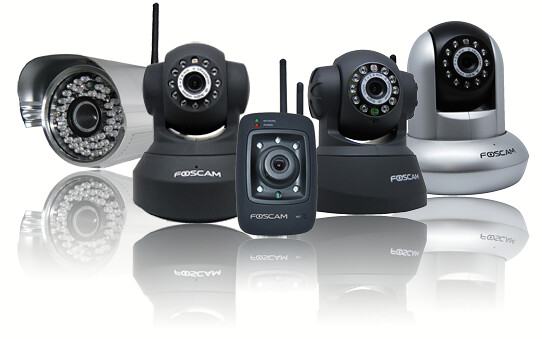
<p>As for video, I'm not entirely sure. I had hoped DropCam would have a better offering but they're focused on cloud only storage of video. Anyone have any good ideas on video monitoring and storage? I think the key here is wifi transmission of the images rather than hard wired, so that limits the playing field quite a bit.</p>
<div class="MediaContainer PhotoContainer"><a href="http://farm6.staticflickr.com/5542/11736138753_a0efc033be_z.jpg" rel="PhotoPopup" popupheight="339" popupwidth="542"><img alt="" src="https://farm6.staticflickr.com/5542/11736138753_a0efc033be.jpg" width="500" height="313" style="border-width: 0px; border-style: solid;"></a></div>
<br>
<p>So that's where we are now. I'm researching and learning a ton about the options that are out there. In the coming weeks I hope to determine a good solution and let you all know how we've made our determination. But as I mentioned, I'd love some input from people with experience in systems they really like. I haven't determined a budget at this point, but I'm thinking the $500-$1000 range is a good starting point. I know it may be more or less depending on what we're interested in adding to the system. We'd also like to get our monthly charges for monitoring down to about $20-$30 per month.</p>
<p>Thoughts? You know we'd love to hear them!</p><p><a href="https://www.oldtownhome.com/2014/1/3/Finding-a-DIY-Install-Home-Security-System/">Read Full Post</a></p>]]></content>
    <category term="Header Image" />
    <category term="Security" />
    <category term="Security System" />
    <PostImage>http://farm3.staticflickr.com/2878/11736382554_528ced3322.jpg</PostImage>
    <media:thumbnail url="https://farm3.staticflickr.com/2878/11736382554_528ced3322_t.jpg" />
    <ExtensionElements>
      <Item>PostImage</Item>
      <Item>media:thumbnail</Item>
    </ExtensionElements>
  </entry>
  <entry>
    <guid>ff76a4e6-2d6e-4eee-b7fb-729e773a4e18</guid>
    <id>https://www.oldtownhome.com/2011/8/4/Knock-Knock-Whos-There-Merv-the-Perv/</id>
    <title>Knock Knock. Who's There? Merv the Perv.</title>
    <summary type="html"><![CDATA[<p>While I'm absolutely thrilled that we've been making great strides to finishing our <a href="http://www.oldtownhome.com/vestibule/index.aspx">front vestibule project,</a> something left me feeling a little uneasy this week. That's where my new buddy Merv comes in. You see, Alex spent a good portion of the weekend <a href="http://www.oldtownhome.com/2011/8/1/How-Do-You-Grow-a-Door-Without-a-Board-Stretcher-Call-In-the-Door-Surgeon/index.aspx">"growing" the new front door</a>, and we even managed to hang it in its final location last night. The great news -- it was a perfect fit. The bad news? Our <a href="http://www.oldtownhome.com/2011/8/3/The-Mail-Slot-is-In---And-Other-Vestibule-Punch-List-Items/index.aspx">new mail slot opening</a> is giving me the heebie jeebies.</p>
<p>
</p>
<div class="MediaContainer PhotoContainer"><a href="http://farm7.static.flickr.com/6141/6003639797_c9af131a39_z.jpg" rel="PhotoPopup" popupheight="640" popupwidth="478"><img alt="" src="https://farm7.static.flickr.com/6141/6003639797_c9af131a39.jpg" width="374" height="500" style="border-width: 0px;border-style: solid;"></a></div>
<p>While growing the door, Alex cut the opening for our <a href="http://www.oldtownhome.com/2011/7/28/Mail-Call-Vestibule-Progress/index.aspx">new (old) mail slot</a>. The location of the mail slot in our new door will be roughly waist height, where our current mail slot is just inches from the floor. Here's our current door, seen in the photo below, which was taken when we were tiling the entryway.&nbsp;</p>
<p>
</p>
<div class="MediaContainer PhotoContainer"><a href="http://farm6.static.flickr.com/5197/5835274984_8b9e18234f_z.jpg" rel="PhotoPopup" popupheight="640" popupwidth="478"><img alt="" src="https://farm6.static.flickr.com/5197/5835274984_8b9e18234f.jpg" width="374" height="500" style="border-width: 0px;border-style: solid;"></a></div>
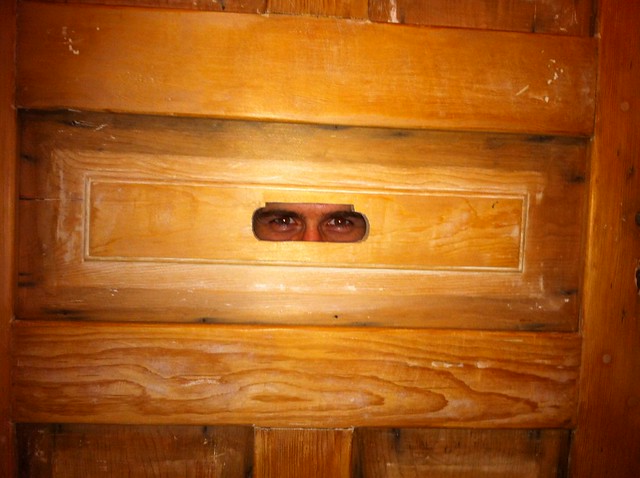
<p>Call me crazy and/or paranoid, but having a hole in the middle of our new door is freaking me out. What's stopping some pervert or burglar on the street from lifting open the new mail slot, pressing his face up against our door, and taking a look around?&nbsp;</p>
<p></p></img></img> <a href="https://www.oldtownhome.com/2011/8/4/Knock-Knock-Whos-There-Merv-the-Perv/">more</a>]]></summary>
    <published>2011-08-04T11:24:00.000-04:00</published>
    <updated>2011-08-04T11:24:00.000-04:00</updated>
    <link rel="alternate" href="https://www.oldtownhome.com/2011/8/4/Knock-Knock-Whos-There-Merv-the-Perv/" />
    <author>
      <name>Wendy</name>
    </author>
    <content type="html"><![CDATA[<p>While I'm absolutely thrilled that we've been making great strides to finishing our <a href="http://www.oldtownhome.com/vestibule/index.aspx">front vestibule project,</a> something left me feeling a little uneasy this week. That's where my new buddy Merv comes in. You see, Alex spent a good portion of the weekend <a href="http://www.oldtownhome.com/2011/8/1/How-Do-You-Grow-a-Door-Without-a-Board-Stretcher-Call-In-the-Door-Surgeon/index.aspx">"growing" the new front door</a>, and we even managed to hang it in its final location last night. The great news -- it was a perfect fit. The bad news? Our <a href="http://www.oldtownhome.com/2011/8/3/The-Mail-Slot-is-In---And-Other-Vestibule-Punch-List-Items/index.aspx">new mail slot opening</a> is giving me the heebie jeebies.</p>
<p>
</p>
<div class="MediaContainer PhotoContainer"><a href="http://farm7.static.flickr.com/6141/6003639797_c9af131a39_z.jpg" rel="PhotoPopup" popupheight="640" popupwidth="478"><img alt="" src="https://farm7.static.flickr.com/6141/6003639797_c9af131a39.jpg" width="374" height="500" style="border-width: 0px;border-style: solid;"></a></div>
<p>While growing the door, Alex cut the opening for our <a href="http://www.oldtownhome.com/2011/7/28/Mail-Call-Vestibule-Progress/index.aspx">new (old) mail slot</a>. The location of the mail slot in our new door will be roughly waist height, where our current mail slot is just inches from the floor. Here's our current door, seen in the photo below, which was taken when we were tiling the entryway.&nbsp;</p>
<p>
</p>
<div class="MediaContainer PhotoContainer"><a href="http://farm6.static.flickr.com/5197/5835274984_8b9e18234f_z.jpg" rel="PhotoPopup" popupheight="640" popupwidth="478"><img alt="" src="https://farm6.static.flickr.com/5197/5835274984_8b9e18234f.jpg" width="374" height="500" style="border-width: 0px;border-style: solid;"></a></div>
<p>Call me crazy and/or paranoid, but having a hole in the middle of our new door is freaking me out. What's stopping some pervert or burglar on the street from lifting open the new mail slot, pressing his face up against our door, and taking a look around?&nbsp;</p>
<p></p>
<p>
</p>
<div class="MediaContainer PhotoContainer"><a href="http://farm7.static.flickr.com/6135/6003638965_7d4e81bf55_z.jpg" rel="PhotoPopup" popupheight="478" popupwidth="640"><img alt="" src="https://farm7.static.flickr.com/6135/6003638965_7d4e81bf55.jpg" width="500" height="374" style="border-width: 0px;border-style: solid;"></a></div>
<p>(Thanks Honey for acting as a stand in for Merv in the photo above.)&nbsp;</p>
<p>Alex thinks I'm totally nuts, and disagrees that we should be concerned because&nbsp;the slot is too small for someone to reach their hand through to be able to manipulate the lock. We also will install a deadbolt higher up on the door, and we're diligent about using our home security system.</p>
<p>Even still, I worry about the errant peeping <span style="text-decoration: line-through;">Merv</span> Tom. I'm trying to come up with a way to somehow shield the back half of the mail slot. Sort of a privacy flap if you will. Any ideas?&nbsp;</p><p><a href="https://www.oldtownhome.com/2011/8/4/Knock-Knock-Whos-There-Merv-the-Perv/">Read Full Post</a></p>]]></content>
    <category term="Header Image" />
    <category term="Security" />
    <category term="Vestibule" />
    <PostImage>http://farm7.static.flickr.com/6147/6008864870_6cf4546018.jpg</PostImage>
    <media:thumbnail url="https://farm7.static.flickr.com/6147/6008864870_6cf4546018_t.jpg" />
    <ExtensionElements>
      <Item>PostImage</Item>
      <Item>media:thumbnail</Item>
    </ExtensionElements>
  </entry>
</feed>