<?xml version="1.0" encoding="utf-8"?>
<feed xmlns="http://www.w3.org/2005/Atom" xmlns:media="http://search.yahoo.com/mrss/">
  <title>Old Town Home Category: 'Home Automation'</title>
  <updated>2017-06-02T11:37:53.500-04:00</updated>
  <id>http://www.oldtownhome.com/home-automation/index.atom</id>
  <link rel="alternate" href="http://www.oldtownhome.com/home-automation/index.atom" />
  <author>
    <name>Alex and Wendy</name>
    <uri>http://www.oldtownhome.com/</uri>
    <email>wendy@oldtownhome.com</email>
  </author>
  <entry>
    <guid>9f3aff78-7c8b-4217-bbfc-8e94e1e523e0</guid>
    <id>https://www.oldtownhome.com/2017/6/2/Low-Voltage-Garden-Lighting-Home-Automation-Insteon-Hack/</id>
    <title>Low Voltage Garden Lighting Home Automation Insteon Hack</title>
    <summary type="html"><![CDATA[<p>Our goal is simple. We have low voltage outdoor lighting and we want to be able to control it using Insteon home automation. </p><p>Ben when it came to outdoor low voltage lighting, we couldn't find one on the market that would work with home automation systems. </p><p>
</p><div class="MediaContainer PhotoContainer"><a href="https://farm2.staticflickr.com/1545/24981433245_91afb1d9b6_z.jpg" rel="PhotoPopup" popupheight="479" popupwidth="640"><img alt="" src="https://farm2.staticflickr.com/1545/24981433245_91afb1d9b6.jpg" width="500" height="375" style="border-width: 0px; border-style: solid;"></a></div><p>Back in February 2016 we shared the relatively inexpensive and very DIY friendly way you can add landscape lighting to your home. Though it looks great when it's on, the control of the lighting leaves something to be desired. There are several problems with how you can control the lights. </p><p>In the case of our unit, there's no good way to control it with a light switch. Each time you turn off the unit it resets, so turning it on only puts it in programming mode. Once it's set, when it's on it's on, even if you want it off, unless you actually press a button on the transformer. To turn it off we have to crawl behind the bushes and there's few people that want to crawl around in dark bushes at night. </p><p>
</p> <a href="https://www.oldtownhome.com/2017/6/2/Low-Voltage-Garden-Lighting-Home-Automation-Insteon-Hack/">more</a>]]></summary>
    <published>2017-06-02T11:37:53.500-04:00</published>
    <updated>2017-06-02T11:37:53.500-04:00</updated>
    <link rel="alternate" href="https://www.oldtownhome.com/2017/6/2/Low-Voltage-Garden-Lighting-Home-Automation-Insteon-Hack/" />
    <author>
      <name>Alex</name>
    </author>
    <content type="html"><![CDATA[<p>Our goal is simple. We have low voltage outdoor lighting and we want to be able to control it using Insteon home automation. </p>
<p>Ben when it came to outdoor low voltage lighting, we couldn't find one on the market that would work with home automation systems. </p>
<p>
</p>
<div class="MediaContainer PhotoContainer"><a href="https://farm2.staticflickr.com/1545/24981433245_91afb1d9b6_z.jpg" rel="PhotoPopup" popupheight="479" popupwidth="640"><img alt="" src="https://farm2.staticflickr.com/1545/24981433245_91afb1d9b6.jpg" width="500" height="375" style="border-width: 0px; border-style: solid;" /></a></div>
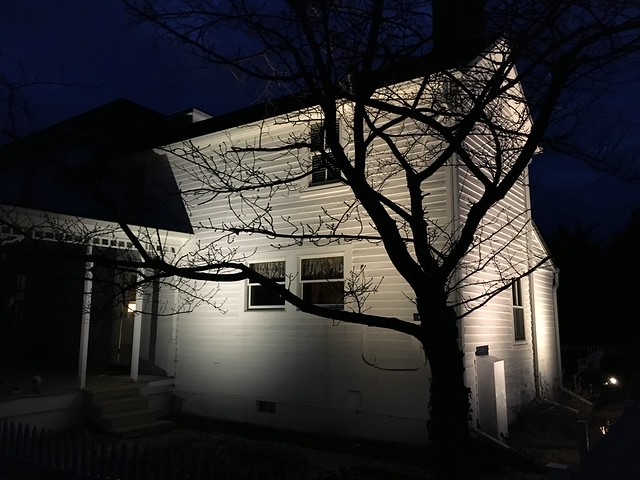
<p>Back in February 2016 we shared the relatively inexpensive and very DIY friendly way you can add landscape lighting to your home. Though it looks great when it's on, the control of the lighting leaves something to be desired. There are several problems with how you can control the lights. </p>
<p>In the case of our unit, there's no good way to control it with a light switch. Each time you turn off the unit it resets, so turning it on only puts it in programming mode. Once it's set, when it's on it's on, even if you want it off, unless you actually press a button on the transformer. To turn it off we have to crawl behind the bushes and there's few people that want to crawl around in dark bushes at night. </p>
<p>
</p>
<div class="MediaContainer PhotoContainer"><a href="https://farm2.staticflickr.com/1514/24070771519_4941668ae9_z.jpg" rel="PhotoPopup" popupheight="480" popupwidth="640"><img alt="" src="https://farm2.staticflickr.com/1514/24070771519_4941668ae9.jpg" width="500" height="375" style="border-width: 0px; border-style: solid;" /></a></div>
<p>There's the ability to set a schedule, but it's rudimentary at best allowing you only to specify the number of hours it should stay on once a photocell triggers it to turn on.  And though a photocell sensor will turn the lights on at sunset and off at sunrise, it seems to be unreliable and we really don't want to leave the lights on all night. All of this together means it's just plain frustrating.</p>
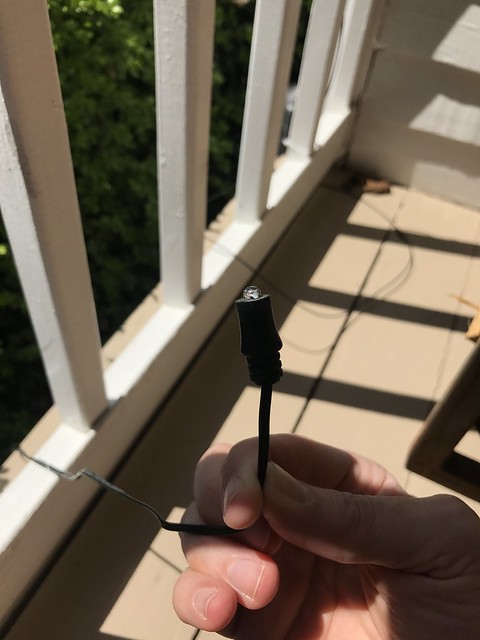
<p class="MediaContainer PhotoContainer"><a href="https://farm3.staticflickr.com/2876/33919228832_5820db9f53_z.jpg" rel="PhotoPopup" popupheight="640" popupwidth="480"><img alt="" src="https://farm3.staticflickr.com/2876/33919228832_5820db9f53.jpg" width="375" height="500" style="border-width: 0px; border-style: solid;" /></a></p>
<p class="MediaContainer PhotoContainer"><em>Tiny photocell that operates the transformer</em></p>

<p>While home automation has grown by leaps and bounds over the last several years, there are some products that just don't exist yet in the marketplace. In this case, we were searching for a low voltage garden lighting transformer that can be controlled with either Insteon or Z-Wave home automation protocols. I've searched high and low looking for an out of the box solution, and while they will probably exist at some point, right now I just haven't found one. </p>
<p>My searches uncovered some creative solutions, like a blog post that outlines how to create your own custom <a href="http://efundies.com/guides/insteon/hardware/how_to_control_outdoor_low_voltage_lighting_with_insteon/how_to_control_outdoor_low_voltage_lighting_with_insteon_page_1.htm" target="_blank">Insteon controlled outdoor enclosure unit</a>. My initial instinct of "ooooooh, I want to build that" was quickly overridden by the practical side of my brain that suggested "there's probably a more straight forward and less labor intensive way to accomplish what you want." Rather than engineering a completely custom approach, I started to look for solution that might work with the transformer we already had on hand.  </p>
<p>When I started to really think about what we wanted to accomplish, I had a lightbulb moment that turned the tide in what we were shooting for. I realized that the photocell that could be used to turn the lights on and off with the sunset and sunrise, was actually just a plain old switch. Sure, it had a light sensor on the end of it, but all that light sensor was responsible for was to turn the lights on and off on the transformer. If I could somehow control that photocell sensor with something else, we'd be golden.</p>
<div class="ToolItem">
<iframe style="width: 120px; height: 240px;" marginwidth="0" marginheight="0" scrolling="no" frameborder="0" src="//ws-na.amazon-adsystem.com/widgets/q?ServiceVersion=20070822&amp;OneJS=1&amp;Operation=GetAdHtml&amp;MarketPlace=US&amp;source=ac&amp;ref=qf_sp_asin_til&amp;ad_type=product_link&amp;tracking_id=oltoho-20&amp;marketplace=amazon&amp;region=US&amp;placement=B001OLVLCK&amp;asins=B001OLVLCK&amp;linkId=8117a9db956daec038d76a4265859dd0&amp;show_border=false&amp;link_opens_in_new_window=true&amp;price_color=333333&amp;title_color=0066c0&amp;bg_color=fafaf8">
</iframe>
</div>
<p>After doing a fair amount of research, I came upon a solution that I thought might work. Insteon has a device call the Insteon IO Linc Module, and it's built for flexibility. If you read the marketing materials on this device, it's meant for whatever you can think of using it for. You can wire it to garage door closure relays, alarm device sensors, door bells, or any other number of low voltage items. But with this tremendous flexibility comes a complete lack of real instructions. So we had to just figure it out.</p>
<p>Assuming we could use the Insteon IO Linc as a home automation controlled switch replacement for the photocell, I got to work. </p>
<p>The first thing I had to do was to determine how the photocell switch works. Switches tend to work in one of two states, either "Normally Open" or "Normally Closed." What this means is that the photocell when triggered by light of the sun would either normally act in the Open or Off switch position or the Closed or On switch position. To verify I decided to just take the plunge and cut the photocell switch off of the wire.</p>
<p>As soon as I cut the photocell off of the end of the wire, the outdoor lights immediately turned on. This told me that when the photocell when activated by the sun was opening the circuit, so the normal position of the switch (without sun activation) was closed.</p>
<p>
</p>
<div class="MediaContainer PhotoContainer"><a href="https://farm3.staticflickr.com/2878/33264521953_4522786097_z.jpg" rel="PhotoPopup" popupheight="640" popupwidth="480"><img alt="" src="https://farm3.staticflickr.com/2878/33264521953_4522786097.jpg" width="375" height="500" style="border-width: 0px; border-style: solid;" /></a></div>
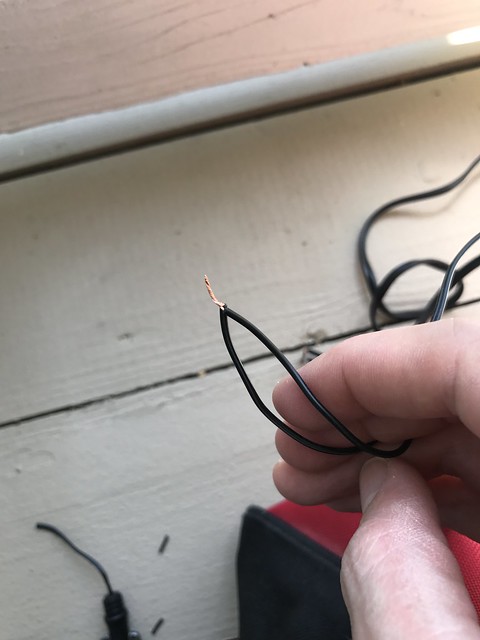
<p>Once it was cut I was able to strip back the wires to the photocell lead, then connect them. This connection completed the circuit and made the state of the switch act in a "closed" manner. About 30 seconds after I closed the circuit, the lights turned off. With this confirmation of the normally closed state of the switch resulting in the lights going off, I could begin to setup the IO Linc test.</p>
<p>
</p>
<div class="MediaContainer PhotoContainer"><a href="https://farm3.staticflickr.com/2808/33946447631_f9c92f0407_z.jpg" rel="PhotoPopup" popupheight="640" popupwidth="480"><img alt="" src="https://farm3.staticflickr.com/2808/33946447631_f9c92f0407.jpg" width="375" height="500" style="border-width: 0px; border-style: solid;" /></a></div>
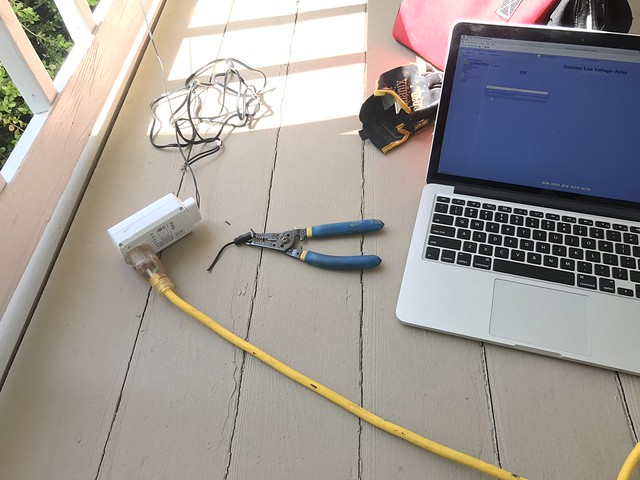
<p>I wired the photocell lights into the "COM" or common terminal and the "NC" or Normally Closed terminal of the IO Linc. If my assumptions were correct, this would allow us to program any Insteon switch in the house to turn these outdoor lights on or off.</p>
<p>
</p>
<div class="MediaContainer PhotoContainer"><a href="https://farm4.staticflickr.com/3856/33233775184_329804ae15_z.jpg" rel="PhotoPopup" popupheight="640" popupwidth="480"><img alt="" src="https://farm4.staticflickr.com/3856/33233775184_329804ae15.jpg" width="375" height="500" style="border-width: 0px; border-style: solid;" /></a></div>
<p>Our whole home automation system is managed using an <a target="_blank" href="https://www.amazon.com/gp/product/B00P7C88XM/ref=as_li_tl?ie=UTF8&amp;camp=1789&amp;creative=9325&amp;creativeASIN=B00P7C88XM&amp;linkCode=as2&amp;tag=oltoho-20&amp;linkId=92c1d2a1799828a7617589c41f692f92">ISY994i ZW PRO</a><img alt="" src="//ir-na.amazon-adsystem.com/e/ir?t=oltoho-20&amp;l=am2&amp;o=1&amp;a=B00P7C88XM" width="1" height="1" style="border: none !important; margin: 0px !important;" /> device. The "ISY" is the brains of our system, and manages all devices we have installed. In this case, the ISY can run a program that automatically turns these lights on when the sun sets each day, and automatically turns them off at a scheduled time (we'll put it at 10:30). I'll definitely do a much more in-depth post on home automation and my obsession with the ISY in the future, but it requires a lot of details. Anyhow, I needed to add this Insteon IO Linc to our setup through the application interface on my computer.</p>
<p>
</p>
<div class="MediaContainer PhotoContainer"><a href="https://farm3.staticflickr.com/2806/33946448211_99332e5447_z.jpg" rel="PhotoPopup" popupheight="480" popupwidth="640"><img alt="" src="https://farm3.staticflickr.com/2806/33946448211_99332e5447.jpg" width="500" height="375" style="border-width: 0px; border-style: solid;" /></a></div>
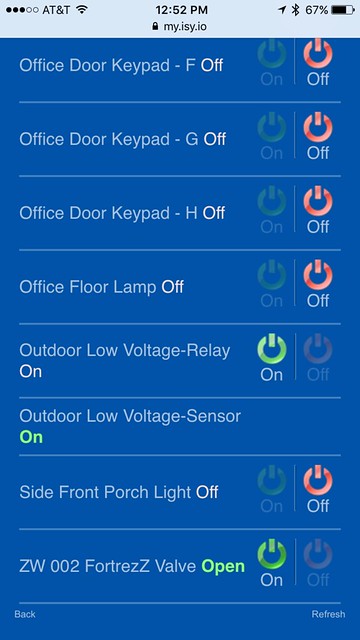
<p>Once I added to the system I tested the function of the switch from the iPhone app. You can see in the screen shot that a "Outdoor Low Voltage-Relay" is listed. When the outdoor lights were off, touching the "On" button caused the lights to immediately come on. And when on, touching the "Off" caused the lights to turn off after the programmed 30 second delay. That 30 second delay is a part of the light system and something I'll just have to live with.</p>
<p>
</p>
<div class="MediaContainer PhotoContainer"><a href="https://farm3.staticflickr.com/2910/33946442621_6a7d664752_z.jpg" rel="PhotoPopup" popupheight="640" popupwidth="360"><img alt="" src="https://farm3.staticflickr.com/2910/33946442621_6a7d664752.jpg" width="281" height="500" style="border-width: 0px; border-style: solid;" /></a></div>
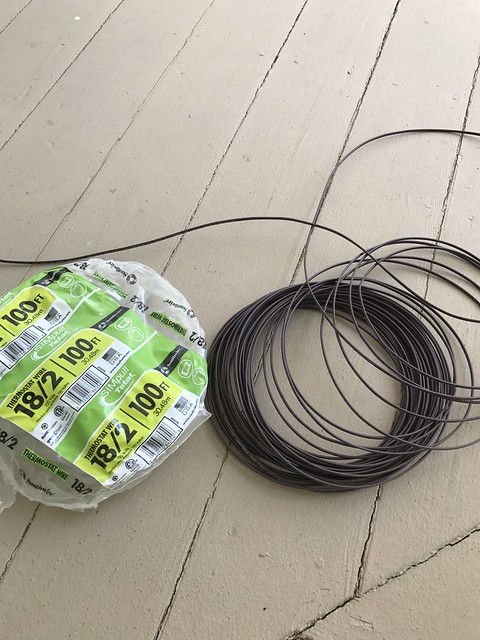
<p>With the successful test of the system, I knew we had ourselves a winner. I disconnected my test set up and wired up a much longer length of lead using some spare HVAC wire I had from a prior project. Using this longer wire would allow me to extend the wiring from the transformer into an outlet in the crawlspace of our house. This way I can plug the IO Linc in an out of the way location that's protected from the weather.</p>
<p>
</p>
<div class="MediaContainer PhotoContainer"><a href="https://farm3.staticflickr.com/2896/34076672845_528353d3e7_z.jpg" rel="PhotoPopup" popupheight="640" popupwidth="480"><img alt="" src="https://farm3.staticflickr.com/2896/34076672845_528353d3e7.jpg" width="375" height="500" style="border-width: 0px; border-style: solid;" /></a></div>
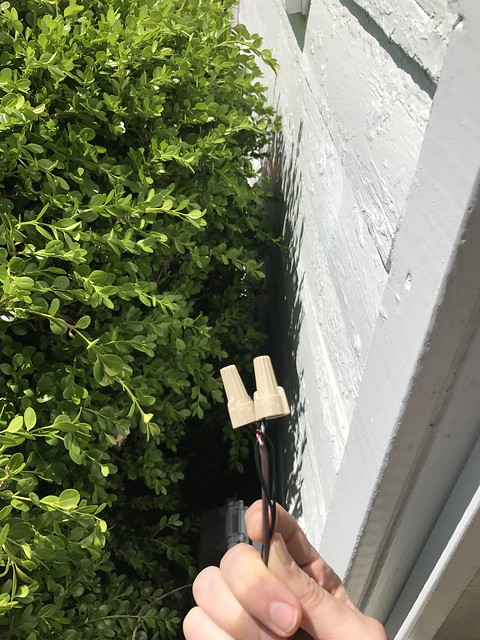
<p>I applied a few wire nuts to the splice, then tons of weather resistant tape to the nuts. Then we hid the wire behind the bottom course of siding so nobody will ever see it. </p>
<p>
</p>
<div class="MediaContainer PhotoContainer"><a href="https://farm3.staticflickr.com/2925/33692795520_31c3cd8282_z.jpg" rel="PhotoPopup" popupheight="640" popupwidth="480"><img alt="" src="https://farm3.staticflickr.com/2925/33692795520_31c3cd8282.jpg" width="375" height="500" style="border-width: 0px; border-style: solid;" /></a></div>
<p>The final step in the process was programming one of the light switches near the front door to control these lights. Now, if we want to go outside and sit around a dark fire pit, but the lights are on, all we have to do it tap the button on the switch and the lights will turn off. (We actually programmed about three switches to perform this duty, which is a great flexibility of home automation.)</p>
<p>
</p>
<div class="MediaContainer PhotoContainer"><a href="https://farm3.staticflickr.com/2838/33919225942_4f82fda54f_z.jpg" rel="PhotoPopup" popupheight="640" popupwidth="480"><img alt="" src="https://farm3.staticflickr.com/2838/33919225942_4f82fda54f.jpg" width="375" height="500" style="border-width: 0px; border-style: solid;" /></a></div>
<p>All told, it's taken much longer to write this blog post than to set up the Insteon IO Linc to control our lights. It was a quick and easy project that really expanded the function of our outdoor lights. Out of the box the programming of the lights and ability to turn them on and off was very limited. Now, using the ISY994 and our iPhone or wall switches, our outdoor lights run on a program that operates with the sunset and can be controlled by our switches or phones.</p>
<p>This is just one example of how versatile home automation is becoming. In many cases you can integrate home automation tools with existing technology in your home. We've been tinkering with home automation for more than a dozen years now, and the last four or five have seen such great strides that it's quickly becoming a reality for more than just the technology geeks of the world. </p>
<p>While this is a little bit more advanced of a home automation post, we plan on doing a handful of Home Automation 101 style posts to help the every day DIYer get off the ground with home automation. </p>
<p>Do you have any experience with home automation? If so, what technology did you choose and why? And if you don't have any experience, is this something that interests you that you'd like to learn more about? Let us know!</p><p><a href="https://www.oldtownhome.com/2017/6/2/Low-Voltage-Garden-Lighting-Home-Automation-Insteon-Hack/">Read Full Post</a></p>]]></content>
    <category term="Garden" />
    <category term="Hack" />
    <category term="Header Image" />
    <category term="Home Automation" />
    <category term="Insteon" />
    <category term="Smarthome" />
    <PostImage>https://c1.staticflickr.com/5/4195/34890619062_fa976889dd_z.jpg</PostImage>
    <media:thumbnail url="https://c1.staticflickr.com/5/4195/34890619062_fa976889dd_t.jpg" />
    <ExtensionElements>
      <Item>PostImage</Item>
      <Item>media:thumbnail</Item>
    </ExtensionElements>
  </entry>
  <entry>
    <guid>540961fb-8f1d-49d2-8d4e-9a5708100523</guid>
    <id>https://www.oldtownhome.com/2012/10/11/Converting-an-Outlet-into-a-Switched-Outlet---No-Electrician-Required/</id>
    <title>Converting an Outlet into a Switched Outlet - No Electrician Required</title>
    <summary type="html"><![CDATA[<p>Most of us DIYers have been there. We have a light switch in one location, and an outlet with a lamp or a light fixture attached to a different location not controlled by the switch, but we want that light switch to control the light. What are we to do? For us, we ran into this situation during our<a href="http://www.oldtownhome.com/2012/10/2/Quick-Easy-Kitchen-Shelving/index.aspx"> kitchen shelf build</a>. But we've been there and done that and we knew what we had to do to make our setup work the way we wanted it to.</p><p>For our <a href="http://www.oldtownhome.com/2012/10/10/Kitchen-Shelving-Part-3---Primed-Painted-and-Installed/index.aspx">shelf project </a>we had <a href="http://www.oldtownhome.com/2012/10/5/Kitchen-Shelving-Part-2---Integrated-Wine-Glass-Storage-and-Lighting/index.aspx">installed recessed lights</a> under the lower shelf, and we had an outlet available to plug the lights in, but we had a few problems facing us before it operated the way we wanted it to.</p><p>
</p><div class="MediaContainer PhotoContainer"><a href="http://farm9.staticflickr.com/8457/8072966665_4581c04b8e_z.jpg" rel="PhotoPopup" popupheight="427" popupwidth="640"><img alt="" src="https://farm9.staticflickr.com/8457/8072966665_4581c04b8e.jpg" width="500" height="333" style="border-width: 0px; border-style: solid;"></a></div><p>The solution to these three somewhat difficult problems? A quick swap and a purchase. </p><p>As you may be aware, we have an extensive collection of home automation items throughout the house, and this is where we started to solve issue #2 and #3. I went to the <a href="http://click.linksynergy.com/fs-bin/click?id=e/m0ZVEOUfc&amp;offerid=224615.10000266&amp;type=3&amp;subid=0" target="_blank">Smarthome.com</a><img alt="" width="1" height="1" src="http://ad.linksynergy.com/fs-bin/show?id=e/m0ZVEOUfc&amp;bids=224615.10000266&amp;type=3&amp;subid=0" style="border-width: 0px; border-style: solid;"> website and ordered one of their <a href="http://click.linksynergy.com/link?id=e/m0ZVEOUfc&amp;offerid=224615.54501&amp;type=2&amp;murl=http%3A%2F%2Fwww.smarthome.com%2F2473swh.html" target="_blank">Insteon OutletLinc dimmers</a>. The switch we wanted to control these lights is already an X10 switch, so that means we already had half of the difficulty solved (the remote side of the equation).</p><p>These outlets look like pretty standard duplex receptacles with one that is always on (lower), and the second controlled by an Insteon remote (like the light switch, or button on the front of the switch). As the corny plastic cover on the front of the device says..."Welcome to the future." (Yeah, the nerd in me even thinks a tagline like that is super cheesy.)</p> <a href="https://www.oldtownhome.com/2012/10/11/Converting-an-Outlet-into-a-Switched-Outlet---No-Electrician-Required/">more</a>]]></summary>
    <published>2012-10-11T09:00:00.000-04:00</published>
    <updated>2012-10-11T09:00:00.000-04:00</updated>
    <link rel="alternate" href="https://www.oldtownhome.com/2012/10/11/Converting-an-Outlet-into-a-Switched-Outlet---No-Electrician-Required/" />
    <author>
      <name>Alex</name>
    </author>
    <content type="html"><![CDATA[<p>Most of us DIYers have been there. We have a light switch in one location, and an outlet with a lamp or a light fixture attached to a different location not controlled by the switch, but we want that light switch to control the light. What are we to do? For us, we ran into this situation during our<a href="http://www.oldtownhome.com/2012/10/2/Quick-Easy-Kitchen-Shelving/index.aspx"> kitchen shelf build</a>. But we've been there and done that and we knew what we had to do to make our setup work the way we wanted it to.</p>
<p>For our <a href="http://www.oldtownhome.com/2012/10/10/Kitchen-Shelving-Part-3---Primed-Painted-and-Installed/index.aspx">shelf project </a>we had <a href="http://www.oldtownhome.com/2012/10/5/Kitchen-Shelving-Part-2---Integrated-Wine-Glass-Storage-and-Lighting/index.aspx">installed recessed lights</a> under the lower shelf, and we had an outlet available to plug the lights in, but we had a few problems facing us before it operated the way we wanted it to.</p>
<p>
</p>
<div class="MediaContainer PhotoContainer"><a href="http://farm9.staticflickr.com/8457/8072966665_4581c04b8e_z.jpg" rel="PhotoPopup" popupheight="427" popupwidth="640"><img alt="" src="https://farm9.staticflickr.com/8457/8072966665_4581c04b8e.jpg" width="500" height="333" style="border-width: 0px; border-style: solid;"></a></div>
<strong>
<div><strong><br>
</strong></div>
Our challenges were:</strong><br>
<ol>
    <li>Placing the whole house audio controller in the present junction box wouldn't work. The audio control is too wide and was forced too far to the right, which meant the outlet cover plate wouldn't fit over both the audio control and the outlet.</li>
    <li>We wanted the outlet to stay as low profile as possible, so using a plugin remote to control the lights wouldn't work, or always plugging unplugging them wasn't an option</li>
    <li>We wanted these lights to be controlled by the same switch that controls the rest of the kitchen's under cabinet lights, not with a separate switch that was somehow stuck on the wall or added near any other switch.</li>
</ol>
<p>The solution to these three somewhat difficult problems? A quick swap and a purchase. </p>
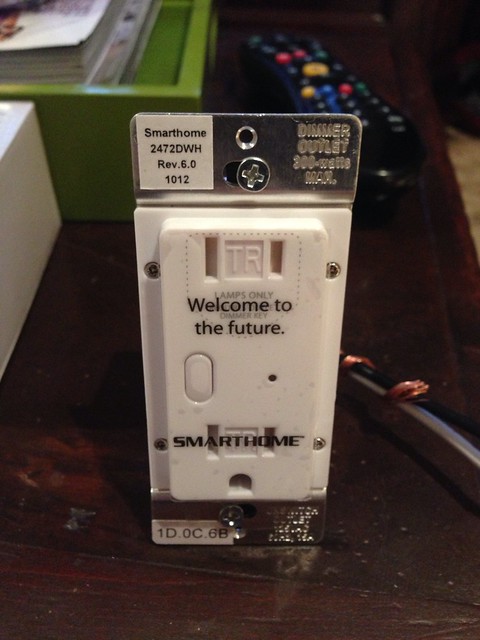
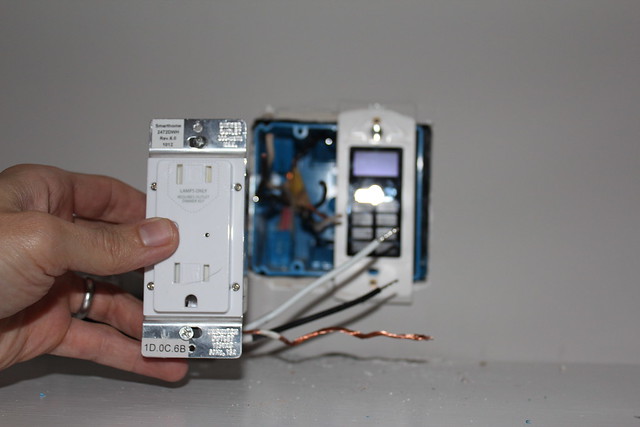
<p>As you may be aware, we have an extensive collection of home automation items throughout the house, and this is where we started to solve issue #2 and #3. I went to the <a href="http://click.linksynergy.com/fs-bin/click?id=e/m0ZVEOUfc&amp;offerid=224615.10000266&amp;type=3&amp;subid=0" target="_blank">Smarthome.com</a><img alt="" width="1" height="1" src="http://ad.linksynergy.com/fs-bin/show?id=e/m0ZVEOUfc&amp;bids=224615.10000266&amp;type=3&amp;subid=0" style="border-width: 0px; border-style: solid;"> website and ordered one of their <a href="http://click.linksynergy.com/link?id=e/m0ZVEOUfc&amp;offerid=224615.54501&amp;type=2&amp;murl=http%3A%2F%2Fwww.smarthome.com%2F2473swh.html" target="_blank">Insteon OutletLinc dimmers</a>. The switch we wanted to control these lights is already an X10 switch, so that means we already had half of the difficulty solved (the remote side of the equation).</p>
<p>These outlets look like pretty standard duplex receptacles with one that is always on (lower), and the second controlled by an Insteon remote (like the light switch, or button on the front of the switch). As the corny plastic cover on the front of the device says..."Welcome to the future." (Yeah, the nerd in me even thinks a tagline like that is super cheesy.)</p>
<p>
</p>
<div class="MediaContainer PhotoContainer"><a href="http://farm9.staticflickr.com/8456/8073739568_8ea4f28ba2_z.jpg" rel="PhotoPopup" popupheight="640" popupwidth="480"><img alt="" src="https://farm9.staticflickr.com/8456/8073739568_8ea4f28ba2.jpg" width="375" height="500" style="border-width: 0px; border-style: solid;"></a></div>
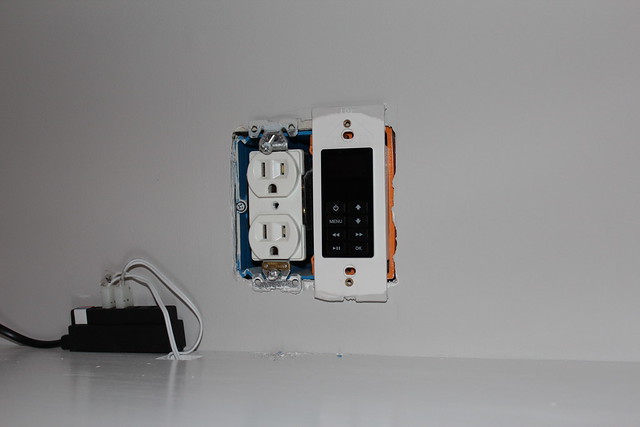
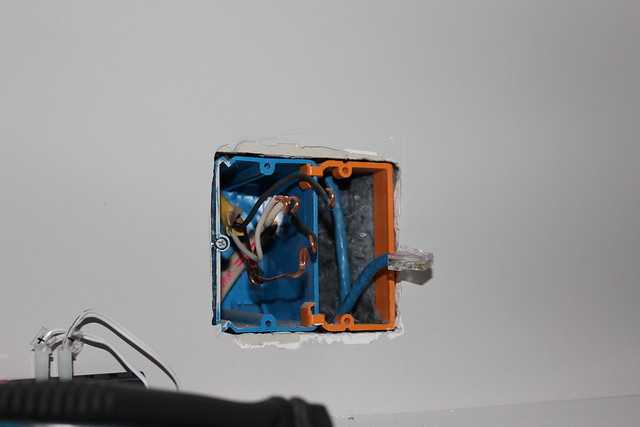
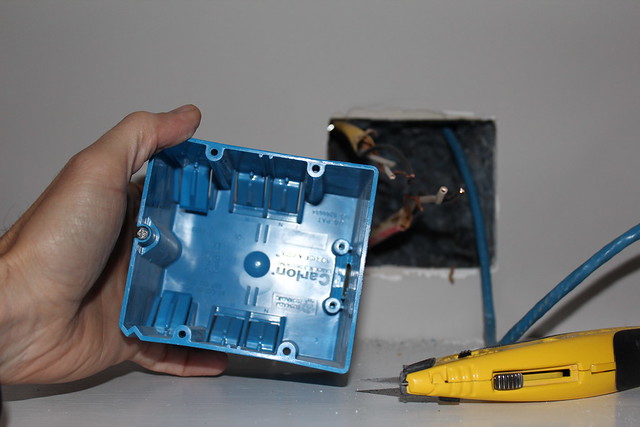
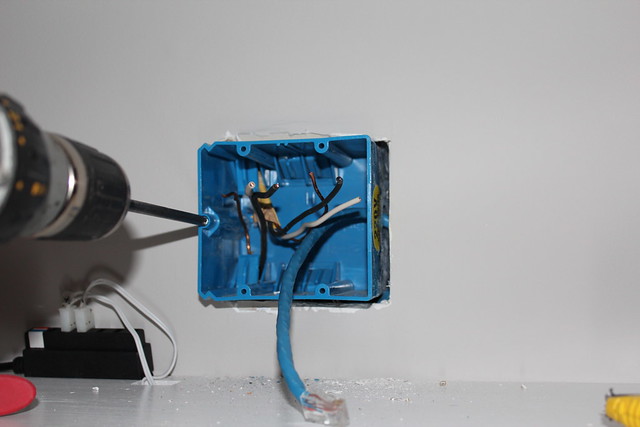
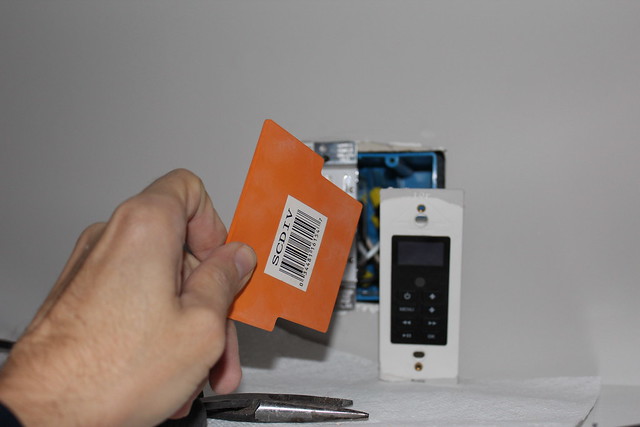
<p>Issue #1 was also somewhat easily resolved, but it involved a little work. I needed to swap out the adjustable single gang junction box (blue one) and the single gang low voltage frame (orange piece), for a double gang box. This would allow the new outlet and the audio control to live side by side in harmony, and would allow a outlet cover to fit properly. </p>
<p>
</p>
<div class="MediaContainer PhotoContainer"><a href="http://farm9.staticflickr.com/8312/8072961194_904a5553d3_z.jpg" rel="PhotoPopup" popupheight="427" popupwidth="640"><img alt="" src="https://farm9.staticflickr.com/8312/8072961194_904a5553d3.jpg" width="500" height="333" style="border-width: 0px; border-style: solid;"></a></div>
<p>To start this, I just had to remove the old outlet and audio control (after first turning off the breaker, of course). </p>
<p>
</p>
<div class="MediaContainer PhotoContainer"><a href="http://farm9.staticflickr.com/8169/8072962790_67c87a0118_z.jpg" rel="PhotoPopup" popupheight="427" popupwidth="640"><img alt="" src="https://farm9.staticflickr.com/8169/8072962790_67c87a0118.jpg" width="500" height="333" style="border-width: 0px; border-style: solid;"></a></div>
<p>Let me first say, the Internet and blog land is overly full of "this is how you change an outlet" posts. There are videos, how to guides, articles, posts with 42 photos that outline "this is how you unscrew a screw", and horror stories of "outlet installs gone wrong." Bottom line, people are often overly scared about electricity, but it's not hard and anyone can do it. You just need to be cautious, respect what you're dealing with, turn off the circuit breaker, test the line often to be sure it has no power, and be patient and thorough.&nbsp;</p>
<p>All of that being said, what I'm talking about isn't a simple "how to change an outlet" posts. Rather, this is a how to switch a junction box and install a Smarthome switched outlet post, which is a bit different. What I'm really trying to say is, "please don't judge."</p>
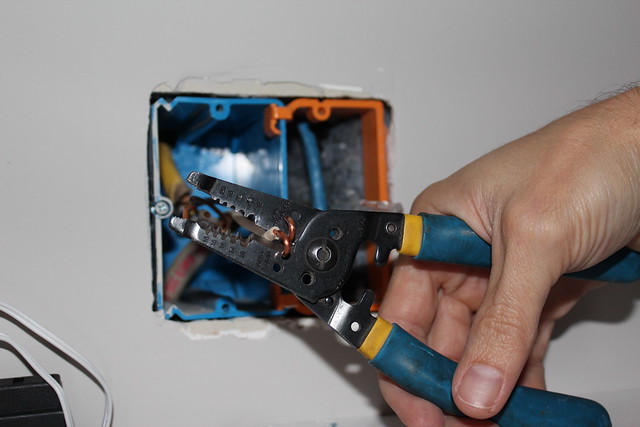
<p>After removing the old outlet, I snipped the curls off of the wires to give less of a barrier to removing the junction box. Otherwise the curls on the wires would have caught the box on the way out, resulting in me swearing and cursing the project. </p>
<p>
</p>
<div class="MediaContainer PhotoContainer"><a href="http://farm9.staticflickr.com/8312/8072971237_8f61992737_z.jpg" rel="PhotoPopup" popupheight="427" popupwidth="640"><img alt="" src="https://farm9.staticflickr.com/8312/8072971237_8f61992737.jpg" width="500" height="333" style="border-width: 0px; border-style: solid;"></a></div>
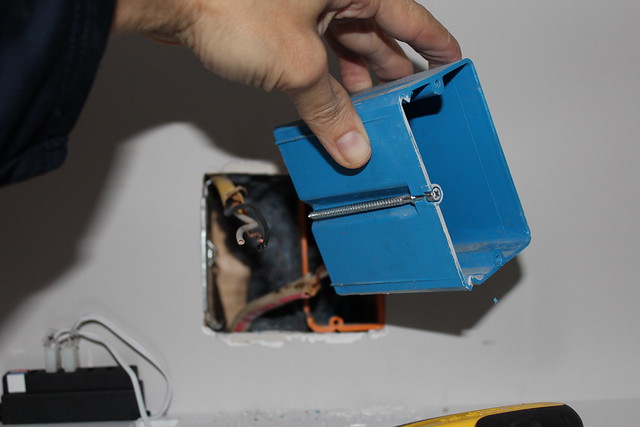
<p>This junction box is one of the ones I really like to use on projects (and one we installed during our <a href="http://www.oldtownhome.com/2012/2/27/Our-Newlywed-Kitchen-Nightmare/index.aspx">kitchen disaster renovation</a>). It mounts with a metal plate on the side, and allows you to adjust its depth by turning the screw on the side of the box. The added benefit of this is if you adjust it all of the way forward, it unseats from the collar that's fixed in place and you can swap it out with another size junction box of the same style without pulling nails or tearing up your wall. How great is that?</p>
<p>
</p>
<div class="MediaContainer PhotoContainer"><a href="http://farm9.staticflickr.com/8173/8072967334_929dec4ceb_z.jpg" rel="PhotoPopup" popupheight="427" popupwidth="640"><img alt="" src="https://farm9.staticflickr.com/8173/8072967334_929dec4ceb.jpg" width="500" height="333" style="border-width: 0px; border-style: solid;"></a></div>
<p>I know some contractors that like to use remodel junction boxes throughout, even in new construction, to allow for easy future removal if needed, but with this type of junction box, it's even easier.</p>
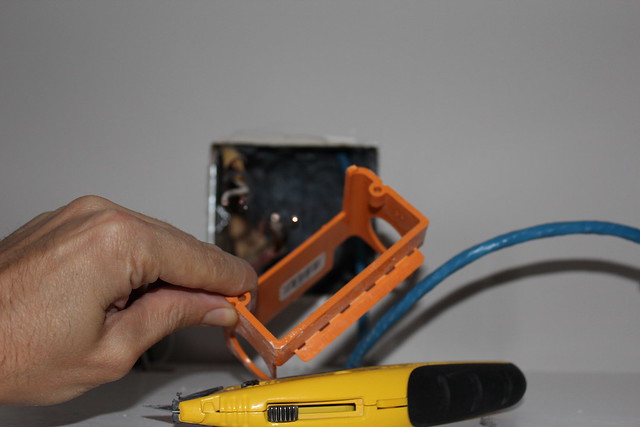
<p>After removing the old junction box, I also slid out the orange low voltage box. I would have liked to have kept it configured the way it was, but the size just wouldn't allow it. The whole reason one would typically use one of these orange pseudo boxes is to ensure the line voltage (outlet), and low voltage (audio control) stay in separate areas. You don't want to end up in a situation where your line voltage items ever turn your low voltage items into line voltage items. This is a fire hazard and can also lead to a lot of damage through electrical components in your house. In the words of The Offspring, "You gotta keep 'em separated."</p>
<p>
</p>
<div class="MediaContainer PhotoContainer"><a href="http://farm9.staticflickr.com/8321/8072968064_9ff6acc636_z.jpg" rel="PhotoPopup" popupheight="427" popupwidth="640"><img alt="" src="https://farm9.staticflickr.com/8321/8072968064_9ff6acc636.jpg" width="500" height="333" style="border-width: 0px; border-style: solid;"></a></div>
<p>Installing the dual gang junction box was as easy as feeding the old wires through the knockouts...</p>
<p>
</p>
<div class="MediaContainer PhotoContainer"><a href="http://farm9.staticflickr.com/8454/8072976489_f75f15a23e_z.jpg" rel="PhotoPopup" popupheight="427" popupwidth="640"><img alt="" src="https://farm9.staticflickr.com/8454/8072976489_f75f15a23e.jpg" width="500" height="333" style="border-width: 0px; border-style: solid;"></a></div>
<p>...And sliding the new box into the old metal mounting collar and adjusting the depth all of the way back.</p>
<p>
</p>
<div class="MediaContainer PhotoContainer"><a href="http://farm9.staticflickr.com/8039/8072970338_4de601b8ae_z.jpg" rel="PhotoPopup" popupheight="427" popupwidth="640"><img alt="" src="https://farm9.staticflickr.com/8039/8072970338_4de601b8ae.jpg" width="500" height="333" style="border-width: 0px; border-style: solid;"></a></div>
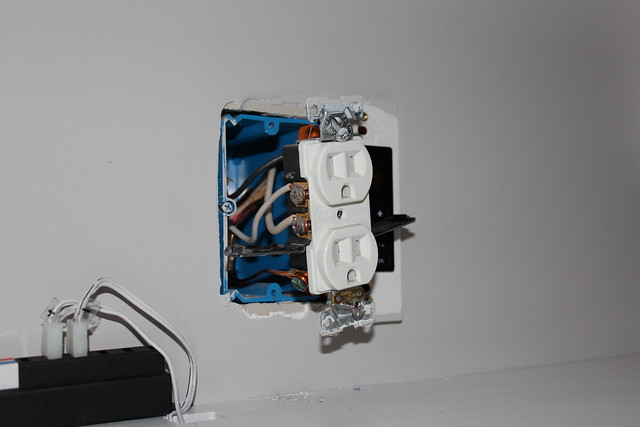
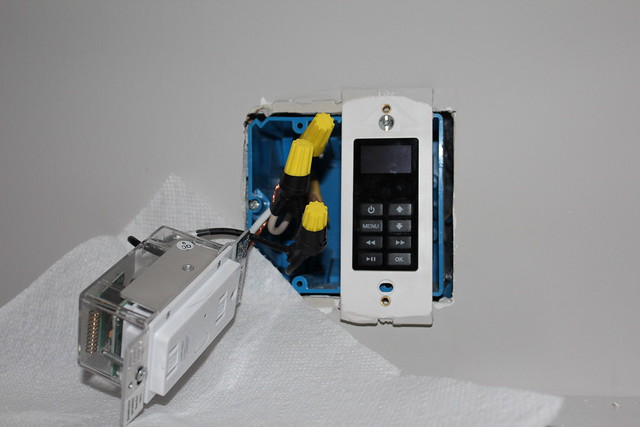
<p>Once the wires were all in place, installing the outlet was rather simple. Unlike normal outlets, this Smarthome outlet doesn't require you to loop the wires over posts, but rather, twist on wire nuts to a few pigtails that come out of the back of the outlet.</p>
<p>
</p>
<div class="MediaContainer PhotoContainer"><a href="http://farm9.staticflickr.com/8319/8072971208_1419303e31_z.jpg" rel="PhotoPopup" popupheight="427" popupwidth="640"><img alt="" src="https://farm9.staticflickr.com/8319/8072971208_1419303e31.jpg" width="500" height="333" style="border-width: 0px; border-style: solid;"></a></div>
<p>When I twist on wire nuts I always like to cover their base on down to the wire with electrical tape. It just adds one extra barrier that would keep a ground wire or other item from entering the back of the wire nut and causing a short. Every time you turn a light on or off, or power goes to an outlet, the wire moves just a little bit, so it's always good to cover all of your bases in case one happens to escape its intended location.&nbsp;</p>
<p>
</p>
<div class="MediaContainer PhotoContainer"><a href="http://farm9.staticflickr.com/8457/8072980735_99935949e7_z.jpg" rel="PhotoPopup" popupheight="427" popupwidth="640"><img alt="" src="https://farm9.staticflickr.com/8457/8072980735_99935949e7.jpg" width="500" height="333" style="border-width: 0px; border-style: solid;"></a></div>
<p>A final item to once again establish the separation between the line and low voltage items in the single junction box is to use this orange divider that is made for the box. The junction box allows you to slide the divider between the two items and prevent any issues if one of the line voltage items was somehow to come loose and in contact with the low voltage.</p>
<p>
</p>
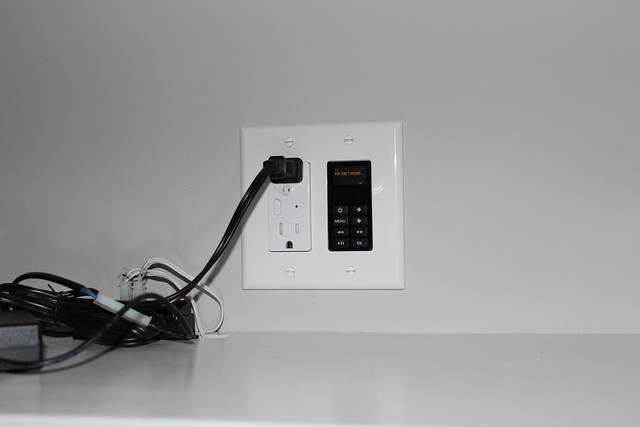
<div class="MediaContainer PhotoContainer"><a href="http://farm9.staticflickr.com/8194/8075694947_9172f80721_z.jpg" rel="PhotoPopup" popupheight="427" popupwidth="640"><img alt="" src="https://farm9.staticflickr.com/8194/8075694947_9172f80721.jpg" width="500" height="333" style="border-width: 0px; border-style: solid;"></a></div>
<p>I popped on the outlet cover plate and called the project "done." It looks good, fits nicely, and all three of the issues I covered have been resolved.&nbsp;</p>
<p>
</p>
<div class="MediaContainer PhotoContainer"><a href="http://farm9.staticflickr.com/8188/8075688338_2d50f9c230_z.jpg" rel="PhotoPopup" popupheight="427" popupwidth="640"><img alt="" src="https://farm9.staticflickr.com/8188/8075688338_2d50f9c230.jpg" width="500" height="333" style="border-width: 0px; border-style: solid;"></a></div>
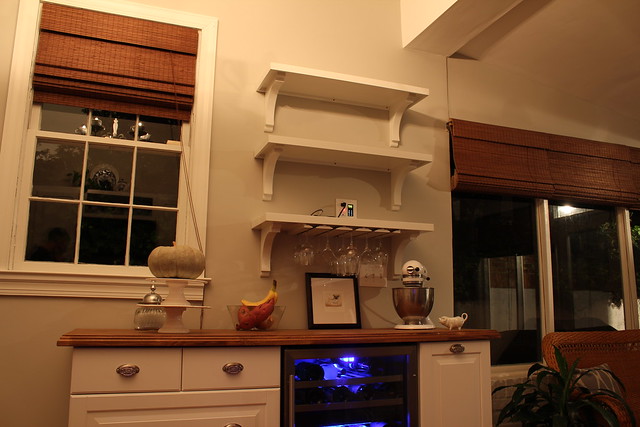
<p>With everything installed I set up the outlet to respond to the under cabinet switch being turned on or off. Following the instructions that come with the outlet, setting the outlet is quite easy. You just hold the button on the front until the light on the outlet begins to flash, then send the code of the item you want the outlet to respond too.&nbsp;Now, when we enter the kitchen it may look like this...</p>
<p>
</p>
<div class="MediaContainer PhotoContainer"><a href="http://farm9.staticflickr.com/8467/8075703219_38bdea4b85_z.jpg" rel="PhotoPopup" popupheight="427" popupwidth="640"><img alt="" src="https://farm9.staticflickr.com/8467/8075703219_38bdea4b85.jpg" width="500" height="333" style="border-width: 0px; border-style: solid;"></a></div>
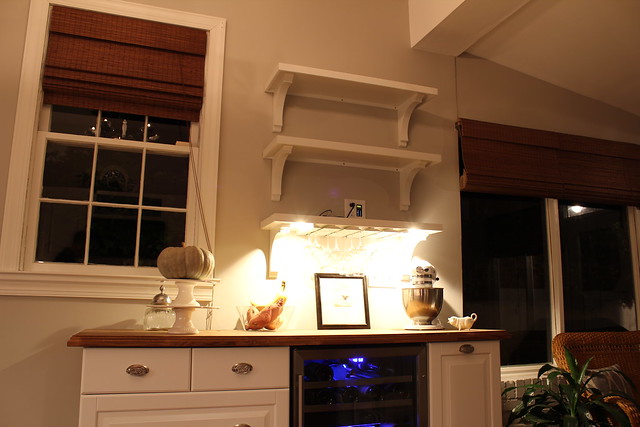
<p>...But a quick flick of the switch has it looking like this.</p>
<p>
</p>
<div class="MediaContainer PhotoContainer"><a href="http://farm9.staticflickr.com/8195/8075702281_505df9711f_z.jpg" rel="PhotoPopup" popupheight="427" popupwidth="640"><img alt="" src="https://farm9.staticflickr.com/8195/8075702281_505df9711f.jpg" width="500" height="333" style="border-width: 0px; border-style: solid;"></a></div>
<p>Now I can't say we are 100% done with the shelves. Wendy obviously needs to come in and work her magic with "styling" them. But at this point they are fully functional and ready for her handiwork. I still need to build a little box or something to conceal the power transformer for the lights. I would have liked to have built the transformer right into the shelf, but it is just a little bit too large for that. Oh well.</p>
<p>Do you have a switch, outlet, or other place in your house that might benefit from one of these devices? This sort of technology, though a novelty right now, will ultimately be standard in just a few years. Once it is, a world of possibilities in controlling your home will open.</p><p><a href="https://www.oldtownhome.com/2012/10/11/Converting-an-Outlet-into-a-Switched-Outlet---No-Electrician-Required/">Read Full Post</a></p>]]></content>
    <category term="Header Image" />
    <category term="Home Automation" />
    <category term="Kitchen" />
    <category term="Projects:Home Improvement" />
    <category term="Technology" />
    <PostImage>http://farm9.staticflickr.com/8056/8076762491_12095492d1.jpg</PostImage>
    <media:thumbnail url="https://farm9.staticflickr.com/8056/8076762491_12095492d1_t.jpg" />
    <ExtensionElements>
      <Item>PostImage</Item>
      <Item>media:thumbnail</Item>
    </ExtensionElements>
  </entry>
  <entry>
    <guid>51f257e0-5fd5-4036-89c3-7b24719c7f15</guid>
    <id>https://www.oldtownhome.com/2011/9/16/What-100-Year-Old-House-Doesnt-Have-a-DIY-Server-Rack/</id>
    <title>What 100+ Year Old House Doesn't Have a DIY Server Rack?</title>
    <summary type="html"><![CDATA[<p>In the past I've written about some of our home technology items that we've installed since moving into the house in 2003. From <a href="http://www.oldtownhome.com/2011/7/7/Confessions-of-a-Total-House-Geek-Structured-Wiring-Technology-Overkill/index.aspx">thousands of feet of structured wiring</a> to <a href="http://www.oldtownhome.com/2011/7/21/Wired-for-Sound---Whole-Historic-House-Audio/index.aspx">whole house audio</a>, I love pimping our pad with as much technology as possible without making the house look like a crazy bling'd out MTV Cribs house. Overblown home tech installation is a hobby that I really enjoy and something very unique and unexpected in a small house.</p><p>Several years ago, when I could see our home tech plans coming together (and I love it when a plan comes together), I could see the growing need for a nerve center for the home. All of the structured wiring had already been laid out to make home runs to the basement, but they all terminated to a disorganized mess that was hanging on the wall.</p><p>
</p><div class="MediaContainer PhotoContainer"><a href="http://farm6.static.flickr.com/5225/5666488991_ff8f1d416d_z.jpg" rel="PhotoPopup" popupheight="640" popupwidth="480"><img alt="" src="https://farm6.static.flickr.com/5225/5666488991_ff8f1d416d.jpg" width="375" height="500" style="border-width: 0px; border-style: solid;"></a></div><p>While this worked for a little while, the number of components, network devices, etc, was sure to grow as we expanded our little home grown system. I wanted to have an actual server rack to house the system, but server racks are too expensive. And if I could find a used rack on eBay or a computer surplus store, there's no way it would be able to fit in the small space we had available under the basement stairs.</p><div class="ToolItem">
<iframe src="http://rcm-na.amazon-adsystem.com/e/cm?t=oltoho-20&amp;o=1&amp;p=8&amp;l=as1&amp;asins=B000A31P2O&amp;ref=tf_til&amp;fc1=3A3128&amp;IS2=1&amp;lt1=_blank&amp;m=amazon&amp;lc1=61838A&amp;bc1=FAFAF8&amp;bg1=FAFAF8&amp;f=ifr" style="width: 120px; height: 240px;" scrolling="no" marginwidth="0" marginheight="0" frameborder="0"></iframe>
</div><p>I decided I had a perfect opportunity to go totally overkill DIY and create a full featured server rack for our humble little home, so I went for it.&nbsp;The first step was sketching out my rack and enclosure to figure out what I would need to buy. I wanted to keep the costs as low as possible, so I decided to custom fabricate my whole rack.&nbsp;</p><p>I started by buying several length of pre-drilled rack rails. If you're trying to do the same, you can buy them in varying lengths to get the size that's right for your application. Pre-drilled rails are tapped in industry standard locations and thread sizes so you can rack mount your items as necessary using standard screws and holders.</p> <a href="https://www.oldtownhome.com/2011/9/16/What-100-Year-Old-House-Doesnt-Have-a-DIY-Server-Rack/">more</a>]]></summary>
    <published>2011-09-16T10:20:00.000-04:00</published>
    <updated>2011-09-16T10:20:00.000-04:00</updated>
    <link rel="alternate" href="https://www.oldtownhome.com/2011/9/16/What-100-Year-Old-House-Doesnt-Have-a-DIY-Server-Rack/" />
    <author>
      <name>Alex</name>
    </author>
    <content type="html"><![CDATA[<p>In the past I've written about some of our home technology items that we've installed since moving into the house in 2003. From <a href="http://www.oldtownhome.com/2011/7/7/Confessions-of-a-Total-House-Geek-Structured-Wiring-Technology-Overkill/index.aspx">thousands of feet of structured wiring</a> to <a href="http://www.oldtownhome.com/2011/7/21/Wired-for-Sound---Whole-Historic-House-Audio/index.aspx">whole house audio</a>, I love pimping our pad with as much technology as possible without making the house look like a crazy bling'd out MTV Cribs house. Overblown home tech installation is a hobby that I really enjoy and something very unique and unexpected in a small house.</p>
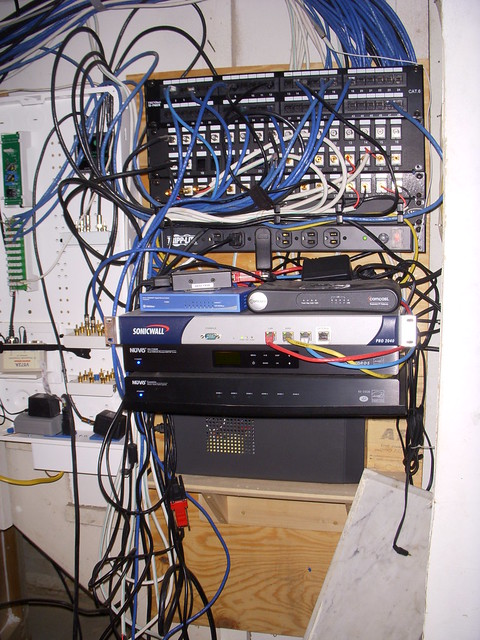
<p>Several years ago, when I could see our home tech plans coming together (and I love it when a plan comes together), I could see the growing need for a nerve center for the home. All of the structured wiring had already been laid out to make home runs to the basement, but they all terminated to a disorganized mess that was hanging on the wall.</p>
<p>
</p>
<div class="MediaContainer PhotoContainer"><a href="http://farm6.static.flickr.com/5225/5666488991_ff8f1d416d_z.jpg" rel="PhotoPopup" popupheight="640" popupwidth="480"><img alt="" src="https://farm6.static.flickr.com/5225/5666488991_ff8f1d416d.jpg" width="375" height="500" style="border-width: 0px; border-style: solid;"></a></div>
<p>While this worked for a little while, the number of components, network devices, etc, was sure to grow as we expanded our little home grown system. I wanted to have an actual server rack to house the system, but server racks are too expensive. And if I could find a used rack on eBay or a computer surplus store, there's no way it would be able to fit in the small space we had available under the basement stairs.</p>
<div class="ToolItem">
<iframe src="http://rcm-na.amazon-adsystem.com/e/cm?t=oltoho-20&amp;o=1&amp;p=8&amp;l=as1&amp;asins=B000A31P2O&amp;ref=tf_til&amp;fc1=3A3128&amp;IS2=1&amp;lt1=_blank&amp;m=amazon&amp;lc1=61838A&amp;bc1=FAFAF8&amp;bg1=FAFAF8&amp;f=ifr" style="width: 120px; height: 240px;" scrolling="no" marginwidth="0" marginheight="0" frameborder="0"></iframe>
</div>
<p>I decided I had a perfect opportunity to go totally overkill DIY and create a full featured server rack for our humble little home, so I went for it.&nbsp;The first step was sketching out my rack and enclosure to figure out what I would need to buy. I wanted to keep the costs as low as possible, so I decided to custom fabricate my whole rack.&nbsp;</p>
<p>I started by buying several length of pre-drilled rack rails. If you're trying to do the same, you can buy them in varying lengths to get the size that's right for your application. Pre-drilled rails are tapped in industry standard locations and thread sizes so you can rack mount your items as necessary using standard screws and holders.</p>
<p>Beyond the rack rails, there are few other technical items needed for my project. Most everything else I either picked up from The Home Depot, Rockler, or I had given to me by a friend, Doug, whose dad had extra server fans he didn't need. This really helped to keep the costs down on this project.</p>
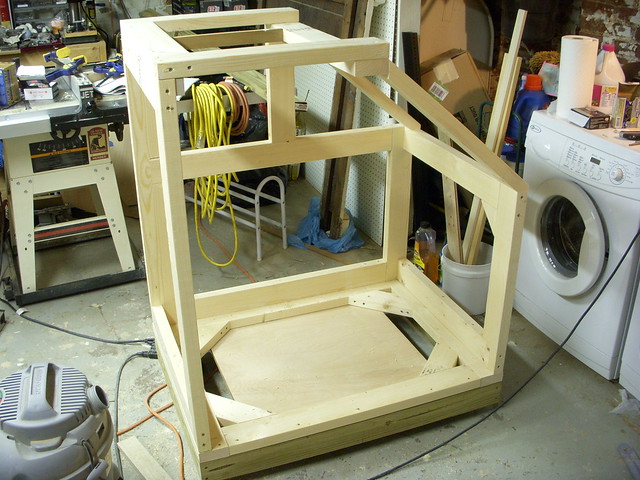
<p>Once I had all of my supplies, and I had my location picked out, I got to work on the build by assembling the base of the enclosure. I decided to build the enclosure frame from 2x4s to give it a sturdy and stable structure. I knew I wanted to make it movable and mount casters on the base, so it had to withstand any moving. I used pressure treated lumber for the absolute base just in case I ever mount the whole enclosure direct on the cement of the basement floor.
</p>
<p>
</p>
<div class="MediaContainer PhotoContainer"><a href="http://farm6.static.flickr.com/5061/5666468797_e04fb6cfbf_z.jpg" rel="PhotoPopup" popupheight="480" popupwidth="640"><img alt="" src="https://farm6.static.flickr.com/5061/5666468797_e04fb6cfbf.jpg" width="500" height="375" style="border-width: 0px; border-style: solid;"></a></div>
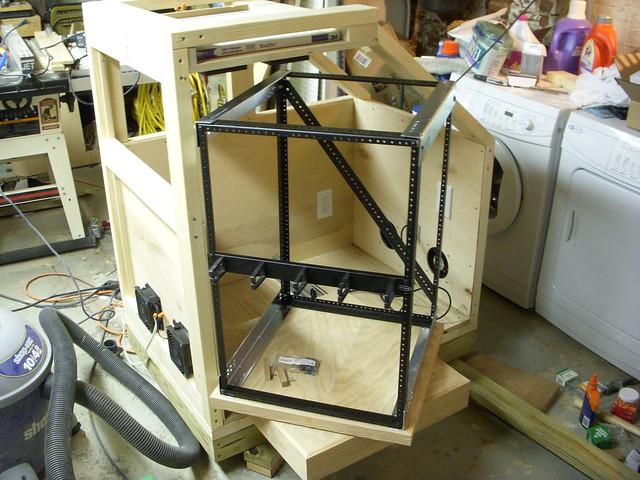
<p>With the base the proper size and able to fite where I needed it, I moved ahead on the rest of the frame. Since this was going to be positioned under the stairs, I decided to build it to mimic the slope of the stairs. This approach would allow the rack to position the left while allowing additional room for other equipment on the right.&nbsp;</p>
<p>
</p>
<div class="MediaContainer PhotoContainer"><a href="http://farm6.static.flickr.com/5061/5667043060_edb2f973a8_z.jpg" rel="PhotoPopup" popupheight="480" popupwidth="640"><img alt="" src="https://farm6.static.flickr.com/5061/5667043060_edb2f973a8.jpg" width="500" height="375" style="border-width: 0px; border-style: solid;"></a></div>
<p>At every stage of my construction, I kept test fitting the enclosure. I was completely paranoid I would end up mess something up and make it not fit. But once I had convinced myself all was good, I proceeded with skinning the inside with some thin 1/4" plywood.</p>
<p>
</p>
<div class="MediaContainer PhotoContainer"><a href="http://farm6.static.flickr.com/5061/5666472747_65cca47942_z.jpg" rel="PhotoPopup" popupheight="480" popupwidth="640"><img alt="" src="https://farm6.static.flickr.com/5061/5666472747_65cca47942.jpg" width="500" height="375" style="border-width: 0px; border-style: solid;"></a></div>
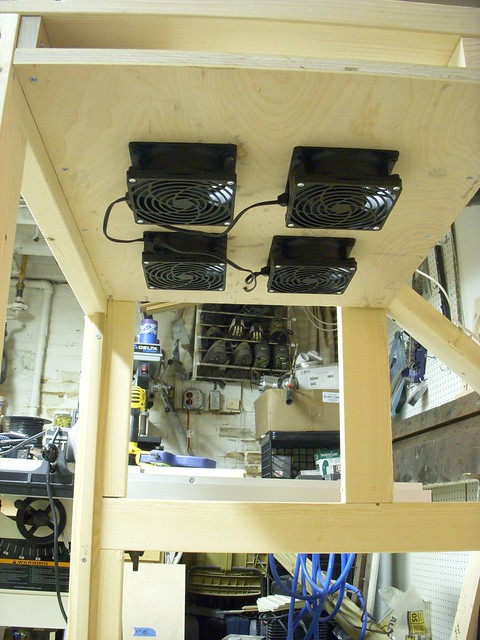
<p>The setup I decided on would use eight 90mm fans, four mounted in the bottom to expel air, and four mounted at the top to draw air in. If you'll notice in the photo above, I included a location for an air filter in the top of the enclosure in an attempt to keep dust out while drawing air in.&nbsp;</p>
<p>
</p>
<div class="MediaContainer PhotoContainer"><a href="http://farm6.static.flickr.com/5228/5667045006_13537d5573_z.jpg" rel="PhotoPopup" popupheight="640" popupwidth="480"><img alt="" src="https://farm6.static.flickr.com/5228/5667045006_13537d5573.jpg" width="375" height="500" style="border-width: 0px; border-style: solid;"></a></div>
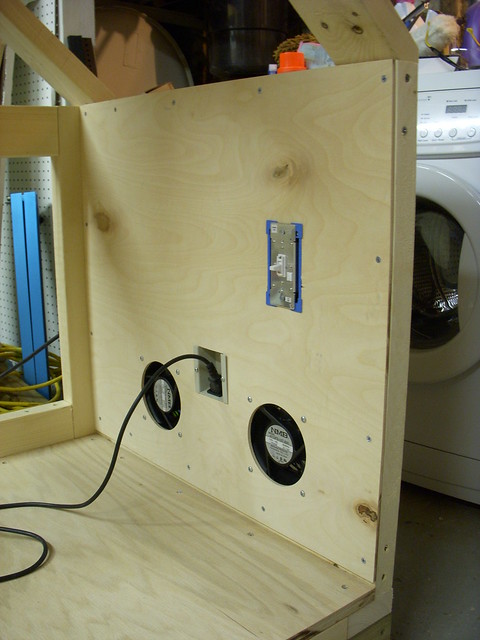
<p>The fans were rewired and hooked up to a dimmer switch that would allow me to modulate the velocity of the fans. When these fans are on at 100% they sound like a swarm of bees, even when you are on another floor, so being able to keep them a little slower was essential.</p>
<p>
</p>
<div class="MediaContainer PhotoContainer"><a href="http://farm6.static.flickr.com/5182/5667045574_7e0d147e19_z.jpg" rel="PhotoPopup" popupheight="640" popupwidth="480"><img alt="" src="https://farm6.static.flickr.com/5182/5667045574_7e0d147e19.jpg" width="375" height="500" style="border-width: 0px; border-style: solid;"></a></div>
<p>With the enclosure taking shape, I shifted focus over the rack itself. The pre-drilled rails I had purchased needed to be cut in several places and assembled in a cube. &nbsp;I used my disc cutter with a diamond disc on it and got to work in the back yard. Remember, if you'r doing this at home, use eye protection, gloves, long sleeves, long pants, and ear protection. Cutting like this is loud, so I put on my NASCAR scanner headset (yep, Wendy makes fun of me for owning them too).&nbsp;</p>
<p>
</p>
<div class="MediaContainer PhotoContainer"><a href="http://farm6.static.flickr.com/5064/5667055524_78186f2bbb_z.jpg" rel="PhotoPopup" popupheight="640" popupwidth="480"><img alt="" src="https://farm6.static.flickr.com/5064/5667055524_78186f2bbb.jpg" width="375" height="500" style="border-width: 0px; border-style: solid;"></a></div>
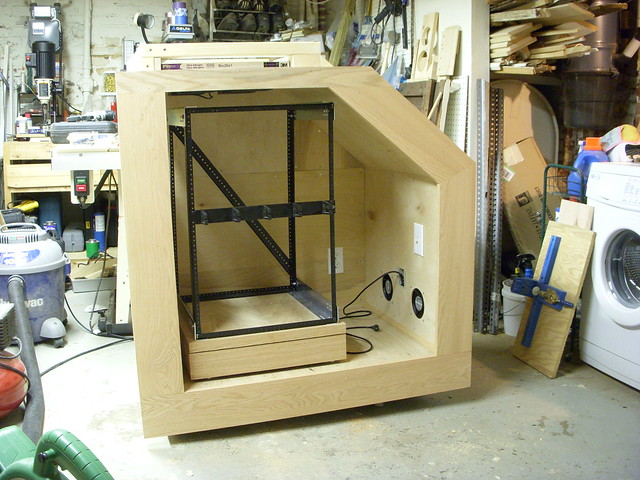
<p>For the rack I put together a sliding and rotating base. I wanted to make sure I could easily gain access to the back of the rack mount items, so it had to fully slide out. I also wanted it to rotate so I could get even easier access. I bought the heavy duty and full extension drawer slides and a ball bearing ring from Rockler. I also finished the exterior of the rack base in oak, in the event I ever I want dress it up in the future. Once I had it all assembled I popped it into the enclosure. It was looking good!</p>
<p>
</p>
<div class="MediaContainer PhotoContainer"><a href="http://farm6.static.flickr.com/5304/5667056570_fb6b23d785_z.jpg" rel="PhotoPopup" popupheight="480" popupwidth="640"><img alt="" src="https://farm6.static.flickr.com/5304/5667056570_fb6b23d785.jpg" width="500" height="375" style="border-width: 0px; border-style: solid;"></a></div>
<p>The next step was to finish all of the interior panels and then put an oak facade on the whole thing, again in the event I need to stain it and make it look nice in the future.</p>
<p>
</p>
<div class="MediaContainer PhotoContainer"><a href="http://farm6.static.flickr.com/5189/5666486075_bd419e5416_z.jpg" rel="PhotoPopup" popupheight="480" popupwidth="640"><img alt="" src="https://farm6.static.flickr.com/5189/5666486075_bd419e5416.jpg" width="500" height="375" style="border-width: 0px; border-style: solid;"></a></div>
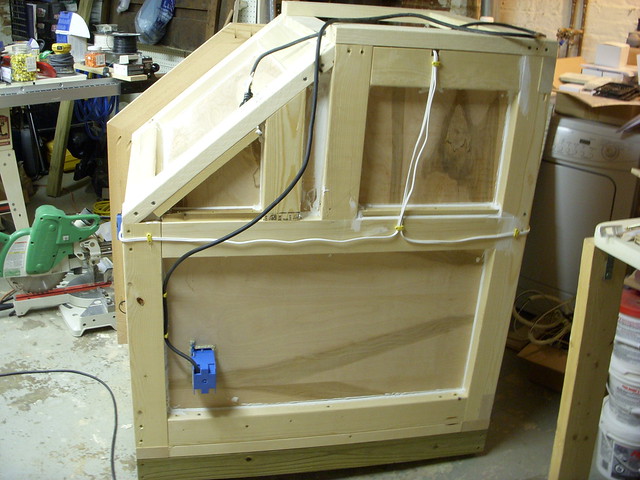
<p>In the photo above you can see that I put an outlet in the read of the enclosure. This outlet acts as an extension and power strip for the whole enclosure and is where all of the equipment ultimately plugs in. The final step was to seal the whole thing from the outside and clean up/organize all of the wiring. For this I used our standard Big-Stretch caulk and a couple of wire tacks. &nbsp;&nbsp;</p>
<p>
</p>
<div class="MediaContainer PhotoContainer"><a href="http://farm6.static.flickr.com/5230/5666487103_4d85173576_z.jpg" rel="PhotoPopup" popupheight="480" popupwidth="640"><img alt="" src="https://farm6.static.flickr.com/5230/5666487103_4d85173576.jpg" width="500" height="375" style="border-width: 0px; border-style: solid;"></a></div>
<p>I was quite happy with how the whole thing had fallen together. After some cabling magic and about six hours of non-stop&nbsp;fighting&nbsp;with wires, I could see my dream of an overkill DIY server rack falling together.</p>
<p>
</p>
<div class="MediaContainer PhotoContainer"><a href="http://farm6.static.flickr.com/5309/5666489465_51ac6ccce6_z.jpg" rel="PhotoPopup" popupheight="480" popupwidth="640"><img alt="" src="https://farm6.static.flickr.com/5309/5666489465_51ac6ccce6.jpg" width="500" height="375" style="border-width: 0px; border-style: solid;"></a></div>
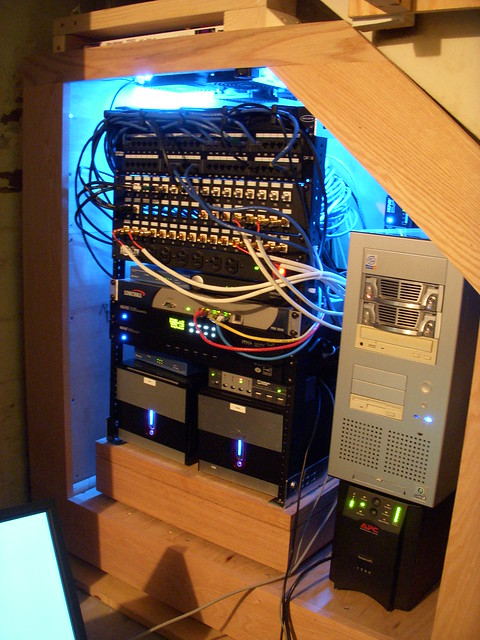
<p>After placing the enclosure back in its permanent home, I added my final little detail items to gussy it up a little bit. "How does one gussy up a server rack and enclosure," you may ask? With blue LEDs and other lights, of course. No computer project is complete without them.&nbsp;</p>
<p>
</p>
<div class="MediaContainer PhotoContainer"><a href="http://farm6.static.flickr.com/5187/5667069386_4435dd3cef_z.jpg" rel="PhotoPopup" popupheight="640" popupwidth="480"><img alt="" src="https://farm6.static.flickr.com/5187/5667069386_4435dd3cef.jpg" width="375" height="500" style="border-width: 0px; border-style: solid;"></a></div>
<p>And there you have it, the story of our basement DIY Server Rack, for the 125 year old house that just can't go another day without one. I'm still planning to build some oak frame doors with glass, but where it currently sits I just put some plastic over the front. It's easier for the time being because of how tight that area is.</p>
<p>What do you think, total overkill? Is there any possibility that the original owner of our house, Mrs. Bryan, could have imagined anything remotely like this back in 1886? I think not.</p>
<p>Do you have any similar technology overkill projects in your home? If you share them with us I can use your place as an example to show Wendy how I'm perfectly normal. I'm counting on you here, do me proud.</p><p><a href="https://www.oldtownhome.com/2011/9/16/What-100-Year-Old-House-Doesnt-Have-a-DIY-Server-Rack/">Read Full Post</a></p>]]></content>
    <category term="Header Image" />
    <category term="Home Automation" />
    <category term="Projects:Hi Tech" />
    <category term="Technology" />
    <PostImage>http://farm7.static.flickr.com/6084/6152533809_0ee86a4eba.jpg</PostImage>
    <media:thumbnail url="https://farm7.static.flickr.com/6084/6152533809_0ee86a4eba_t.jpg" />
    <ExtensionElements>
      <Item>PostImage</Item>
      <Item>media:thumbnail</Item>
    </ExtensionElements>
  </entry>
  <entry>
    <guid>9a33017b-8638-4862-b015-4ccb3bdd1327</guid>
    <id>https://www.oldtownhome.com/2011/7/7/Confessions-of-a-Total-House-Geek-Structured-Wiring-Technology-Overkill/</id>
    <title>Confessions of a Total House Geek. Structured Wiring Technology Overkill!</title>
    <summary type="html"><![CDATA[<p>If you're a reader of our blog, or if you are a new reader and look back through some of our posts, it is no secret that I am somewhat obsessive when it comes to the historically accurate details and character elements of our home. I obsess over the details, what might be period authentic or not, and what we can do to make our house just a little bit more historically "correct."&nbsp;</p>
<p>That being said, there is something about me that only my friends really know. But I'm ready to share it for the whole internet world...</p>
<h2 style="text-align: center;">I'M A HUGE NERD!</h2>
<p>This is not something I take lightly and is a badge I wear with pride. Though I try to present myself as a normal person, I've long been a major geek. I've been obsessed with things commonly associated with nerds since I was a small child. I love Star Wars and actually own several light sabers and a set life-sized Stormtrooper armor. (Yeah, I'm that guy. I just don't wear it out of the house). Just look at the cake Wendy made for me for my 33rd birthday.</p>
<p>
</p>
<div class="MediaContainer PhotoContainer"><a href="http://farm7.static.flickr.com/6043/5910407691_d183be5ed0_z.jpg" rel="PhotoPopup" popupheight="640" popupwidth="640"><img alt="" src="https://farm7.static.flickr.com/6043/5910407691_d183be5ed0_m.jpg" width="240" height="240" style="border-width: 0px; border-style: solid;"></a></div>
<p>I'm also totally into all things related to technology, and I don't mean just having a cool stereo or television. I mean I'm into how they work and how they're constructed. I started my first website back in 1995 when I was in high school, spend all of my free time screwing around on the computer, work as a software developer in my real life, and am so obsessed with DIY and computer programming that this whole blog is a DIY creation. Yep, no wordpress here, blogger...no thanks, this is a 100% custom built blog. That's how I roll, white and nerdy! Cue my anthem...</p>
<p>
</p>
<div class="MediaContainer VideoEmbed"><iframe width="560" height="349" src="http://www.youtube.com/embed/N9qYF9DZPdw?wmode=transparent&amp;hd=1" frameborder="0" allowfullscreen="true"></iframe></div>
<p>Quite honestly, I've not oversold how much I like to geek out, and owning a home has allowed me to take it to the next level.</p>
<p></p></img> <a href="https://www.oldtownhome.com/2011/7/7/Confessions-of-a-Total-House-Geek-Structured-Wiring-Technology-Overkill/">more</a>]]></summary>
    <published>2011-07-07T09:20:00.000-04:00</published>
    <updated>2011-07-07T09:20:00.000-04:00</updated>
    <link rel="alternate" href="https://www.oldtownhome.com/2011/7/7/Confessions-of-a-Total-House-Geek-Structured-Wiring-Technology-Overkill/" />
    <author>
      <name>Alex</name>
    </author>
    <content type="html"><![CDATA[<p>If you're a reader of our blog, or if you are a new reader and look back through some of our posts, it is no secret that I am somewhat obsessive when it comes to the historically accurate details and character elements of our home. I obsess over the details, what might be period authentic or not, and what we can do to make our house just a little bit more historically "correct."&nbsp;</p>
<p>That being said, there is something about me that only my friends really know. But I'm ready to share it for the whole internet world...</p>
<h2 style="text-align: center;">I'M A HUGE NERD!</h2>
<p>This is not something I take lightly and is a badge I wear with pride. Though I try to present myself as a normal person, I've long been a major geek. I've been obsessed with things commonly associated with nerds since I was a small child. I love Star Wars and actually own several light sabers and a set life-sized Stormtrooper armor. (Yeah, I'm that guy. I just don't wear it out of the house). Just look at the cake Wendy made for me for my 33rd birthday.</p>
<p>
</p>
<div class="MediaContainer PhotoContainer"><a href="http://farm7.static.flickr.com/6043/5910407691_d183be5ed0_z.jpg" rel="PhotoPopup" popupheight="640" popupwidth="640"><img alt="" src="https://farm7.static.flickr.com/6043/5910407691_d183be5ed0_m.jpg" width="240" height="240" style="border-width: 0px; border-style: solid;"></a></div>
<p>I'm also totally into all things related to technology, and I don't mean just having a cool stereo or television. I mean I'm into how they work and how they're constructed. I started my first website back in 1995 when I was in high school, spend all of my free time screwing around on the computer, work as a software developer in my real life, and am so obsessed with DIY and computer programming that this whole blog is a DIY creation. Yep, no wordpress here, blogger...no thanks, this is a 100% custom built blog. That's how I roll, white and nerdy! Cue my anthem...</p>
<p>
</p>
<div class="MediaContainer VideoEmbed"><iframe width="560" height="349" src="http://www.youtube.com/embed/N9qYF9DZPdw?wmode=transparent&amp;hd=1" frameborder="0" allowfullscreen="true"></iframe></div>
<p>Quite honestly, I've not oversold how much I like to geek out, and owning a home has allowed me to take it to the next level.</p>
<p></p>
<p>While I was quite excited by the prospect of owning a 100+ year old home in an historic&nbsp;district, and at the potential of restoring its period details, I was just as excited about the modern technology I had long planned on incorporating into any house we own. I had visions of home theaters, computerized lighting, and home automation dancing in my head. But, with the purchase of an old home, the $64,000 question was "how could we do all of this while maintaining the historic fabric of our house?" The answer...<strong>VERY SLOWLY!</strong></p>
<p>This is just the first post in what is sure to be a long line of home technology related items associated with our renovation, but I need to start with the basics of what has enabled us to turn our circa 1886 home into somewhat of a technological jewel in the rough.</p>
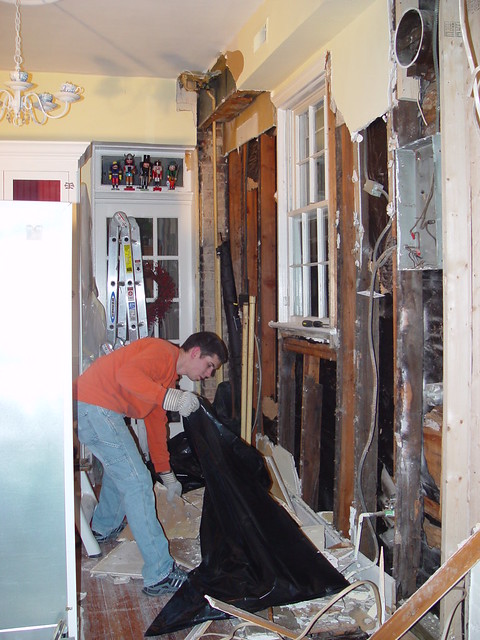
<p>Several years ago we had to open several walls and the ceiling in our kitchen and put a few holes in our ceiling in other parts of the house. This was due to a series of unfortunate events caused by a combination of ice damming, termite damage, broken plumbing pipes, and old fashioned bad luck. I was determined to turn this misfortune into an opportunity to begin my grand plan.&nbsp;</p>
<p>
</p>
<div class="MediaContainer PhotoContainer"><a href="http://farm6.static.flickr.com/5065/5645972531_21df02d448_z.jpg" rel="PhotoPopup" popupheight="640" popupwidth="480"><img alt="" src="https://farm6.static.flickr.com/5065/5645972531_21df02d448.jpg" width="375" height="500" style="border-width: 0px; border-style: solid;"></a></div>
<p>Yep, that's our kitchen just after Christmas, 2004...Merry Christmas indeed! The demo was actually just beginning. About 1/2 of the floor and 1/2 of the ceiling still had to come out. But as I said, I viewed this as an opportunity to begin my journey of wiring the house for the future.</p>
<p><em>Note: This may seem confusing, overkill, ridiculous, tedious, totally geeky, and&nbsp;unnecessary. It is, in fact, all of that, but I think that's why I took on this project. In all honesty though, making technological advancements to your home isn't that difficult of a task. You just need the right tools to tackle it, and a lot of patience (both on your side and from your significant other).&nbsp;</em></p>
<p>I began researching the various options in home wiring that would allow me to maximize my impact without totally destroying our non-existent budget. Today, there are so many options out there for bundled structured wiring, but back in 2004 there were only a mix of high end and low end. The high end contained a bundle of Cat-5e, Fiber, Speaker, and Quad Shield Coax, and the low end simply had Cat-5, Speaker and Coax. I felt like had I gone either of those routes, I would have been paying a lot of money for not a lot of wiring. I also knew the limitations of Cat-5 and Cat-5e for network cabling, and I knew I wanted the improved shielding of Cat-6.</p>
<p><em>If you're reading this page looking for info on wiring, do yourself a favor and get Cat-6. It will fill your short and long term needs. Cat-6 is actually what a lot of video and high end home theater devices will use to communicate in the future.</em></p>
<p>I came up with a plan to run Cat-6 for network cabling, speaker wire for whole house audio, and coax for general video. I also decided that every room had to have either two or three outlets, each of which needed at least two coax lines and four Cat-6 lines. I didn't know what I would use it all for, but I knew I <em>could </em>use it if it was there, and I didn't want a situation where I needed it and I hadn't installed it.</p>
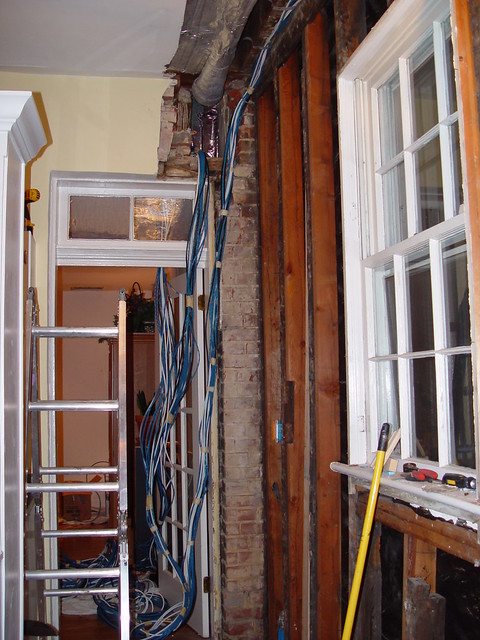
<p>We took the plunge and put in our first order for 1000' of Cat-6 (blue wire), 500' of speaker wire (white wire), and 1000' of quad shielded coax (black wire). The day they arrived I tore the boxes open and started making a spider web of wires that we lived in for several weeks. (I love my wife, she puts up with this stuff, she's amazing.)</p>
<p>
</p>
<div class="MediaContainer PhotoContainer"><a href="http://farm7.static.flickr.com/6027/5910430907_4a850e8287_z.jpg" rel="PhotoPopup" popupheight="640" popupwidth="480"><img alt="" src="https://farm7.static.flickr.com/6027/5910430907_4a850e8287.jpg" width="375" height="500" style="border-width: 0px; border-style: solid;"></a></div>
<p>Since then the project has grown to us more than 5000' of Cat-6, 1000' of speaker wire, and 2000' of coax. Yep,<span style="text-decoration: line-through;"> I fear I may have gone</span>&nbsp;I've&nbsp;happily&nbsp;gone overboard. One thing I've learned through all of these wiring orders, <a href="http://www.monoprice.com" target="_blank">MonoPrice.com</a> is my friend. They have some really awesome prices on wiring and connectors.</p>
<p>The other big thing you have to remember when doing network cabling in your house is to make sure you are using something called "home runs." Unlike a phone line or cable wire that can be split off at each need for a junction, a network wire needs to have a central or "home" point to run to. All wiring in the house should originate at this point and should not branch before its termination point. The home runs point houses a patch panel and is usually located in a closet or a basement. In our situation, we chose to run it to a central location in the basement, just under the basement stairs. The spider's web of wires continued down there.</p>
<p>
</p>
<div class="MediaContainer PhotoContainer"><a href="http://farm6.static.flickr.com/5077/5911021446_843ff0dece_z.jpg" rel="PhotoPopup" popupheight="480" popupwidth="640"><img alt="" src="https://farm6.static.flickr.com/5077/5911021446_843ff0dece.jpg" width="500" height="375" style="border-width: 0px; border-style: solid;"></a></div>
<p>I actually built a DIY server rack in the basement to house our patch panel and associated network gear. The photo above was from the day I was wiring everything up to it. It is the nerve center of our tech'd out house, and the whole thing was done on a super tight budget with hand me down equipment, mostly scrap lumber, and eBay finds (even the blue lights were a bargain).</p>
<p>
</p>
<div class="MediaContainer PhotoContainer"><a href="http://farm6.static.flickr.com/5187/5667069386_4435dd3cef_z.jpg" rel="PhotoPopup" popupheight="640" popupwidth="480"><img alt="" src="https://farm6.static.flickr.com/5187/5667069386_4435dd3cef.jpg" width="375" height="500" style="border-width: 0px; border-style: solid;"></a></div>
<p>You tell me...when is the last time you saw a 125 year old house with a server rack?</p>
<p>We've continued this process of running wiring throughout the house and stashing the wires in ceilings, walls, or the attic knowing that we will eventually renovate the room they will eventually live in, and when we do, the wires are all there waiting for us. I just make sure I color code both ends of each wire with a combination of color electrical tape so I can easily tell which wire is which once we actually get to attaching them to their outlets.</p>
<p>
</p>
<div class="MediaContainer PhotoContainer"><a href="http://farm6.static.flickr.com/5231/5911049732_c98debcf67_z.jpg" rel="PhotoPopup" popupheight="640" popupwidth="640"><img alt="" src="https://farm6.static.flickr.com/5231/5911049732_c98debcf67_m.jpg" width="240" height="240" style="border-width: 0px; border-style: solid;"></a>
<a href="http://farm7.static.flickr.com/6054/5911055180_2633190432_z.jpg" rel="PhotoPopup" popupheight="640" popupwidth="640"><img alt="" src="https://farm7.static.flickr.com/6054/5911055180_2633190432_m.jpg" width="240" height="240" style="border-width: 0px; border-style: solid;"></a></div>
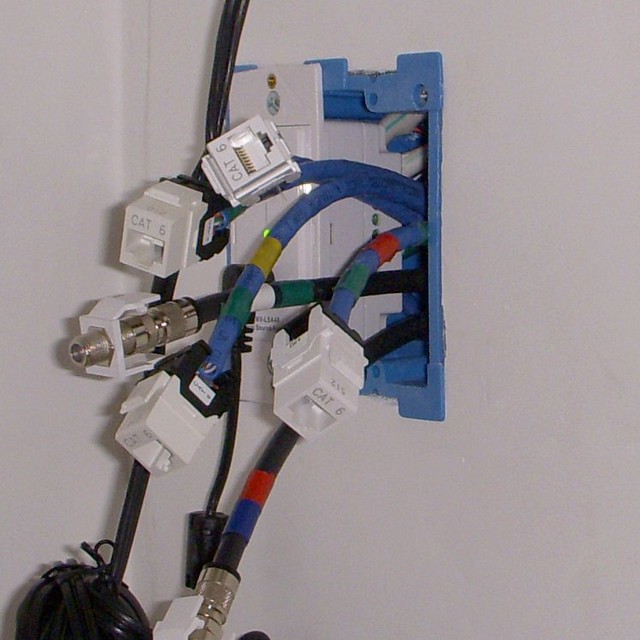
<p>The above photos are from inside the closet in our master bedroom (yes, inside the closet). The outlet on the right has two coax connections for television and four Cat-6 connections for internet. The item on the left if a local source input for our whole house audio. If you saw yesterday's <a href="http://www.oldtownhome.com/2011/7/6/Getting-Plastered-How-To-Patch-a-Hole-In-Your-Wall/index.aspx">plaster patching post</a>, the outlet we were patching around was one of the outlets in the guest bedroom, and it had a similar setup.</p>
<p>
</p>
<div class="MediaContainer PhotoContainer"><a href="http://farm7.static.flickr.com/6055/5911085972_641db33e04_z.jpg" rel="PhotoPopup" popupheight="640" popupwidth="640"><img alt="" src="https://farm7.static.flickr.com/6055/5911085972_641db33e04_m.jpg" width="240" height="240" style="border-width: 0px; border-style: solid;"></a></div>
<p>So you're probably wondering, "Ok, what does all of this wiring get you? And I've got WiFi at home, why not just use that? And why are you talking about this...what's the point?"</p>
<p>I've got the answers for you:</p>
<ol>
    <li><strong>What does it get us?</strong> It allows for a tremendous amount of integrated technology in our house. Whole house audio, streaming video, internet enabled devices like our TV or DVD player, integrated security, and extensive smart home automation.<br>
    <br>
    </li>
    <li><strong>Why not just use WiFi?</strong> Well, we have that too, but with the bandwidth demands of the more intensive internet applications -- think Netflix Streaming and HD video downloads -- our house's construction and all of the interference from living so close to so many Wifi networks simply doesn't allow for a strong and consistent connection. The only way to ensure a reliable connection for our bandwidth hogging devices is to make sure they are hard wired.<br>
    <br>
    </li>
    <li><strong>What's the Point?</strong> This is just the first post of many that we will include in the coming weeks that involve the hi-tech items we've integrated into our historic home and how to guides if you want to accomplish the same. I also want other people who are renovating older homes to know they can include the&nbsp;technology of the future&nbsp;while keeping with the original character of their home.&nbsp;</li>
</ol>
<p>There is a commercial currently running in our area that says "The average home now has over four internet connected devices." I counted it up and we currently have 20 devices in our house that have an active connection to the internet. This is just the tip of the iceberg for what we will have in a couple of years. I wanted to make sure that our house was ready for the future and what it would bring. So far I think we're doing a pretty good job. And remember, this is 100% DIY, we're not hiring anyone to run any of this stuff. If we were, we would never be able to afford it.</p>
<p>
</p>
<div class="MediaContainer PhotoContainer"><a href="http://farm6.static.flickr.com/5142/5645980213_a94077a43d_z.jpg" rel="PhotoPopup" popupheight="640" popupwidth="480"><img alt="" src="https://farm6.static.flickr.com/5142/5645980213_a94077a43d.jpg" width="375" height="500" style="border-width: 0px; border-style: solid;"></a></div>
<p>Do you have any high tech items in your house that make your friends shake their head at your technology overkill? I'm looking for cohorts here, someone who can let Wendy know that I'm not crazy! Let me know. I'll leave you with one other Weird Al song that I totally identify with.&nbsp;This post is&nbsp;admittedly&nbsp;pretty tech heavy, so thanks for sticking with me through it.</p>
<p>
</p>
<div class="MediaContainer VideoEmbed"><iframe width="560" height="349" src="http://www.youtube.com/embed/qpMvS1Q1sos?wmode=transparent&amp;hd=1" frameborder="0" allowfullscreen="true"></iframe></div><p><a href="https://www.oldtownhome.com/2011/7/7/Confessions-of-a-Total-House-Geek-Structured-Wiring-Technology-Overkill/">Read Full Post</a></p>]]></content>
    <category term="Home Automation" />
    <category term="Network Wiring" />
    <category term="Projects:Hi Tech" />
    <category term="Structured Wiring" />
    <category term="Technology" />
    <PostImage>http://farm6.static.flickr.com/5120/5911700839_330c4d48f3.jpg</PostImage>
    <media:thumbnail url="https://farm6.static.flickr.com/5120/5911700839_330c4d48f3_t.jpg" />
    <ExtensionElements>
      <Item>PostImage</Item>
      <Item>media:thumbnail</Item>
    </ExtensionElements>
  </entry>
</feed>